Jump to content


Photo
* * * * * 2 votes

VP10_Cactus_Canyon_Dozer_RTM_1.2.rar [Visual Pinball X]

Bally Cactus Canyon

  • Please log in to reply
52 replies to this topic

#1 Dozer316

Dozer316

    Dozer

  • VIP
  • 669 posts

  • Flag: Australia

  • Favorite Pinball: Cirqus Voltaire

Posted 16 January 2016 - 11:52 AM

Posted Image


File Name: VP10_Cactus_Canyon_Dozer_RTM_1.2.rar

File Submitter: Dozer316

File Submitted: 16 Jan 2016

File Category: VPinMAME Recreations

Author(s): Dozer - Lord Hiryu, MRCMRC, Sheltemke, Aaron James, The Wool, Grizz, Kodiac.
Manufacturer: Bally
Year: 1998
ROM: Link to ROM
Permission to MOD?: Yes, without approval


Cactus Canyon VP10 Port.
 
From the VP9 version which was authored by - 
 
Lord Hiryu, MRCMRC, Sheltemke, Aaron James, The Wool, Grizz, Kodiac
 
This version adds some smoother primitive action on the Bart toy as well as some gear cogs on the train motor.
 
VP10 lighting has been employed to replace the original VP9 flasher lighting.
 
Lock is lit and so am I.
Dozer.


Click here to download this file


#2 bolt

bolt

    VPF Veteran

  • VIP
  • 5,161 posts
  • Location:Kiel / Schleswig Holstein

  • Flag: Germany

  • Favorite Pinball: JP's Deadpool, Harlem Globetrotters, Spiderman and much more

Posted 16 January 2016 - 12:18 PM

Thank you so much Dozer, I love your vp10 version of CC.

For me as a desktop player is the table a little to bif, I change the X Scale value from 1,2 to 1,0. So looks the table perfect for me.


regards


bolt


Posted Image

#3 tttttwii

tttttwii

    Enthusiast

  • Platinum Supporter
  • 300 posts

  • Flag: Germany

  • Favorite Pinball: Attack from Mars

Posted 16 January 2016 - 02:27 PM

I was waiting for this one! Thanks Dozer - very sweet!


#4 nicco84

nicco84

    Enthusiast

  • Members
  • PipPipPip
  • 150 posts

  • Flag: Italy

  • Favorite Pinball: medieval madness

Posted 16 January 2016 - 03:11 PM

FANTASTIC!!! thanks so much dozer.

sorry dozer for users like me utilize z-axis with plunger v2...

i enable mechanical plunger but it doesnt work and i couldn't see plunger image moving.... i'm missing something?


#5 Dozer316

Dozer316

    Dozer

  • VIP
  • 669 posts

  • Flag: Australia

  • Favorite Pinball: Cirqus Voltaire

Posted 16 January 2016 - 03:19 PM

Hello there - someone else maybe able to answer this for you -  I don't use an analog plunger so cannot test to see what the problem may be with it not moving.


I think from memory I used a standard VP10 plunger so not sure what could be wrong.


#6 tictox

tictox

    Enthusiast

  • Members
  • PipPipPip
  • 143 posts

  • Flag: South Africa

  • Favorite Pinball: space

Posted 16 January 2016 - 03:23 PM

Thank you so much Dozer, I love your vp10 version of CC.

For me as a desktop player is the table a little to bif, I change the X Scale value from 1,2 to 1,0. So looks the table perfect for me.


regards


bolt

Where do you change the xscale ..?  I looked everywhere for a value named x scale and did not find it??? 


#7 Outhere

Outhere

    Pinball Wizard

  • Platinum Supporter
  • 4,807 posts

  • Flag: United States of America

  • Favorite Pinball: M M

Posted 16 January 2016 - 03:34 PM

xscale

Attached Files


Edited by Outhere, 16 January 2016 - 03:34 PM.


#8 tictox

tictox

    Enthusiast

  • Members
  • PipPipPip
  • 143 posts

  • Flag: South Africa

  • Favorite Pinball: space

Posted 16 January 2016 - 04:10 PM

Thanks a million!! I would have never found it there , the table looks fantastic when changing this as bolt mentioned to 1 instead of 1.2 


Thanks for the conversion ;)


#9 shadowshd

shadowshd

    Enthusiast

  • Members
  • PipPipPip
  • 153 posts
  • Location:Le Bouscat

  • Flag: France

  • Favorite Pinball: Cirqus Voltaire; Medieval Madness

Posted 17 January 2016 - 11:55 AM

Hi Dozer,


Thank you again for your great work ;)


It seems that the multiball doesn't work as it should : the balls don't get launched automatically from the lane.

I took a look in the PM5 version of this great table, and found that there's an auto-plunger above (or under) the plunger.


I may say silly things, as I'm far away from being as talented in table creation, but maybe the auto-plunger is missing in your table ?


As Nicco84, I have in my cab a KL25Z with a sensor, and even with the Enable mechanical plunger option activated, it doesn't work.


Thank you again ;)


#10 Dozer316

Dozer316

    Dozer

  • VIP
  • 669 posts

  • Flag: Australia

  • Favorite Pinball: Cirqus Voltaire

Posted 17 January 2016 - 12:10 PM

I think I've found the problem with this - sw18 (shooter lane) switch is not being triggered (there is an auto plunger present) but the game doesn't know there's a ball in the shooter lane.


Also when you guys select the plunger to turn on mechanical, you are probably selecting the autoplunger (plunger2) and not the main plunger. 


I will upload a new version shortly.


#11 nicco84

nicco84

    Enthusiast

  • Members
  • PipPipPip
  • 150 posts

  • Flag: Italy

  • Favorite Pinball: medieval madness

Posted 17 January 2016 - 01:08 PM

in a plunger (i don't remember witch one) it need to be selected other image.


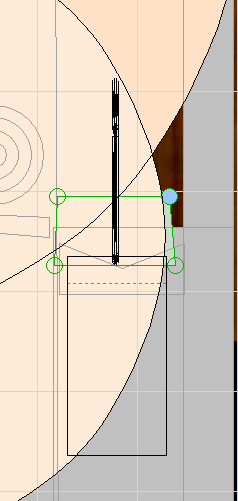
- @shadowshd --> edit, select elemnt, find plunger 1 and plunger 2. be sure to have settings like mine. it will work


9u2noz.jpg


27x407m.jpg


- @ cab guys . to display correctly dmd be sure to write after 


Sub Table1_Init

 On Error Resume Next
With Controller
.GameName = cGameName
 
this
 
.Games(cGameName).Settings.Value("rol") = 0 


#12 Dozer316

Dozer316

    Dozer

  • VIP
  • 669 posts

  • Flag: Australia

  • Favorite Pinball: Cirqus Voltaire

Posted 17 January 2016 - 01:11 PM

Version 1.1 has been uploaded - please let me know if the mech plunger works now.


#13 nicco84

nicco84

    Enthusiast

  • Members
  • PipPipPip
  • 150 posts

  • Flag: Italy

  • Favorite Pinball: medieval madness

Posted 17 January 2016 - 01:35 PM

now it's ok!

DMD rol and plunger working and animation!


thanks dozer


#14 shadowshd

shadowshd

    Enthusiast

  • Members
  • PipPipPip
  • 153 posts
  • Location:Le Bouscat

  • Flag: France

  • Favorite Pinball: Cirqus Voltaire; Medieval Madness

Posted 17 January 2016 - 01:58 PM

Downloading right now and giving feedback ASAP Dozer ;)


Edit : OK, working great now, very nice job Sir ;)


++


Edited by shadowshd, 17 January 2016 - 02:24 PM.


#15 bolt

bolt

    VPF Veteran

  • VIP
  • 5,161 posts
  • Location:Kiel / Schleswig Holstein

  • Flag: Germany

  • Favorite Pinball: JP's Deadpool, Harlem Globetrotters, Spiderman and much more

Posted 17 January 2016 - 04:13 PM

Thank you Dozer for the fix.


Posted Image

#16 ClarkKent

ClarkKent

    Pinball Fan

  • Members
  • PipPipPipPip
  • 1,552 posts

  • Flag: Austria

  • Favorite Pinball: Q*Bert's Quest, Red's and Ted's Road Show, Dialed In, Big Bang Bar

Posted 17 January 2016 - 07:31 PM

If you set wall229 to Top 170/Bottom 165 you can use larger ball sizes.


#17 shadowshd

shadowshd

    Enthusiast

  • Members
  • PipPipPip
  • 153 posts
  • Location:Le Bouscat

  • Flag: France

  • Favorite Pinball: Cirqus Voltaire; Medieval Madness

Posted 31 January 2016 - 01:13 PM

Hi Dozer,


It seems there's an issue with the multi ball, I and some members on our french pincab forum are encountering the same thing : when multi ball is activated, the balls won't launch from the lane automatically, you have to launch them manually.

And then, after a while, the table gets stuck in a "seeking for balls" loop.


Thank you ;)


++


#18 Dozer316

Dozer316

    Dozer

  • VIP
  • 669 posts

  • Flag: Australia

  • Favorite Pinball: Cirqus Voltaire

Posted 31 January 2016 - 01:51 PM

Hello there, are you running version 1.1?


#19 shadowshd

shadowshd

    Enthusiast

  • Members
  • PipPipPip
  • 153 posts
  • Location:Le Bouscat

  • Flag: France

  • Favorite Pinball: Cirqus Voltaire; Medieval Madness

Posted 31 January 2016 - 03:18 PM

Yes Sir,


Arngrim suggested us to lower a little the w18, like this :


vi6n.png


Unfortunately, this doesn't solve the issue :

- when you get a ball saved, the ball is put into the lane, the auto-plunger activates 5 or 6 times (I can hear my contactor in action) but the ball isn't launched,

- when you get a Gold Mine Multiball, the second ball is put into the lane but not launched, and the 3rd ball never shows.


Arngrim has just suggested me to move up plunger2 a little, I'm gonna try it right now and give feedback ASAP.


Thank you for your fast answer, and again, so many thanks for your great work ;)


Edit : with plunger2 moved up a little, the ball saved is OK.

Trying right now to get the multi ball ;)


Edit 2 : multi ball and ball saved working great with these settings :


captur18.png


Thanks ;)


++


Edited by shadowshd, 31 January 2016 - 03:34 PM.


#20 Dozer316

Dozer316

    Dozer

  • VIP
  • 669 posts

  • Flag: Australia

  • Favorite Pinball: Cirqus Voltaire

Posted 31 January 2016 - 04:02 PM

Good news - this is a weird problem, the default settings (table release) work fine here but some people including yourself experience that issue. (not sure why).


Anyway, good that it is working now :)


Also tagged with one or more of these keywords: Bally, Cactus, Canyon