Jump to content


Photo

90's Workshop: Buildin' The Table


  • Please log in to reply
369 replies to this topic

#161 kruge99

kruge99

    Pinball Wizard

  • VPF Staff
  • 3,901 posts
  • Location:Markham, Ont.

  • Flag: Canada

  • Favorite Pinball: Black Knight, High Speed and Pin*Bot


Posted 24 June 2009 - 03:54 PM

Hi Faralos,

when you click on one of the 'walls' that you are using to attach the plastics image to the top of, does it's top and bottom height match the ones in this picture:


or perhaps is this a "hardware graphic rendering" setting issue again?

[proud owner of a Williams Solar Fire]

- It's called "The American Dream" because you have to be asleep to believe it.
George Carlin
- Truly great madness cannot be achieved without significant intelligence.
Henrik Tikkanen
- "Reality check, Michelle, Talk about composure, Total lack of. He's a man-- About-- 12 Feet Tall--"
Carrie Kelly
Posted Image

#162 faralos

faralos

    VPF Veteran

  • Members
  • PipPipPipPipPipPip
  • 7,838 posts
  • Location:Eastern Pa,USA

  • Flag: United States of America

  • Favorite Pinball: Flash (Williams) 1979, Flash2 Updated


  • Trophies:

Posted 24 June 2009 - 04:20 PM

I have tried checking and unchecking hardware rendering as you can see by these updated pics. at times i get streaks across the table as you can see here. and yes I have the plastics all set at 55 and 50 top and bottom respectively. different loads do different things even crashes such as this one, so I guess vp9 still has many buggy issues to sort out. I am continuing to render all the plastics anyhow in the hope that I can get a pin to load with them and the flippers all showing up at the same time. If I get really frustrated I'll continue the with ramps since I love building ramps! os side rails or something else i've yet to catch up[ on, I won't let this stop me, it's just a speed bump for now...

Attached Files


"Don’t let the noise of others’ opinions drown out your own inner voice.
And most important, have the courage to follow your heart and intuition.”
----Steve Jobs


#163 kruge99

kruge99

    Pinball Wizard

  • VPF Staff
  • 3,901 posts
  • Location:Markham, Ont.

  • Flag: Canada

  • Favorite Pinball: Black Knight, High Speed and Pin*Bot


Posted 24 June 2009 - 10:28 PM

Hi Faralos, those screen-shots definitely look like a video card or video driver as the cause of your problems in vp9. I think it was destruk or perhaps TheMcD that indicated that VP9 can run out of video memory and those type of video problems start to occur. If your video drivers are the latest available and the directx components are updated it may be that the video card itself is the issue. I'm not sure what else to suggest honestly. sad.gif


Best Regards,
Todd.

[proud owner of a Williams Solar Fire]

- It's called "The American Dream" because you have to be asleep to believe it.
George Carlin
- Truly great madness cannot be achieved without significant intelligence.
Henrik Tikkanen
- "Reality check, Michelle, Talk about composure, Total lack of. He's a man-- About-- 12 Feet Tall--"
Carrie Kelly
Posted Image

#164 faralos

faralos

    VPF Veteran

  • Members
  • PipPipPipPipPipPip
  • 7,838 posts
  • Location:Eastern Pa,USA

  • Flag: United States of America

  • Favorite Pinball: Flash (Williams) 1979, Flash2 Updated


  • Trophies:

Posted 24 June 2009 - 10:36 PM

wow that sucks, Question then, even though it looks shitty on my computer will it still render properly on someone else's? Can i still program pins in vp9 just ignoring flipper visibility working around that and possibly the weird plastic table image problems too. If I save it like that will it play properly elsewhere?

so here's new pics concerning what was determined to be a video issue. I'll look into getting the best video updates but I use intel integrated graphics which suck

Attached Files


"Don’t let the noise of others’ opinions drown out your own inner voice.
And most important, have the courage to follow your heart and intuition.”
----Steve Jobs


#165 kruge99

kruge99

    Pinball Wizard

  • VPF Staff
  • 3,901 posts
  • Location:Markham, Ont.

  • Flag: Canada

  • Favorite Pinball: Black Knight, High Speed and Pin*Bot


Posted 24 June 2009 - 11:51 PM

My best guess to answer your question is yes, it will probably work for other people who have a better video card. You won't know for sure until you send a table you made to someone for play-testing. The only problem doing that is you won't be able to see your own work. I honestly hope you get it sorted out.


Best Regards,
Todd.

[proud owner of a Williams Solar Fire]

- It's called "The American Dream" because you have to be asleep to believe it.
George Carlin
- Truly great madness cannot be achieved without significant intelligence.
Henrik Tikkanen
- "Reality check, Michelle, Talk about composure, Total lack of. He's a man-- About-- 12 Feet Tall--"
Carrie Kelly
Posted Image

#166 faralos

faralos

    VPF Veteran

  • Members
  • PipPipPipPipPipPip
  • 7,838 posts
  • Location:Eastern Pa,USA

  • Flag: United States of America

  • Favorite Pinball: Flash (Williams) 1979, Flash2 Updated


  • Trophies:

Posted 25 June 2009 - 03:03 PM

this is as good as it gets! I can play, I just have no flippers or plunger showing at all. The plastics also are weird towards the bottom of the pin, too I guess my old computer can't handle the graphics in vp9. But aside from these glitches it works ok, so far. So I will continue with ramp construction and I'll see if they work in it ok. one step at a time here, I may try to replace plastics with a solid color to see if it uses less processing power and maybe it'll show up normal. I'm still experimenting, but so far like I said, it works it just looks strange! SO, Onward Ho!! biggrin.gif

Attached Files


"Don’t let the noise of others’ opinions drown out your own inner voice.
And most important, have the courage to follow your heart and intuition.”
----Steve Jobs


#167 faralos

faralos

    VPF Veteran

  • Members
  • PipPipPipPipPipPip
  • 7,838 posts
  • Location:Eastern Pa,USA

  • Flag: United States of America

  • Favorite Pinball: Flash (Williams) 1979, Flash2 Updated


  • Trophies:

Posted 26 June 2009 - 02:52 AM

would ya' look at that? ok that was the translucent image I needed! Thanks WTiger! I still have those other rendering problems with the plastics but at least the ramps look like real translucent ones (ok just one but now I'm all set)

Attached Files


"Don’t let the noise of others’ opinions drown out your own inner voice.
And most important, have the courage to follow your heart and intuition.”
----Steve Jobs


#168 faralos

faralos

    VPF Veteran

  • Members
  • PipPipPipPipPipPip
  • 7,838 posts
  • Location:Eastern Pa,USA

  • Flag: United States of America

  • Favorite Pinball: Flash (Williams) 1979, Flash2 Updated


  • Trophies:

Posted 26 June 2009 - 06:39 PM

ok I finished the ramps! whose idea was it to pick a pin with 3 ramps all crossing over each other with holes in them no less! What a sadist! tup.gif Now I'm having a problem with the apron graphics. Ok not a problem really, but GIMP I know nothing about and I don't know photobie well enough to resize the apron graphix. Does anyone have this already sized and scaled? I tried gimp but got too lost in it when it came to outlining the apron and trying to copy it. I doubt I can actually have the pic in place due to my rendering problems, but it would be nice to have when it's finally finished so others can enjoy looking at it. as you can see, the only way for me to see the flippers and plunger was to turn off the plastic pics in all plastics and turn off the playfield graphix too. I had to do this to playtest the ramps.
The only stuff left I think to catch up is : I have the apron to do, the cabinet and some cosmetic touchups (screws, corners of plastics, etc), but I think I'm just about caught up with you guys for now, whew...

Attached Files


"Don’t let the noise of others’ opinions drown out your own inner voice.
And most important, have the courage to follow your heart and intuition.”
----Steve Jobs


#169 Noah Fentz

Noah Fentz

    'Rasslin' Fan

  • VPF Administrator
  • 12,266 posts
  • Location:South Lyon, MI

  • Flag: United States of America

  • Favorite Pinball: Whitewater

  • PS3 Gamer Tag: noahfentz


Contributor

Posted 26 June 2009 - 07:48 PM

Faralos, are you saving the table with hardware rendering checked or unchecked?

IdleReel.gif RumbleDMD.jpg HS2-DMD.jpg SBM.jpg ww_logo.jpg EK.jpg

 
T2.jpg Sorcerer.jpg Breakshot.jpg Firepower.jpg GorGar.jpg StarTrek.jpg


My Photobucket Resources
Whether You Believe You Can, Or You Can't, You Are Right." - Henry Ford
The future of pinball lives, it just needs to be nurtured!
If you're here to stab me in the back, you're going to have to get in line.


#170 faralos

faralos

    VPF Veteran

  • Members
  • PipPipPipPipPipPip
  • 7,838 posts
  • Location:Eastern Pa,USA

  • Flag: United States of America

  • Favorite Pinball: Flash (Williams) 1979, Flash2 Updated


  • Trophies:

Posted 26 June 2009 - 09:21 PM

I'm saving it with it checked, then closing it then reopening it to see the flippers, but the plastics and the table pics still dont show up with the flippers and plunger. It's either showing up as the default color I'd picked for the table or it crashes to desktop, I've tried clicking everything, saving multiple tables, to see if there is a difference. but no go. So what I do is make all the plastics on a new table with the pic, copy and paste them into the pin, then go back into the new table and start ramps or something, copy it and paste it into the wip. one thing at a time saving at each step (with hrdr rndrng checked). to playtest it I keep all graphix off, as you see in the pics. I can then import anything into the new table and work on it there saving it to my pin, just not turning it on, yet. So upon finishing the table I can then click all the plastic pics on, the table graphix and anything else I turned off to help my computer render everything. Sure it sucks but it's workable!
I have another question, I've tried to play my Zizzles in VP9 but keep on getting a 'cannot create offscreen z surface' then it crashes to desktop, this is ONLY with Hardware Rendering turned on. why is this? I am converting my pins (including all WIP's) to VP9 and it seems that I have that same problem with not being able to see the flippers at all with my other pins. but with the zizzles I can't even default the tavble pic and check hardware rend... it keeps on giving that mssge then crashing to desktop. Anything that can be done to fix this would be most appreciated.
Thanks
"Don’t let the noise of others’ opinions drown out your own inner voice.
And most important, have the courage to follow your heart and intuition.”
----Steve Jobs


#171 kruge99

kruge99

    Pinball Wizard

  • VPF Staff
  • 3,901 posts
  • Location:Markham, Ont.

  • Flag: Canada

  • Favorite Pinball: Black Knight, High Speed and Pin*Bot


Posted 27 June 2009 - 12:17 AM

Hi Faralos,

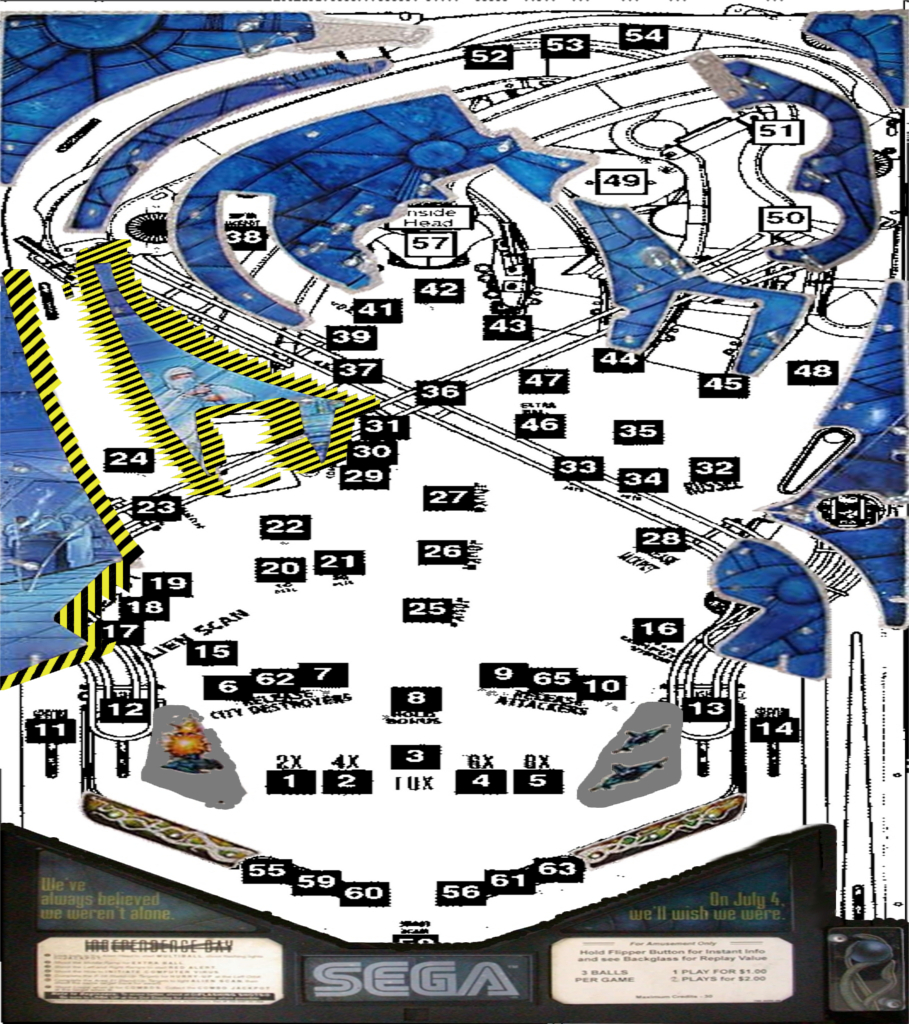
I'd recommend that since you have an Intel integrated video that you always build your table with the Hardware Rendering option disabled. Never turn on the hardware rendering feature until you upgrade your video card to something more powerfull for the time being. I do this for all my tables on my notebook with Intel video chipset in VP9. Second, for the final "finish" output from your graphics program, resize the graphics to a maximum size of 1024x1024. I believe if you follow these suggestions you will have fewer video issues with VP9.


Best Regards,
Todd.


[proud owner of a Williams Solar Fire]

- It's called "The American Dream" because you have to be asleep to believe it.
George Carlin
- Truly great madness cannot be achieved without significant intelligence.
Henrik Tikkanen
- "Reality check, Michelle, Talk about composure, Total lack of. He's a man-- About-- 12 Feet Tall--"
Carrie Kelly
Posted Image

#172 wtiger

wtiger

    Pinball Fan

  • VIP
  • 1,148 posts
  • Location:Los Angeles, CA

  • Flag: United States of America

  • Favorite Pinball: Junkyard


Contributor

Posted 27 June 2009 - 12:28 AM

QUOTE (faralos @ Jun 26 2009, 11:39 AM) <{POST_SNAPBACK}>
...Now I'm having a problem with the apron graphics. Ok not a problem really, but GIMP I know nothing about and I don't know photobie well enough to resize the apron graphix. Does anyone have this already sized and scaled?...


Faralos,
Nice job with the ramps! For the apron, see post#123 on page 7. Kruge99 posted an image where he worked on the yellow & black edges of some of the plastics. That image has both the plastics and the apron. You can load the image into Photobie and scale it down to 1024 x 1024 so that it doesn't mess up the rendering on your computer in VP.

Edited by wtiger, 27 June 2009 - 10:30 PM.


#173 kruge99

kruge99

    Pinball Wizard

  • VPF Staff
  • 3,901 posts
  • Location:Markham, Ont.

  • Flag: Canada

  • Favorite Pinball: Black Knight, High Speed and Pin*Bot


Posted 27 June 2009 - 12:57 AM

Actually wtiger, those are images that I worked on!! ;-) neoblood was quoting one of my posts - no worries tho! and btw - I'm much better at "The GIMP" now than I was a few weeks ago. I've secretly been working on another original table while I've been learning from the 90's workshop. I hope that it's good enough for an original table too!


Best Regards,
Todd.

[proud owner of a Williams Solar Fire]

- It's called "The American Dream" because you have to be asleep to believe it.
George Carlin
- Truly great madness cannot be achieved without significant intelligence.
Henrik Tikkanen
- "Reality check, Michelle, Talk about composure, Total lack of. He's a man-- About-- 12 Feet Tall--"
Carrie Kelly
Posted Image

#174 faralos

faralos

    VPF Veteran

  • Members
  • PipPipPipPipPipPip
  • 7,838 posts
  • Location:Eastern Pa,USA

  • Flag: United States of America

  • Favorite Pinball: Flash (Williams) 1979, Flash2 Updated


  • Trophies:

Posted 27 June 2009 - 01:30 AM

QUOTE (kruge99 @ Jun 26 2009, 08:17 PM) <{POST_SNAPBACK}>
Hi Faralos,

I'd recommend that since you have an Intel integrated video that you always build your table with the Hardware Rendering option disabled. Never turn on the hardware rendering feature until you upgrade your video card to something more powerfull for the time being...........

Best Regards,
Todd.
the only way I can see flippers at all and the plunger for playtesting if nothing else, is to have hardware rendering turned on. Once I have tested ramps or shooter lanes, I turn it back off, but I still have a problem with rendering the plastic pics or table graphix. I start to get those black lines cutting thru the table as shown in the previous posts or that beautiful Moire pattern like the one pic I'd posted! so I did actually do all the plastics for the table I just cab't have the images showing in rendered form. It is an obstacle that I have worked out to the best of my ability. Hopefully, when coding starts to go into it it'll not lock up or anything and it'll still render ok. I'll see, as i really like this translucent ramp thing and see MANY possibilities for me since I LOVE ramps! So, I hope I can continue to work with VP9! so far all is ok. This is also the reason I can't even run FP. But I'll make do, also, in the future, most of my pins will be originals and won't have as detailed a pic as the graphics on these plastics, so hopefully they'll load better! I'm also trying new ways to cut down on all those layers in slings and post rubbers to cut down on the sheer number of objects that my computer must draw each time, We'll see...thanks for anything new you can throw me...Oh, I'm also putting in screws too, for the plastics, as an afterthought, see?

Attached Files


"Don’t let the noise of others’ opinions drown out your own inner voice.
And most important, have the courage to follow your heart and intuition.”
----Steve Jobs


#175 faralos

faralos

    VPF Veteran

  • Members
  • PipPipPipPipPipPip
  • 7,838 posts
  • Location:Eastern Pa,USA

  • Flag: United States of America

  • Favorite Pinball: Flash (Williams) 1979, Flash2 Updated


  • Trophies:

Posted 27 June 2009 - 01:47 AM

[quote name='kruge99' date='Jun 8 2009, 07:01 PM' post='13442']

..............
Also, as my notebook is not "hardware render friendly" something occured to me about the size of the playfield image and the plastics image and I solved some of the graphical glitching on my notebook! All I did was use The GIMP to "scale" the plastics image and the playfield image down to 909wide x 1024long (originally 909x2048) and the table rendered perfectly! So now I have two tables to maintain blink.gif one with hardware rendering and one without! If anyone else is having trouble with graphics issues in VP9, let me know and I'll upload the scaled images. btw - the graphical difference is not noticeable!!


Best Regards,
Todd.
yes please! I am having numerous rendering problems! check my posts in the 90' tutorial forum so yes If you can pm me those scaled images I'd greatly appreciate it.
thanks!! Faralos


"Don’t let the noise of others’ opinions drown out your own inner voice.
And most important, have the courage to follow your heart and intuition.”
----Steve Jobs


#176 faralos

faralos

    VPF Veteran

  • Members
  • PipPipPipPipPipPip
  • 7,838 posts
  • Location:Eastern Pa,USA

  • Flag: United States of America

  • Favorite Pinball: Flash (Williams) 1979, Flash2 Updated


  • Trophies:

Posted 27 June 2009 - 02:37 AM

ALL FIXED!!!!! Kruge99 (todd) helped with his post of the same problem. I used a 909 by 1024 instead of 1024 x 1024 and TADA! it now works great! every now and then flippers dont show up so i check hardware render... and save, close and reopen vp9 and reload and there they are again.
here's the weird thing though and I hope it's just my computer. When I just click on the table it loads but the ramps have a large checkered pattern on them. but if I load it thru vp9 then they are indeed translucent!
thanks Kruge for that helpful solve! can;'t believe it was as easy as resizing the table graphic. duh... tongue.gif

Attached Files


"Don’t let the noise of others’ opinions drown out your own inner voice.
And most important, have the courage to follow your heart and intuition.”
----Steve Jobs


#177 kruge99

kruge99

    Pinball Wizard

  • VPF Staff
  • 3,901 posts
  • Location:Markham, Ont.

  • Flag: Canada

  • Favorite Pinball: Black Knight, High Speed and Pin*Bot


Posted 27 June 2009 - 10:34 AM

I have the same "checkered" pattern on my Intel integrated video on my notebook and on my ATI 4850 video cards. I think it's the way that VP9 works with those video cards and their hardware. Perhaps someone with an nVidia video card who is working in our group could comment or post a picture of transparent ramps to compare?


Best Regards,
Todd.

p.s. Here are the scaled playfield and plastics images I made for the id pinball:

Playfield


Plastics

Edited by kruge99, 11 July 2009 - 01:06 PM.

[proud owner of a Williams Solar Fire]

- It's called "The American Dream" because you have to be asleep to believe it.
George Carlin
- Truly great madness cannot be achieved without significant intelligence.
Henrik Tikkanen
- "Reality check, Michelle, Talk about composure, Total lack of. He's a man-- About-- 12 Feet Tall--"
Carrie Kelly
Posted Image

#178 faralos

faralos

    VPF Veteran

  • Members
  • PipPipPipPipPipPip
  • 7,838 posts
  • Location:Eastern Pa,USA

  • Flag: United States of America

  • Favorite Pinball: Flash (Williams) 1979, Flash2 Updated


  • Trophies:

Posted 27 June 2009 - 04:01 PM

woohoo! thanks but I'd already resized it in photobie in a layer image. here is what i have so far including screws and that ball protector. I remember that thing so well having to put them into all our pins when we finally got them as an 'upgrade' to the shooter lane (it saved the actual cabinet side from the ball impact when it launched into the plunger lane). I am still tweaking the ramp heights as I still have a ball sticking in the back and also by the leftmost pop bumper. does anyone have a list of standardized ramp heights? what a nightmare! it wouldn't be so bad, except for the fact that I am not that great and it takes me forever to get a ball up the ramp to test it. tongue.gif

Attached Files


"Don’t let the noise of others’ opinions drown out your own inner voice.
And most important, have the courage to follow your heart and intuition.”
----Steve Jobs


#179 wtiger

wtiger

    Pinball Fan

  • VIP
  • 1,148 posts
  • Location:Los Angeles, CA

  • Flag: United States of America

  • Favorite Pinball: Junkyard


Contributor

Posted 27 June 2009 - 10:40 PM

QUOTE (kruge99 @ Jun 26 2009, 05:57 PM) <{POST_SNAPBACK}>
Actually wtiger, those are images that I worked on!! ;-) neoblood was quoting one of my posts - no worries tho! and btw - I'm much better at "The GIMP" now than I was a few weeks ago. I've secretly been working on another original table while I've been learning from the 90's workshop. I hope that it's good enough for an original table too!


Best Regards,
Todd.


Sorry Todd. I've edited the post.

QUOTE (kruge99 @ Jun 27 2009, 03:34 AM) <{POST_SNAPBACK}>
I have the same "checkered" pattern on my Intel integrated video on my notebook and on my ATI 4850 video cards. I think it's the way that VP9 works with those video cards and their hardware. Perhaps someone with an nVidia video card who is working in our group could comment or post a picture of transparent ramps to compare?


I'm using an nVidia 8800GT. My transparent ramps look just like the image above from faralos. You could try experimenting with the transluscent gray image by spacing the gray color aound or something like that.

#180 faralos

faralos

    VPF Veteran

  • Members
  • PipPipPipPipPipPip
  • 7,838 posts
  • Location:Eastern Pa,USA

  • Flag: United States of America

  • Favorite Pinball: Flash (Williams) 1979, Flash2 Updated


  • Trophies:

Posted 28 June 2009 - 01:09 AM

well the translucent ramps only show up when I run the pin thru vp9. If I run it by just clicking on it, then I also get that checkered pattern. weird but I'm hoping once someone else has it they can just click on it and their computer will handle it ok and it's not a coding glitch I have embedded somewhere within vp9.
"Don’t let the noise of others’ opinions drown out your own inner voice.
And most important, have the courage to follow your heart and intuition.”
----Steve Jobs