Jump to content


Photo
* * * * * 40 votes

The VP 10.7 beta thread


  • Please log in to reply
4027 replies to this topic

#1621 wiesshund

wiesshund

    VPF Legend

  • Members
  • PipPipPipPipPipPipPip
  • 11,862 posts

  • Flag: United States of America

  • Favorite Pinball: How many can i have?

Posted 06 April 2021 - 08:53 AM


and for everybody without github login: https://github.com/v...7.0-127-c9c069f

@Toxie, I've always Used the 32bit executable and here is also the x64 version... so which one should I use ? I'm puzzled


The 64bit works, and actually seems maybe a bit more efficient.
But B2SServer is only 32bit, so you wont get any backglasses showing
(which also could be the reason it seemed a bit more efficient)


Still, was interesting to play with it some, 1st time i got to play with an up to date build of it.


If you feel the need to empty your wallet in my direction, i don't have any way to receive it anyways

Spend it on Hookers and Blow


#1622 remdwaas1986

remdwaas1986

    Enthusiast

  • Platinum Supporter
  • 284 posts
  • Location:Netherlands

  • Flag: Netherlands

  • Favorite Pinball: Pokemon

Contributor

Posted 06 April 2021 - 08:57 AM

lol, i used the 64 bits but did what wies said, just rename the exe to version 10.7 and leave everything else good, i played your table mephisto jp and i have no issues with sound or anything else. i keep building now tables in 10.6 till 10.7 fully is released because its backwards compatible. I liked your script with flex JP that saves me again uploading 2 tables. i modified the code of my sample table with it. And that without help  :otvclap:


gallery_139054_567_13031.pnggallery_139054_567_2859.png


#1623 Thalamus

Thalamus

    Pinball Wizard

  • Platinum Supporter
  • 4,988 posts

  • Flag: Norway

  • Favorite Pinball: GOT, Alien Star, LOTR, TOM

Posted 06 April 2021 - 09:53 AM

I believe the major issue with going 64bit is that at91jit isn't working in pinmame64. So, you are kind of stuck on 32bit, because, like JP says. It is a all or nothing kind of thing. Just make efficient tables and that won't be an issue ;)


From now on. I won't help anyone here at VPF. Please ask Noah why that is.


#1624 wiesshund

wiesshund

    VPF Legend

  • Members
  • PipPipPipPipPipPipPip
  • 11,862 posts

  • Flag: United States of America

  • Favorite Pinball: How many can i have?

Posted 06 April 2021 - 10:10 AM

I believe the major issue with going 64bit is that at91jit isn't working in pinmame64. So, you are kind of stuck on 32bit, because, like JP says. It is a all or nothing kind of thing. Just make efficient tables and that won't be an issue ;)

might be right there, i am not sure, running vpinmame 3.4 at the moment (https://github.com/v...pinmame/actions)

any way to test if at91jit works?
know any particular tables that crash if it doesnt?
Just for curiosity sake.


It's not something anyone would throw on their cab, cause it needs all 64bit helpers to go with it, and they dont all come in that flavor

though i guess, one day, MS may go the apple route, and ditch 32bit support on us

But that is not this day.


If you feel the need to empty your wallet in my direction, i don't have any way to receive it anyways

Spend it on Hookers and Blow


#1625 Thalamus

Thalamus

    Pinball Wizard

  • Platinum Supporter
  • 4,988 posts

  • Flag: Norway

  • Favorite Pinball: GOT, Alien Star, LOTR, TOM

Posted 06 April 2021 - 10:22 AM

Many of the modern Sterns need to have at91jit enabled for timing purposes. Mustang, TWD and Star Trek all, according to DjRobX needs it. But, I think it is a good idea to test this out from time to time. Pinmame is like any other of these fine programs under constant change and I have noticed that several of my known to crash situations have vanished lately. Most of them where known to start acting up with at91jit combined with dmddevice. I haven't tried 64bit on pinmame for a long time myself. If you are going to test it. Try with at91jit both enabled and disabled. Look for dmd getting out of sync with the game. You might have to play the machine for a while though.


From now on. I won't help anyone here at VPF. Please ask Noah why that is.


#1626 DKong

DKong

    Pinball Fan

  • Platinum Supporter
  • 600 posts

  • Flag: ---------

  • Favorite Pinball: IJ (Williams), TOM, AFM

Posted 06 April 2021 - 07:54 PM

I see quite a few tables recently uploaded require vpx 10.7 beta to run. Is the most recent build considered stable and does this mean 10.7 is close to an official release?


#1627 toxie

toxie

    VPF Veteran

  • VP Dev Team
  • PipPipPipPipPipPip
  • 5,734 posts
  • Location:berlin, germany

  • Flag: Germany

  • Favorite Pinball: AFM

Posted 06 April 2021 - 08:04 PM

We're getting nearer at least.  ;)


As for 32 vs 64bit builds: Thalamus nailed it with his explanations. Also, at the moment there is no real benefit (except for larger address space, i.e. more RAM available to tables) for using 64bit builds. Performance is usually pretty much the same (unless at91jit is triggered (Stern), then even x86/32bit always wins at the moment).


#1628 Friffy1

Friffy1

    Hobbyist

  • Members
  • PipPip
  • 43 posts
  • Location:US, Pennsylvania

  • Flag: United States of America

  • Favorite Pinball: Cyclone

Posted 06 April 2021 - 08:04 PM

I see quite a few tables recently uploaded require vpx 10.7 beta to run. Is the most recent build considered stable and does this mean 10.7 is close to an official release?


There's no permanent change happening so there's no reason not to try it.  If you run into issues, switch back, or run them both side-by-side.


#1629 Thalamus

Thalamus

    Pinball Wizard

  • Platinum Supporter
  • 4,988 posts

  • Flag: Norway

  • Favorite Pinball: GOT, Alien Star, LOTR, TOM

Posted 06 April 2021 - 08:05 PM

I you where to ask me. Yes. Go for it. At last it is now so good that we should get more feedback from it. Rename your current VPinballX.exe to VPinball106.exe or something. If you at any point want to go back. Just renamed your VPinballX.exe to VpinballX107beta.exe and rename the other one back to VPinballX.exe.


Under keys/dof preferences, know that there is a new plunger that is enabled. It might for some tables do odd things. So, turning it off ( default - currently it is on ) might be a solution you find satisfying, until the tables themselves has fixes.


From now on. I won't help anyone here at VPF. Please ask Noah why that is.


#1630 toxie

toxie

    VPF Veteran

  • VP Dev Team
  • PipPipPipPipPipPip
  • 5,734 posts
  • Location:berlin, germany

  • Flag: Germany

  • Favorite Pinball: AFM

Posted 06 April 2021 - 08:05 PM

32bit vs 64bit: But: You can also have both installed at the same time, if you really like. Same goes for (V)PinMAME.


Edited by toxie, 06 April 2021 - 08:05 PM.


#1631 wiesshund

wiesshund

    VPF Legend

  • Members
  • PipPipPipPipPipPipPip
  • 11,862 posts

  • Flag: United States of America

  • Favorite Pinball: How many can i have?

Posted 06 April 2021 - 11:26 PM

Many of the modern Sterns need to have at91jit enabled for timing purposes. Mustang, TWD and Star Trek all, according to DjRobX needs it. But, I think it is a good idea to test this out from time to time. Pinmame is like any other of these fine programs under constant change and I have noticed that several of my known to crash situations have vanished lately. Most of them where known to start acting up with at91jit combined with dmddevice. I haven't tried 64bit on pinmame for a long time myself. If you are going to test it. Try with at91jit both enabled and disabled. Look for dmd getting out of sync with the game. You might have to play the machine for a while though.


I dont mind testing it, just to see how it is working currently, for observations sake.
are you by any chance able to compile a 64bit b2sServer?
 

I will set ST to auto play for a while a91jit is enabled
i will see how bad it can get


If you feel the need to empty your wallet in my direction, i don't have any way to receive it anyways

Spend it on Hookers and Blow


#1632 wiesshund

wiesshund

    VPF Legend

  • Members
  • PipPipPipPipPipPipPip
  • 11,862 posts

  • Flag: United States of America

  • Favorite Pinball: How many can i have?

Posted 07 April 2021 - 01:14 AM

@Thalamus


Well, interestingly enough

VPX 10.7 64bit with
VPinMAME 3.4 64bit
With freezys 1.9.1 r10 64bit
Is still running Star Trek LE 1.61, in sync even.
Table has been on auto play for almost 3 hours (and the only time i will EVER roll the score board LOL)

this is with at91jit on.


I will try it later with it off.

I know we do not need it now, but i guess is kind of nice to know what state it is in, since it probably does not get tested much as a whole package.


Of course, when you guys start getting 8k playfield screens.... ;) 


If you feel the need to empty your wallet in my direction, i don't have any way to receive it anyways

Spend it on Hookers and Blow


#1633 wiesshund

wiesshund

    VPF Legend

  • Members
  • PipPipPipPipPipPipPip
  • 11,862 posts

  • Flag: United States of America

  • Favorite Pinball: How many can i have?

Posted 07 April 2021 - 06:11 AM

Ok, so, you can not actually roll over the scoreboard :(

It just keeps going in the trillions


I am stopping it now, but it was still in  sync, and no crash or anything.

If someone could help me do a 62bit b2s, i'd be willing to kick it around for a bit
see how it works in regular use


If you feel the need to empty your wallet in my direction, i don't have any way to receive it anyways

Spend it on Hookers and Blow


#1634 lukpcn

lukpcn

    Enthusiast

  • Members
  • PipPipPip
  • 249 posts

  • Flag: Poland

  • Favorite Pinball: I love all !!! :)

  • PS3 Gamer Tag: N/A
  • 360 Gamer Tag: N/A

Posted 07 April 2021 - 06:47 AM


Table has been on auto play for almost 3 hours (and the only time i will EVER roll the score board LOL)

this is with at91jit on.


I will try it later with it off.

I know we do not need it now, but i guess is kind of nice to know what state it is in, since it probably does not get tested much as a whole package.


Of course, when you guys start getting 8k playfield screens.... ;) 
 

What is the autoplay ?


Regards

Luk

My Pinball Youtube Channel: https://www.youtube....lPinballFanatic


#1635 wiesshund

wiesshund

    VPF Legend

  • Members
  • PipPipPipPipPipPipPip
  • 11,862 posts

  • Flag: United States of America

  • Favorite Pinball: How many can i have?

Posted 07 April 2021 - 06:51 AM


Table has been on auto play for almost 3 hours (and the only time i will EVER roll the score board LOL)

this is with at91jit on.


I will try it later with it off.

I know we do not need it now, but i guess is kind of nice to know what state it is in, since it probably does not get tested much as a whole package.


Of course, when you guys start getting 8k playfield screens.... ;) 
 

What is the autoplay ?


i rigged the table to play itself


Sadly, it was much more impressive than my playing


Edited by wiesshund, 07 April 2021 - 07:14 AM.

If you feel the need to empty your wallet in my direction, i don't have any way to receive it anyways

Spend it on Hookers and Blow


#1636 juju1976

juju1976

    Hobbyist

  • Members
  • PipPip
  • 16 posts

  • Flag: France

  • Favorite Pinball: terminator

Posted 07 April 2021 - 03:06 PM

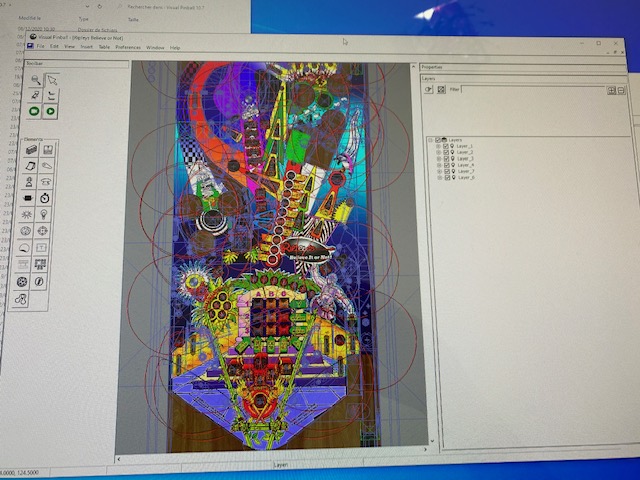
Hello probably i miss something but i cannot get table properties with this beta.

I meen i always get un Layer properties, i have no more option button in toolbar


do you someone know how to reactivate options for table ?


https://drive.google...iew?usp=sharing


thanks a lot


#1637 toxie

toxie

    VPF Veteran

  • VP Dev Team
  • PipPipPipPipPipPip
  • 5,734 posts
  • Location:berlin, germany

  • Flag: Germany

  • Favorite Pinball: AFM

Posted 07 April 2021 - 03:52 PM

this is with at91jit on.


I will try it later with it off.

don't need to do that.. at91jit is not supported on x64, so its always off there.


Hello probably i miss something but i cannot get table properties with this beta.

I meen i always get un Layer properties, i have no more option button in toolbar


do you someone know how to reactivate options for table ?


https://drive.google...iew?usp=sharing


thanks a lot

Could you please upload to something that is accessible publically?


#1638 juju1976

juju1976

    Hobbyist

  • Members
  • PipPip
  • 16 posts

  • Flag: France

  • Favorite Pinball: terminator

Posted 07 April 2021 - 04:08 PM

https://i.postimg.cc...Fm/IMG-7623.jpg


this is the pictureIMG-7623.jpg


Edited by juju1976, 07 April 2021 - 04:08 PM.


#1639 barneyrfd

barneyrfd

    Enthusiast

  • Members
  • PipPipPip
  • 141 posts

  • Flag: Canada

  • Favorite Pinball: Too hard to pick just one...

Posted 07 April 2021 - 04:15 PM

Hello


Installed VPX 10.7 and tried several tables.  Had to install flexdmd to get them to run.  I did that and the tables run so I assume flexdmd is working.  But...I do not have any form of dmd on any of the tables.  The F1 key does nothing, no menu, nothing.  No other F keys work either.


Just wondering if anyone else has this problem and how it might be corrected. Thanks.


cheers


#1640 juju1976

juju1976

    Hobbyist

  • Members
  • PipPip
  • 16 posts

  • Flag: France

  • Favorite Pinball: terminator

Posted 07 April 2021 - 04:21 PM

Ok sorry i fount it i just need to open with mouse the windows between properties and layer


thanks