- View New Content
-
Getting Started
-
Tutorials
Tutorial Categories
Tutorials Main Page Installation and Setup Downloadable TutorialsROM Adjustments
Number of Balls Adjustments Volume Adjustments
-
Visual Pinball Tables
VP 8 Desktop Tables
All VPM Recreations VP Recreations VP/VPM MODs VP Originals ROMsVP 9 Desktop Tables
All VPM Recreations VP Recreations VP/VPM MODs VP Originals ROMsVP9 Cabinet Tables
All Full Screen Cabinet Full Screen B2S Cabinet Spanned Cabinet Tables Media Packs ROMsVPX Tables
All VPinMAME Recreations VPX- - /VPinMAME - MOD Tables VPX Recreations VPX Originals Media Packs ROMs VR
-
Frontend Media & Backglass
Media Packs
Complete Media Packs Wheel Logos VideosBackglasses
dB2S Animated Backglasses UVP Animated Backglasses Topper Images
- Future Pinball Tables
-
Design Resources
Main Resources
Table Templates Playfield Images Image Library Sound Library Key CodesVP Guides
VP8 Guide - English VP8 Guide - Deutsch VP9 Guide - English VP9.1.x Guide - English VP Object Guide VPM DocumentationFuture Pinball Resources
Playfield Images 3D Model LibraryFuture Pinball Guides
FP Script Guide Big Draco Script Guide FP Table Design Guide FP DMD Guide
- Other Features
- Bug Tracker
- Image Gallery
- Blogs
-
More
Scared Stiff VP91x v1.4.4FS
Started By
jpsalas
, Feb 14 2010 05:18 AM
157 replies to this topic
#141
Posted 10 September 2011 - 11:15 AM
I once again got the "object required" error during Monster Multiball @ version 1.4.3
When I drained the balls after that, the table was missing one ball and kept searching for it.
I wonder what could cause this error.
When I drained the balls after that, the table was missing one ball and kept searching for it.
I wonder what could cause this error.
**Each pinball machine is a tiny universe... that we control.**
#143
Posted 10 September 2011 - 02:16 PM
It's no biggie, but it's always sad when you get above 100 mill and need to restart the table 
Perhaps if more people have this issue, we could narrow it down a bit to make it easier to locate.
**Each pinball machine is a tiny universe... that we control.**
#145
Posted 10 September 2011 - 04:51 PM
QUOTE (kiwi @ Sep 10 2011, 12:22 PM) <{POST_SNAPBACK}>
I changed the script line 1436
Dim currentball(3), ballStatus(3)
with
Dim currentball(4), ballStatus(4)
I tested the table and everything seems ok
Max
Dim currentball(3), ballStatus(3)
with
Dim currentball(4), ballStatus(4)
I tested the table and everything seems ok
Max
To be safe, on tables where I've added the B2B collision script / process, I've made this value one or two higher than the actual number of balls that could ever feasibly be in play / locked on the table. For this table, I would consider making it 5 for tnopb and, as always, match the Dim currentball(5), ballStatus(5) as sometimes there can be a timing thing between destroying a ball / ID and creating a new one.
I don't know this table that well, but it seems to that Monster Multi-ball is the test to see if the B2B is totally working but requires a ton of playing first or modifying the table to troubleshoot and get there quicker.
#146
Posted 10 September 2011 - 06:12 PM
OK, last fix 1.4.4 for the ball collision is on its way up 
I hope this time is the last update. Anyway, it is the last update
it should work now
I hope this time is the last update. Anyway, it is the last update
If you want to check my latest uploads then click on the image below:
Next table? A tribute table to Stern's Foo Fighters
#148
Posted 10 September 2011 - 09:41 PM
QUOTE (numiah @ Sep 10 2011, 03:25 PM) <{POST_SNAPBACK}>
Works a charm now !
I had two monsterballs and all went perfect.
Thank you so much for your support JP, and thanks to kiwi for pointing things out.
reI had two monsterballs and all went perfect.
Thank you so much for your support JP, and thanks to kiwi for pointing things out.
Great news.
Guess I will be getting the last version now.
#151
Posted 15 September 2011 - 07:30 PM
QUOTE (thewool @ Sep 15 2011, 02:17 PM) <{POST_SNAPBACK}>
I just wanted to add my thanks for the latest update JP 
It was me that suggested the ball sounds in the first place, sorry for causing you such a pain in the arse
It adds a lot to the immersion factor IMO. I, for one, am glad you suggested it.
#152
Posted 24 September 2011 - 09:10 PM
QUOTE (jpsalas @ Sep 10 2011, 01:12 PM) <{POST_SNAPBACK}>
OK, last fix 1.4.4 for the ball collision is on its way up 
I hope this time is the last update. Anyway, it is the last update
it should work now 
I hope this time is the last update. Anyway, it is the last update
I was playing the B2S Scared Stiff, and ran into this problem with a ball missing in monster multiball, and the author said he was using your latest code.
I'm not sure if you were able to track it down but this is what I posted over there in case it can help you out at all:
I ran into a problem in the monster multiball.
One of the 4 balls is getting stuck somewhere between the coffin lock and the coffin kickout. I was able to get to monster multiball twice, and it happened both times. Shooting the coffin lock would "unstick the ball". Both times it happened, I was down to 2 balls left in the multiball, the stuck ball and the ball I was juggling. When I shot the lock (left loop) one ball was released out of the coffin and the other ball came back down the left loop onto the playfield (it may have been stuck around the lock gate?).
I have not had this problem with earlier versions of JP's Scared Stiff, I know he's been updating his code lately, so this may have been fixed in one of his recent updates. So this bug has more to do with what version of his code you based your B2S conversion on than anything the B2S code is effecting, but I thought you should be aware, in case JP has updated the table script and it needs to be updated in your conversion.
Edited by cdf12345, 24 September 2011 - 09:11 PM.
#153
Posted 25 September 2011 - 08:59 AM
Hi!
I don't know if that's the case in this table.
But when an updated version of a table comes out and you want to easily add the B2S code to it.
You can do this by comparing the differencies of the code from the same versions of the table. The one with the B2S code with the table without it,
Then add these lines B2S code to the new table in the right place of the script.
Very easy!
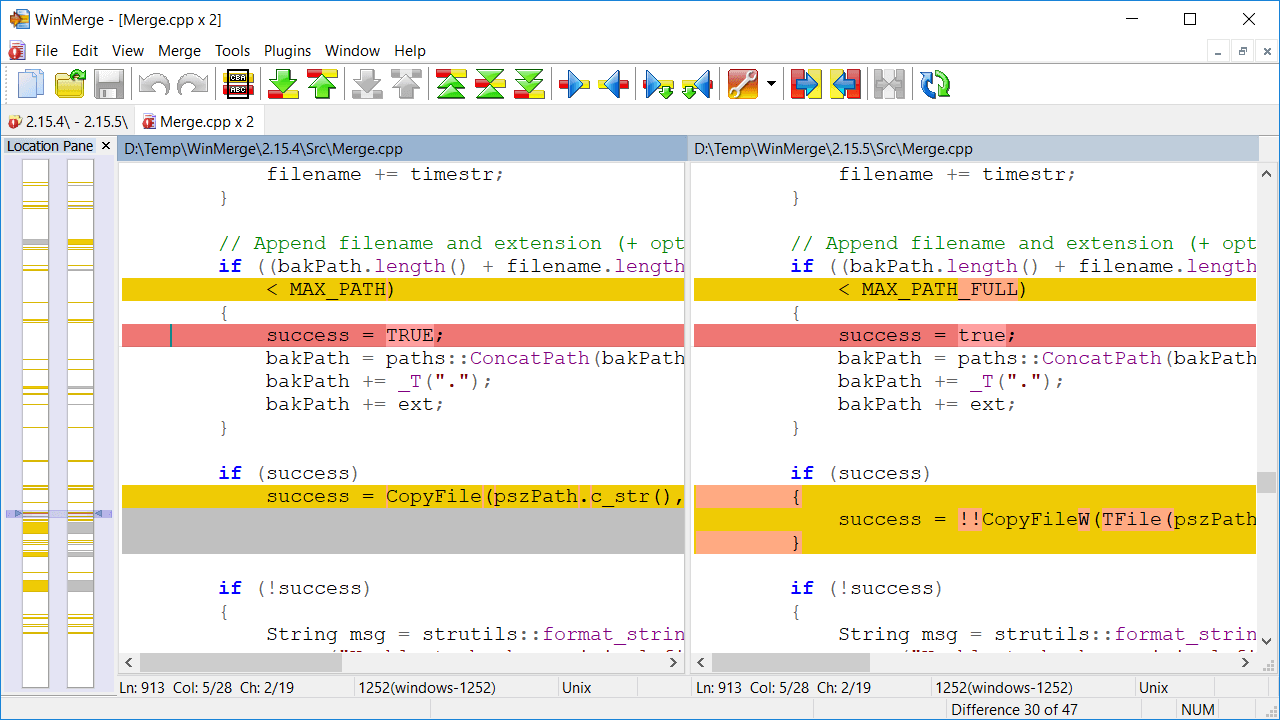
I've played with the free app WinMerge, download here
Ass seen of a screen dump below you can compare the two scripts side by side (not vp in pic), and any differences is shown marked yellow, and you can also
sot them quick by the column in the left.

So an updated table would be a few minutes for anyone to "MOD" back to B2S if needed!
Cheers!
I don't know if that's the case in this table.
But when an updated version of a table comes out and you want to easily add the B2S code to it.
You can do this by comparing the differencies of the code from the same versions of the table. The one with the B2S code with the table without it,
Then add these lines B2S code to the new table in the right place of the script.
Very easy!
I've played with the free app WinMerge, download here
Ass seen of a screen dump below you can compare the two scripts side by side (not vp in pic), and any differences is shown marked yellow, and you can also
sot them quick by the column in the left.

So an updated table would be a few minutes for anyone to "MOD" back to B2S if needed!
Cheers!
Edited by gStAv, 25 September 2011 - 09:01 AM.
#154
Posted 14 April 2012 - 11:53 AM
I still get the invisible ball bug, dont know what causes it,

but today the invisible square ball turned into a white square ball then coloured in the ramps white.
Normally the ramps will have some stretched ball images down them when it goes invisible.
This is the only table out of 300 I have that does it. The GI8 and normal B2S tables do it too. All the last few versions.

Using an i7 and 2 GTS250's on XP
Please help

but today the invisible square ball turned into a white square ball then coloured in the ramps white.
Normally the ramps will have some stretched ball images down them when it goes invisible.
This is the only table out of 300 I have that does it. The GI8 and normal B2S tables do it too. All the last few versions.

Using an i7 and 2 GTS250's on XP
Please help
#155
Posted 29 August 2012 - 09:56 AM
Great table, but I'm having an issue with low audio. The flippers, bumpers, bullseye targets, and slingshots sounds play at perfect volume. My problem is that the DMD audio, game music, voice-overs these type of sounds play extremely quiet.
Is there a fix for this? Something I am doing incorrect?
In Visual Pinball --> Preferences --> Audio Options... both are at max volume.
Totally brand new to Virtual Pinball. Thanks for any help in advance.
Is there a fix for this? Something I am doing incorrect?
In Visual Pinball --> Preferences --> Audio Options... both are at max volume.
Totally brand new to Virtual Pinball. Thanks for any help in advance.
#157
Posted 30 August 2012 - 01:03 AM
QUOTE (zocken23 @ Aug 29 2012, 05:36 AM) <{POST_SNAPBACK}>
Try hitting 8,9 or 0 for in-game volume adjustment. if the dmd say "open coin door", try hitting end-key on your keyboard first.
8 & 9 did it! Thank you very much, zocken23.


Top


are all trademarks of VPFORUMS.