Jump to content


Photo
* * * * * 11 votes

VP10 table testing - available right here!


  • Please log in to reply
2585 replies to this topic

#1421 Talantyyr

Talantyyr

    Enthusiast

  • Members
  • PipPipPip
  • 204 posts

  • Flag: Austria

  • Favorite Pinball: Monster Bash

Posted 20 July 2015 - 12:15 PM

I've just copied the new version of addams family to my cab and i've noticed that the backdrop settings fro cabinet are wrong... i think this worked in the last version, but unfortunately i've overwritten it with the new file. Could you please fix that?


Also cabinet mode settings for Scared Stiff are wrong... :(


Check out my cabinet build log: http://virtual-pinball.blogspot.co.at/


#1422 jbg4208

jbg4208

    Enthusiast

  • Members
  • PipPipPip
  • 339 posts
  • Location:Arkansas

  • Flag: United States of America

  • Favorite Pinball: Kiss, Monster Bash, Safe Cracker,

  • 360 Gamer Tag: Bobs_Road

Posted 20 July 2015 - 12:24 PM

I've just copied the new version of addams family to my cab and i've noticed that the backdrop settings fro cabinet are wrong... i think this worked in the last version, but unfortunately i've overwritten it with the new file. Could you please fix that?


Also cabinet mode settings for Scared Stiff are wrong... :(


Try these backdrop settings, for TAF, that are in this post from gStAv. They work great on my cab. http://www.vpforums....=70#entry314923


Edited by jbg4208, 20 July 2015 - 12:25 PM.

My VPX Tables:

sig0.png


#1423 boiydiego

boiydiego

    Pinball Fan

  • Members
  • PipPipPipPip
  • 978 posts
  • Location:baal

  • Flag: Belgium

  • Favorite Pinball: flinstones,t2 chrome edition,wcs,afm,fish tales,medieval,rollercoaster tycoon,taxi

Posted 20 July 2015 - 12:34 PM

i install vp10 yesterday and set my keys to the right ones but the tilt doesnt register !?i use mech. tilt ..

also i use the freescale device for nudging and normaly in vp9 i set it to 1200 xgain and 1200 ygain  but in vp10 its to much i tryed to change to 120 but stil to much always with xmax set to 100 what are the best default settings for that?


boiydiego___gebruik-n2kbkyc.png


#1424 freneticamnesic

freneticamnesic

    A Faint Ghost Through the Raindrops

  • VIP
  • 3,370 posts
  • Location:Portland, OR

  • Flag: United States of America

  • Favorite Pinball: Star Trek, Black Hole, AFM, Fast Draw, Tron, AMH

  • 360 Gamer Tag: sixgunsounddd

Posted 20 July 2015 - 02:24 PM

You mean you guys can't play a screenshot???


here's working link to Tales From The Crypt


#1425 bolt

bolt

    VPF Veteran

  • VIP
  • 5,162 posts
  • Location:Kiel / Schleswig Holstein

  • Flag: Germany

  • Favorite Pinball: JP's Deadpool, Harlem Globetrotters, Spiderman and much more

Posted 20 July 2015 - 02:27 PM

:otvclap: Thank you fren. This link is much better.


Posted Image

#1426 freneticamnesic

freneticamnesic

    A Faint Ghost Through the Raindrops

  • VIP
  • 3,370 posts
  • Location:Portland, OR

  • Flag: United States of America

  • Favorite Pinball: Star Trek, Black Hole, AFM, Fast Draw, Tron, AMH

  • 360 Gamer Tag: sixgunsounddd

Posted 20 July 2015 - 02:30 PM


Why is anyone using object detail level less than max? This has long been a cause of consternation, it shouldn't even be an option. When building a table, we shouldn't worry about whether this is not going to play at all when someone comes along and sets their object detail level less than what I have......... frankly I don't worry about it, set your object detail to max and be done with it. If I make a smooth ramp that the ball travels along without issue, and you come in with an object detail level less than what I have, you start getting hard angles on the ramp. If you turn it all the way down, maybe you get a 90° angle in the ramp - of course the ball isn't going to work on that. This option should go away.

We could fine tune the slider settings so that it won't create too strange unplayable ramps. Otherwise some users won't be able to play newer tables because they don't own hardware that is fast enough to play them. But that hardly depends how someone creates a table. If you use a lot of small transparent primitives you really need a fast gfx card playing those tables. But if you combine these meshes into a couple of higher poly meshes it could run better on low end hardware as well. But you need to learn to use a 3D editor to create such things.


I've been doing this lately, check out TFTC, I try to combine everything that will be using the same texture and/or material into one primitive. I haven't measured performance yet but I'm sure it's much improved.

I can't speak for everyone else but adjusting the object detail level settings on both of my common PCs has no effect on  performance, exact same FPS right down to the decimal. In my experience, when people have said a ball gets stuck on a ramp or similar problem and I have them adjust that setting, they say "Thanks that fixed it!" with no complaints about performance. I think most people can run just fine and don't know what the setting actually does, it works so they just leave it alone.


#1427 Slydog43

Slydog43

    Pinball Wizard

  • Platinum Supporter
  • 3,008 posts
  • Location:Hackettstown, NJ

  • Flag: United States of America

  • Favorite Pinball: Addams Family, All Williams 90's Games

Posted 20 July 2015 - 03:27 PM

Nice table freneticamnesic, I get around 160 FPS with it without any stutter, even with multiball it was perfectly smooth.  I also turned on Aero with my Win7x64 setup to get rid of flipper tearing (I forgot about this for over a year)


#1428 fuzzel

fuzzel

    spaghetti code

  • VP Dev Team
  • PipPipPipPipPip
  • 2,818 posts

  • Flag: Germany

  • Favorite Pinball: yes I have

Posted 20 July 2015 - 03:56 PM


Why is anyone using object detail level less than max? This has long been a cause of consternation, it shouldn't even be an option. When building a table, we shouldn't worry about whether this is not going to play at all when someone comes along and sets their object detail level less than what I have......... frankly I don't worry about it, set your object detail to max and be done with it. If I make a smooth ramp that the ball travels along without issue, and you come in with an object detail level less than what I have, you start getting hard angles on the ramp. If you turn it all the way down, maybe you get a 90° angle in the ramp - of course the ball isn't going to work on that. This option should go away.

We could fine tune the slider settings so that it won't create too strange unplayable ramps. Otherwise some users won't be able to play newer tables because they don't own hardware that is fast enough to play them. But that hardly depends how someone creates a table. If you use a lot of small transparent primitives you really need a fast gfx card playing those tables. But if you combine these meshes into a couple of higher poly meshes it could run better on low end hardware as well. But you need to learn to use a 3D editor to create such things.


I've been doing this lately, check out TFTC, I try to combine everything that will be using the same texture and/or material into one primitive. I haven't measured performance yet but I'm sure it's much improved.

I can't speak for everyone else but adjusting the object detail level settings on both of my common PCs has no effect on  performance, exact same FPS right down to the decimal. In my experience, when people have said a ball gets stuck on a ramp or similar problem and I have them adjust that setting, they say "Thanks that fixed it!" with no complaints about performance. I think most people can run just fine and don't know what the setting actually does, it works so they just leave it alone.


I've checked TFTC: That's exactly the way how newer tables should be created, very well made :)


Regarding the details slider: actually the slider was the old ramp accuracy slider in VP9. I changed the name and used the slider also to decrease the rubber accuracy but if all this isn't necessary I can remove that (I'm always a friend of removing stuff from a program btw :D )


#1429 cyberpez

cyberpez

    Enthusiast

  • Silver Supporter
  • 394 posts

  • Flag: United States of America

  • Favorite Pinball: Back to the Future

Posted 20 July 2015 - 03:57 PM


Why is anyone using object detail level less than max? This has long been a cause of consternation, it shouldn't even be an option. When building a table, we shouldn't worry about whether this is not going to play at all when someone comes along and sets their object detail level less than what I have......... frankly I don't worry about it, set your object detail to max and be done with it. If I make a smooth ramp that the ball travels along without issue, and you come in with an object detail level less than what I have, you start getting hard angles on the ramp. If you turn it all the way down, maybe you get a 90° angle in the ramp - of course the ball isn't going to work on that. This option should go away.

We could fine tune the slider settings so that it won't create too strange unplayable ramps. Otherwise some users won't be able to play newer tables because they don't own hardware that is fast enough to play them. But that hardly depends how someone creates a table. If you use a lot of small transparent primitives you really need a fast gfx card playing those tables. But if you combine these meshes into a couple of higher poly meshes it could run better on low end hardware as well. But you need to learn to use a 3D editor to create such things.


I've been doing this lately, check out TFTC, I try to combine everything that will be using the same texture and/or material into one primitive. I haven't measured performance yet but I'm sure it's much improved.

I can't speak for everyone else but adjusting the object detail level settings on both of my common PCs has no effect on  performance, exact same FPS right down to the decimal. In my experience, when people have said a ball gets stuck on a ramp or similar problem and I have them adjust that setting, they say "Thanks that fixed it!" with no complaints about performance. I think most people can run just fine and don't know what the setting actually does, it works so they just leave it alone.


So what exactly does the slider do now?  for vp 9.9 I've always had it set around half.  (my cab and laptop have sorta lame specks, but upgrades are in the works)  For vp10 I have set it down a few notches on my cab and almost halfway on my laptop..... it did seem to fix Fatal Error: HRRESULT errors I was getting on the custom table I'm working on...  but I havn't really noticed other weird things on mine or other tables because of it..  like the stuck balls etc....?  Interesting to know though incase I do run across it as it never would have crossed my mind that being the case.


Edit:  I guess Fuzzel answered my "what do it do question" while I was typing :P


Edited by cyberpez, 20 July 2015 - 03:59 PM.


#1430 hmueck

hmueck

    MaX

  • VIP
  • 2,190 posts
  • Location:Hamburg

  • Flag: ---------

  • Favorite Pinball: IPDB Top 300


Contributor

Posted 20 July 2015 - 04:55 PM

I've checked TFTC: That's exactly the way how newer tables should be created, very well made :)


am i guessing correctly, when i say, that "the way" is to export the table in blender, do some joining magic and then importing parts in VP again?
VPX0beta tables: 29cff786951ed9c1a70fc1fa47f5e3c1.png 0cecd68ffa2537a7262337834a05bbbe.png Finish them if you like!

#1431 ICPjuggla

ICPjuggla

    Early Retirement

  • VIP
  • 1,193 posts

  • Flag: United States of America

  • Favorite Pinball: Star Wars

Posted 20 July 2015 - 05:45 PM

I've checked TFTC: That's exactly the way how newer tables should be created, very well made :)


am i guessing correctly, when i say, that "the way" is to export the table in blender, do some joining magic and then importing parts in VP again?

I was going to ask the same thing.. Why do we have to depend on other programs for this? Why can't there be an option in VP to join like primitives. This seems counter productive to depend on other programs to do this and many extra steps to help performance. Some of us aren't that good in blender, so what your saying is if I build a table and don't do this it will be built wrong?!!!

We need an option in VP to do this and skip blender all together here to join like primitives. It seems to me this could be something you devs could add right into VP. If doing this helps performance so much it also seems to me that something like this would be a top priority to add into VP its self and not depend on another program.

cosmicgunfight-sig2.png breakshot-sig-small3.png atlantis-sig-small.png mousinaround-sig6.png hurricane-sig16.png sc-badge1.png lw-sig.png embryon-logo0.png icp-3.png apollo13_badge(1).png whirlwind_badge0.png playboy_badge0.png oxo1.png raven_logo.png rambo_logo4.png


#1432 toxie

toxie

    VPF Veteran

  • VP Dev Team
  • PipPipPipPipPipPip
  • 5,734 posts
  • Location:berlin, germany

  • Flag: Germany

  • Favorite Pinball: AFM

Posted 20 July 2015 - 05:53 PM


Regarding the details slider: actually the slider was the old ramp accuracy slider in VP9. I changed the name and used the slider also to decrease the rubber accuracy but if all this isn't necessary I can remove that (I'm always a friend of removing stuff from a program btw :D )


And just for the record: The ball(s), too..


#1433 fuzzel

fuzzel

    spaghetti code

  • VP Dev Team
  • PipPipPipPipPip
  • 2,818 posts

  • Flag: Germany

  • Favorite Pinball: yes I have

Posted 20 July 2015 - 06:02 PM


I've checked TFTC: That's exactly the way how newer tables should be created, very well made :)


am i guessing correctly, when i say, that "the way" is to export the table in blender, do some joining magic and then importing parts in VP again?

I was going to ask the same thing.. Why do we have to depend on other programs for this? Why can't there be an option in VP to join like primitives. This seems counter productive to depend on other programs to do this and many extra steps to help performance. Some of us aren't that good in blender, so what your saying is if I build a table and don't do this it will be built wrong?!!!

We need an option in VP to do this and skip blender all together here to join like primitives. It seems to me this could be something you devs could add right into VP. If doing this helps performance so much it also seems to me that something like this would be a top priority to add into VP its self and not depend on another program.


There is something like that already in VP: remember the "Group elements together" switch? But it has some drawbacks. The "right way" is to export the meshes and join them in Blender, 3DSMAX and the like. You need such tools for remapping the UV coodinates. If you don't want to depend on another program then we have to implement Photoshop/Gimp into VP too  :blink: . VPX isn't a simple sprite show like VP8/VP9 anymore. To get the most out of VPX (visually) you need a 3D editing tool and something like Photoshop/Gimp.


Why is anyone using object detail level less than max? This has long been a cause of consternation, it shouldn't even be an option. When building a table, we shouldn't worry about whether this is not going to play at all when someone comes along and sets their object detail level less than what I have......... frankly I don't worry about it, set your object detail to max and be done with it. If I make a smooth ramp that the ball travels along without issue, and you come in with an object detail level less than what I have, you start getting hard angles on the ramp. If you turn it all the way down, maybe you get a 90° angle in the ramp - of course the ball isn't going to work on that. This option should go away.

We could fine tune the slider settings so that it won't create too strange unplayable ramps. Otherwise some users won't be able to play newer tables because they don't own hardware that is fast enough to play them. But that hardly depends how someone creates a table. If you use a lot of small transparent primitives you really need a fast gfx card playing those tables. But if you combine these meshes into a couple of higher poly meshes it could run better on low end hardware as well. But you need to learn to use a 3D editor to create such things.


I've been doing this lately, check out TFTC, I try to combine everything that will be using the same texture and/or material into one primitive. I haven't measured performance yet but I'm sure it's much improved.

I can't speak for everyone else but adjusting the object detail level settings on both of my common PCs has no effect on  performance, exact same FPS right down to the decimal. In my experience, when people have said a ball gets stuck on a ramp or similar problem and I have them adjust that setting, they say "Thanks that fixed it!" with no complaints about performance. I think most people can run just fine and don't know what the setting actually does, it works so they just leave it alone.


So what exactly does the slider do now?  for vp 9.9 I've always had it set around half.  (my cab and laptop have sorta lame specks, but upgrades are in the works)  For vp10 I have set it down a few notches on my cab and almost halfway on my laptop..... it did seem to fix Fatal Error: HRRESULT errors I was getting on the custom table I'm working on...  but I havn't really noticed other weird things on mine or other tables because of it..  like the stuck balls etc....?  Interesting to know though incase I do run across it as it never would have crossed my mind that being the case.


Edit:  I guess Fuzzel answered my "what do it do question" while I was typing :P


The slider reduces the poly count on some elements like ramps/rubbers/balls. If you get a fatal error when maxed out then your gfx ram on your card is full.


Edited by fuzzel, 20 July 2015 - 06:03 PM.


#1434 ICPjuggla

ICPjuggla

    Early Retirement

  • VIP
  • 1,193 posts

  • Flag: United States of America

  • Favorite Pinball: Star Wars

Posted 20 July 2015 - 07:00 PM

I've checked TFTC: That's exactly the way how newer tables should be created, very well made :)


am i guessing correctly, when i say, that "the way" is to export the table in blender, do some joining magic and then importing parts in VP again?

I was going to ask the same thing.. Why do we have to depend on other programs for this? Why can't there be an option in VP to join like primitives. This seems counter productive to depend on other programs to do this and many extra steps to help performance. Some of us aren't that good in blender, so what your saying is if I build a table and don't do this it will be built wrong?!!!
We need an option in VP to do this and skip blender all together here to join like primitives. It seems to me this could be something you devs could add right into VP. If doing this helps performance so much it also seems to me that something like this would be a top priority to add into VP its self and not depend on another program.
There is something like that already in VP: remember the "Group elements together" switch? But it has some drawbacks. The "right way" is to export the meshes and join them in Blender, 3DSMAX and the like. You need such tools for remapping the UV coodinates. If you don't want to depend on another program then we have to implement Photoshop/Gimp into VP too  :blink: . VPX isn't a simple sprite show like VP8/VP9 anymore. To get the most out of VPX (visually) you need a 3D editing tool and something like Photoshop/Gimp.

lol It seems I touched a nerve or something to get a response like that! I'm fully aware of what you said about "grouping elements together" switch, having to use photoshop/gimp. etc. I appreciate all that you devs do to advance VP and have said this many times.. Sorry if I thought by adding a new feature to VP was a good idea to help performance. Maybe I approached it the wrong way or worded it in a way that pissed you off, b/c it seems a lot of what "us authors" bring up as good idea's to help VP advance goes un noticed.. Many of us have brought up great ideas and very few have come to see the light of day, or just go ignored!

Carry on and I'll just stop bringing up my ideas as an author and keep my opinions to my self as it seems to really not matter anyway...

cosmicgunfight-sig2.png breakshot-sig-small3.png atlantis-sig-small.png mousinaround-sig6.png hurricane-sig16.png sc-badge1.png lw-sig.png embryon-logo0.png icp-3.png apollo13_badge(1).png whirlwind_badge0.png playboy_badge0.png oxo1.png raven_logo.png rambo_logo4.png


#1435 hmueck

hmueck

    MaX

  • VIP
  • 2,190 posts
  • Location:Hamburg

  • Flag: ---------

  • Favorite Pinball: IPDB Top 300


Contributor

Posted 20 July 2015 - 07:09 PM

There is something like that already in VP: remember the "Group elements together" switch? But it has some drawbacks. The "right way" is to export the meshes and join them in Blender, 3DSMAX and the like.


I havent read/found any documentation/explanation about the "group elements together" yet. i only know that the editor will select all items from that collection at the same time, which makes changing some stuff easier.
but what its doing otherwise - no idea.

i have no idea how to join stuff in blender. looks like i have to find a tutorial for that.

P.S. can somebody maybe make a benchmark test?
to compare: classic vp9 building, grouping elements together and joining meshes in blender?

P.P.S. do we have a wiki somewhere? where we can collect small bits information of all kinds? all the stuff that gets forgotten in a gazillion forum posts?
VPX0beta tables: 29cff786951ed9c1a70fc1fa47f5e3c1.png 0cecd68ffa2537a7262337834a05bbbe.png Finish them if you like!

#1436 freneticamnesic

freneticamnesic

    A Faint Ghost Through the Raindrops

  • VIP
  • 3,370 posts
  • Location:Portland, OR

  • Flag: United States of America

  • Favorite Pinball: Star Trek, Black Hole, AFM, Fast Draw, Tron, AMH

  • 360 Gamer Tag: sixgunsounddd

Posted 20 July 2015 - 07:25 PM

icp I think you read something that wasn't there...

that's my job


#1437 Talantyyr

Talantyyr

    Enthusiast

  • Members
  • PipPipPip
  • 204 posts

  • Flag: Austria

  • Favorite Pinball: Monster Bash

Posted 20 July 2015 - 07:43 PM

Thx for the tip boydiego, i've completly overlooked that... This settings work perfectly! Addams Family looks AMAZING and it's by far the best electronic version of Addams Family i've ever played. Graphics- and gameplay wise, i love it. The table is also much harder then all others, that's awesome too! :)


Fren, your TFTC table is also absolutely stunning. It looks far better than the vp9 version, and it plays fantastic. I love it, will be one of of our favourite tables! We just had one issue. One time the ball hit the drain, nothing happened, we've waited for about 5mins and had to restart the game. Didn't happen again...


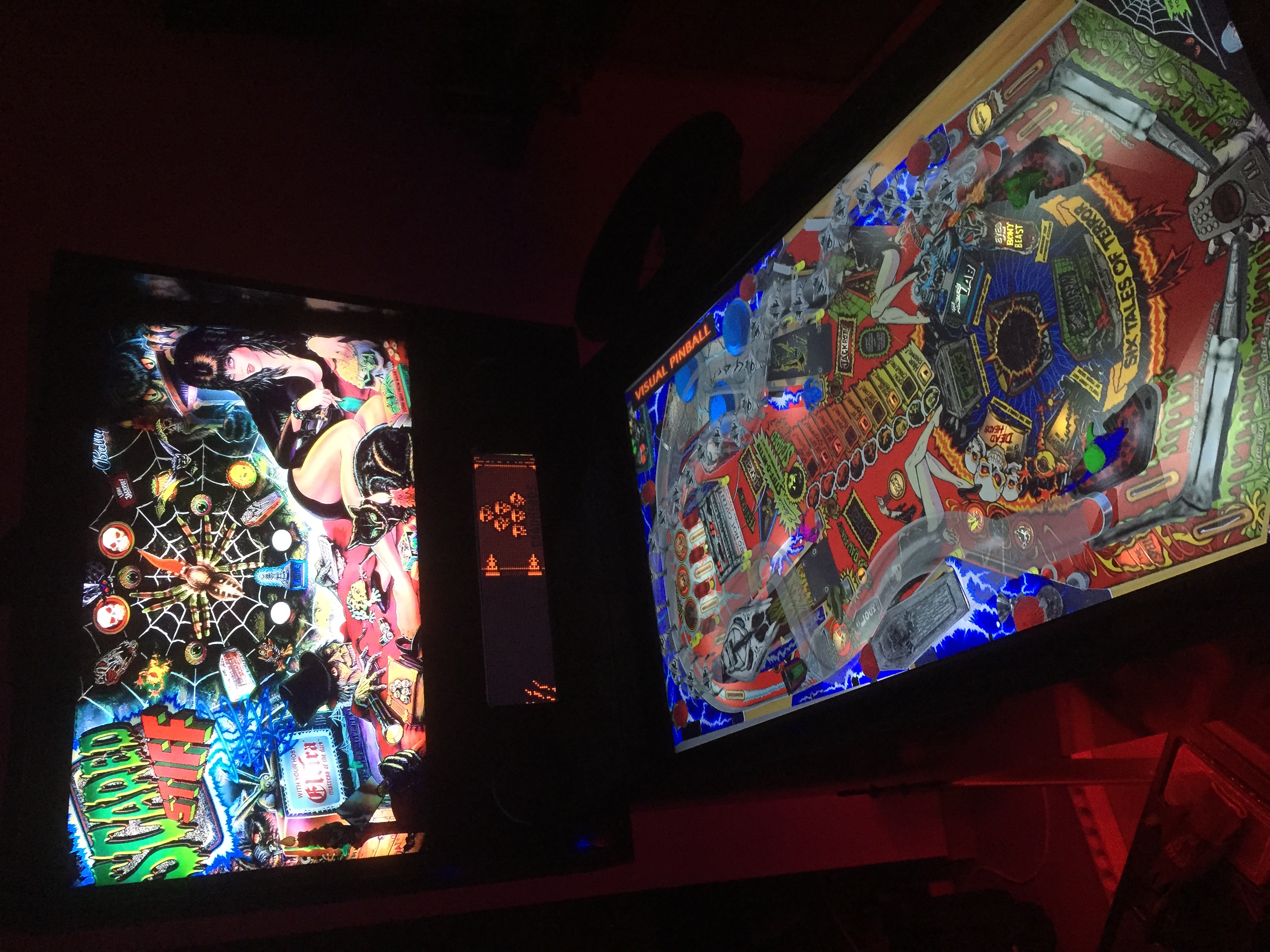
The Scared Stiff table is wonderful. I totally love all those primitives and how the little monsters jump around. so much going on at this table and so beautiful!

I used the same backdrop settings gStav posted for addams family, they don't fit perfectly but good enough to play. You really should add them to the table. I had one issue, that was reproducable 3 times. Everytime i hit the crate, the ball doesn't come out again and i have to restart the game. It also takes long for the ball to reappear when it hits the drain. about 15seconds... The spider on my backglass also doesn't move when i get the "stop the spider mode", don't know if it's my backglass or an issue with the table. I'm using the latest rom you're refering to in the script.


Btw, why is there a VISUAL PINBALL banner? I couldn't find it in the image manager, how do i get rid of it?


I also enabled the day-night slider and pushed it a little to the left, looks amazing.


Here's a picture of it running on my cab:
ejyljqzl.jpg


Edited by Talantyyr, 20 July 2015 - 07:44 PM.

Check out my cabinet build log: http://virtual-pinball.blogspot.co.at/


#1438 freneticamnesic

freneticamnesic

    A Faint Ghost Through the Raindrops

  • VIP
  • 3,370 posts
  • Location:Portland, OR

  • Flag: United States of America

  • Favorite Pinball: Star Trek, Black Hole, AFM, Fast Draw, Tron, AMH

  • 360 Gamer Tag: sixgunsounddd

Posted 20 July 2015 - 07:58 PM

Talantyrr, open the Scared Stiff table in the VP editor, click on backdrop. You'll see a movable box in the upper left, move it out of the black outline and save the table, you should be good now


#1439 Talantyyr

Talantyyr

    Enthusiast

  • Members
  • PipPipPip
  • 204 posts

  • Flag: Austria

  • Favorite Pinball: Monster Bash

Posted 20 July 2015 - 08:02 PM

Thx that helped!

Check out my cabinet build log: http://virtual-pinball.blogspot.co.at/


#1440 RYSr

RYSr

    Pinball Fan

  • Charter Member
  • 511 posts
  • Location:Mercerville (Central) NJ, USA

  • Flag: United States of America

  • Favorite Pinball: TZ - G&R - MB - CV - Metallica

Posted 21 July 2015 - 01:32 AM


I can't speak for everyone else but adjusting the object detail level settings on both of my common PCs has no effect on  performance, exact same FPS right down to the decimal. In my experience, when people have said a ball gets stuck on a ramp or similar problem and I have them adjust that setting, they say "Thanks that fixed it!" with no complaints about performance. I think most people can run just fine and don't know what the setting actually does, it works so they just leave it alone.


Your right!

I also tested the object detail in min and max setting I didn't see any difference in FPS either. I always assumed since it did make a difference in VP9 that it would also help in VP10. So I always kept it at the min on my slower desktop that I use to download new tables. I like to play them on my desktop before I load them on my Cabinet which has a strong Video card.


I would suggest that the authors check the overwrite Global Settings box for the Object Detail Level slider and set it to Max in the table settings, so It will override the Preference/Video setting the user has. This should stop the ball hang problems.

Rich