Jump to content


Photo
* * * * * 2 votes

The Addams Family VP91X 2.0


  • Please log in to reply
187 replies to this topic

#121 Dan Fielding

Dan Fielding

    Hobbyist

  • Members
  • PipPip
  • 22 posts

  • Flag: United States of America

  • Favorite Pinball: Eight Ball Deluxe

Posted 08 May 2010 - 08:55 PM

No matter what ROM I try to use when it starts up I get, "Machine terminated before intialized, chech the rom path or rom file!"

All my other games seem to work with the ROM path where it is.

#122 bolt

bolt

    VPF Veteran

  • VIP
  • 5,161 posts
  • Location:Kiel / Schleswig Holstein

  • Flag: Germany

  • Favorite Pinball: JP's Deadpool, Harlem Globetrotters, Spiderman and much more

Posted 08 May 2010 - 09:56 PM

Use the taf_l7 rom for melon Addams Family.
Posted Image

#123 Dan Fielding

Dan Fielding

    Hobbyist

  • Members
  • PipPip
  • 22 posts

  • Flag: United States of America

  • Favorite Pinball: Eight Ball Deluxe

Posted 09 May 2010 - 02:13 AM

I did. And I get the same message

#124 destruk

destruk

    VPF Veteran

  • VPF Staff
  • 6,338 posts
  • Location:Colorado Springs, CO

  • Flag: United States of America

  • Favorite Pinball: Ultrapin!


Posted 09 May 2010 - 02:31 AM

The same game worked for you July 31st of last year, so what has changed since then?
http://www.vpforums....i...ost&p=17417

Guess you could run the visual pinmame setup, and uninstall and reinstall it again - that'd probably fix it - be sure to remove all registry entries when it's uninstalled.

Build a fire, vipers love the heat.


#125 Dan Fielding

Dan Fielding

    Hobbyist

  • Members
  • PipPip
  • 22 posts

  • Flag: United States of America

  • Favorite Pinball: Eight Ball Deluxe

Posted 09 May 2010 - 03:31 PM

I know it, that's what is so weird about it. sad.gif I will try your recommendation and see what happens.

#126 bolt

bolt

    VPF Veteran

  • VIP
  • 5,161 posts
  • Location:Kiel / Schleswig Holstein

  • Flag: Germany

  • Favorite Pinball: JP's Deadpool, Harlem Globetrotters, Spiderman and much more

Posted 09 May 2010 - 08:14 PM

Hi Melon,

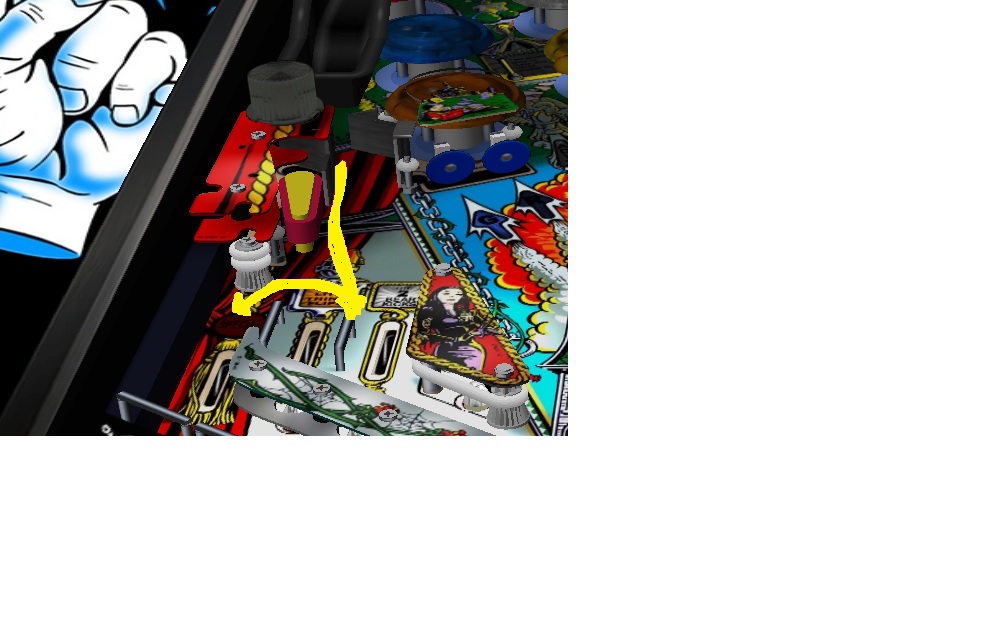
i played your fabulous pinball now very often. If I do not hit the ball with the left small flipper, the ball drops on the small metal rail and then jump to the left out in most cases. This problem I never had with the real Addams Family table. Is it possible to modify this a little?


Is the slingshot force with 8 not a little to hard?

6 is a good value.

Your table gives me a lot of fun, but your version is a lot heavier than PacDudes version.


My score today is 230.010.310.
Posted Image

#127 melon

melon

    Enthusiast

  • VIP
  • 326 posts
  • Location:Spain

  • Flag: Spain

  • Favorite Pinball: Addams Family


Posted 09 May 2010 - 09:59 PM

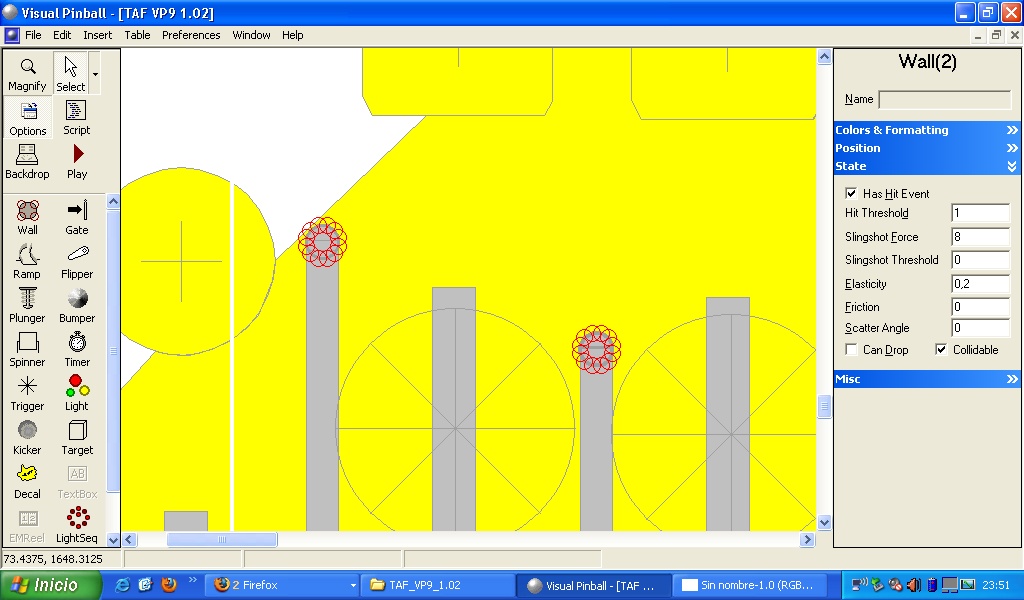
If you are using the last version (1.02) select the 2 walls you can see in the image (called GuiaMeta1 and GuiaMetal2) and change the elasticity from 0.2 to something lower, like 0.1 and the ball won't bounce:

In the first version tha elasticity was 0.1, but somebody (I don't remember who was) suggeested that the ball should bounce a little, so I increased the elasticity a little.

cycloneMini2.png TafMini2.png FishTalesMini2.png spaceShuttleMini2.png bk2kmini.png GetawayMini.png


#128 bolt

bolt

    VPF Veteran

  • VIP
  • 5,161 posts
  • Location:Kiel / Schleswig Holstein

  • Flag: Germany

  • Favorite Pinball: JP's Deadpool, Harlem Globetrotters, Spiderman and much more

Posted 09 May 2010 - 10:50 PM

Thank you very much for your help melon.


Have a good start in the new week.

Posted Image

#129 janux

janux

    Hobbyist

  • Members
  • PipPip
  • 11 posts

  • Flag: Argentina

  • Favorite Pinball: Addams Family

Posted 03 August 2010 - 02:00 PM

Well, Im a lil'bit outdated rigth now, but just couldn't keep playing this table without thanking you!.
I believe it can be improved, as anything can.... but It ROCKS man!.
I know what a pain can be to get a code working right and can't imagine what would be to get such a table work the way this one does.

Thanks for this great release. wink.gif


#130 gnr_rules

gnr_rules

    Hobbyist

  • Validating
  • PipPip
  • 37 posts

  • Flag: United States of America

  • Favorite Pinball: GnR

Posted 17 August 2010 - 12:35 AM

Great game...one of my favorites. I am having a small issue that I hope someone can help me with. I was having the ball freeze on the screen while playing for only a second or so occasionally. I thought maybe my PC processor was having a hard time keeping up so I upgraded my PC to a 3.0Ghz quad core processor with 8 mg of ram and a 9800gtx video card thinking that would solve the problem. It didn't, the ball still freezes on the screen momentarily every minute or so. I'm sure there is a setting somewhere that I am missing but I can't find it. Any suggestions on how to fix the problem?

#131 deadsoulz

deadsoulz

    Enthusiast

  • Platinum Supporter
  • 175 posts

  • Flag: United States of America

  • Favorite Pinball: Creature from the Black Lagoon

Posted 17 August 2010 - 04:24 PM

QUOTE (gnr_rules @ Aug 16 2010, 06:35 PM) <{POST_SNAPBACK}>
Great game...one of my favorites. I am having a small issue that I hope someone can help me with. I was having the ball freeze on the screen while playing for only a second or so occasionally. I thought maybe my PC processor was having a hard time keeping up so I upgraded my PC to a 3.0Ghz quad core processor with 8 mg of ram and a 9800gtx video card thinking that would solve the problem. It didn't, the ball still freezes on the screen momentarily every minute or so. I'm sure there is a setting somewhere that I am missing but I can't find it. Any suggestions on how to fix the problem?


If you re using a UVP try it without it, Also make sure your screen resolution and bit matches in both windows and VP. Another thing you can try is turning off the AntiAliasing in pinmame as well as shrinking the size of the dmd or resolution if your dmd is on a separate screen. As long as your 9800gtx has 1GB of memory you should be fine there. Also make sure you are running the recommended drivers 185.xx I think it is, you can double check in these forums.


#132 melon

melon

    Enthusiast

  • VIP
  • 326 posts
  • Location:Spain

  • Flag: Spain

  • Favorite Pinball: Addams Family


Posted 01 November 2011 - 09:32 PM

Updated to version 2.0:

Revision 2 (1 - November - 2011)
Massive Update.
Updated to VP91X: Transparent ramps, transparent plastics. New Screws, nuts, pegs... New metal and wood textures, new flashers, new sounds, new physics, added missing sensor (sensor 58 at the end of the ramp) and lots of little adjustments I just can't remember!

Enjoy wink.gif

FS version is coming...

cycloneMini2.png TafMini2.png FishTalesMini2.png spaceShuttleMini2.png bk2kmini.png GetawayMini.png


#133 bolt

bolt

    VPF Veteran

  • VIP
  • 5,161 posts
  • Location:Kiel / Schleswig Holstein

  • Flag: Germany

  • Favorite Pinball: JP's Deadpool, Harlem Globetrotters, Spiderman and much more

Posted 01 November 2011 - 09:38 PM

Great News Melon. Thanks for release.
Posted Image

#134 numiah

numiah

    Pinball Fan

  • Members
  • PipPipPipPip
  • 984 posts
  • Location:Netherlands

  • Flag: Netherlands

  • Favorite Pinball: TOTAN

Posted 01 November 2011 - 10:16 PM

woot !
I hardly can't wait for the FS.
thanks a lot !

**Each pinball machine is a tiny universe... that we control.**


#135 thewool

thewool

    Pinball Fan

  • VIP
  • 1,068 posts
  • Location:North Yorkshire, UK

  • Flag: England

  • Favorite Pinball: WOZ


Posted 01 November 2011 - 10:23 PM

Hello melon - woohoo it's here, cheers for the update!!

I've just had a few games on the new table and it plays great, plenty of improvments and tweaks. The table quality is lifted by the addition of alpha ramps and other cosmetic upgrades. It plays really well and the physics feel smooth and just right smile.gif

The only thing I was slightly gutted at the quality of the PF. I think it's the same 1024x1024 image you used before which gives quite a lot of pixelation, more apparent on the text and lower Pf images. The same goes for the slingshot and other lower plastics. Are there any plans to up the resolution of these images for the FS version? (fingers crossed!)

All in all - good work that man and thanks for sharing!! good.gif

#136 thewool

thewool

    Pinball Fan

  • VIP
  • 1,068 posts
  • Location:North Yorkshire, UK

  • Flag: England

  • Favorite Pinball: WOZ


Posted 01 November 2011 - 11:08 PM

Actually that might be the issue... and I hope I'm not teaching my Granny how to suck eggs here smile.gif

I saw your post in another thread saying that you are using HD images for your tables but that be VP must be distorting them somehow. I noticed the same pixelation that is in TAF can also be seen in Cyclone, which also uses PF images of 1024x1024. It seems that a lot of other table authors are using images with approximately double the vertical width such as 1024x2048 to get the full vertical resolution.

By using a 1024x1024 image VP is stretching the image vertically so you are losing a lot (roughly half) of the detail which explains why the text close to the apron is illegible and other images are not so good. That might explain why Noah made the comment about the Cyclone PF. The same goes for your 'plasticos' images, also 1024x1024 which explains the slingshot quality.

Maybe you could try using PF images with a res of something like 1024x2048 (if you still have the source files) to see if that would make a difference. It's just a suggestion old pal smile.gif Cheers again for your efforts and the update!

Edited by thewool, 02 November 2011 - 02:23 PM.


#137 Slydog43

Slydog43

    Pinball Wizard

  • Platinum Supporter
  • 3,008 posts
  • Location:Hackettstown, NJ

  • Flag: United States of America

  • Favorite Pinball: Addams Family, All Williams 90's Games

Posted 02 November 2011 - 12:49 AM

I'm so excited to see an improved TAF for my PinCab. (Not that it was bad in any way). Thank you, thank you, Thank you.

#138 Sabbat

Sabbat

    The Pinball Monk

  • VIP
  • 4,510 posts
  • Location:Aberdeen, WA

  • Flag: United States of America

  • Favorite Pinball: Solar Ride, Centaur, Gorgar, Cyclopes, Fathom, Frontier, ElviraATPM, Atlantis, Hang Glider, Mystic, Old Chicago, Ed/Gordon Gottliebs

  • PS3 Gamer Tag: SabbatM
  • 360 Gamer Tag: Mions Hill


Posted 02 November 2011 - 01:13 AM

ty for the update
If you have a widescreen 16:9 monitor and want to play your VP9 desktop tables without them being stretched, check out This Link

#139 rcadefrk

rcadefrk

    Pinball Fan

  • Members
  • PipPipPipPip
  • 742 posts
  • Location:Cincy, OH

  • Flag: United States of America

  • Favorite Pinball: Gorgar Hellfire/T2 Ultra & Chrome, TFTC/BBB & JP, Rosve's Starship Troopers, Real Pinball: SW Trilogy & Krull

Posted 02 November 2011 - 02:15 AM

Thanks for update Melon, nice new features dblthumb.gif

#140 melon

melon

    Enthusiast

  • VIP
  • 326 posts
  • Location:Spain

  • Flag: Spain

  • Favorite Pinball: Addams Family


Posted 02 November 2011 - 07:29 AM

QUOTE (thewool @ Nov 2 2011, 12:08 AM) <{POST_SNAPBACK}>
Actually that might be the issue... and I hope I'm not teaching my Granny how to suck eggs here smile.gif

I saw your post in another thread saying that you are using HD images for your tables but that be VP must be distorting them somehow. I noticed the same pixelation that is in TAF can also be seen in Comet, which also uses PF images of 1024x1024. It seems that a lot of other table authors are using images with approximately double the vertical width such as 1024x2048 to get the full vertical resolution.

By using a 1024x1024 image VP is stretching the image vertically so you are losing a lot (roughly half) of the detail which explains why the text close to the apron is illegible and other images are not so good. That might explain why Noah made the comment about the Comet PF. The same goes for your 'plasticos' images, also 1024x1024 which explains the slingshot quality.

Maybe you could try using PF images with a res of something like 1024x2048 (if you still have the source files) to see if that would make a difference. It's just a suggestion old pal smile.gif Cheers again for your efforts and the update!


The idea is releasing a FSHD version. For the 4:3 version those 1024x1024 textures make everybody able to play the game (there are people with the HW Rendering off).
Anyway, I have good images as you can see:


Maybe I can upload a Hi res pack and some instructions on how to change those textures.

cycloneMini2.png TafMini2.png FishTalesMini2.png spaceShuttleMini2.png bk2kmini.png GetawayMini.png