
For me the Rotation Option from Screens installer does not work.
Really a pretty nice feature but without rotation pretty useless for me
Edited by calium, 30 November 2017 - 08:46 AM.


 3 votes

Enthusiast


Posted 30 November 2017 - 08:35 AM
For me the Rotation Option from Screens installer does not work.
Really a pretty nice feature but without rotation pretty useless for me
Edited by calium, 30 November 2017 - 08:46 AM.
Monkey see, Monkey do
Enthusiast



Posted 30 November 2017 - 11:56 AM
good grief got it fellas, has to make an adjustment to my dmddevice.ini and the dmd is now gone, and the videos play as expected.
On to see how it loads and acts in PBX now.
Trying to get it running as well...
Set up goes easy with the vid on youtube. (THANKS!)
When the testprog everything works and when starting the table I can see PinupPlayer strting, but can't get it to show on my cab... Got latest vpx 10.4, B2S1.31, W764. Vids in the designated folder where also a trn_147 is created.
So I am curious: What did you alter in the dmddevice.ini in order to get it running?
Enthusiast


Posted 30 November 2017 - 02:48 PM
Trying to get it running as well...good grief got it fellas, has to make an adjustment to my dmddevice.ini and the dmd is now gone, and the videos play as expected.
On to see how it loads and acts in PBX now.
Set up goes easy with the vid on youtube. (THANKS!)
When the testprog everything works and when starting the table I can see PinupPlayer strting, but can't get it to show on my cab... Got latest vpx 10.4, B2S1.31, W764. Vids in the designated folder where also a trn_147 is created.
So I am curious: What did you alter in the dmddevice.ini in order to get it running?
It was running prior to this update.
The change to the dmddevice.ini was tweak to remove the virtual dmd from my tables once i went to windowed mode.
Here are few check points when doing the install:
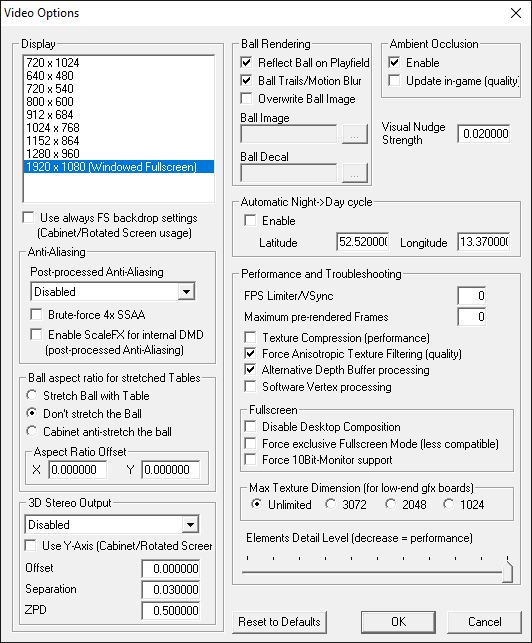
Make sure your .dll files are unblocked, I think Dave forgot to mention this in his video.

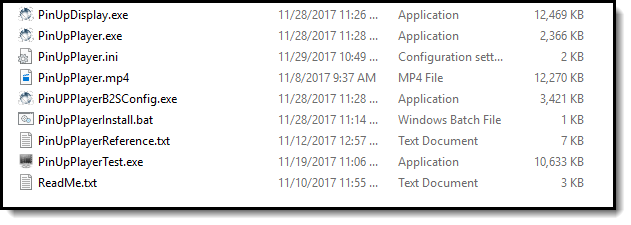



If you follow the youtube tutorial, and use these checkpoints you should be fine, as always get this working as expected outside of any frontend first, then migrate into your frontend. I migrated seamlessly into PBX no issues.
Keep in mind, when you start the table, videos do not just start playing out of the box. You have to play the game, you will see the ZUSE and TRON videos first, and if you want a quick demo, just let ball drain and the ball saved video is immediate.
As you keep paying the game the backglass videos will start coming up.
I was skeptical about this at first, but once you have it going, and lined up as expected, the effects are pretty cool.
However, if you're a highscore player, this might be annoying to you as you will constantly be looking up to see what video is playing and lose your ball, but if you have an audience your showing it off too, it is trully bad ass.
P.S. as an enhancement, can we add a feature to give us the option to show the splash or not, or option to change the splash video that plays to a black screen? it is a bit of an eyesore when booting the table.
Hope this helps folks...
Edited by rablack97, 30 November 2017 - 02:54 PM.
Enthusiast

Posted 30 November 2017 - 02:55 PM
nice work rablack97.
Can you re=post that in the new troubleshooting thread I just made....thanks
But note that you don't HAVE to run in windowed mode. I know others and I've tested on my system that it works fine in full-screen exclusive. We'll just have to see why it didn't work in your setup.
Edited by NailBuster, 30 November 2017 - 02:58 PM.
Enthusiast
Posted 30 November 2017 - 03:07 PM
Ok.
I have some questions and maybe suggestions, as well as a 'beta beta' access request, but first, let me set some context:
That's a run of the mill Data East Batman using alt sounds. Please excuse my less than studio quality lighting and sound.
Dave, you are definitely onto something here. I was able o do as much as you see there, with zero code. I could have *easily* don't more with a couple of tiny enhancements and better docs for sure, but I wanted you, and anyone else who might be 'chin-scratching' and nay-saying to know that I ain't Terry, a 'vet' at this stuff. I saw what he did with TRON, and committed myself to doing as much as the tool would let me w/o physically changing the table.
This is the way to go.
Now, I have some questions...
That's impressive!!! Good work. All that with no-table code is nice!!! Feel free to PM me any questions....
Pinball Fan

 Contributor
Posted 30 November 2017 - 05:29 PM
Ok.
I have some questions and maybe suggestions, as well as a 'beta beta' access request, but first, let me set some context:
That's a run of the mill Data East Batman using alt sounds. Please excuse my less than studio quality lighting and sound.
Dave, you are definitely onto something here. I was able o do as much as you see there, with zero code. I could have *easily* don't more with a couple of tiny enhancements and better docs for sure, but I wanted you, and anyone else who might be 'chin-scratching' and nay-saying to know that I ain't Terry, a 'vet' at this stuff. I saw what he did with TRON, and committed myself to doing as much as the tool would let me w/o physically changing the table.
This is the way to go.
Now, I have some questions...
Great stuff.
My Pup Mod is not required at all if you simply want to create a PuPB2S, and have it play videos from triggers, switches, lights, etc. PuPB2S is awesome, and makes for an easy way to do a simple video backglass.
I did both a Tron PuPB2S and the "mod". The big difference between the two is with PuPB2S you wouldn't have had any jackpots videos or "XXXX MultiBall" is lit videos, or any control over other things as you would need code, and Timers to make that work which is beyond with PuPB2S (or even a normal B2S) can do on their own.
I want everyone to realize you don't need to do what I did with Tron to get great results. In fact many tables won't be moddable to the extent of what I did with Tron. So a PuPB2S with some smart Trigger controls can do wonders. Just like what I did with Getaway Hi Speed 2 and addressable leds to get some custom animated effects with no mods to the table.
I also did the DOFLinx mods for Tron Legacy (SLAMT1LT's Ultimate) version, and the MX leds for the VPX version....so I was very well versed with the code and rules for that game going into this.
Hobbyist

Posted 30 November 2017 - 08:26 PM
FWIW, for whatever reason on one of my particular machines, if I try to run a table without running it via PBX, sometimes it appears that PuP doesn't run at all...which might be REALLY confusing people trying to 'see if it works' but I do not know *why* that is the case.
If I launch via PBX, everything is fine. On this particular machine I am doing this on right now it uses DMD Ext's Pretty dots Virtual DMD, so it isn't like that doesn't work...there is some little fiddly bit in there somewhere....
Edited by mrkai, 30 November 2017 - 08:30 PM.
Enthusiast

Posted 01 December 2017 - 02:34 AM
On another note....how loud is your volume for videos? Mine seems to be low. All screens are set to 100 volume level. My videos use AC3 stereo audio...so maybe that's the issue. Wondering how about you guys?
I just tried playing an mp3 (did you know it supports mp3's.... woohoo background tracks
playing mp3 in a screen or playing outside in windows media player sounded the same level....should check your vids.
Oh boy, this could be really fun if I can trigger my bass shakers with ~20-50hz mp3
Pinball Fan
Contributor
Posted 01 December 2017 - 02:49 AM
I actually use an MP3 of Tron's bit saying "NO", to stop any multiball mode videos for the Topper. Works great!
Neophyte


Posted 01 December 2017 - 01:30 PM
many thx it's fantastic!!!
i have a little problem .. the videos playing are too big for the PuP window ... i see just the left of the videos.
when i set the window of PuP it's ok but when i'm playing the game it' not the same issue...
help
Enthusiast


Posted 01 December 2017 - 06:01 PM
I love it is great - thanks for all the hard work!. the only thing I cant seem to do is rotate a screen. in the configuration menu I can change it to 90, 198, etc but nothing happens. I can however move the windows around an resize them. since i'm using two screens plus a pindmd3 id like to put the topper in the bottom left hand corner of the playfiled but right now the orientation is off and I need to rotate it.90 degrees. I try changing he orientation in the menu and nothing happens...
Enthusiast


Posted 02 December 2017 - 05:11 PM
Try as I might, I just haven't been able to get this working with the Tron PuP version.
I've gone through so many checklists of things and I swear everything seems fine, just no videos ever display (topper or backglass) during play.
I'm on B2S version 1.3.0.1 (the backglass file version says 1.2).
Activate Plugins is ON
When I view plugin settings I can see "PinUPPlayer Display Driver (V: 0.5.6526.22774 as of 2017.11.13 12:39) is ACTIVE and the Last Exception is blank.
The videos are all inside C:\Visual Pinball\Tables\PinUPPlayer\PUPVideos\Tron_Legacy
I can also see an empty folder "trn_174h" has been made too.
When I run the table I can see the PinUPPlayer and PinUPDisplay exe's are running and in the system processes. But no videos *ever* appear.
When I run PinUPPlayer display setup I can see all videos fine during this and have setup all my video positions that I'm happy with. I've tried ALL video modes (OpenGL, DirectX, Direct3d, Default and WinGDI) but none of them work in game.
I'm running in cabinet mode but launching the table directly (no front end) and have tried with both Exclusive Fullscreen OFF and ON.
Now. My Setup could be weird and I'm not 100% sure how to verify everything i'm running but I have a PinDMDv3 so i'm using one of freezy's DLLs (one with PBFX3 support so pretty recent). I have a version of the SAM build too. The version of VPX i'm running is 10.4.0 (Revision 3167 32 bit).
I'm at a bit of a loss trying to figure out what it is i'm missing here but videos never appear when I play :/
Pinball Fan
Contributor
Posted 02 December 2017 - 06:11 PM
Terryred's PUP of Tron Legacy but in FSS, I just had to try it out..
Is there anything involved to get that to work beyond some setting in the VPX Editor for the table? I have no experience using FSS...
Enthusiast

Posted 02 December 2017 - 06:18 PM
@Terry I had to modify all your videos,to include a background and pinch in the bottoms, and while I was at it, might as well blend-in / blend-out , in other words.. a lot of video desktop editing work!

Pinball Fan
Contributor
Posted 02 December 2017 - 06:34 PM
@Terry I had to modify all your videos,to include a background and pinch in the bottoms, and while I was at it, might as well blend-in / blend-out , in other words.. a lot of video desktop editing work!
Damn...so what you are saying is that PuP is still playing the videos like normal, but you have it positioned perfect to match up with the angled backbox.
So did you need to add some kind of transparency to the videos, for the pinched bottom portions, so you wouldn't have any "black" areas showing up from VLC?
Try as I might, I just haven't been able to get this working with the Tron PuP version.
I've gone through so many checklists of things and I swear everything seems fine, just no videos ever display (topper or backglass) during play.
I'm on B2S version 1.3.0.1 (the backglass file version says 1.2).
Activate Plugins is ON
When I view plugin settings I can see "PinUPPlayer Display Driver (V: 0.5.6526.22774 as of 2017.11.13 12:39) is ACTIVE and the Last Exception is blank.
The videos are all inside C:\Visual Pinball\Tables\PinUPPlayer\PUPVideos\Tron_Legacy
I can also see an empty folder "trn_174h" has been made too.
When I run the table I can see the PinUPPlayer and PinUPDisplay exe's are running and in the system processes. But no videos *ever* appear.
When I run PinUPPlayer display setup I can see all videos fine during this and have setup all my video positions that I'm happy with. I've tried ALL video modes (OpenGL, DirectX, Direct3d, Default and WinGDI) but none of them work in game.
I'm running in cabinet mode but launching the table directly (no front end) and have tried with both Exclusive Fullscreen OFF and ON.
Now. My Setup could be weird and I'm not 100% sure how to verify everything i'm running but I have a PinDMDv3 so i'm using one of freezy's DLLs (one with PBFX3 support so pretty recent). I have a version of the SAM build too. The version of VPX i'm running is 10.4.0 (Revision 3167 32 bit).
I'm at a bit of a loss trying to figure out what it is i'm missing here but videos never appear when I play :/
Do you have everything running as Admin...and are you on Win7? Some have said that setting Pup, to Wn2000 compatibility helped them. Seems most people with issues tend to be Win 7 users.
@Terry I had to modify all your videos,to include a background and pinch in the bottoms, and while I was at it, might as well blend-in / blend-out , in other words.. a lot of video desktop editing work!
...ok, i see what you did. You basically made the videos composited over a still pic of the backglass and background,etc...
That's dedication! Great stuff!
Enthusiast


Posted 02 December 2017 - 06:59 PM
Hello everybody i can not make it work
I look and install like i see on youtube
But the moment i click on b2s screen to check on plugins
The plugins setting stay off and can not see of it is connected or not
This happened to me on one of my computers. Make sure you are not running an old version, like 1.0.0, of the B2S software. I had an old version in my VPX folder for some reason, and a later one in my tables folder.
See if that helps.
Enthusiast
Posted 02 December 2017 - 07:10 PM
@Terry I had to modify all your videos,to include a background and pinch in the bottoms, and while I was at it, might as well blend-in / blend-out , in other words.. a lot of video desktop editing work!
Damn...so what you are saying is that PuP is still playing the videos like normal, but you have it positioned perfect to match up with the angled backbox.
So did you need to add some kind of transparency to the videos, for the pinched bottom portions, so you wouldn't have any "black" areas showing up from VLC?
Try as I might, I just haven't been able to get this working with the Tron PuP version.
I've gone through so many checklists of things and I swear everything seems fine, just no videos ever display (topper or backglass) during play.
I'm on B2S version 1.3.0.1 (the backglass file version says 1.2).
Activate Plugins is ON
When I view plugin settings I can see "PinUPPlayer Display Driver (V: 0.5.6526.22774 as of 2017.11.13 12:39) is ACTIVE and the Last Exception is blank.
The videos are all inside C:\Visual Pinball\Tables\PinUPPlayer\PUPVideos\Tron_Legacy
I can also see an empty folder "trn_174h" has been made too.
When I run the table I can see the PinUPPlayer and PinUPDisplay exe's are running and in the system processes. But no videos *ever* appear.
When I run PinUPPlayer display setup I can see all videos fine during this and have setup all my video positions that I'm happy with. I've tried ALL video modes (OpenGL, DirectX, Direct3d, Default and WinGDI) but none of them work in game.
I'm running in cabinet mode but launching the table directly (no front end) and have tried with both Exclusive Fullscreen OFF and ON.
Now. My Setup could be weird and I'm not 100% sure how to verify everything i'm running but I have a PinDMDv3 so i'm using one of freezy's DLLs (one with PBFX3 support so pretty recent). I have a version of the SAM build too. The version of VPX i'm running is 10.4.0 (Revision 3167 32 bit).
I'm at a bit of a loss trying to figure out what it is i'm missing here but videos never appear when I play :/
Do you have everything running as Admin...and are you on Win7? Some have said that setting Pup, to Wn2000 compatibility helped them. Seems most people with issues tend to be Win 7 users.
@Terry I had to modify all your videos,to include a background and pinch in the bottoms, and while I was at it, might as well blend-in / blend-out , in other words.. a lot of video desktop editing work!
...ok, i see what you did. You basically made the videos composited over a still pic of the backglass and background,etc...
That's dedication! Great stuff!
That is it exactly.. the dedication part! lolz kidding, since I ease-in out out at the start and finish it blends better when the PUP turns off, reduces flicker effect.
EDIT: btw I have had no issues in win7.
Edited by hanzoverfist, 02 December 2017 - 07:12 PM.
Enthusiast
Posted 02 December 2017 - 07:29 PM
Do you have everything running as Admin...and are you on Win7? Some have said that setting Pup, to Wn2000 compatibility helped them. Seems most people with issues tend to be Win 7 users.
Omg finally! Thats it! I am runing Win7 and set PinupPlayer.exe to run in Windows XP Service Pack 3 compatibility mode and that seems to make it work now!
Only thing I notice is the first video that plays on the table is delayed a bit before showing, i've disabled Topper videos so I only see Backglass ones and usually its a full screen black image appears when the video "triggers" but then the video doesn't actually appear for a couple of seconds.
After that, all further videos play instantly, no black screen.
Otherwise its working perfectly!
I suggest maybe adding the compatibility issue to the troubleshooting steps for Windows 7 users.
Enthusiast
Posted 02 December 2017 - 07:38 PM
Do you have everything running as Admin...and are you on Win7? Some have said that setting Pup, to Wn2000 compatibility helped them. Seems most people with issues tend to be Win 7 users.
Omg finally! Thats it! I am runing Win7 and set PinupPlayer.exe to run in Windows XP Service Pack 3 compatibility mode and that seems to make it work now!
Only thing I notice is the first video that plays on the table is delayed a bit before showing, i've disabled Topper videos so I only see Backglass ones and usually its a full screen black image appears when the video "triggers" but then the video doesn't actually appear for a couple of seconds.
After that, all further videos play instantly, no black screen
Otherwise its working perfectly!
I suggest maybe adding the compatibility issue to the troubleshooting steps for Windows 7 users.
Edited by Johngreve, 02 December 2017 - 07:41 PM.


Community Forum Software by IP.Board
Licensed to: VPForums.org
 are all trademarks of VPFORUMS.
 Top
Top