Sorry I didn't mean the sub was literally in the backbox. More that the sub was paired with the backbox speakers, but I see where we are diverging. Typically folks aren't using the LFE channel and are separating things by front, side and rear channels with separate 2.1 amps for each and using an audio sub for the front and bass shakers on the side and rear for the .1 channel of their respective amps.
So 10.6 is using the DirectSound3D API which takes individual single channel sound effect clips and places them in a 3D audio space. Its an old deprecated API and I don't know if it was ever terribly good. But the backward compatibility mode we are using now doesn't seem to do a great job spatially positioning the sound (getting sound on just the side speakers is difficult). With 10.7 VPX seems to be using bass.dll which I think might be implemented on top of a newer windows API but seems to provide an interface very similar to the DirectSound3D system. I'll have to try it out to see if it has the same issues. My fixes for 10.6 spatially place the effect fairly well I think and you can easily hear the sound effects localized to different areas of the table.
I like your setup but it actually (I think) fundamentally demonstrates the disconnect between surround sound and virtual pinball. If you have actually positioned the speakers around you (the real listener) then you have a real surround sound system. But for most people (with cabinets) they have speakers positioned around the table and they (the real listener) are essentially sitting outside the sound stage. The difference can be a little subtle but I think it explains why it seems a bit off. That and how DirectSound3D positions things in 3D audio space defied my brain's ability to make sense of it. The sound was certainly 'moving' but not where I expected.
In any event I see how your setup differs from most now. I hope everything can be made to co-exist. I don't really know what I am doing but I will help with what I can. Having the option to use ogg files is interesting, just hope it falls back nicely on non-surround systems. Now I want room level surround sound as another layer of sound to add to virtual pinball media..... or maybe I need to finish building my cabinet.
Please no one take me as an expert or even particularly knowledgeable about audio, mostly I am just a stubborn programmer who heard mechanical sound effects coming out of the backbox and didn't like it and decided to try to fix it. Am happy to learn more from anyone who is working on this.
To be honest, on 10.6, i am not sure
maybe it uses Xaudio2 for all i know? which kind of never did work as intended after XP, as in later OS's it did a terrible job of properly identifying some audio configurations.
I suppose i could find out actually, but trying to feed it a different set of xaudio DLLs and see if it winds up loading them.
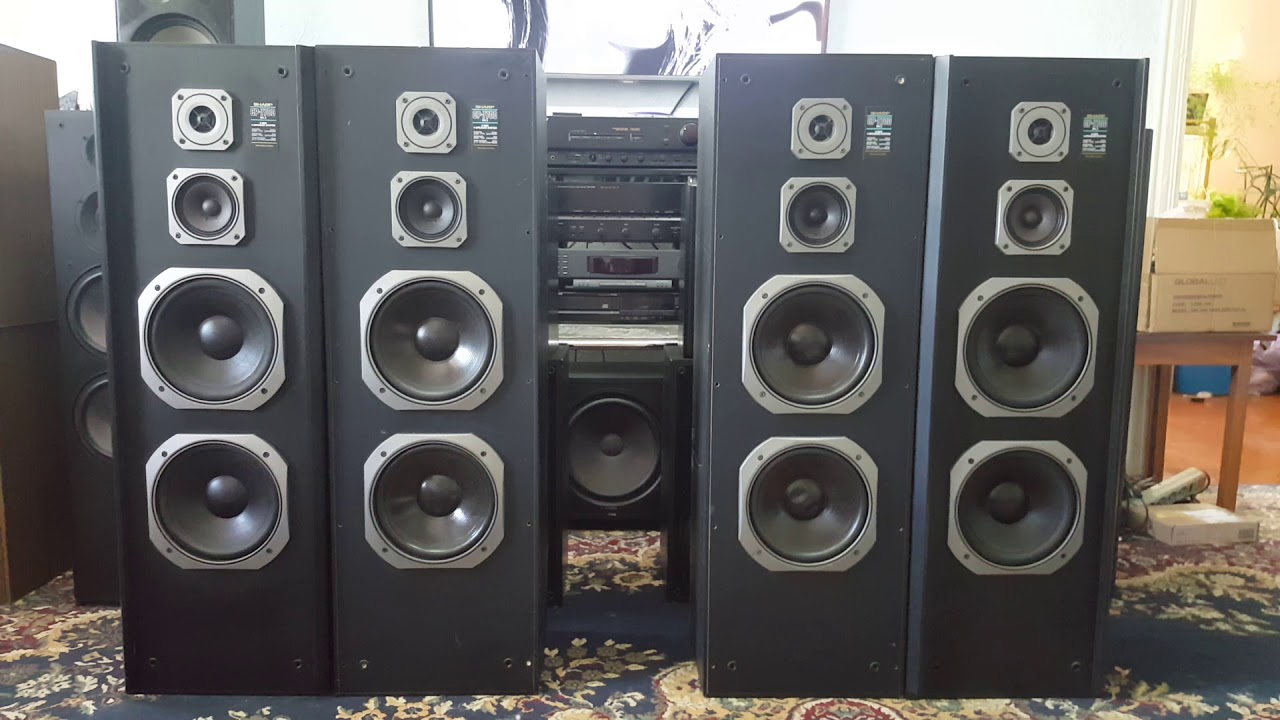
As for my speaker setup, partly i kind of have no choice, aside from the backbox speakers which sit beside the monitor, they kind of wont sit on the desk, well they might
but even i have Some style standards
and well, it is my main PC so it kind of has to also play a movie or do other things that are not pinball.
If i was building a cab, i would use the same set up, aside from stupid big column speakers
The lockdown bar would have the rear (front of table) speakers underneath it, firing up, yes it would make the lockdown wider then standard, but it's only metal, i can fab metal
The side (front of table) speakers would be under the backbox in a blacked out riser
The backbox itself would have the backglass speakers, and the center channel above the backglass screen made from an array of small speakers.
2" drivers should work with out needing too much extra room
And the only place for the sub to go, is obviously firing out the bottom of the cabinet.
And me being kind of anal when it comes to audio stuff, they would all be internally enclosed and ported.
I am not sure why the 2.1 systems that i know people use a lot?
I guess some audio hardware (or drivers) maybe especially USB, lacks any kind of crossover to allow some of the non LFE bass to be played out of the sub, or does a terrible job of it.
I can set that in my audio driver, but i generally just let the receiver do it as it does a better job of it, it has much better bass management than the audio driver does
as i can set different cut offs for different channels
Now you are right in that the way windows generally does sound as far as game engines go, is that it assumes REAR speakers are actually REAR as in behind you
Where as theater standard, REAR is not really REAR as in behind you, in an optimal setup in 5.1 REAR is 90 degrees from the tip of your nose, or directly overhead
and in 7.1 it is over head, with the sides being like 80 or 90 degrees off the tip of your nose to the side.
Obviously peoples house are not generally built to conform to that, so you adapt as needed.
Windows basically has 2 schools of 3d sound
Game Sound, where rear means behind you
and Theater sound, where nothing is actually behind you
But in pinball, REAR is still generally in front of you, not behind and not beside.
But you can work with that some, by adapting the playfield
The game plots the sound position based on the dimensions of the table
In many tables, the table actually ends short of the cabinet, one thing you can do is increase the table length so that there is table all the way under the lockdown bar
which is usually just sitting in null space.
That is not hard to do to an existing table, you do have to add the extra surface to the playfield art, but what you are adding is unseen, so technically can just be transparent.
I just make a new image of the now different length, then put in the original art as a new layer and align the top.
Now the tables Y coordinates are larger, so the flipper sound for example, or slingshot or drain is now spatially more in front of you.
It is not a huge amount, but it is noticeable.
Another little trick, for like when it just feels like the ball drained behind your back because of how the sound gets played
is to take a simple prim, non rendered, non collidable etc, name it what ever, drainaudio lets say
throw drain audio on the table
and go make the drain_hit do a PlaySoundAt "sound name", drainaudio
Now fiddle with drainaudio's position until it suits you.
Yes technically if you go sticking your head individually at the speakers, you are going to say wait, i am hearing the drain sound
bleeding through the speakers at the front of the table.
But that is how the 3d illusion works, you are not supposed to move around and critique each speaker, you are supposed to see how the illusion works from your listening position, your friend standing beside the table watching you play can bugger off, and wait his turn in the theater chair so to speak.
You can't change the reality (how the hardware was designed) but you can manipulate the illusion
Not that i would expect table authors to run about trying to redo existing and make new tables trying to fiddle with all that.
They can't, they dont have your set up, it would always be wrong for someone.
I figure it is just part of making your stuff the way you want it to be.
Play it as it is and be thankful to the person that make it, or learn to modify it a bit to suit your particular setup.
I do the prim thing a lot for sounds tables play but have no actual object for, solenoids and relays etc.
If i find a table manual, i will try to put the sound objects in the right place, if not i will borrow a position from one that i could find a manual
or take a logical guess.
Maybe sounds kind of dumb, and maybe it is, but i like hearing the ball lift solenoid kick the ball from someplace that sounds like the right area
or hear the target reset solenoids fire off near the correct bank of targets and stuff.
Especially on older tables that have little to no ROM sounds to fill in the gaps and generally blur everything.
And yes, i would not want to see options taken out of 10.7, but instead more options put in to allow tuning VPX
for more audio setups.
It would be great if it would simply ask
Hi you have X channel audio, which channels are you using?
which channels are serving which table area?
Ok thank you, here is your sound setup
Edited by wiesshund, 05 March 2021 - 08:49 AM.





 Top
Top



 ).
). .
.



 are all trademarks of VPFORUMS.