


Jump to content


Photo
* * * * * 10 votes

The VP 10.2 beta thread

vpx beta

  • Please log in to reply
1353 replies to this topic

#1001 shadowshd

shadowshd

    Enthusiast

  • Members
  • PipPipPip
  • 153 posts
  • Location:Le Bouscat

  • Flag: France

  • Favorite Pinball: Cirqus Voltaire; Medieval Madness

Posted 08 December 2016 - 02:31 PM

But you use the same core scripts for both tests?

If yes, could you search core.vbs for Private Function PinMAMEInterval and then replace the following code block (up to, but excluding End Function) with just PinMAMEInterval = 3 and retest please with 10.2? Thanks!


Hi Toxie,


Yes I run VPX 10.1 with 10.2 scripts (located in VP\Scripts with no duplicates).

All executables relatives to VP are run as administrator.


I've just tested by replacing all code between Private Function PinMAMEInterval and End Function with PinMAMEInterval = 3 and get a little less stutter, but it's still here.


It's flagrant in Scared Stiff when the ball hits the woodbox or in Medieval Madness X when the ball hits the castle door then goes down to the flippers, and in multiball modes.


My VPX 10.1/10.2 video options :
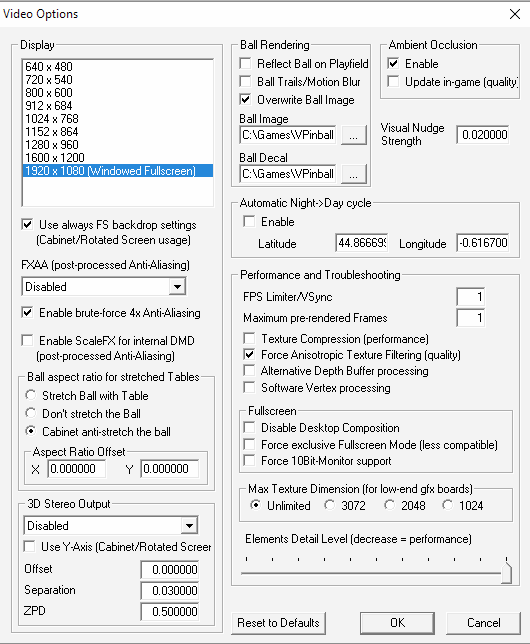
 

captur20.png


I've updated nVidia drivers to 376.19 12/05/2016 two days ago but they don't help.


With 10.1 exe + 10.2 vbs, tables run very smoothly with no lag or stutter.


Thanks ;)


Edited by shadowshd, 08 December 2016 - 02:32 PM.


#1002 toxie

toxie

    VPF Veteran

  • VP Dev Team
  • PipPipPipPipPipPip
  • 5,734 posts
  • Location:berlin, germany

  • Flag: Germany

  • Favorite Pinball: AFM

Posted 08 December 2016 - 03:59 PM

phew.. thats complicated then.. could be all kinds of stuff that we tweaked.. I'll try to think about it somemore..


Is it possible to code (if it doesnt already do this) less bounce near the ends of the rubber compared to the middle of a rubber? Just thinking about this .. the ball would bounce more in the center (lengthwise) versus hitting the rubber close to the posts.


hmmm.. that would mean that somehow the physics parameters would be varying over the rubber..

do you have any idea what that would mean in the VP world? e.g. which parameter(s) would be more/less towards the ends? maybe we could hack this in reasonably simple.


@shadowshd: one more thing: is there anything majorly different in the "F11" statistics between VP10.1 and 10.2?


#1003 fuzzel

fuzzel

    spaghetti code

  • VP Dev Team
  • PipPipPipPipPip
  • 2,818 posts

  • Flag: Germany

  • Favorite Pinball: yes I have

Posted 08 December 2016 - 04:17 PM

I fear that's not so easy. You can't tell from the control points where the rubber is bent over a post or not to everything else not ;)

#1004 toxie

toxie

    VPF Veteran

  • VP Dev Team
  • PipPipPipPipPipPip
  • 5,734 posts
  • Location:berlin, germany

  • Flag: Germany

  • Favorite Pinball: AFM

Posted 08 December 2016 - 04:43 PM

hmmm.. also true.. couldn't we guess something about the neighborhood though, e.g. if its bent or straight? (of course there could still be a post behind a straight rubber segment :( )


#1005 Ben Logan

Ben Logan

    Pinball Wizard

  • Members
  • PipPipPipPipPip
  • 2,275 posts
  • Location:California

  • Flag: ---------

  • Favorite Pinball: System 11

Posted 08 December 2016 - 04:44 PM

Maybe there could be a way to split flipper rubbers in half. Set high elasticity at the base, low elasticity toward the tip of bat.

#1006 shadowshd

shadowshd

    Enthusiast

  • Members
  • PipPipPip
  • 153 posts
  • Location:Le Bouscat

  • Flag: France

  • Favorite Pinball: Cirqus Voltaire; Medieval Madness

Posted 08 December 2016 - 04:50 PM

@Toxie : Here's my VPX 10.1 & 10.2 stats with MMX, after playing some minutes :


VPX 10.1 :


vpx10110.png


VPX 10.2 :


vpx10210.jpg


I don't really know what some of these values mean, but FPS are stables, so are they with Scared Stiff.

When stutters happen FPS won't drop.


++


#1007 BorgDog

BorgDog

    We come in peace.. shoot to kill.. shoot to kill.

  • Members
  • PipPipPipPip
  • 1,427 posts
  • Location:Leavenworth, WA

  • Flag: United States of America

  • Favorite Pinball: Alien Star, TNA


Posted 08 December 2016 - 05:31 PM

I fear that's not so easy. You can't tell from the control points where the rubber is bent over a post or not to everything else not ;)


Would it be possible to set parameters for sections of the rubber based on control points? And can we also distinguish hit events by section (active slingshot vs hit like on walls maybe).


#1008 toxie

toxie

    VPF Veteran

  • VP Dev Team
  • PipPipPipPipPipPip
  • 5,734 posts
  • Location:berlin, germany

  • Flag: Germany

  • Favorite Pinball: AFM

Posted 08 December 2016 - 06:26 PM

Not easily, as fuzzel pointed out already. :/


@shadowshd: Thats strange. Basically almost all stats look better in 10.2. But it at least once happened in 10.2 that you got a ~4-frame delay (the 61.1 max value), but in 10.1 only a ~2-frame delay. This does not have to mean anything, could have been just a glitch when the table started (e.g. when the gfx driver uploads some textures or so, on-demand), so overall there is not really anything there that points to something specific.  :/


#1009 fuzzel

fuzzel

    spaghetti code

  • VP Dev Team
  • PipPipPipPipPip
  • 2,818 posts

  • Flag: Germany

  • Favorite Pinball: yes I have

Posted 08 December 2016 - 06:47 PM

I fear that's not so easy. You can't tell from the control points where the rubber is bent over a post or not to everything else not ;)

 
Would it be possible to set parameters for sections of the rubber based on control points? And can we also distinguish hit events by section (active slingshot vs hit like on walls maybe).
Sure we could all do that but it would make things much more complicated again. And even if we had the information we had to add another weird hack to the physics. So i wouldn't add such stuff to VP.

#1010 Epistaxis

Epistaxis

    Hobbyist

  • Members
  • PipPip
  • 31 posts

  • Flag: United States of America

  • Favorite Pinball: Lord of the rings, Creature from the black lagoon, Scared stiff

Posted 08 December 2016 - 06:48 PM

I don't know if this is the right place to post this. So sorry in advance if it's not. 


I update to the new 10.2 beta from 10.1 and I keep getting the error message.


Fatal error D3DERR_INVALIDCALL (0x8876086c: Invalid call) at RenderDevice,cpp:830
 
And it dose it on any table I play on. 
 
So if any one could hep that would be great. Thanks 


Edited by Epistaxis, 08 December 2016 - 06:54 PM.


#1011 toxie

toxie

    VPF Veteran

  • VP Dev Team
  • PipPipPipPipPipPip
  • 5,734 posts
  • Location:berlin, germany

  • Flag: Germany

  • Favorite Pinball: AFM

Posted 08 December 2016 - 08:02 PM

@shadowshd: you could also try to add a registry key: Under the Visual Pinball/VP10 registry folder:

"Player" / "EnableLegacyMaximumPreRenderedFrames" as a DWORD with value 1

 -> always force old VP9.X-like hack to force the driver to discard pre-rendered frames
 

this will make the behavior of Maximum pre-rendered frames in the video preferences the same as in VP10.1 then


#1012 shadowshd

shadowshd

    Enthusiast

  • Members
  • PipPipPip
  • 153 posts
  • Location:Le Bouscat

  • Flag: France

  • Favorite Pinball: Cirqus Voltaire; Medieval Madness

Posted 09 December 2016 - 08:01 AM

I've just tried the registry key but I can't see any improvements.


I also tried with FXAA and AO disabled, but still no improvements  :hmm:


Anyway thanks for trying to find what can cause the issue ;)


++


#1013 toxie

toxie

    VPF Veteran

  • VP Dev Team
  • PipPipPipPipPipPip
  • 5,734 posts
  • Location:berlin, germany

  • Flag: Germany

  • Favorite Pinball: AFM

Posted 09 December 2016 - 08:26 AM

Very weird, really..


#1014 shadowshd

shadowshd

    Enthusiast

  • Members
  • PipPipPip
  • 153 posts
  • Location:Le Bouscat

  • Flag: France

  • Favorite Pinball: Cirqus Voltaire; Medieval Madness

Posted 09 December 2016 - 09:30 AM

I agree Toxie, these two tables run perfectly with VPX 10.1 but lag with 10.2 :think:


++


#1015 Mark70

Mark70

    Enthusiast

  • Members
  • PipPipPip
  • 421 posts

  • Flag: Germany

  • Favorite Pinball: Godzilla 70th anniv. T2, Jack*Bot, ToM, ST-2013, Pinball Champ 82

Posted 09 December 2016 - 11:14 AM

I agree Toxie, these two tables run perfectly with VPX 10.1 but lag with 10.2 :think:


++

could it be due to VPX 10.1 is not using the new lightning features?


#1016 shadowshd

shadowshd

    Enthusiast

  • Members
  • PipPipPip
  • 153 posts
  • Location:Le Bouscat

  • Flag: France

  • Favorite Pinball: Cirqus Voltaire; Medieval Madness

Posted 09 December 2016 - 11:18 AM

I will test on a fresh and clean Windows 10 installation, the issue may come from something in my system ;)


++


#1017 toxie

toxie

    VPF Veteran

  • VP Dev Team
  • PipPipPipPipPipPip
  • 5,734 posts
  • Location:berlin, germany

  • Flag: Germany

  • Favorite Pinball: AFM

Posted 09 December 2016 - 11:58 AM

But thats a good theory. Is there something with these tables that is only triggered when using 10.2? Like the modulated flashers?


#1018 Mark70

Mark70

    Enthusiast

  • Members
  • PipPipPip
  • 421 posts

  • Flag: Germany

  • Favorite Pinball: Godzilla 70th anniv. T2, Jack*Bot, ToM, ST-2013, Pinball Champ 82

Posted 09 December 2016 - 01:25 PM

Yes, both table use the new modulated flashers.

I had similiar issues with scared stiff and one other table, but in my case I could solve it with the pre-rendered frames value, as reported on page 50.
http://www.vpforums....=35311&p=364824


#1019 ICPjuggla

ICPjuggla

    Early Retirement

  • VIP
  • 1,193 posts

  • Flag: United States of America

  • Favorite Pinball: Star Wars

Posted 09 December 2016 - 01:34 PM

I've also noticed significant lag in 10.2 it started in the last few revs.

Sometimes animations seem to run in slow motion..

cosmicgunfight-sig2.png breakshot-sig-small3.png atlantis-sig-small.png mousinaround-sig6.png hurricane-sig16.png sc-badge1.png lw-sig.png embryon-logo0.png icp-3.png apollo13_badge(1).png whirlwind_badge0.png playboy_badge0.png oxo1.png raven_logo.png rambo_logo4.png


#1020 toxie

toxie

    VPF Veteran

  • VP Dev Team
  • PipPipPipPipPipPip
  • 5,734 posts
  • Location:berlin, germany

  • Flag: Germany

  • Favorite Pinball: AFM

Posted 09 December 2016 - 01:42 PM

any specific table(s) where the animations problem happens?


Also tagged with one or more of these keywords: vpx beta



