Jump to content


Photo
* * * * * 5 votes

Call for testing


  • Please log in to reply
1630 replies to this topic

#901 elabree

elabree

    Hobbyist

  • Members
  • PipPip
  • 34 posts

  • Flag: Netherlands

  • Favorite Pinball: Revenge from Mars

Posted 22 November 2019 - 07:17 PM

I think that's probably Teamviewer moving things around then, not PinballY.  It's the part about how things come back to the original layout when you go back without Teamviewer. 
 
Here's my thinking.  Suppose that PinballY were putting the "backglass on top" in Teamviewer, as you say.  That would mean PinballY is moving the window, right?  Now figure what PinballY stores in the settings file after that Teamviewer session ends.  It would store the moved position - the "backglass on top" position - right?  So now you go back without Teamviewer and run again.  PinballY restores the last saved position.  But it's back where it was in the last non-Teamviewer session!  So it didn't get saved at a new position after all.  So that says to me that PinballY thinks it's working with the original location when Teamviewer is running.  Conclusion: Teamviewer is the one that's moving the window - it's doing some kind of virtual desktop coordinate change that makes PinballY think it's leaving the window at the old position, but Teamviewer displays it at the new position.

Hi MJR,

Thank you for taking this so seriously. We are probably on the right track with our thinking :dblthumb:


In my experience teamviewer is a pretty solid solution. Some time ago I tested several remote desktop / vnc solutions to access the PC in the cab from my mac. I am using teamviewer for about a year now with visual pinball and pinballx. Never had issues like this.


As far as I can determine it does not mess with the screens or the windows as much as you think. At least nothing visible on the screens in my cabinet. I can start a game via teamviewer and play pinball on my cab while my mac shows a copy of the backglass or playfield as desired. No noticeable perfomance hit, flawless image on the displays.


Also regarding your line of thinking: I never moved or changed the window locations on my cabinet. All was done remotely via teamviewer. So the position stored by PinballY was from a teamviewer session !

I think that teamviewer is not messing up the window locations and that PinballY saves the window setup correctly. The only thing that goes wrong when starting PinballY via teamviewer is that it uses the wrong monitor. The location and mode (windowed/full-screen) are applied correctly.


Some more thinking would be nice :juggle: ...

Kind Regards,

Egon.


Edited by elabree, 22 November 2019 - 07:18 PM.


#902 mjr

mjr

    Pinball Wizard

  • Members
  • PipPipPipPipPip
  • 3,346 posts

  • Flag: United States of America

  • Favorite Pinball: Medieval Madness

Posted 22 November 2019 - 08:05 PM

elabree - I'll add some logging so that we can figure out what Windows is telling PinballY about the desktop layout for your situation.  It seems like there's got to be some kind of desktop virtualization going on when you're running Teamviewer, but it's hard to infer exactly what based on the limited information we get from observing the window position changes.  Hopefully the additional logging will make it apparent what's really going on.


One further experiment you might try in the meantime: try that bit I suggested about NOT using full-screen mode with the backglass window.  Switch it to borderless mode and just position it as though it were in full-screen mode - move it and size it so that it exactly covers the second monitor area.  That should LOOK LIKE full-screen mode without actually being full-screen mode.  Teamviewer's desktop virtualization might be messing with the way Windows reports the available monitor positions, which PInballY uses to restore full-screen windows.  If you take the window out of full-screen mode, that kind of virtualization won't affect the positioning.


#903 elabree

elabree

    Hobbyist

  • Members
  • PipPip
  • 34 posts

  • Flag: Netherlands

  • Favorite Pinball: Revenge from Mars

Posted 23 November 2019 - 08:15 AM

elabree - I'll add some logging so that we can figure out what Windows is telling PinballY about the desktop layout for your situation.  It seems like there's got to be some kind of desktop virtualization going on when you're running Teamviewer, but it's hard to infer exactly what based on the limited information we get from observing the window position changes.  Hopefully the additional logging will make it apparent what's really going on.


One further experiment you might try in the meantime: try that bit I suggested about NOT using full-screen mode with the backglass window.  Switch it to borderless mode and just position it as though it were in full-screen mode - move it and size it so that it exactly covers the second monitor area.  That should LOOK LIKE full-screen mode without actually being full-screen mode.  Teamviewer's desktop virtualization might be messing with the way Windows reports the available monitor positions, which PInballY uses to restore full-screen windows.  If you take the window out of full-screen mode, that kind of virtualization won't affect the positioning.

OK: that would give more insight.


I did the test NOT using full screen mode => same result:

1. Started PinballY via teamviewer, positioned the backglass window (borderless) and Closed PinballY: backglass on playfield monitor.

2. Closed the teamviewer client (left the server part running on the cab). Started PinballY: backglass on the backglass monitor.

https://postimg.cc/gallery/1dr3qeyj0/


Also when I connect with teamviewer after 2. the backglass stays put on the backglass monitor.


Edited by elabree, 23 November 2019 - 03:08 PM.


#904 mjr

mjr

    Pinball Wizard

  • Members
  • PipPipPipPipPip
  • 3,346 posts

  • Flag: United States of America

  • Favorite Pinball: Medieval Madness

Posted 23 November 2019 - 06:15 PM

elabree - hang on, that seems like a pretty confusing test.  What happens if you do all of the positioning from the PC ONLY, and only view things from Teamviewer?


1. On the PC (no Teamviewer), set the backglass window to  bordlerless, non-full-screen mode

2. Position the backglass where you want it

3. Close PinballY

4. Now go to Teamviewer

5. Run PinballY. View the window layout.  Don't move any windows.

6. Close PinballY, shut down Teamviewer

7. Go back to the PC only view without Teamviewer

8. Observe the window locations


(Maybe between steps 3 and 4, give PinballY another run on the PC only side and confirm that the window locations are sticking properly.)


#905 elabree

elabree

    Hobbyist

  • Members
  • PipPip
  • 34 posts

  • Flag: Netherlands

  • Favorite Pinball: Revenge from Mars

Posted 24 November 2019 - 03:09 PM

elabree - hang on, that seems like a pretty confusing test.  What happens if you do all of the positioning from the PC ONLY, and only view things from Teamviewer?
1. On the PC (no Teamviewer), set the backglass window to  bordlerless, non-full-screen mode
2. Position the backglass where you want it
3. Close PinballY
(Maybe between steps 3 and 4, give PinballY another run on the PC only side and confirm that the window locations are sticking properly.)

Done (teamviewer client logged out, using kb/mouse on cabinet)
Closed PinballY and started it => The window locations remain intact.

4. Now go to Teamviewer
5. Run PinballY. View the window layout.  Don't move any windows.

Both the playfield and the backglass are on the playfield monitor (only the backglass is visible). No image on the backglass monitor.

6. Close PinballY, shut down Teamviewer

Can't exit PinballY without manipulation of the backglass. The backglass is covering the playfield, can't get pinbally on top to access the menu. So I enable the borders of the backglass and minimized it. Then used the Pinbally menu to exit.
Also disconnected the teamviewer client.

7. Go back to the PC only view without Teamviewer
8. Observe the window locations

Started PinballY. It shows only the playfield, the backglass is not visible. Had some trouble finding it. Finally used RMB "Show backglass".

====

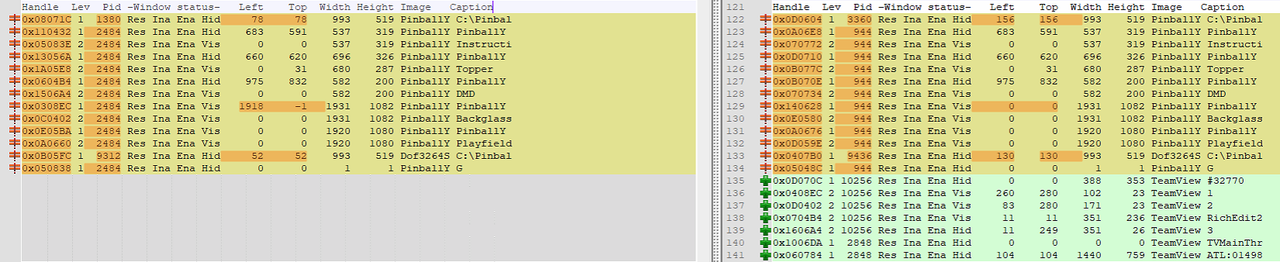
Also I tried to readout the window positions with : http://ritchielawrence.github.io/cmdow :

Screenshot-2019-11-24-at-15-49-39.png

The left side shows the window positions when teamviewer is not used. On the right side the teamviewer client is connected.

====

During the above tests I used the keyboard and mouse connected to the cabinet PC. I noticed the following while viewing with the teamviewer client:

- When the client displays the playfield monitor, I get into trouble with the backglass image as desribed above.

- When the client displays the backglass tv the image shows up on the backglass monitor as intended. This can only be done using the mouse on the cab, since I need to select the playfield screen to start pinbally remotely.

So I think that teamviewer somehow causes PinballY to be confused about the active/selected screen or the identification of the displays is changed. Unfortunately cmdow does not provide that information.

Also it seems odd that the DMD window state is 'Vis' because I disabled it in PinballY (I am using a pin 2 dmd).

====

And, thinking about a workaround:

I tried to copy the desktop shortcut to start PinballY to the backglass monitor, select that one in the teamviewer client and use it to start PinballY....

Result: the playfield shows up on the backglass monitor but no backglass...


Edited by elabree, 24 November 2019 - 04:10 PM.


#906 mjr

mjr

    Pinball Wizard

  • Members
  • PipPipPipPipPip
  • 3,346 posts

  • Flag: United States of America

  • Favorite Pinball: Medieval Madness

Posted 24 November 2019 - 06:39 PM

Can't exit PinballY without manipulation of the backglass. The backglass is covering the playfield, can't get pinbally on top to access the menu.


Actually, the playfield window will be getting keystrokes even though the backglass appears to be in front, so you can still exit without moving anything.  You just have to navigate the menus blind.  Wait a few seconds for the splash screen to clear, then press EXIT - NEXT - EXIT (Esc - Right Shift - Esc, if you haven't changed the keys around) for "Exit Menu", "Go to the next thing on the Exit Menu, which is the Exit command", "Select current command, which is Exit".


#907 elabree

elabree

    Hobbyist

  • Members
  • PipPip
  • 34 posts

  • Flag: Netherlands

  • Favorite Pinball: Revenge from Mars

Posted 27 November 2019 - 05:51 PM

Can't exit PinballY without manipulation of the backglass. The backglass is covering the playfield, can't get pinbally on top to access the menu.

 
Actually, the playfield window will be getting keystrokes even though the backglass appears to be in front, so you can still exit without moving anything.  You just have to navigate the menus blind.  Wait a few seconds for the splash screen to clear, then press EXIT - NEXT - EXIT (Esc - Right Shift - Esc, if you haven't changed the keys around) for "Exit Menu", "Go to the next thing on the Exit Menu, which is the Exit command", "Select current command, which is Exit".

Yes, I did the whole sequence again using Esc - Right Shift - Esc to exit. => The same results regarding the window positions except for steps 7,8 => The backglass remains on the wrong monitor (covering the playfield).
Conclusion: when I start PinballY while the teamviewer client is connected (showing the playfield monitor) the backglass is displayed on the playfield monitor. Then when I close PinballY the incorrect window position is stored (correctly ;-).
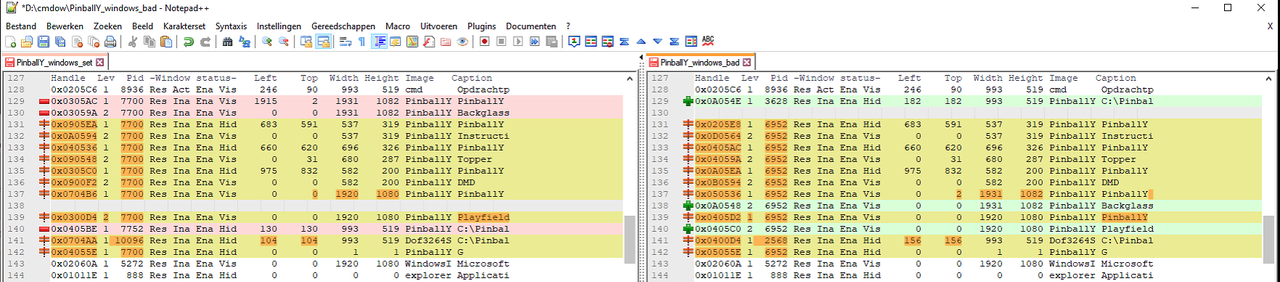
I also ran cmdow 2x (left while the backglass was positioned on the backglass monitor, right when the backglass is on the playfield monitor):
Screenshot-2019-11-27-at-18-34-16.png
Unfortunately cmdow does not indicate on which screen the windows appear.

#908 mjr

mjr

    Pinball Wizard

  • Members
  • PipPipPipPipPip
  • 3,346 posts

  • Flag: United States of America

  • Favorite Pinball: Medieval Madness

Posted 27 November 2019 - 07:48 PM

elabree - okay, I think we'll just have to get some more data from further instrumentation (logging).  I've already added that for the next update, so when I get that released you can give it a try and see what it turns up.


#909 methetton

methetton

    Neophyte

  • Members
  • Pip
  • 1 posts

  • Flag: United States of America

  • Favorite Pinball: Addams Family, Funhouse

Posted 29 November 2019 - 10:33 PM

EDIT:  Beta 16 fixed the problem, as I'm sure you know :) Thanks for your great work!

Original message:

mjr - I've been running PBY for a few weeks with VPX, and really enjoy it.
I have had several issues with Future Pinball not exiting, and decided today to see what I could do to address it, and to also set up FX3 tables.

First thing I did was notice a new beta 15, so I downloaded and ran the msi to update.  It updated everything.

However, now when I open PBY, I starts up and then it exits. I see no window or anything.


The log file doesn't look useful, but here is the text:

Friday, November 29, 2019, 4:01:00 PM: Session started
PinballY 1.0.0 (Beta 15), build 8712 (x64, 20191128-2034)
 
DOF (DirectOutput): initializing DOF client
+ Launching DOF surrogate process.  This is required because PinballY is running
  in 64-bit, and DOF is a 32-bit COM object.  Surrogate command line:
  >"C:\Games\PinballY\Dof3264Surrogate.exe"  -parent_pid=1116 -clsid=888ec299-2295-40d3-ad45-4faedaa50ffc
 
DOF: creating DOF COM object (a23bfdbc-9a8a-46c0-8672-60f23d54ffb6)
DOF: got table mapping file: 


Any thoughts?


Edited by methetton, 30 November 2019 - 02:19 AM.


#910 blur

blur

    Pinball Fan

  • VIP
  • 1,500 posts

  • Flag: Croatia

  • Favorite Pinball: Amazing Spiderman, Black Hole, Totem


Posted 30 November 2019 - 11:37 AM

Hi folks, long time no see, it's good to be back :)

It's nice to see all tables from my time (gottlieb's golden 80s) finally done in a great way - totem, time line, pink panther, mars god of war, ...


I have one strange issue with dmd going behind direct b2s backglass.

I have two screen cab setup - backglass and dmd on same screen, all is fine for non dmd tables.

But for dmd tables i use db2s with grill and dmd stays behind db2s when i launch the game. I have to alt-tab it to get it to front.


If I launch the table outside of the pinbally i can fix it by unchecking "bring bg to front" in db2s config screen.

But if I'm in pinbally and "bring bg to front" is not checked db2s will stay behind pinbally black backglass window so i can't see it - again I have to alt-tab to get it in front.


If i check "bring bg to front" in db2s then db2s will show fine but dmd will stay behind db2s in and out of pinbally.


Is there any way to make directb2s or pinbally bring dmd to front - or is there a way to make pinbally minimize or hide  black backglass screen during the game - I tried putting red sign on backglass window in systems config but didn't help. If i right click on it and select hide - it works, db2s comes up.

What is b2s dmd? Can b2s have dmd included in grill area so that i don't ever need dmd window?


I remember i was fixing this from my fplaunch by doing alt-tab to b2s, al-tab to dmd, click on dmd, click on b2s and then click on table.

That procedure always works if i do it manually - but on a cab you don't want to use keyboard all the time.


Edited by blur, 30 November 2019 - 11:42 AM.


#911 Thalamus

Thalamus

    VPF Veteran

  • Platinum Supporter
  • 5,007 posts

  • Flag: Norway

  • Favorite Pinball: GOT, Alien Star, LOTR, TOM

Posted 30 November 2019 - 02:33 PM

Hi Blur and thank you for your earlier contributions to this community. I highly recommend that you just jump straight on to problem by installing freezy.

https://github.com/f.../dmd-extensions - it not only sets a fixed placement for the dmd, it is also gives you a better looking dmd. It is kind of - set the default, then you make exceptions for machines that has larger than standard size in the ini file. Currently, I'm still running the mjr patched version that you find a link to in the very thread that this topic is about. Now, I know that freezy has made some test builds since then, but, I haven't followed that project as close as I used to, mostly because I'm waiting for one specific issue to be resolved first. But, it is related to my pindmd3 hardware.


Edited by Thalamus, 30 November 2019 - 02:36 PM.

From now on. I won't help anyone here at VPF. Please ask Noah why that is.


#912 mjr

mjr

    Pinball Wizard

  • Members
  • PipPipPipPipPip
  • 3,346 posts

  • Flag: United States of America

  • Favorite Pinball: Medieval Madness

Posted 30 November 2019 - 07:19 PM

I have two screen cab setup - backglass and dmd on same screen, all is fine for non dmd tables.

But for dmd tables i use db2s with grill and dmd stays behind db2s when i launch the game. I have to alt-tab it to get it to front.


If I launch the table outside of the pinbally i can fix it by unchecking "bring bg to front" in db2s config screen.

But if I'm in pinbally and "bring bg to front" is not checked db2s will stay behind pinbally black backglass window so i can't see it - again I have to alt-tab to get it in front.


... or is there a way to make pinbally minimize or hide  black backglass screen during the game - I tried putting red sign on backglass window in systems config but didn't help.


I'm a little unclear on exactly which windows are problematic here.  Is it the PinballY backglass window that's stuck in front, or the B2S backglass window that's stuck in front?  In other words, is it:


  Frontmost window = PinballY Backglass

  Next window behind it  = B2S backglass

  Next window behind that = VPM DMD


or is it:


  Frontmost window = B2S backglass

  Next window behind that = VPM DMD


...or something else entirely?


I *think* I'm hearing you say that it's the first one - that the PinballY Backglass window is in front.  Because you then said:


 "or is there a way to make pinbally minimize or hide  black backglass screen during the game"


There actually is a way to do that, but not with a checkbox option - you have to drop in a little Javascript code.  If you go back and look at this post:


https://www.vpforums...=40679&p=424577


It has a couple of little Javascript snippets you can try that attempt to force the PinballY backglass window to the bottom of the window stack after the game starts.


#913 Thalamus

Thalamus

    VPF Veteran

  • Platinum Supporter
  • 5,007 posts

  • Flag: Norway

  • Favorite Pinball: GOT, Alien Star, LOTR, TOM

Posted 30 November 2019 - 07:24 PM

@mjr : I mentioned earlier that the dmd always on didn't work. (https://www.vpforums...=40679&p=432310 ) 

I believe that at that time I had 14 beta installed. Upgraded now and even if the setting says 'dmd always on' and if I go into game details and make sure that the dmd is configured to on. I will be turned off when the game is loaded.


What I'm hoping to get to work is to play small dmd videos that I've created - that loops, showing the gamename, manufacturer and year. The dmd goes from being a dud to something useful, for Electro Mechanical like Loserman' releases - especially. https://vpinball.com...eal-dmd-videos/


Edited by Thalamus, 30 November 2019 - 07:26 PM.

From now on. I won't help anyone here at VPF. Please ask Noah why that is.


#914 mjr

mjr

    Pinball Wizard

  • Members
  • PipPipPipPipPip
  • 3,346 posts

  • Flag: United States of America

  • Favorite Pinball: Medieval Madness

Posted 30 November 2019 - 07:39 PM

@mjr : I mentioned earlier that the dmd always on didn't work. (https://www.vpforums...=40679&p=432310 ) 

I believe that at that time I had 14 beta installed. Upgraded now and even if the setting says 'dmd always on' and if I go into game details and make sure that the dmd is configured to on. I will be turned off when the game is loaded.


What I'm hoping to get to work is to play small dmd videos that I've created - that loops, showing the gamename, manufacturer and year. The dmd goes from being a dud to something useful, for Electro Mechanical like Loserman' releases - especially. https://vpinball.com...eal-dmd-videos/


I'm guessing you're talking about the REAL DMD, not the PinballY DMD window, right?  Because right, the "keep DMD open" only applies to the fake window; the real DMD is unconditionally handed over to the game currently.  It probably wouldn't be hard to add a new option to keep the real DMD active - I'll make a note to look at it.


#915 Thalamus

Thalamus

    VPF Veteran

  • Platinum Supporter
  • 5,007 posts

  • Flag: Norway

  • Favorite Pinball: GOT, Alien Star, LOTR, TOM

Posted 30 November 2019 - 09:23 PM

Ah. Crap. Yes. I misunderstood that completely - thank you. I've got a pindmd3 - so, what is want is basically that the dmd isn't turned off after table loading. I use the same videos in the frontend for all tables. Then for EM' - especially, I want them to continue playing. Of course, for SS, DMD - Originals this is different. So, I'm not sure how it is best implemented. On a table basis is kind of needed.


Edited by Thalamus, 30 November 2019 - 09:28 PM.

From now on. I won't help anyone here at VPF. Please ask Noah why that is.


#916 mjr

mjr

    Pinball Wizard

  • Members
  • PipPipPipPipPip
  • 3,346 posts

  • Flag: United States of America

  • Favorite Pinball: Medieval Madness

Posted 30 November 2019 - 09:51 PM

On a table basis is kind of needed.


I completely agree.  I think the same scheme as the "Keep windows open" should work nicely, where you can select it on a global + per system + per game basis, with each more specific level overriding the defaults.  And since there's already a UI for that, just adding a "Real DMD" checkbox in each place alongside the Backglass, (fake) DMD, etc checkboxes should be clear enough.


#917 Teahaus

Teahaus

    Hobbyist

  • Silver Supporter
  • 45 posts

  • Flag: Canada

  • Favorite Pinball: Firepower by 3rdAxis.........

Posted 30 November 2019 - 10:34 PM

I've been happily using PBY for the past couple of months and it is so easy to use and it looks great on my mini-cab.  I love how  easily you can capture playfield media etc etc.  I like to keep it simple and only enable non-video capture.  One thing that I am finding confusing is I'm sure there are options under the media capture menu for the backglass to be captured but when I go to a table, press 0 for the menu, scroll to the capture setting, I'm met with capture playfied options and nothing else.  Did I disable this somewhere else?  I honestly can't remember since it's been a while since I installed.  Maybe it's time to install the latest beta (I'm on #14).  Any advice/help is greatly appreciated.  Thanks MJR for the great front-end!!


Edited by Teahaus, 30 November 2019 - 10:34 PM.


#918 Thalamus

Thalamus

    VPF Veteran

  • Platinum Supporter
  • 5,007 posts

  • Flag: Norway

  • Favorite Pinball: GOT, Alien Star, LOTR, TOM

Posted 30 November 2019 - 11:33 PM

I had almost all old tables already complete when I stated out with PBY. So, I haven't been going into the menus that much. But, If I understand you right. Can't you just pick the table you want to re-record and then use the configure game or what is called. The first option ? I did a re-recording recently where the table took a bit longer than I had set to default time for recording this way.


From now on. I won't help anyone here at VPF. Please ask Noah why that is.


#919 Teahaus

Teahaus

    Hobbyist

  • Silver Supporter
  • 45 posts

  • Flag: Canada

  • Favorite Pinball: Firepower by 3rdAxis.........

Posted 01 December 2019 - 12:03 AM

I had almost all old tables already complete when I stated out with PBY. So, I haven't been going into the menus that much. But, If I understand you right. Can't you just pick the table you want to re-record and then use the configure game or what is called. The first option ? I did a re-recording recently where the table took a bit longer than I had set to default time for recording this way.

Yes, I can re-record or recapture the PF but the issue I'm seeing is that I would like to also capture the backglass (which does appear when I am capturing) but I don't get the option to enable it under the capture menu.  I think I may have disabled it somewhere when I installed.  Not sure where to look for that setting.  It must be a global setting for backglass because every table I try doesn't have the capture backglass option.  For example, I press 0 to set-up the table.  Scroll down the menu and click on 'capture images & videos'.  Another menu opens which has the following options:  Playfield image - Playfield video - playfield audio.  I'm sure it used to have options for backglass image - backglass video - backglass audio.  Those are missing on my menu.  

Hope this is understandable!!


#920 mjr

mjr

    Pinball Wizard

  • Members
  • PipPipPipPipPip
  • 3,346 posts

  • Flag: United States of America

  • Favorite Pinball: Medieval Madness

Posted 01 December 2019 - 12:12 AM

Teahaus - there's no secret mystery option you could have disabled.  The selection of which windows to offer for capture is really simple: it's just the list of open windows.  Given that you're trying to capture the backglass, I have to assume that you're also showing the backglass at all times, right?  If not, showing the backglass window before capture should be all that you need to get it back on the list.  If you already are showing the backglass window, I'm not sure why it wouldn't be in the list - the condition in the code is just "If window is visible...".