
Figured it out. Change the launch line to this to get the of physics to play
applaunch 442120 -class "-table_[TABLEFILE]"
So you have to add the -class option, it looks like? Cool, I'll make a note about that in the help file.


 5 votes

Pinball Wizard


Posted 09 November 2019 - 07:25 PM
Figured it out. Change the launch line to this to get the of physics to play
applaunch 442120 -class "-table_[TABLEFILE]"
So you have to add the -class option, it looks like? Cool, I'll make a note about that in the help file.
Enthusiast


Posted 13 November 2019 - 08:12 PM
Yes there's other commands to use as well.
To enable hotseat from commandline use -hotseat_X option where X is number 2 3 or 4 to enable local hot seat mode there are more:
-hotseat_x -> (x= 2 3 or 4) local multiplayer hotseat
for example: -applaunch 442120 -hotseat_2 -table_[TABLEFILE] will start a table with 2 player hotseat.
My question MJR is can I create 2 systems using the same EXE address?
Like in VPX, if I want to separate out tables that uses Pup Packs and those that don't I want to create a new VPX Pup system not just a category
For the VPX example, if I have 4 screens but I like to keep a specific videos in the topper playing after I launch so i enabled that option in the system options,but if I have a Pup Pack that uses the topper screen, the pup pack will be blocked with the attract mode video.
So can I create a new system named like VPX PUP Packs and copy the VPX parameters without a problem? I know i'll need to create a new media and database folder.
Edited by djlunchbox, 13 November 2019 - 08:13 PM.
Pinball Wizard
Posted 13 November 2019 - 08:53 PM
-hotseat_x -> (x= 2 3 or 4) local multiplayer hotseat
Okay, I'll mention that as well. If I understand correctly, you're saying -class means one-player hotseat, -hotseat_2 means 2-player hotseat, etc. (What a lovely consistent syntax.  )
My question MJR is can I create 2 systems using the same EXE address?
Like in VPX, if I want to separate out tables that uses Pup Packs and those that don't I want to create a new VPX Pup system not just a category
For the VPX example, if I have 4 screens but I like to keep a specific videos in the topper playing after I launch so i enabled that option in the system options,but if I have a Pup Pack that uses the topper screen, the pup pack will be blocked with the attract mode video.
So can I create a new system named like VPX PUP Packs and copy the VPX parameters without a problem? I know i'll need to create a new media and database folder.
Yes, that should work fine, if I'm getting the idea correctly. It should be the same principle used for the different VP versions - you normally have the VP9.2, VP9.9, and VPX executables in a single folder, and create a separate PinballY system entry in the options for each one. It should work the same way if you want to create multiple system entries for the same .EXE program with different options. And you're exactly right that you'll want to create unique database and media folders for each one so that all of that can be distinguished properly.
Enthusiast
Posted 13 November 2019 - 10:46 PM
Perfect thank you.
actually the -class addition is so you launch FX3 in classic single player which is for use on the newest Williams tables to use original Arcade/cabinet physics not Zen physics as well as no powerups. There are also tournament physics but doesn't seem like you can launch those via a command
adding -hotseat_x to the parameter launches the Hotseat "multiplayer" where you can have up to 4 people locally taking turns. You simply replace X with the number if people up to 4.
So in essence you can create multiple FX3 "emulators" to launch the various versions. however there was this that was created to use with PBX that launches a menu which lets you choose which mode you want to play. Maybe it works with PBY as well?
https://github.com/j...X_Launcher_app/
However it's only really necessary for those that want the options. the regular parameter launches Zen single player with Zen physics and power ups, however I prefer to have the classic arcade physics for the Zen tables.
Pinball Wizard
Posted 13 November 2019 - 11:02 PM
actually the -class addition is so you launch FX3 in classic single player which is for use on the newest Williams tables to use original Arcade/cabinet physics not Zen physics as well as no powerups. There are also tournament physics but doesn't seem like you can launch those via a command
adding -hotseat_x to the parameter launches the Hotseat "multiplayer" where you can have up to 4 people locally taking turns. You simply replace X with the number if people up to 4.
I see, so hotseat isn't related to the physics, it's just multiplayer mode. Is -class used in combination with that, then? -class -hotseat_2 means classic physics + 2-player? From your first post I was thinking they were mutually exclusive.
So in essence you can create multiple FX3 "emulators" to launch the various versions. however there was this that was created to use with PBX that launches a menu which lets you choose which mode you want to play. Maybe it works with PBY as well?
I don't know, you can give it a try. If it's a launcher that starts Steam and then exits, you should look at the "Process Name" option in the system settings. PinballY normally monitors the program that you tell it to launch, and assumes that the game is done when that program exits. But if you use a launcher that fires up the actual game and then itself exits, PinballY will think that the game has ended as soon as the launcher exits, *unless* you tell it otherwise using the Process name option, which tells PBY the name of the real game process that it should monitor.
(On second thought, since FX already works that way via Steam as the launcher, the Process Name is already set up that way for FX, so you should be good. The only snag might be that I didn't plan on the launcher being something interactive that might run for a long time, so PBY might time out after 30 seconds or so and assume that the launch failed if it doesn't see the Process Name process start up. So it might not work because of that. If that's the case, let me know, and I can think about what to do about it. Maybe explicitly wait until the initial launch process has exited before starting the timeout countdown or something like that.)
You can also look at this section in the help, which is all about setting up custom menus for different launch modes:
http://mjrnet.org/pi...desExample.html
That might give you a nicer UI for the launch selection, since it would let you create menus that are fully integrated into PBY's UI rather than something separate.
Edited by mjr, 13 November 2019 - 11:06 PM.
Hobbyist


Posted 19 November 2019 - 06:49 PM
Hi MJR,
After fighting for some time with the latest PinballX release I decided to try the PinballY beta.
I downloaded the PinballY-64bit-20190531 release. Worked out of the box perfectly launching the tables I tried.
Then needed to consult the well written documentation to figure out how to add a wheel image and other media. Initially I could not find the game setting menu... I hoped that adding media would be a piece of cake. Very smart to use the ipd for that.
But the 1st table I tried: "Terminator Salvation (TBA2018)" is not in the ipd. So I tried the capture function.
Unfortunately it did not work smoothly. During the 1st try I aborted the capturing process using esc. But it did not stop. When I restarted PBY it responded really slow. During the 3rd run the VPX script stopped with an error.
I will try another table later to see if that matters. Hopefully I just had bad luck with the 1st table I tried.
Kind Regards,
Egon.
VPF Veteran



Posted 19 November 2019 - 06:54 PM
If PBY crashes, and that is very seldom her should I add. Then make sure that all the processes from the previous run is terminated before starting it again. A reboot might be a smart thing to do if you're not sure.
From now on. I won't help anyone here at VPF. Please ask Noah why that is.
Hobbyist
Posted 19 November 2019 - 07:31 PM
If PBY crashes, and that is very seldom her should I add. Then make sure that all the processes from the previous run is terminated before starting it again. A reboot might be a smart thing to do if you're not sure.
Yes: you are right, It must be a user error ;-) I should't abort the capturing sequence...
But the following is reproducable. I guess that it's table specific behaviour.
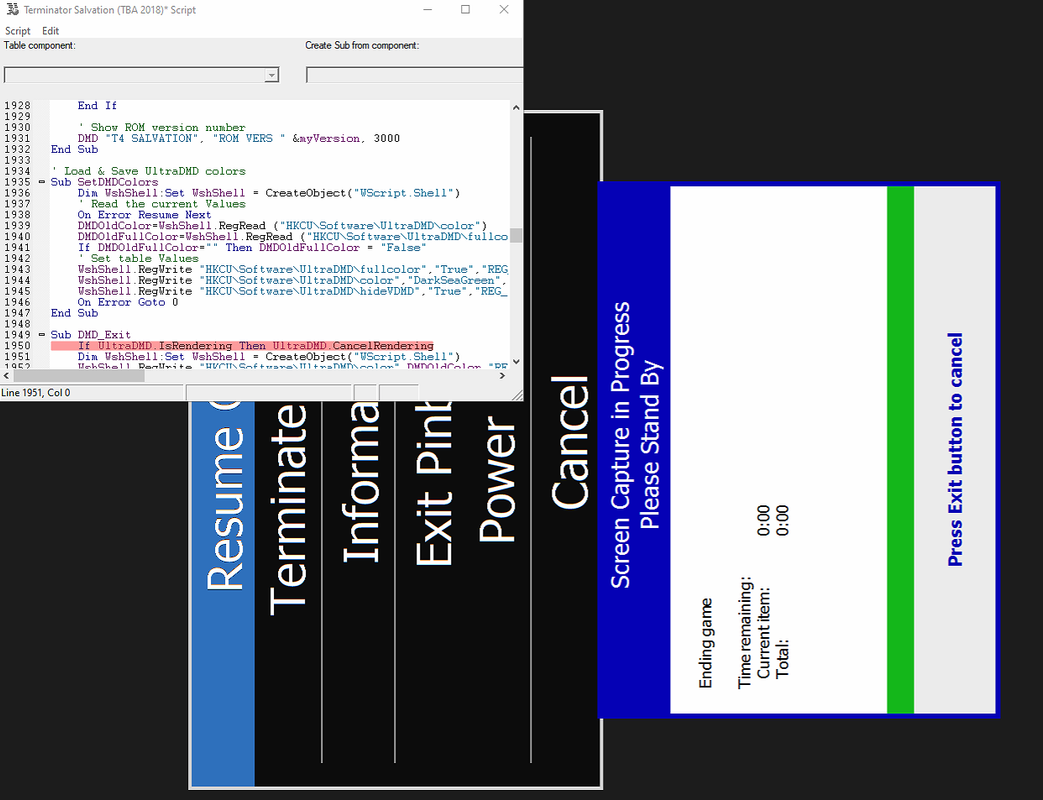
Also the backglass image does not stick to my 2nd monitor. It is on top of my playfield screen when I start PBY. I can press F11 and move it back to the backglass monitor (set to fullscreen again). But the next time I start PBY the backglass image is back on my playfield monitor.
Edited by elabree, 19 November 2019 - 07:36 PM.
Pinball Wizard
Posted 19 November 2019 - 07:43 PM
If PBY crashes, and that is very seldom her should I add. Then make sure that all the processes from the previous run is terminated before starting it again. A reboot might be a smart thing to do if you're not sure.
Yes: you are right, It must be a user error ;-) I should't abort the capturing sequence...
It really should be okay to cancel a capture. But in this case it looks like you might have some kind of conflict going on that's bringing both PBY and VP to a stand-still, so maybe something is getting stuck after the capture that's leaving multiple processes running in state that they can't exit on their own.
But the following is reproducable. I guess that it's table specific behaviour.
The question is whether that table is having a problem purely on its own, or somehow related to PinballY, or somehow related to capture mode.
- Can you run the table successfully by launching it directly with from the Windows desktop, without PinballY being involved?
- Can you run the table successfully when launching it from PinballY, without capture being involved? When you do, does it exit correctly, without leaving any other processes running? (No zombie VP processes, no zombie other processes? Maybe get a snapshot of the Task Manager process list before and after the run, and compare them.)
If the lock-up only happens during capture mode, that error message involving Ultra DMD might be important and might bear further investigation. E.g., you could disable Ultra DMD in that table (if that's possible) and see if the lock-up still occurs.
Software Developer

Posted 19 November 2019 - 08:50 PM
And what is ipd?
How I built my B2S Pinball Cabinet, step-by-step, with pictures! Full-sized cabinet for ~$700. Believe me, if I can do it, so can you!
"Making anything with your hands goes wonderfully with whatever in your life you would consider your grind." ~Nick Offerman
Pinball Wizard

Posted 20 November 2019 - 04:33 AM
mjr, do you do VR? If not I will ship you a headset, cause you have done tone! (Only Rift cv1)
I might (no I am drunk) but come on what a time to live!!! I can't believe how good vr pinball is!!!
plus I love coding, and open source is King (no seriously its king, and can change the world more than anything)
Edited by Slydog43, 20 November 2019 - 04:34 AM.
Hobbyist
Posted 20 November 2019 - 05:46 AM
Hi MJR,
Thanks for your response.
It really should be okay to cancel a capture. But in this case it looks like you might have some kind of conflict going on that's bringing both PBY and VP to a stand-still, so maybe something is getting stuck after the capture that's leaving multiple processes running in state that they can't exit on their own.
Yes, I think you are right.
The question is whether that table is having a problem purely on its own, or somehow related to PinballY, or somehow related to capture mode.
- Can you run the table successfully by launching it directly with from the Windows desktop, without PinballY being involved?
- Can you run the table successfully when launching it from PinballY, without capture being involved? When you do, does it exit correctly, without leaving any other processes running? (No zombie VP processes, no zombie other processes? Maybe get a snapshot of the Task Manager process list before and after the run, and compare them.)
If the lock-up only happens during capture mode, that error message involving Ultra DMD might be important and might bear further investigation. E.g., you could disable Ultra DMD in that table (if that's possible) and see if the lock-up still occurs.
- Yes, when I open it from VPX there are no issues.
- Yes, it runs from PinballY and exits. I need to check about running processes after exit.
=> 
Started my table via PinballY, played one round and closed table and PinballY => UltraDMD.exe appears to be still running.
=> Did a 2nd test: No pinballY. Killed the ultradmd process with the taskmanager. Started the table from vpx. => exactly the same problem, the ultradmd process keeps running.
- OK, I will try to disable Ultra DMD. Also try to capture any error messages.
=> I don't have sufficient insight in how the table scripts work but as far as I can see this table completely relies on it. So disabling is not going to work. Also I tried to find info on table scripting with ultradmd but could not find much.
I guess the right concusion is that this table has a bug. Not a PinballY issue :-)
Also the backglass image does not stick to my 2nd monitor. It is on top of my playfield screen when I start PBY. I can press F11 and move it back to the backglass monitor (set to fullscreen again). But the next time I start PBY the backglass image is back on my playfield monitor.
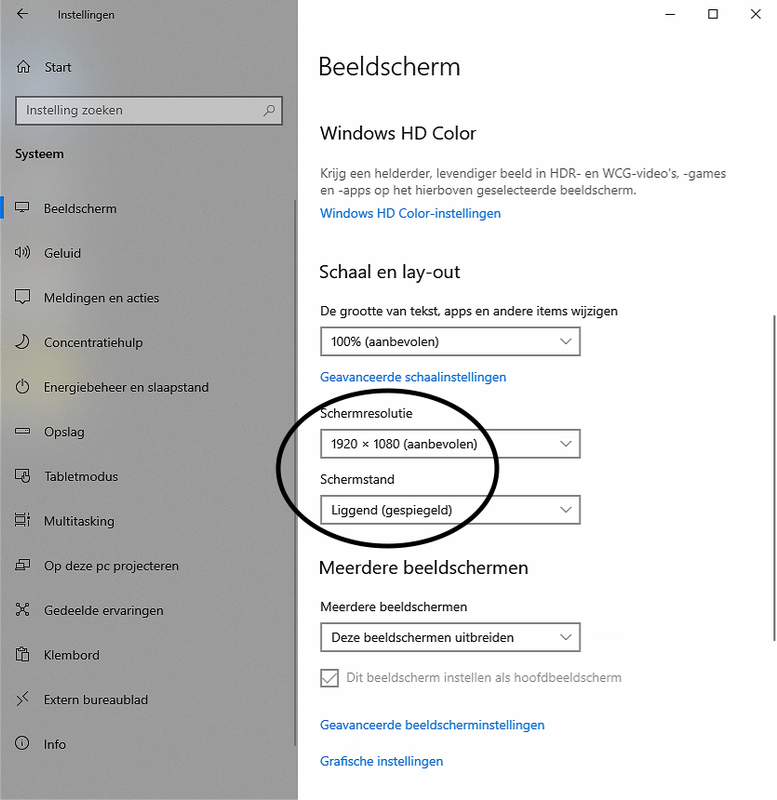
When I woke up this morning I realized that this may be caused by my playfield configuration. It's my first cabinet, and I mounted the playfield tv incorrectly. Therefore I have changed my windows setting to use it in landscape - mirrored position (270 deg rotation instead of 90). Is it possible that the positioning of the backglass window to my 2nd monitor does not stick because of that ?
Edited by elabree, 20 November 2019 - 07:12 PM.
Pinball Wizard
Posted 20 November 2019 - 06:47 AM
When I woke up this morning I realized that this may be caused by my playfield configuration. It's my first cabinet, and I mounted the playfield tv incorrectly. Therefore I have changed my windows setting to use it in landscape - mirrored position (270 deg rotation instead of 90). Is it possible that the positioning of the backglass window to my 2nd monitor does not stick because of that ?
The last time I heard of someone running into something like this, it was because they had a separate program running that was changing the screen around every time PinballY started and exited. So PinballY would restore its saved position based on the desktop coordinates, and then that other screen-changing program would kick in and rearrange everything. Any possibility you have something like that going on?
If so, try going to the Startup section in the options, and un-checking the box "Make sure all windows are positioned within the visible desktop area". That was the real culprit with the screen-changing program. PinballY normally wants to make sure that all of the window are in valid screen areas, but if you're going to switch around the monitor layout shortly after PinballY starts, the notion of what's a "valid screen area" is only temporarily right, so this might make it unnecessarily move windows into what it thinks are safe areas. Un-checking the box prevents that automatic rearranging and preserves the settings exactly as stored, even if they look "wrong" at startup.
And if that still doesn't work, try this advice from the Startup options help section:
Note that disabling this option only works with windows that aren't in Full Screen mode. Full-screen windows are always set up so that they fill the nearest monitor to the saved position, so they'll end up within a visible monitor in any case. If you have problems with full-screen windows moving to unwanted monitors at startup, try taking them out of full-screen mode and instead using "borderless" mode (which you can select via the right-click menu within the window), simply sizing the window to the screen area you want it to take.
Edited by mjr, 20 November 2019 - 06:59 AM.
Hobbyist
Posted 20 November 2019 - 04:00 PM
No, I only changed the screen orientation in the windows 10 settings (sorry for the dutch):The last time I heard of someone running into something like this, it was because they had a separate program running that was changing the screen around every time PinballY started and exited. So PinballY would restore its saved position based on the desktop coordinates, and then that other screen-changing program would kick in and rearrange everything. Any possibility you have something like that going on?
Good tip (it really amazes me that you forsee all possible cases). I tried it, but unfortunately it does not help.If so, try going to the Startup section in the options, and un-checking the box "Make sure all windows are positioned within the visible desktop area".
Yes, that makes sense. However I don't use such a program, just the above setting of windows 10. So the display rotates only 1x: after the bios startup screen when windows starts (before user login).That was the real culprit with the screen-changing program. PinballY normally wants to make sure that all of the window are in valid screen areas, but if you're going to switch around the monitor layout shortly after PinballY starts, the notion of what's a "valid screen area" is only temporarily right, so this might make it unnecessarily move windows into what it thinks are safe areas. Un-checking the box prevents that automatic rearranging and preserves the settings exactly as stored, even if they look "wrong" at startup.
Where is my luck ? It still doesn't work.And if that still doesn't work, try this advice from the Startup options help section:
Yes, I tried it with or without borders. Every time I start PinballY the backglass is on top of the playfield.Note that disabling this option only works with windows that aren't in Full Screen mode. Full-screen windows are always set up so that they fill the nearest monitor to the saved position, so they'll end up within a visible monitor in any case. If you have problems with full-screen windows moving to unwanted monitors at startup, try taking them out of full-screen mode and instead using "borderless" mode (which you can select via the right-click menu within the window), simply sizing the window to the screen area you want it to take.
Edited by elabree, 20 November 2019 - 07:37 PM.
Pinball Wizard
Posted 20 November 2019 - 07:21 PM
No, I only changed the screen orientation in the windows 10 settings (sorry for the dutch):
Okay, must be something else then. But you might try the remedies I suggested anyway, in case it's something similar.
Hobbyist
Posted 21 November 2019 - 05:13 PM
Yes!Okay, must be something else then. But you might try the remedies I suggested anyway, in case it's something similar.
Pinball Wizard
Posted 21 November 2019 - 07:08 PM
Yes!
It is caused by Teamviewer somehow.
Ah, that makes sense. Teamviewer is a remote access program, right? I don't know about Teamviewer in particular, but remote access servers usually change the monitor layout while they're running - exactly the sort of desktop layout change that makes PinballY want to rearrange its windows if you have the "Make sure all windows are positioned in the visible desktop area" option enabled.
So you might try disabling that option - it might fix it for you even when using Teamviewer, since it'll let PinballY keep its windows in the out-of-bounds area when Teamviewer is running. You won't be able to see the out-of-bounds windows with Teamviewer, but when you return to the PC directly later, the PinballY windows should stay where you left them.
Hobbyist
Posted 22 November 2019 - 05:55 AM
Ah, that makes sense. Teamviewer is a remote access program, right? I don't know about Teamviewer in particular, but remote access servers usually change the monitor layout while they're running - exactly the sort of desktop layout change that makes PinballY want to rearrange its windows if you have the "Make sure all windows are positioned in the visible desktop area" option enabled.
So you might try disabling that option - it might fix it for you even when using Teamviewer, since it'll let PinballY keep its windows in the out-of-bounds area when Teamviewer is running. You won't be able to see the out-of-bounds windows with Teamviewer, but when you return to the PC directly later, the PinballY windows should stay where you left them.
Pinball Wizard
Posted 22 November 2019 - 06:43 AM
- The teamviewer client shows only one of the screens (starts with the main screen = playfield monitor).
- There is a button to switch to other screens connected to the host (so I can switch between my 2 monitors)
- I start PinballY from my main screen, so probably PinballY detects only 1 monitor and puts the playfield there and the backglass on top.
But PinballX does remember the 2 screen situation because when I exit the remote desktop and start it locally on the cabinet the backglass shows up on the 2nd monitor without me having to change anything.
I think that's probably Teamviewer moving things around then, not PinballY. It's the part about how things come back to the original layout when you go back without Teamviewer.
Here's my thinking. Suppose that PinballY were putting the "backglass on top" in Teamviewer, as you say. That would mean PinballY is moving the window, right? Now figure what PinballY stores in the settings file after that Teamviewer session ends. It would store the moved position - the "backglass on top" position - right? So now you go back without Teamviewer and run again. PinballY restores the last saved position. But it's back where it was in the last non-Teamviewer session! So it didn't get saved at a new position after all. So that says to me that PinballY thinks it's working with the original location when Teamviewer is running. Conclusion: Teamviewer is the one that's moving the window - it's doing some kind of virtual desktop coordinate change that makes PinballY think it's leaving the window at the old position, but Teamviewer displays it at the new position.
Edited by mjr, 22 November 2019 - 06:44 AM.


Community Forum Software by IP.Board
Licensed to: VPForums.org
 are all trademarks of VPFORUMS.
 Top

