Jump to content


Photo
- - - - -

How to rotate the DMD in 16:9 FS tables?


  • Please log in to reply
185 replies to this topic

#61 yogiholzer

yogiholzer

    Pinball Fan

  • VIP
  • 1,870 posts
  • Location:Hamburg

  • Flag: Germany

  • Favorite Pinball: All.

Contributor

Posted 08 July 2010 - 05:47 PM

biggrin.gif

No problem.
Click the picture frame to visit the pinball people gallery.

#62 bluto

bluto

    Gramps

  • Charter Member
  • 618 posts
  • Location:Aurora Ont.

  • Flag: Canada

  • Favorite Pinball: Cactus Canyon

Posted 17 July 2010 - 11:02 PM

QUOTE (yogiholzer @ Apr 20 2010, 03:08 PM) <{POST_SNAPBACK}>
How to rotate the DMD in 16:9 FS tables on a single 16:9 display, which is (hardware) rotated vertically?

I know this has been discussed in several threads before, but I think it's hard to find, still not described well enough and not that easy to follow. Here I just want to try to give some help, because I just run the problem on my new monitor. I use Megapin_Williams_Medieval_Madnees_V1.33FS as example. You want to have it like this, but the DMD isn't shown like in the screenshot, but upright?

There are two possibilities to rotate the DMD.

1. Change the table script.

2. Change the Windows registry.

About the methods (!!! If you use method 2, be sure what you do. Not exactly recommended for beginners/novices. You can destroy your system setup, if you do wrong! !!!). I don't take any responsibility for anything you do!:

1. As I absolutely don't understand the script language, I can't help here much. It's recommended to search for the DMD settings in the table script and change the entries. Else it's recommended to add them. As I didn't find these DMD settings in the table script of the example table (probably still not available) and as I don't know, where exactly to add them in the table script, I chosed to use method 2. Any help is requested. So if you can give clear instructions how/where to add the needed line/-s to the table script, please feel free to post here.

I abstain from posting possible script additions because I didn't try them by myself, so I'm not sure about the results.

2. I started the Windows registry editor by using the command "regedit" in the Windows 7 Start menu. Just type "regedit" (without the quotes) in the programs/files search box in the Start menu and then chose it from the search results.

On the left navigate to HKEY_CURRENT_USER\Software\Freeware\Visual PinMame. If still not shown, open the tree structure of Visual PinMame on the left. Then also on the left once click onto the rom name of the table you want to rotate the DMD. In this example it's mm_109c. Then on the right you get shown a bunch of single settings. Scroll down to find rol and/or ror (rotate left and rotate right). Right mouse click onto rol or ror to change the value from 0 to 1 or backwards. Depends on in which direction you rotated your monitor. As I rotated it clockwise, I chosed to rotate the DMD counterclockwise (rotate left/rol) and changed the value from 0 to 1 and confirmed with Ok. Then close the Windows registry editor and try. Result is what you see in the screenshot.

If you still didn't play the table before, there's still no entry of the rom name of the table you want to rotate the DMD in the registry in the tree structure of Visual PinMame on the left. If that's the case I suggest to start/play the table once before you try to change the settings/registry value.


Please feel free to give some better explanations. I did my best, but I know my English capabilities are low/bad.


QUOTE (bluto @ Jul 17 2010, 05:50 PM) <{POST_SNAPBACK}>
QUOTE (yogiholzer @ Apr 20 2010, 03:08 PM) <{POST_SNAPBACK}>
How to rotate the DMD in 16:9 FS tables on a single 16:9 display, which is (hardware) rotated vertically?

I know this has been discussed in several threads before, but I think it's hard to find, still not described well enough and not that easy to follow. Here I just want to try to give some help, because I just run the problem on my new monitor. I use Megapin_Williams_Medieval_Madnees_V1.33FS as example. You want to have it like this, but the DMD isn't shown like in the screenshot, but upright?

There are two possibilities to rotate the DMD.

1. Change the table script.

2. Change the Windows registry.

About the methods (!!! If you use method 2, be sure what you do. Not exactly recommended for beginners/novices. You can destroy your system setup, if you do wrong! !!!). I don't take any responsibility for anything you do!:

1. As I absolutely don't understand the script language, I can't help here much. It's recommended to search for the DMD settings in the table script and change the entries. Else it's recommended to add them. As I didn't find these DMD settings in the table script of the example table (probably still not available) and as I don't know, where exactly to add them in the table script, I chosed to use method 2. Any help is requested. So if you can give clear instructions how/where to add the needed line/-s to the table script, please feel free to post here.

I abstain from posting possible script additions because I didn't try them by myself, so I'm not sure about the results.

2. I started the Windows registry editor by using the command "regedit" in the Windows 7 Start menu. Just type "regedit" (without the quotes) in the programs/files search box in the Start menu and then chose it from the search results.

On the left navigate to HKEY_CURRENT_USER\Software\Freeware\Visual PinMame. If still not shown, open the tree structure of Visual PinMame on the left. Then also on the left once click onto the rom name of the table you want to rotate the DMD. In this example it's mm_109c. Then on the right you get shown a bunch of single settings. Scroll down to find rol and/or ror (rotate left and rotate right). Right mouse click onto rol or ror to change the value from 0 to 1 or backwards. Depends on in which direction you rotated your monitor. As I rotated it clockwise, I chosed to rotate the DMD counterclockwise (rotate left/rol) and changed the value from 0 to 1 and confirmed with Ok. Then close the Windows registry editor and try. Result is what you see in the screenshot.

If you still didn't play the table before, there's still no entry of the rom name of the table you want to rotate the DMD in the registry in the tree structure of Visual PinMame on the left. If that's the case I suggest to start/play the table once before you try to change the settings/registry value.


Please feel free to give some better explanations. I did my best, but I know my English capabilities are low/bad.


Why not have a corrected version made available.this might invlove hundreds of
tables.

think.gif
Just let the maker post a fixed table(s)
This could involve hundreds of tables and members.

rofl.gif
Hi to all members.
I'm From Aurora,Ontario
I am 76 in 2010
---------------------------
Please post in the
right Forum
ABOUT TOPIC
NOT ME,OK


#63 yogiholzer

yogiholzer

    Pinball Fan

  • VIP
  • 1,870 posts
  • Location:Hamburg

  • Flag: Germany

  • Favorite Pinball: All.

Contributor

Posted 18 July 2010 - 01:30 PM

QUOTE (bluto @ Jul 18 2010, 01:02 AM) <{POST_SNAPBACK}>
Why not have a corrected version made available.this might invlove hundreds of
tables.

think.gif
Just let the maker post a fixed table(s)
This could involve hundreds of tables and members.

rofl.gif


Dear Stan,

it doesn't only depend on the table script, but on Windows registry settings/entries made by previous table runs too, so this isn't anything to correct/fix in the downloads, but a user dependent adjustment.

Now please let us all know how are you doing. Your last post is about half a year ago.
Click the picture frame to visit the pinball people gallery.

#64 bluto

bluto

    Gramps

  • Charter Member
  • 618 posts
  • Location:Aurora Ont.

  • Flag: Canada

  • Favorite Pinball: Cactus Canyon

Posted 18 July 2010 - 09:51 PM

How come then i suddenly have this happen.I diidn't do it.
SUDDENLY IT'S THERE AFTER MONTHS OF NOT. ??

Hi to all members.
I'm From Aurora,Ontario
I am 76 in 2010
---------------------------
Please post in the
right Forum
ABOUT TOPIC
NOT ME,OK


#65 yogiholzer

yogiholzer

    Pinball Fan

  • VIP
  • 1,870 posts
  • Location:Hamburg

  • Flag: Germany

  • Favorite Pinball: All.

Contributor

Posted 19 July 2010 - 06:53 PM

QUOTE (bluto @ Jul 18 2010, 11:51 PM) <{POST_SNAPBACK}>
How come then i suddenly have this happen.I diidn't do it.
SUDDENLY IT'S THERE AFTER MONTHS OF NOT. ??


I don't know.

Maybe you have different versions of the same tables, namely a 4:3 version and a 16:9 version?
When you first play one version of the table, the DMD registry entries are made. If you then play
the other version, the DMD registry entries apparently aren't changed.

It doesn't seem to occur everywhere, everytime and to everyone.

The registry method should allow everyone to rotate the DMD to his/her needs manually, not only
in 16:9 tables, but also in 4:3 tables.


Click the picture frame to visit the pinball people gallery.

#66 powerchisper

powerchisper

    Enthusiast

  • Silver Supporter
  • 243 posts
  • Location:Sevilla

  • Flag: Spain

  • Favorite Pinball: Dracula

Posted 23 July 2010 - 09:44 PM

Hi Friends.

I have been reading and experimenting.

With your help I have succesfully rotated the DMD on various tables , but :

When I open the script on Indiana Jones ( for example ) , it is completely different from the ones you've mentioned.

I was wondering if some of you has already found the solution.

If I paste "that line" in the beginning of the script it returns some kind of error.

Thanks in advance , I don't understand a lot about programming ( only basic 1.1 )
Please correct my English if it is necessary.

Any funny words or sentences you can teach me are welcome too !!!

This way I'll learn about pinball but English as well.

#67 yogiholzer

yogiholzer

    Pinball Fan

  • VIP
  • 1,870 posts
  • Location:Hamburg

  • Flag: Germany

  • Favorite Pinball: All.

Contributor

Posted 23 July 2010 - 10:24 PM

Try the registry method as in some examples explained.

Go to

HKEY_CURRENT_USER\Software\Freeware\Visual PinMame\ij_l7

and change rol to 1.

Attached Files

  • Attached File  IJ.jpg   96.82KB   39 downloads

Click the picture frame to visit the pinball people gallery.

#68 powerchisper

powerchisper

    Enthusiast

  • Silver Supporter
  • 243 posts
  • Location:Sevilla

  • Flag: Spain

  • Favorite Pinball: Dracula

Posted 24 July 2010 - 09:38 AM

Thank you very much !!

I didn't know it was so easy.

Just changed the ROL parameter to 1 and worked instantly !!! It is really nice , actually because my neck was already crooked from trying to read the display.

Really happy now , and with vp9.0.8 the flippers are no longer transparent.

Please correct my English if it is necessary.

Any funny words or sentences you can teach me are welcome too !!!

This way I'll learn about pinball but English as well.

#69 turnedmyworld

turnedmyworld

    Hobbyist

  • Silver Supporter
  • 42 posts
  • Location:Riverside, CA

  • Flag: United States of America

  • Favorite Pinball: ZEN Pinball Street Fighter II Turbo Table & Pro Pinball Big Race USA

Posted 27 July 2010 - 05:08 AM

Hi I im using the newest version of VP and I have been able to rotate my dmd using the regedit method. Only problem is they are now square shaped instead of being rectangle. It basically looks like somebody came and squeezed the dmd from the sides and made it a square. I can still read the display it just doesn't look as nice and the odd aspect ratio on it bothers me. Anybody have this issue as well or know how to solve it? Thanks.

BTW: Table is fine, plays fine and is in the proper aspect ratio. Its just the dmd im having trouble with. My Screen rez is 1920x1080 on a 25in widescreen lcd.

#70 yogiholzer

yogiholzer

    Pinball Fan

  • VIP
  • 1,870 posts
  • Location:Hamburg

  • Flag: Germany

  • Favorite Pinball: All.

Contributor

Posted 27 July 2010 - 04:55 PM

Right click onto the DMD, chose 'Show window border', then click and hold window border and move the mouse to resize the window.
Click the picture frame to visit the pinball people gallery.

#71 turnedmyworld

turnedmyworld

    Hobbyist

  • Silver Supporter
  • 42 posts
  • Location:Riverside, CA

  • Flag: United States of America

  • Favorite Pinball: ZEN Pinball Street Fighter II Turbo Table & Pro Pinball Big Race USA

Posted 27 July 2010 - 09:53 PM

Thanks for the quick reply and the solution! It didnt completely solve the problem though. I have to leave the window border highlighted for it to stay the size I want. Even then it only lasts while I have a table loaded. Once I close the table and reopen it I have to resize the dmd again. Is there anyway to make it stay the size I adjust it to permanently? Thanks.

#72 yogiholzer

yogiholzer

    Pinball Fan

  • VIP
  • 1,870 posts
  • Location:Hamburg

  • Flag: Germany

  • Favorite Pinball: All.

Contributor

Posted 31 July 2010 - 11:13 AM

Uncheck "Show window border" when done.
Click the picture frame to visit the pinball people gallery.

#73 TomPetersen

TomPetersen

    Hobbyist

  • Members
  • PipPip
  • 14 posts

  • Flag: United States of America

  • Favorite Pinball: Rolling Stones

Posted 08 August 2010 - 08:22 PM

When I use the registry method, the DMD doesn't show up at all. No biggie right now, just trying to get this all going on my rotated Dell monitor using these cabinet tables.

Wouldn't it just be easier to use the OS/drivers to rotate your screen so that both the table and DMD would be rotated instead of the table being automatically, forced rotated?

#74 yogiholzer

yogiholzer

    Pinball Fan

  • VIP
  • 1,870 posts
  • Location:Hamburg

  • Flag: Germany

  • Favorite Pinball: All.

Contributor

Posted 09 August 2010 - 06:03 PM

QUOTE (TomPetersen @ Aug 8 2010, 10:22 PM) <{POST_SNAPBACK}>
When I use the registry method, the DMD doesn't show up at all. No biggie right now, just trying to get this all going on my rotated Dell monitor using these cabinet tables.


Weird/strange!? Does it show up else?

Try Alt + TAB to make it visible. If that works running VP in compatibility mode could eventually help for permanent display.

This is for FS/Full Screen tables. I don't have multiple screens so I never tried a spanned table and I can't make any suggestion.


QUOTE
Wouldn't it just be easier to use the OS/drivers to rotate your screen so that both the table and DMD would be rotated instead of the table being automatically, forced rotated?


The tables and the table elements wouldn't shown correct, but stretched and in unwanted arrangement and would eventually cause strange behavior in gameplay. FS/spanned tables are made separately.
Click the picture frame to visit the pinball people gallery.

#75 TomPetersen

TomPetersen

    Hobbyist

  • Members
  • PipPip
  • 14 posts

  • Flag: United States of America

  • Favorite Pinball: Rolling Stones

Posted 11 August 2010 - 01:32 AM

QUOTE (yogiholzer @ Aug 9 2010, 01:03 PM) <{POST_SNAPBACK}>
QUOTE (TomPetersen @ Aug 8 2010, 10:22 PM) <{POST_SNAPBACK}>
When I use the registry method, the DMD doesn't show up at all. No biggie right now, just trying to get this all going on my rotated Dell monitor using these cabinet tables.


Weird/strange!? Does it show up else?

Try Alt + TAB to make it visible. If that works running VP in compatibility mode could eventually help for permanent display.

This is for FS/Full Screen tables. I don't have multiple screens so I never tried a spanned table and I can't make any suggestion.


QUOTE
Wouldn't it just be easier to use the OS/drivers to rotate your screen so that both the table and DMD would be rotated instead of the table being automatically, forced rotated?


The tables and the table elements wouldn't shown correct, but stretched and in unwanted arrangement and would eventually cause strange behavior in gameplay. FS/spanned tables are made separately.


Ahh, that makes sense. My machine can barely play these vp9 tables anyway, need a faster one! smile.gif

#76 chas

chas

    Pinball Fan

  • Banned
  • PipPipPipPip
  • 1,791 posts

  • Flag: ---------

  • Favorite Pinball: i played Timezone, quickdraw, triple action, frontier and a few more

Posted 11 August 2010 - 02:13 AM

QUOTE (Rawd @ Apr 20 2010, 01:24 PM) <{POST_SNAPBACK}>
Look for this part of the script... (The Table_init)

Sub mm_Init
With Controller
.GameName = cGameName
If Err Then MsgBox "Can't start Game" & cGameName & vbNewLine & Err.Description:Exit Sub
.SplashInfoLine = "" & vbNewLine & ""
.HandleKeyboard = 0
.ShowTitle = 0
.ShowDMDOnly = 1
.ShowFrame = 0
.HandleMechanics = 0
.Hidden = 0
On Error Resume Next
.Run GetPlayerHWnd
If Err Then MsgBox Err.Description
End With
On Error Goto 0


Add this line: (somewhere between 'With' and 'End With"

.Games(cGameName).Settings.Value("rol") = 1


Sub mm_Init
With Controller
.GameName = cGameName
If Err Then MsgBox "Can't start Game" & cGameName & vbNewLine & Err.Description:Exit Sub
.SplashInfoLine = "" & vbNewLine & ""
.HandleKeyboard = 0
.ShowTitle = 0
.ShowDMDOnly = 1
.ShowFrame = 0
.HandleMechanics = 0
.Hidden = 0
.Games(cGameName).Settings.Value("rol") = 1
On Error Resume Next
.Run GetPlayerHWnd
If Err Then MsgBox Err.Description
End With
On Error Goto 0


All table scripts will have an area like that. Some already have the line, and you just need to change the "rol= 0" to "rol= 1"


Rawd,
this thread is for FS.
untill more FS tables are released i would like to rotate VP9 and VP8 if possible.
tried making script changes to handlekeyboard- Show title-DMD- handle mechanics and Hiddden.
did not work for VP9 tables.

tried the suggestion by adding a line.
got an error of "cGames".
is there a thread to rotate VP9 or do you have any suggestions?


#77 pinuck

pinuck

    Pinball Fan

  • VIP
  • 514 posts
  • Location:Toronto

  • Flag: Canada

  • Favorite Pinball: Jacks Open, AFM, TOM


Posted 11 August 2010 - 03:03 AM

QUOTE (chas @ Aug 10 2010, 10:13 PM) <{POST_SNAPBACK}>
tried the suggestion by adding a line.
got an error of "cGames".
is there a thread to rotate VP9 or do you have any suggestions?


I found in the last week or two since i started setting up my tables, that a bunch of the VP9 tables i downloaded don't declare the cGameName variable for the table name/rom.

So when you add lines for the rotation or the dmd size that use cGameName, you get an error that Variable is undefined: 'cGameName' - which makes sense, if you think about it.

I think that's what you're talking about.

here's two ways to solve it.

either way, open up the text file called gamelist.txt in your Visual Pinball/VPinMame directory, and find the "Internal Name" for the game you're working on.
(for example, twilight zone is "tz_92")

and then you can either:

1) Assign the correct name to cGameName by adding a line near the top (like where the other lines that start with "Const" are):

Const cGameName = "Internal_Name"

except instead of Internal_Name, put whatever the name you found in the gamelist for your table, but leave the double quotes

or

2) forget about cGameName and assign it directly, by changing Rawd's code from

.Games(cGameName).Settings.Value("rol") = 1

to

.Games("Internal_Name").Settings.Value("rol") = 1

except instead of Internal_Name, put whatever the name you found in the gamelist for your table, but leave the double quotes

So in other words, replace cGameName with the rom name in double quotes.

the same goes for setting the width and height of the dmd, if you want to hard-code it and not mess with the registry:

.Games(cGameName).Settings.Value("dmd_width") = 400
.Games(cGameName).Settings.Value("dmd_height") = 92


either set cGameName at the top, or change it in those lines to the rom name in double quotes.

That seemed to work for 99% of the tables i setup. And since i won't be changing my monitor resolution anytime soon, I'd rather have it saved into the table script than messing with the registry every time i reinstall or something - since i've installed tiny XP several times since i started this process. (damn i miss OS X)

hope that helps.

#78 chas

chas

    Pinball Fan

  • Banned
  • PipPipPipPip
  • 1,791 posts

  • Flag: ---------

  • Favorite Pinball: i played Timezone, quickdraw, triple action, frontier and a few more

Posted 11 August 2010 - 06:30 AM

QUOTE (pinuck @ Aug 10 2010, 08:03 PM) <{POST_SNAPBACK}>
QUOTE (chas @ Aug 10 2010, 10:13 PM) <{POST_SNAPBACK}>
tried the suggestion by adding a line.
got an error of "cGames".
is there a thread to rotate VP9 or do you have any suggestions?


I found in the last week or two since i started setting up my tables, that a bunch of the VP9 tables i downloaded don't declare the cGameName variable for the table name/rom.

So when you add lines for the rotation or the dmd size that use cGameName, you get an error that Variable is undefined: 'cGameName' - which makes sense, if you think about it.

I think that's what you're talking about.

here's two ways to solve it.

either way, open up the text file called gamelist.txt in your Visual Pinball/VPinMame directory, and find the "Internal Name" for the game you're working on.
(for example, twilight zone is "tz_92")

and then you can either:

1) Assign the correct name to cGameName by adding a line near the top (like where the other lines that start with "Const" are):

Const cGameName = "Internal_Name"

except instead of Internal_Name, put whatever the name you found in the gamelist for your table, but leave the double quotes

or

2) forget about cGameName and assign it directly, by changing Rawd's code from

.Games(cGameName).Settings.Value("rol") = 1

to

.Games("Internal_Name").Settings.Value("rol") = 1

except instead of Internal_Name, put whatever the name you found in the gamelist for your table, but leave the double quotes

So in other words, replace cGameName with the rom name in double quotes.

the same goes for setting the width and height of the dmd, if you want to hard-code it and not mess with the registry:

.Games(cGameName).Settings.Value("dmd_width") = 400
.Games(cGameName).Settings.Value("dmd_height") = 92


either set cGameName at the top, or change it in those lines to the rom name in double quotes.

That seemed to work for 99% of the tables i setup. And since i won't be changing my monitor resolution anytime soon, I'd rather have it saved into the table script than messing with the registry every time i reinstall or something - since i've installed tiny XP several times since i started this process. (damn i miss OS X)

hope that helps.


RE: Pinuck.
>>So when you add lines for the rotation or the dmd size that use cGameName, you get an error that Variable is undefined: 'cGameName' - which makes sense, if you think about it.
I think that's what you're talking about.<<

Chas : to recap.
waiting for more vp9 FS tables to be released.
if i can get vp9 to rotate i might make a cab.
would like to rotate vertical VP9 to horizontal to play on a WS 32.
tried 250cc vp9 to see if it could be done.
in vp9 not FS near the top in the script window table initiation under handle keyboard, showtitle, DMD, show frame, handle mechanics and hidden just above END with and under END with i typed the cgame("rol")=1 text as suggested from Rawd.
closed and saved changes.
restart.
did not work for VP9.
"cgame" error.


Pinuck
>>That seemed to work for 99% of the tables i setup.<<
you were able to rotate VP9 with this method?

chas:
there is a rotate box in the 905-908 desktop exec options window.
does not work for me.
did you try to get vp9 to rotate with the 905-908 desktop exec options window?

Edited by chas, 11 August 2010 - 06:46 AM.


#79 yogiholzer

yogiholzer

    Pinball Fan

  • VIP
  • 1,870 posts
  • Location:Hamburg

  • Flag: Germany

  • Favorite Pinball: All.

Contributor

Posted 11 August 2010 - 09:03 PM

Some clarification (mainly because of the latest posts):

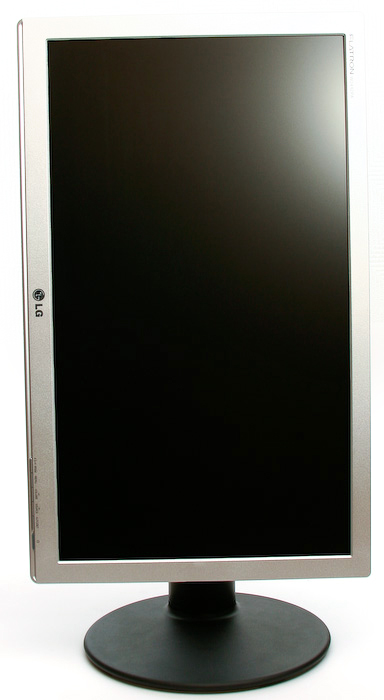
I started this thread as a help thread to rotate the DMD in 16:9 FS=Full Screen tables. Reason behind: I bought me this rotatable LCD, so I can also play FS tables:

But don't forget: The DMD is a feature of (V)PinMAME! So the DMD should be rotatable in every (V)PinMAME table! It's not a feature of Visual Pinball and it's not a feature of FS tables!

You should be able to rotate the DMD either by a command to (V)PinMAME made in the table script or, if that doesn't work as wanted/intended, by using the described 'registry method', as I called it. There are already several examples in this thread, so it shouldn't be that hard anymore.

I always use the registry method to rotate the DMD, because I don't exactly understand the table scripts. If you understand the scripting and know what to add/change and prefer it saved into the table script, you're free to do that.
Click the picture frame to visit the pinball people gallery.

#80 pinuck

pinuck

    Pinball Fan

  • VIP
  • 514 posts
  • Location:Toronto

  • Flag: Canada

  • Favorite Pinball: Jacks Open, AFM, TOM


Posted 11 August 2010 - 09:23 PM

QUOTE (chas @ Aug 11 2010, 02:30 AM) <{POST_SNAPBACK}>
you were able to rotate VP9 with this method?

there is a rotate box in the 905-908 desktop exec options window.
does not work for me.
did you try to get vp9 to rotate with the 905-908 desktop exec options window?


I'm not sure what you're trying to do when you say "rotate VP9"

the .Games(cGameName).Settings.Value("rol") = 1 code is for rotating just the DMD, on whatever display it's on.

if you're talking about rotating the whole table, i think that's on the options panel for the backdrop in VP9. BUT i've never had to use that because the FS tables are already set to work that way. I've got a 24" WS on its side for the playfield, and every FS table displays correctly on it. Just look under Cabinet Tables and not Desktop.

as for cGameName errors, see my code from last post.