- View New Content
-
Getting Started
-
Tutorials
Tutorial Categories
Tutorials Main Page Installation and Setup Downloadable TutorialsROM Adjustments
Number of Balls Adjustments Volume Adjustments
-
Visual Pinball Tables
VP 8 Desktop Tables
All VPM Recreations VP Recreations VP/VPM MODs VP Originals ROMsVP 9 Desktop Tables
All VPM Recreations VP Recreations VP/VPM MODs VP Originals ROMsVP9 Cabinet Tables
All Full Screen Cabinet Full Screen B2S Cabinet Spanned Cabinet Tables Media Packs ROMsVPX Tables
All VPinMAME Recreations VPX- - /VPinMAME - MOD Tables VPX Recreations VPX Originals Media Packs ROMs VR
-
Frontend Media & Backglass
Media Packs
Complete Media Packs Wheel Logos VideosBackglasses
dB2S Animated Backglasses UVP Animated Backglasses Topper Images
- Future Pinball Tables
-
Design Resources
Main Resources
Table Templates Playfield Images Image Library Sound Library Key CodesVP Guides
VP8 Guide - English VP8 Guide - Deutsch VP9 Guide - English VP9.1.x Guide - English VP Object Guide VPM DocumentationFuture Pinball Resources
Playfield Images 3D Model LibraryFuture Pinball Guides
FP Script Guide Big Draco Script Guide FP Table Design Guide FP DMD Guide
- Other Features
- Bug Tracker
- Image Gallery
- Blogs
-
More
Reconstructing an SS Pinball Machine for FP
Started By
MeatBundle
, Mar 11 2010 03:46 AM
63 replies to this topic
#61
Posted 12 July 2010 - 01:24 AM
if you want something that is portable, adaptable and modular then I would say stick with classes, that is exactly what they are designed for. It's much better to think less about what the thing does directly (which you could code without classes), but what you else can build with it once it is complete (which is where classes will come into their own). If you're just coding for the one table then you can run it that way but I would definitely experiment with classes if you want something you can re-use.
#62
Posted 12 July 2010 - 02:30 AM
QUOTE (highrise @ Jul 12 2010, 05:24 AM) <{POST_SNAPBACK}>
if you want something that is portable, adaptable and modular then I would say stick with classes, that is exactly what they are designed for. It's much better to think less about what the thing does directly (which you could code without classes), but what you else can build with it once it is complete (which is where classes will come into their own). If you're just coding for the one table then you can run it that way but I would definitely experiment with classes if you want something you can re-use.
Yeah, I'm hoping to be able to do more of these System 11 tables in the future, so that's a big part of me getting the hang of the classes that were already built for BoP, Bad Cats, and Cyclone. Once you are familiar with all of the classes, coding is very easy and quick to do. I like how I can focus on the logic of things, and not get bogged down in making FP do what I want it to do - that bridge has already been built.
#63
Posted 21 July 2010 - 01:41 AM
I finally ripped out most of the table-specific code in the Bad Cats script that I'm using, and am building my own code to replace it. The base code is probably about 10000 lines of code, and I've added around 1000 or so. There are a bunch of comments and various bits and pieces that I've commented out to learn from. So far, there are 14600 lines of code when it's all said and done.
I'd like the code to be much smaller than this, but there is a lot of extra functionality in the base code that I'm not going to use. I have no desire either to wade into the stuff that's already been done and monkey around with it. It's kind of like a black box. As long as it works, I'm not going to worry about it.
And the code is working fairly well. Still a great deal of setup to do the lighting, sound, and display effects to match the actual table, but the classes help me to keep it all organized, and that's the main reason that I'm using it.
#64
Posted 25 November 2020 - 11:05 AM
Hello my friend!
Do you have the design of the medieval madness ramps?
Please send me [email protected]
Thank you
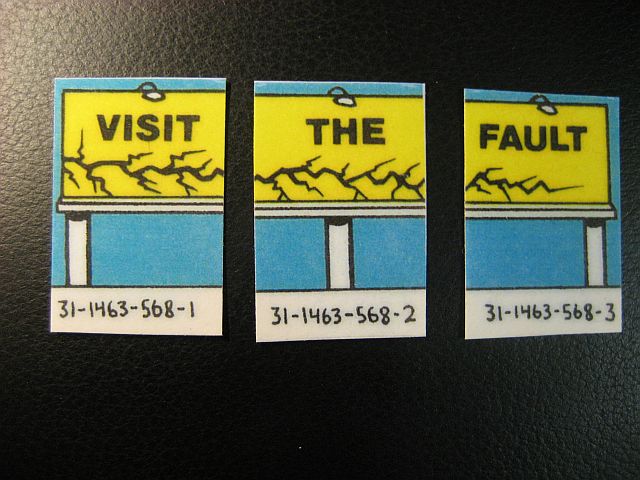
I've almost finished building the entire playfield. The major thing left is the mechanism for splitting the California-Nevada "Fault Line". Other than that, I have to create the billboards in front of the ramps, I have to create the Earthquake Institute, and I have to complete the plastics around the flippers.
As you can see from the current WIP pic on Post #1, there are a few anomalies between the playfield image and where I've got things placed, but overall everything is lining up well. I'm using pictures of an actual machine as the final say in things, so things right now are looking pretty solid. I might tweak things a mm here and there, but overall I'm feeling good about the layout. All the shots are reproducable, and that's what I'm primarily concerned with.
The major things that I'm worried about is 1.) Making the ramps look accurate, and 2.) Replicating the shaker motors in the cabinet.
1.) The ramps are clear plastic with a sticker running down the middle of them. I'm fairly certain I can do a good job of recreating the sticker, but getting the look of clear plastic on FP might be more of an issue. Right now I've just got them drawn as transparent, but I don't feel that it looks quite right. Maybe if the rest of the plastics were colored it would be different, but right now it just looks weird. I'm going to revisit this a little bit later to see what I can accomplish.
2.) The shaker motors I believe are impossible to code in this version of FP. There is no way to access the "Nudge" functions from within the script that I can see, which limits nudging to just a button press. I also can't "fake" a button press, because the nudge buttons are hardcoded into the software to run the nudge script. There are no calls anywhere in the accessible script to monkey around with it. I fear that unfortunately that's a feature I won't be able to include. I'd be glad to be proven wrong, so if anyone knows a way around this, please let me know.
I've placed most of the required switches, only missing out on one at the opening to each of the two ramps. I'm not sure if it is an opto-sensor or a wire trigger. I can't track it down online, so I'm left to guessing. As none of the pictures shows any sort of mechanical switch on the ramp, I'm going to try using opto-triggers to replicate the functionality. The beam will go right through any other object, and I can choose to not render the model so it won't affect the visuals.
The other big project as far as table construction are the lights. I've already placed all of the flashers, now I just have to work on the light inserts. I don't anticipate that taking too long. The layout seems clear and many of the lights are the same size. I should be able to create-copy-paste in most areas.
However, I'm a bit worn out from table construction, so I'm going to do some simple table graphics to give myself a break. First up: the drop targets.
thank you


Top


are all trademarks of VPFORUMS.