Which type of installation did they use in your cab? A or B
-
Installation
Hosting applications which can use the DirectOutput framework, implement plugin interfaces which will automatically detect, load and use the library if it is correctly installed.
The DirectOutput framework can be installed in two ways:
- Directly within the directory structure of the hosting application (e.g. B2S.Server). This will require only minimal effort when installing, but it might lead to duplicate installations if DOF is used in more than one hosting application.
- In any other directory of your system. This will require a little more work during installation, because shortcuts from the hosting applications plugin directory to the directoy containg DOF have to be added. This installation pattern will all all applications which support DOF to use the same installation, so no duplicate installtions are required. This is the recommanded installtion pattern.
A - Installation within hosting application directory structure
To install DOF withing the directory structure of the application using the framework (e.g. B2S.Server), please do the following:
- In the installation directory of the hosting application, create a directoy called plugins.
- Inside the newly created plugins directory, create a subdirectory called DirectOutput (any other name will be ok as well).
- Unzip the contents of the zip-file containg the framework to the newly created DirectOutput directory.
- If using platforms like Vista or Win7, the installed files might be blocked by UAC. To unblock the files please read: Unblock the DLLs
If this has been done correctly, the hosting application will automatically detect, load and use the framework.
Example: A typical installation of the framework for the B2S.Server (provided that B2S.Server is installed in the VP tables directory) will have to following directory and file structure:
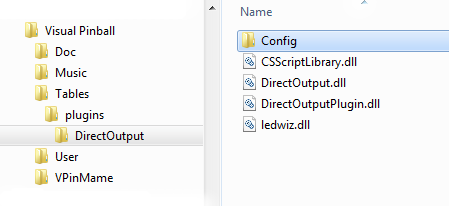
Installation in hosting application directory structure
Note: Depending on the DirectOutput framework version, more files might exist in the installation.
-
B - Installation in own directory (Recommended)
To avoid duplicate installations of the DirectOutput framework, the applications using the framework as a plugin can follow windows shortcuts to the directory containging DOF.
To install DirectOutput like this, please do the following:
- Create a directory for you DirectOutput installtion (e.g. C:\DirectOutput). The name and the path to this directory can be anything you like, but it might be a clever idea to have DirectOutput in the directory name.
- Unzip the contents of the zip-file containg the framework to the newly created directory.
- If using platforms like Vista or Win7, the installed files might be blocked by UAC. To unblock the files please read: Unblock the DLLs
To allow the hosting application (e.g. B2S.Server) to detect the DirectOutput framework, do the following:
- Go to the directory containing the files of the hosting application (For B2S.Server this is typically the VP tables folder).
- In this directory create a subdirectory named plugins.
- In the newly created plugins directory, create a windows shortcut pointing to the directory containg the DirectOutput framework. This can be done by right clicking in the plugins directory and selecting New -> Shortcut in the context menu.
Example: A typical installation of the framework in its own directory might resemble the following file and directory structure:
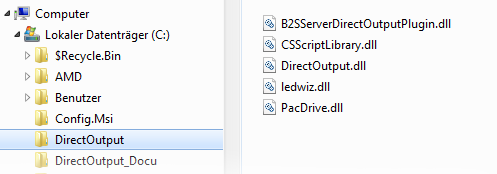
DirectOutput installtion in own directory
Note: Depending on the DirectOutput framework version, more files might exist in the installation.
If the framework is used with a B2S.Server installtion (which normaly reside in the VP table folder), you should have the following directory structure and shortcut (pointing to the directory containg the DirectOutput framework):
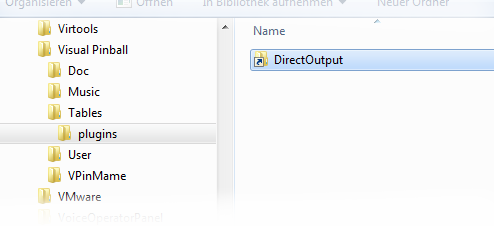
Shortcut pinting to the DirectOutput installation directory
Edited by Outhere, 10 August 2017 - 07:44 AM.



 Top
Top



 are all trademarks of VPFORUMS.