Jump to content


Photo
* * * * * 1 votes

Terminator 3 - Megapin - V.1.1 - VP9


  • This topic is locked This topic is locked
119 replies to this topic

#61 gordon

gordon

    Enthusiast

  • Members
  • PipPipPip
  • 261 posts
  • Location:Schleswig-Holstein/Kiel

  • Flag: Germany

  • Favorite Pinball: Pirates of the Caribbean

Posted 01 October 2009 - 05:30 PM

QUOTE (Noah Fentz @ Oct 1 2009, 05:23 PM) <{POST_SNAPBACK}>
Could you please post in English, so everyone knows what you're discussing? I can translate using Babelfish, but this is an English board.

Thank you.


Sorry is litte Problem with the Table and and to hard for me to Translete in english.

Next i post in bad English smile.gif

#62 Noah Fentz

Noah Fentz

    'Rasslin' Fan

  • VPF Administrator
  • 12,271 posts
  • Location:South Lyon, MI

  • Flag: United States of America

  • Favorite Pinball: Whitewater

  • PS3 Gamer Tag: noahfentz


Contributor

Posted 01 October 2009 - 05:38 PM

Thank you, and I apologize for the inconvenience, but it makes support by others much easier.

smile.gif

IdleReel.gif RumbleDMD.jpg HS2-DMD.jpg SBM.jpg ww_logo.jpg EK.jpg

 
T2.jpg Sorcerer.jpg Breakshot.jpg Firepower.jpg GorGar.jpg StarTrek.jpg


My Photobucket Resources
Whether You Believe You Can, Or You Can't, You Are Right." - Henry Ford
The future of pinball lives, it just needs to be nurtured!
If you're here to stab me in the back, you're going to have to get in line.


#63 GRONI

GRONI

    Pinball Recreator

  • VIP
  • 1,071 posts
  • Location:Germany

  • Flag: Germany

  • Favorite Pinball: TWD - LOTR - TSPP - POTC - AFM


Posted 01 October 2009 - 05:44 PM

QUOTE (gordon @ Oct 1 2009, 05:15 PM) <{POST_SNAPBACK}>
Hallo GRONI,

der Tisch macht echt laune, aber das Teil hat leiner ein Timerproblem glaub ich.


Kann ich was machen das er die Sachen im Command Center besser activiert?

Kann ich inder Script T3.maxballspeed ändern um das zu beheben oder wofür ist die Zeile?

gruß gordon


What Gordon wanted to know, was, if there is a Timerproblem in the commandcenter, cause it gets
not activated right on his machine.

Well, I have no probs at all, to get the CommandCenter Items. But I´m not that scripting Genius, so I
don´t really know, if there is any Problem with the script. Maybe Brian can check this. He knows this
Machine, and maybe knows if I have did something wrong.

My current VPX Tables I am working on:


Attack from Mars/Finished - The Walking Dead Pro/90% - The Lord of the Rings/75% - Family Guy/90% - The Simpsons Pinball Party/15%


#64 Vorador

Vorador

    Enthusiast

  • Members
  • PipPipPip
  • 88 posts

  • Flag: ---------

  • Favorite Pinball: Attack From Mars

Posted 01 October 2009 - 10:49 PM

QUOTE (GRONI @ Oct 1 2009, 05:44 PM) <{POST_SNAPBACK}>
QUOTE (gordon @ Oct 1 2009, 05:15 PM) <{POST_SNAPBACK}>
Hallo GRONI,

der Tisch macht echt laune, aber das Teil hat leiner ein Timerproblem glaub ich.


Kann ich was machen das er die Sachen im Command Center besser activiert?

Kann ich inder Script T3.maxballspeed ändern um das zu beheben oder wofür ist die Zeile?

gruß gordon


What Gordon wanted to know, was, if there is a Timerproblem in the commandcenter, cause it gets
not activated right on his machine.

Well, I have no probs at all, to get the CommandCenter Items. But I´m not that scripting Genius, so I
don´t really know, if there is any Problem with the script. Maybe Brian can check this. He knows this
Machine, and maybe knows if I have did something wrong.

Hi Groni! Thanks again for the great table! Could you try out the table and tell me if the bumpers are moving when they are hit? They aren't on my system sad.gif

Edited by Vorador, 01 October 2009 - 10:51 PM.


#65 gordon

gordon

    Enthusiast

  • Members
  • PipPipPip
  • 261 posts
  • Location:Schleswig-Holstein/Kiel

  • Flag: Germany

  • Favorite Pinball: Pirates of the Caribbean

Posted 01 October 2009 - 11:00 PM

i mean no animation effect by me the bumpers

#66 Noah Fentz

Noah Fentz

    'Rasslin' Fan

  • VPF Administrator
  • 12,271 posts
  • Location:South Lyon, MI

  • Flag: United States of America

  • Favorite Pinball: Whitewater

  • PS3 Gamer Tag: noahfentz


Contributor

Posted 01 October 2009 - 11:04 PM

Hey, GRONI.

The table looks and plays very well, but there's one thing that bothers me...

When hitting the outside loop on the right and it comes around down the left, it hits the back of the left target bank. Shouldn't it return to the left flipper without hitting the target?

IdleReel.gif RumbleDMD.jpg HS2-DMD.jpg SBM.jpg ww_logo.jpg EK.jpg

 
T2.jpg Sorcerer.jpg Breakshot.jpg Firepower.jpg GorGar.jpg StarTrek.jpg


My Photobucket Resources
Whether You Believe You Can, Or You Can't, You Are Right." - Henry Ford
The future of pinball lives, it just needs to be nurtured!
If you're here to stab me in the back, you're going to have to get in line.


#67 gordon

gordon

    Enthusiast

  • Members
  • PipPipPip
  • 261 posts
  • Location:Schleswig-Holstein/Kiel

  • Flag: Germany

  • Favorite Pinball: Pirates of the Caribbean

Posted 01 October 2009 - 11:18 PM

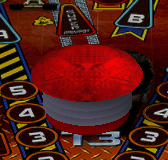
@ Vorador

I have copy the complete bumper to look.

The bumper is not a animation bumper.


#68 GRONI

GRONI

    Pinball Recreator

  • VIP
  • 1,071 posts
  • Location:Germany

  • Flag: Germany

  • Favorite Pinball: TWD - LOTR - TSPP - POTC - AFM


Posted 01 October 2009 - 11:26 PM

QUOTE (gordon @ Oct 1 2009, 11:18 PM) <{POST_SNAPBACK}>
@ Vorador

I have copy the complete bumper to look.

The bumper is not a animation bumper.


You made a Mistake. When you copy an object, and paste it on the table, the Material get standard names. For example: Ring1a turns to Wall1 after coping. So the script have no Wall1 to animate the sling. So with the way you did that, the three rings that makes the Animation, are all visible at the same time.


QUOTE (Noah Fentz @ Oct 1 2009, 11:04 PM) <{POST_SNAPBACK}>
Hey, GRONI.

The table looks and plays very well, but there's one thing that bothers me...

When hitting the outside loop on the right and it comes around down the left, it hits the back of the left target bank. Shouldn't it return to the left flipper without hitting the target?


oh ok, I didn´t noticed that before.

I have to do an update, to fix some errors like Bumper Animation, and some position corrections.
And then I will fix this too

My current VPX Tables I am working on:


Attack from Mars/Finished - The Walking Dead Pro/90% - The Lord of the Rings/75% - Family Guy/90% - The Simpsons Pinball Party/15%


#69 billyrjse

billyrjse

    Pinball Fan

  • Members
  • PipPipPipPip
  • 646 posts
  • Location:Brazil

  • Flag: Brazil

  • Favorite Pinball: Cavaleiro negro, Medieval Madness, AFM, Elvira Scared Stiff

Posted 06 October 2009 - 01:53 PM

Groni,

I just want to praise your work. Excellent!! I love playing your tables. The gameplay of them is fantastic. You've found the right point. Pure adrenaline. I play all the time trying to break my own record. Good difficulty makes the table very interesting and closer to a real machine, in my opinion. In addition to the beautiful visual and sounds. Congratulations and thank you!!
Worship.gif

Edited by billyrjse, 06 October 2009 - 01:54 PM.


Big Thanks to my friend Hassanchop for this very nice dmd.

#70 Noah Fentz

Noah Fentz

    'Rasslin' Fan

  • VPF Administrator
  • 12,271 posts
  • Location:South Lyon, MI

  • Flag: United States of America

  • Favorite Pinball: Whitewater

  • PS3 Gamer Tag: noahfentz


Contributor

Posted 06 October 2009 - 02:01 PM

QUOTE (Noah Fentz @ Oct 1 2009, 07:04 PM) <{POST_SNAPBACK}>
Hey, GRONI.

The table looks and plays very well, but there's one thing that bothers me...

When hitting the outside loop on the right and it comes around down the left, it hits the back of the left target bank. Shouldn't it return to the left flipper without hitting the target?


I played this over the weekend, and my suspicions were correct. It returns to the left flipper from the left loop.

Just thought you'd like to know.

IdleReel.gif RumbleDMD.jpg HS2-DMD.jpg SBM.jpg ww_logo.jpg EK.jpg

 
T2.jpg Sorcerer.jpg Breakshot.jpg Firepower.jpg GorGar.jpg StarTrek.jpg


My Photobucket Resources
Whether You Believe You Can, Or You Can't, You Are Right." - Henry Ford
The future of pinball lives, it just needs to be nurtured!
If you're here to stab me in the back, you're going to have to get in line.


#71 kaczor

kaczor

    Neophyte

  • Members
  • Pip
  • 1 posts

  • Flag: ---------

  • Favorite Pinball: Terminator 2

Posted 06 October 2009 - 08:50 PM

http://img35.imagesh...erminatoru.jpg/
i have this problem with heads and lamps. i have ati radeon. in table megapin but in table jp i dont have any problem.

#72 mars007

mars007

    Enthusiast

  • Members
  • PipPipPip
  • 165 posts
  • Location:Croatia

  • Flag: Croatia

  • Favorite Pinball: Terminator 2

Posted 06 October 2009 - 09:03 PM

Download this archive with this link below ....
http://vpforums.org/...a...post&id=398
Then unzip archive and start Hardware Render Key Off, and then go play Terminator 3 - Megapin - V.1.1 - VP9
Light table and stability will be ok.
For me it works.
drinks.gif

#73 Silvertree

Silvertree

    Neophyte

  • Members
  • Pip
  • 2 posts

  • Flag: ---------

  • Favorite Pinball: Attack from Mars

Posted 08 November 2009 - 01:13 AM

Groni, this is a gorgeous recreation.

The table itself makes me angry with all the right side drains and the ramps I can't seem to master but your work on this is outstanding. Thank you.

#74 chumpy

chumpy

    Neophyte

  • Members
  • Pip
  • 2 posts

  • Flag: United States of America

  • Favorite Pinball: Terminator 2

Posted 20 November 2009 - 03:56 AM

The middle and right bonus rollovers do no light correctly for me in VP 9.0.3. More specifically, the middle never lights and the right lights briefly before appearing unlit. Otherwise, this is a nice and enoyable table (high score ~111M smile.gif)

#75 destruk

destruk

    VPF Veteran

  • VPF Staff
  • 6,338 posts
  • Location:Colorado Springs, CO

  • Flag: United States of America

  • Favorite Pinball: Ultrapin!


Posted 20 November 2009 - 05:47 AM

QUOTE (chumpy @ Nov 19 2009, 08:56 PM) <{POST_SNAPBACK}>
The middle and right bonus rollovers do no light correctly for me in VP 9.0.3. More specifically, the middle never lights and the right lights briefly before appearing unlit. Otherwise, this is a nice and enoyable table (high score ~111M smile.gif)


Does it light in the rom selftest diagnostics? Press 7, 7, 7, 8, 8, 1, 1, and use 1 to advance through the lamps. The top rollovers are 38/39/40 and those work fine for me here both in the diagnostic and while playing the game.

Build a fire, vipers love the heat.


#76 chumpy

chumpy

    Neophyte

  • Members
  • Pip
  • 2 posts

  • Flag: United States of America

  • Favorite Pinball: Terminator 2

Posted 20 November 2009 - 06:45 PM

Redownloading the table corrected the "problem". Sorry to post about something so easily fixed. It was probably somehow caused by migrating everything from 9.0.2.

#77 Pinballman

Pinballman

    Enthusiast

  • Gold Supporter
  • 304 posts

  • Flag: ---------

  • Favorite Pinball: Wizard of Oz

Posted 22 November 2009 - 12:37 AM

When I try to play the table, there is no lettering on playfield lights or backglass. I'm sure I'm missing something, but can't figure out what it is. Any help would be very appreciated! Thank you

#78 destruk

destruk

    VPF Veteran

  • VPF Staff
  • 6,338 posts
  • Location:Colorado Springs, CO

  • Flag: United States of America

  • Favorite Pinball: Ultrapin!


Posted 22 November 2009 - 01:59 AM

QUOTE (Pinballman @ Nov 21 2009, 05:37 PM) <{POST_SNAPBACK}>
When I try to play the table, there is no lettering on playfield lights or backglass. I'm sure I'm missing something, but can't figure out what it is. Any help would be very appreciated! Thank you


You'll need to toggle the hardware render setting on the table on your system.

Build a fire, vipers love the heat.


#79 Pinballman

Pinballman

    Enthusiast

  • Gold Supporter
  • 304 posts

  • Flag: ---------

  • Favorite Pinball: Wizard of Oz

Posted 26 November 2009 - 02:30 AM

QUOTE (destruk @ Nov 21 2009, 09:59 PM) <{POST_SNAPBACK}>
QUOTE (Pinballman @ Nov 21 2009, 05:37 PM) <{POST_SNAPBACK}>
When I try to play the table, there is no lettering on playfield lights or backglass. I'm sure I'm missing something, but can't figure out what it is. Any help would be very appreciated! Thank you


You'll need to toggle the hardware render setting on the table on your system.


Probably a dumb question, but how do you do that? I have a Nvidia 8800 - can't seem to figure it out. Thanks for any assistance!

#80 destruk

destruk

    VPF Veteran

  • VPF Staff
  • 6,338 posts
  • Location:Colorado Springs, CO

  • Flag: United States of America

  • Favorite Pinball: Ultrapin!


Posted 26 November 2009 - 03:21 AM

Open the table in the editor, click options on the left pane, click the table surface to show the table options on the right side, check or uncheck (toggle setting) for hardware render, and resave it. Then close the table and reopen it and play.

Build a fire, vipers love the heat.















