Jump to content


Photo

90's Workshop: Buildin' The Table


  • Please log in to reply
369 replies to this topic

#61 neoblood

neoblood

    Enthusiast

  • Charter Member
  • 381 posts
  • Location:USA

  • Flag: United States of America

  • Favorite Pinball: bop

Posted 02 May 2009 - 03:18 AM

QUOTE (wtiger @ May 1 2009, 10:56 PM) <{POST_SNAPBACK}>
I do too, hopefully the others do as well. I will possibly post tomorrow with the start of the actual table in VP.


That'll be great, I have most of the weekend free. So either I'll work on this or my other mod for a while. You're doing a fantastic job man really. That video was awesome, made it so much easier.
A Pinball a day takes the boredom away

#62 1up

1up

    Enthusiast

  • Charter Member
  • 192 posts
  • Location:Adelaide, Australia

  • Flag: Australia

  • Favorite Pinball: monopoly

Posted 02 May 2009 - 05:20 AM

QUOTE (neoblood @ May 2 2009, 01:57 AM) <{POST_SNAPBACK}>
I like the Wide single view like Jpg-pins, but if I ever get moving on a pinball cab I'll appreciate the 16x9's 8 )

QUOTE (wtiger @ May 2 2009, 03:56 AM) <{POST_SNAPBACK}>
I do too, hopefully the others do as well. I will possibly post tomorrow with the start of the actual table in VP.


i also like the wide view angle (JP style). and a 16:9 would be good also as i'm shortly building a cab.

#63 wtiger

wtiger

    Pinball Fan

  • VIP
  • 1,148 posts
  • Location:Los Angeles, CA

  • Flag: United States of America

  • Favorite Pinball: Junkyard


Contributor

Posted 02 May 2009 - 03:58 PM

QUOTE (neoblood @ May 1 2009, 08:18 PM) <{POST_SNAPBACK}>
That'll be great, I have most of the weekend free. So either I'll work on this or my other mod for a while. You're doing a fantastic job man really. That video was awesome, made it so much easier.


Thanks. I appreciate that!

As for videos, I wouldn't mind making some more. I will see if I can implement some more for the the table building process.

I'm going out for a bit but when I come back we will start the table in VP. I'm going to post the resources we will need (images and VP file with the posts we can use) in case there's someone out there that is having trouble or whatever. If you can though, everyone who is following this should try all of this on their own.


#64 wtiger

wtiger

    Pinball Fan

  • VIP
  • 1,148 posts
  • Location:Los Angeles, CA

  • Flag: United States of America

  • Favorite Pinball: Junkyard


Contributor

Posted 03 May 2009 - 01:41 AM

Lets start building the VP table.

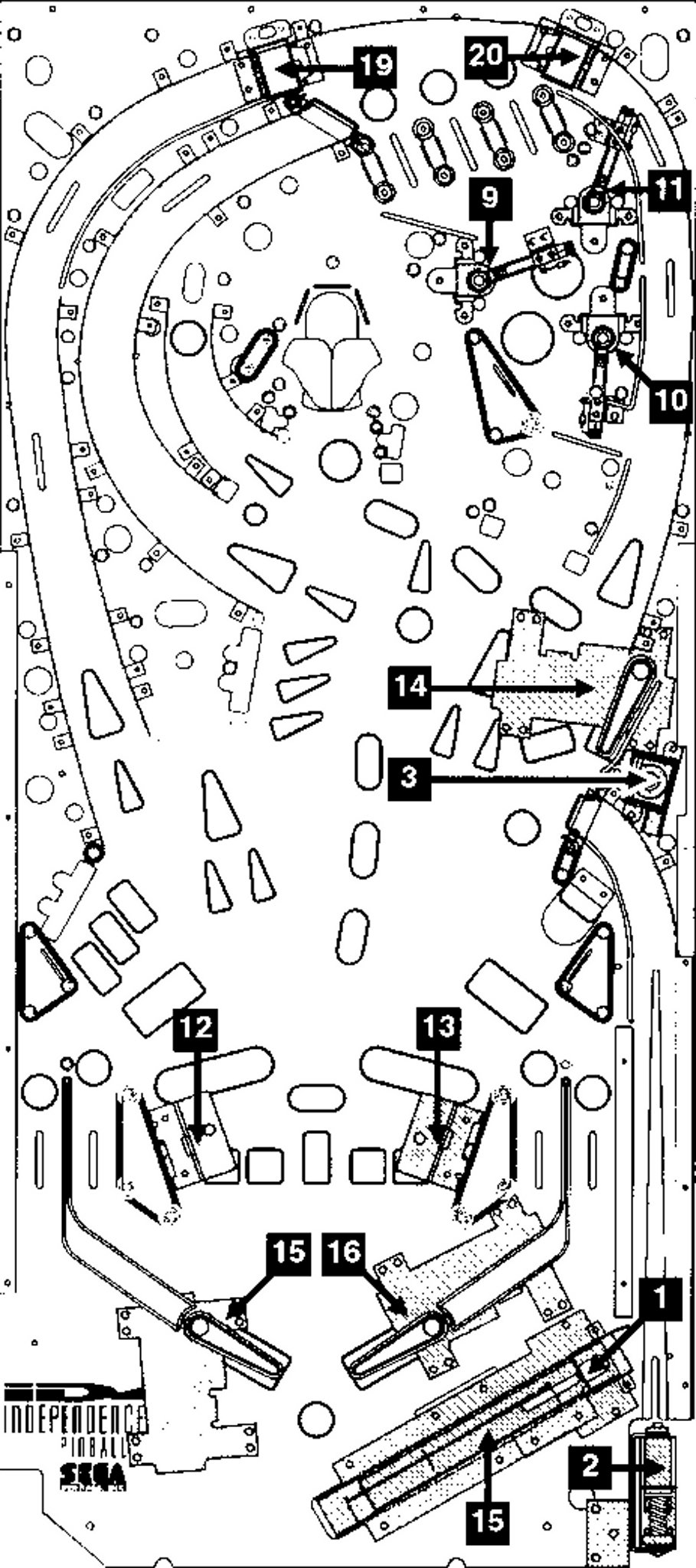
To start out, we need to determine the table size in VP. This particular pinball machine playfield is about 20.25" x 46" (thanks Destruk). I found some old notes that one VP unit is equal to .53975 mm. If we convert our playfield dimensions from inches to mm we come up with 514.35 mm x 1168.4 mm. If we then divide both by .53975 we will get our dimensions in VP units. This comes out to 952.94 x 2164.70. Since we are using VP9 we actually want to go a little bigger to make sure that the ball will have plenty of room in all the lanes it needs to travel through. We will use VP dimensions of 1000 x 2300 (again, thanks Destruk).

Go ahead and start up Visual Pinball and create a new table (File, New). Make sure the options button on the left is on so we have the options visible on the right side of the screen. If you made some posts go ahead and load the table you saved them in as well.

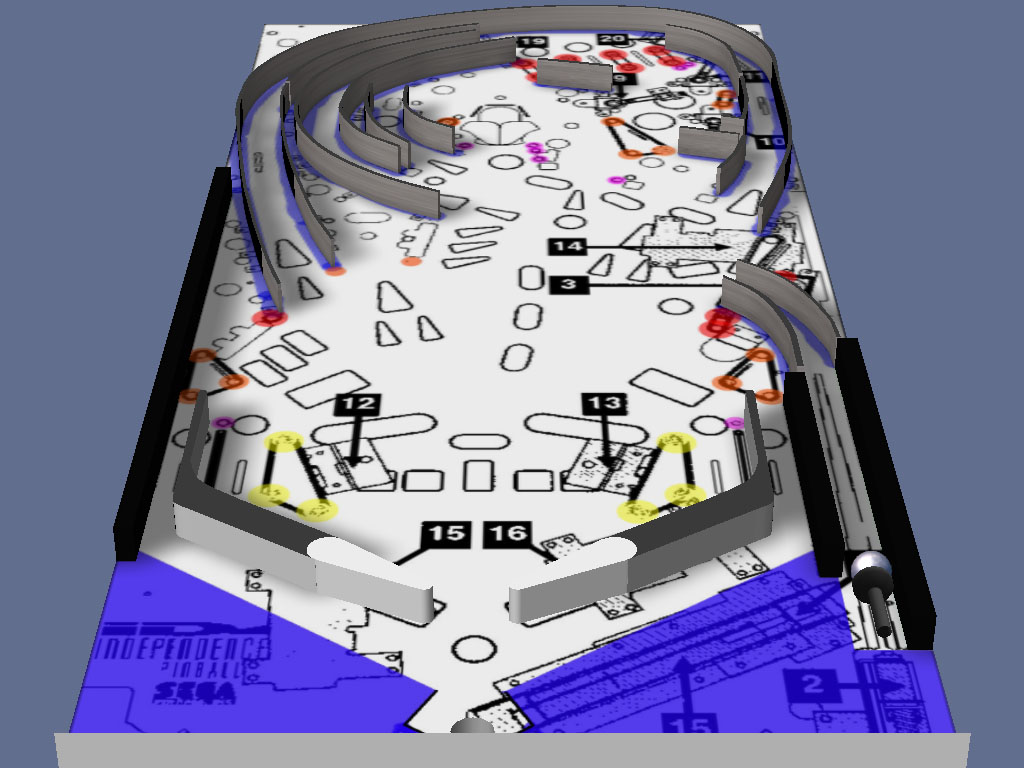
I made a color coded guide for placement of the various posts and guides. Go ahead and download it below and import it in (Table, Image Manager, Import):

ID-guide-colors.jpg


In case anyone needs the playfield image and the original guide image, download them below:

ID-playfield.jpg


ID-guide.jpg without the colors


For this exercise you will also need a metal texture for the sides of the metal guides. Download it below:

Metal.jpg


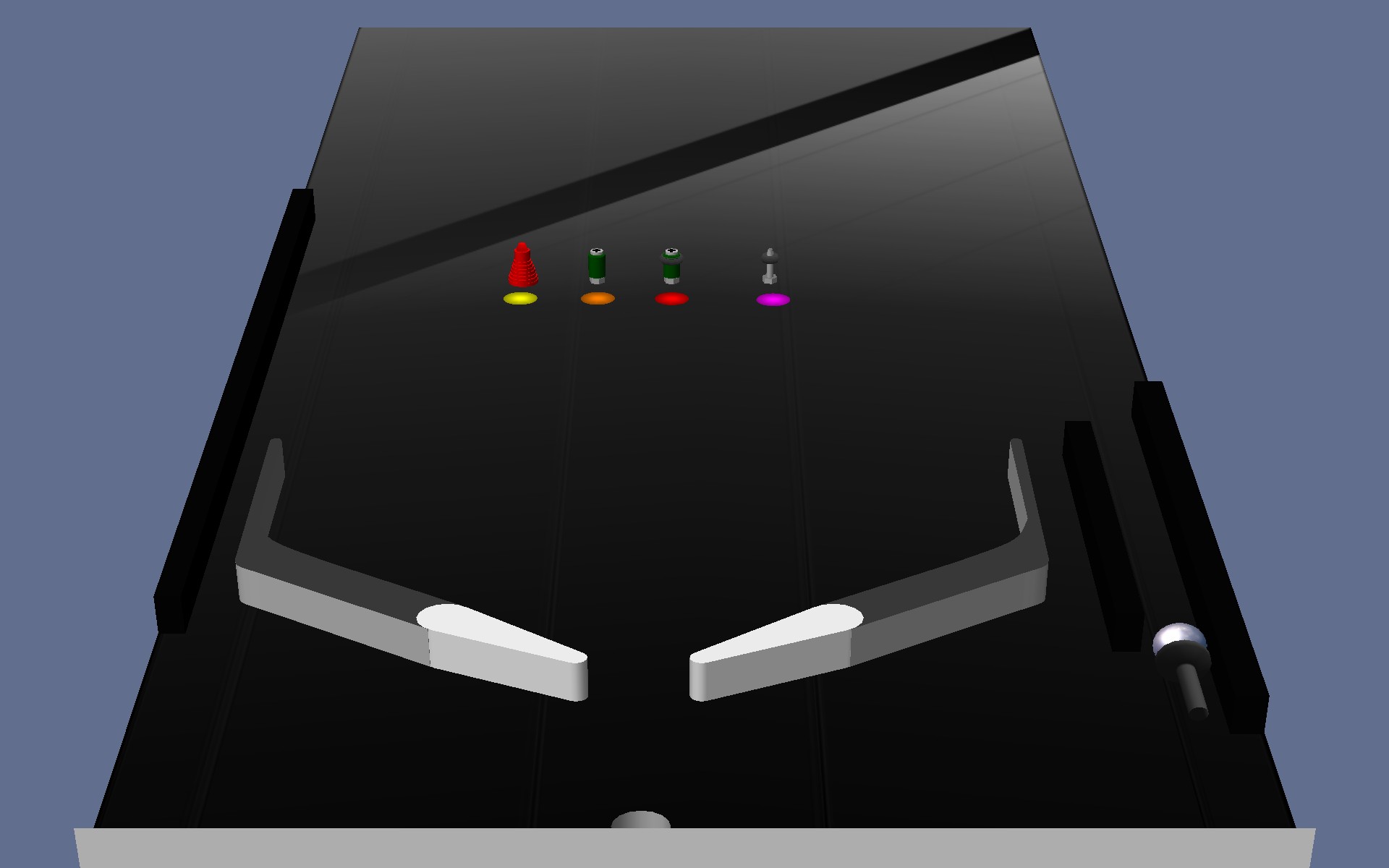
At the bottom of this post is a zipped VP table file with the posts that will be necessary to build this table in case anyone needs them. I also have an image showing them with a colored light below each one. The color of the lights (yellow, red, orange, purple) match with the colors in the ID-Guide-colors above. Download this and load it in if you don’t have posts that you created yourself.

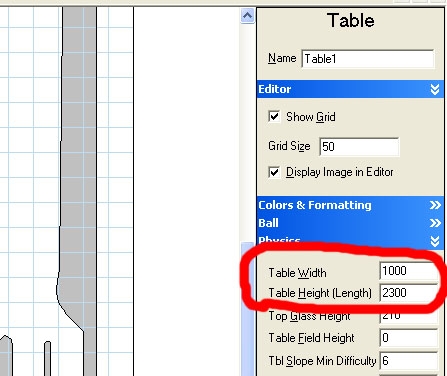
The first thing we want to do is under the Physics section on the right side of the screen set the table width to 1000 (it should already be set at that, but just in case it’s not set it) and the height to 2300.


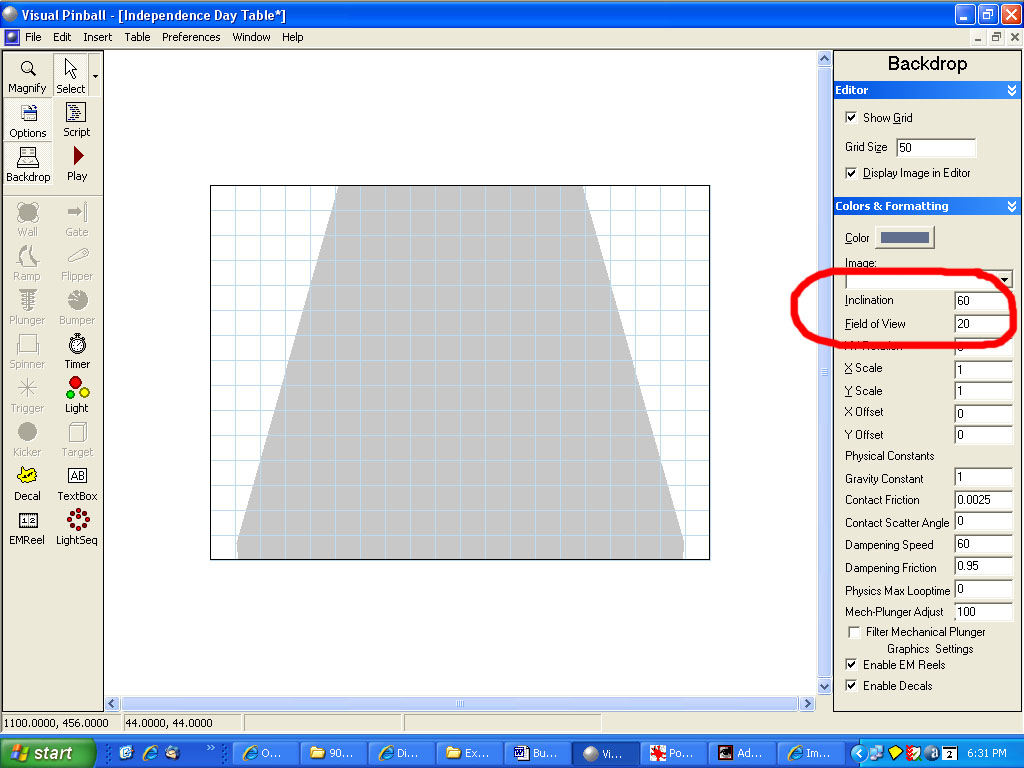
Switch over to the Backdrop (click on the Backdrop button on the left side of the screen). Under Colors and Formatting, enter 60 for Inclination and 20 for Field of View. Delete the TextBox object. Switch back over to our playfield by clicking back on the Backdrop button.


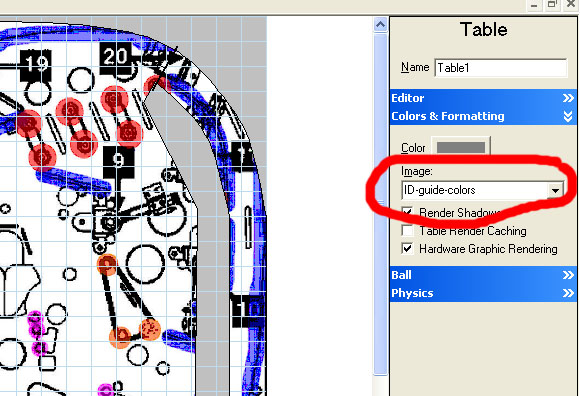
Under Colors & Formatting, select the ID-guide-colors for our image:


The default table has 14 objects. Go ahead and delete the Outer Wall, Gate, LeftInlane trigger, LeftOutlane trigger, RightInlane trigger, RightOutlane trigger, leftSlingshot, rightSlingshot.

Click on the Plunger rectangle object and set the X position to 940 and the Y position to 2062.

Select the LeftFlipper, RightFlipper, LeftLane and RightLane (make a selection rectangle around all four objects, or click on one, hold down the shift key, click on the next one still holding the shift key then click on the third and finally the fourth object. Let go of the shift key). Right click inside the gray area of one of the objects and select Translate. Enter 170 in the Y. This should move then into approximately the right location.


Grab the drain object and move it to X position 455 and Y position 2236.

There are three tall rectangle pieces colored in light green on our ID-guide-color image (one on each side of the shooter lane and one on the left side). Go ahead and work one at a time. Add a wall object near top and left edge of the rightmost one. You can move the wall object one unit at a time by hitting the left or right arrow key on the keyboard as well ad the up and down arrows (this is to move objects precisely versus using the mouse to position objects). With the wall object still selected, click on the upper right control point, hold down the shift key and click on the bottom right control point. Both are now selected. Now right slick on one of the selected control points and left click on Translate. Enter -71 in the X value. This will position them into the right position. You could have also used the left arrow key on the keyboard to move both of them one unit at a time, but you’ have to hit it 71 times (or hold it down and let go when they are in the right spot). Left click on the bottom left control point, hold the shift key and left click on the bottom right control point. Right click on one of them and select Translate. Enter 580 in the Y value. Set the top and bottom colors to black.


Go ahead and add the other objects where the green is from our guide using the same process. When you are all done you table should look like this:


Here's the VP table with the posts necessary:

Attached Files


#65 neoblood

neoblood

    Enthusiast

  • Charter Member
  • 381 posts
  • Location:USA

  • Flag: United States of America

  • Favorite Pinball: bop

Posted 03 May 2009 - 03:25 PM

QUOTE (wtiger @ May 2 2009, 09:41 PM) <{POST_SNAPBACK}>
I found some old notes that one VP unit is equal to .53975 mm. If we convert our playfield dimensions from inches to mm we come up with 514.35 mm x 1168.4 mm. If we then divide both by .53975 we will get our dimensions in VP units.


This is some need to know info. smile.gif We should get Noah or someone to sticky a topic with this kind of stuff in a general builders information post. That way even a closet table builder can have the tools they need to make a great table.
A Pinball a day takes the boredom away

#66 TheMcD

TheMcD

    Pinball Wizard

  • VPF Staff
  • 2,461 posts
  • Location:Bavaria

  • Flag: Germany

  • Favorite Pinball: Frankenstein, Safecracker, Big Hurt, Four Horsemen, Tommy, X-Files

Contributor

Posted 03 May 2009 - 03:31 PM

QUOTE (neoblood @ May 3 2009, 05:25 PM) <{POST_SNAPBACK}>
This is some need to know info. smile.gif We should get Noah or someone to sticky a topic with this kind of stuff in a general builders information post. That way even a closet table builder can have the tools they need to make a great table.


You go ahead and make/find that topic and tell me about it. Then I'll get it stickied, no problem.

The McD

VPF's resident pinball music fanatic.

The McD's Pinball Music Emporium: YouTube /// MediaFire (old tracks) /// Mega (new tracks)


#67 neoblood

neoblood

    Enthusiast

  • Charter Member
  • 381 posts
  • Location:USA

  • Flag: United States of America

  • Favorite Pinball: bop

Posted 03 May 2009 - 06:16 PM

TY, I'm just learning the program over the last couple weeks but as I do more and more I can get a sense of things that are best explained by the veterans. Wtiger, JP, Scapino, Groni, Destruk, and the others that are around from the original forums may have some information saved or learned through experience that may cut the growing pains down for other new guys like myself. I will attempt to keep track of information that helps jump the hurdles and keep an eye out for other posts related to this topic. If anyone who is in the know reads this and has any technical information that isn't exactly self-explained please drop a post someplace. I wouldn't even know what to ask for yet but maybe in the course of building this table some of the things we will need will naturally be brought out.

A Pinball a day takes the boredom away

#68 wtiger

wtiger

    Pinball Fan

  • VIP
  • 1,148 posts
  • Location:Los Angeles, CA

  • Flag: United States of America

  • Favorite Pinball: Junkyard


Contributor

Posted 03 May 2009 - 10:09 PM

We are now ready to build the metal guides.

We’ll start with one that’s towards the top.


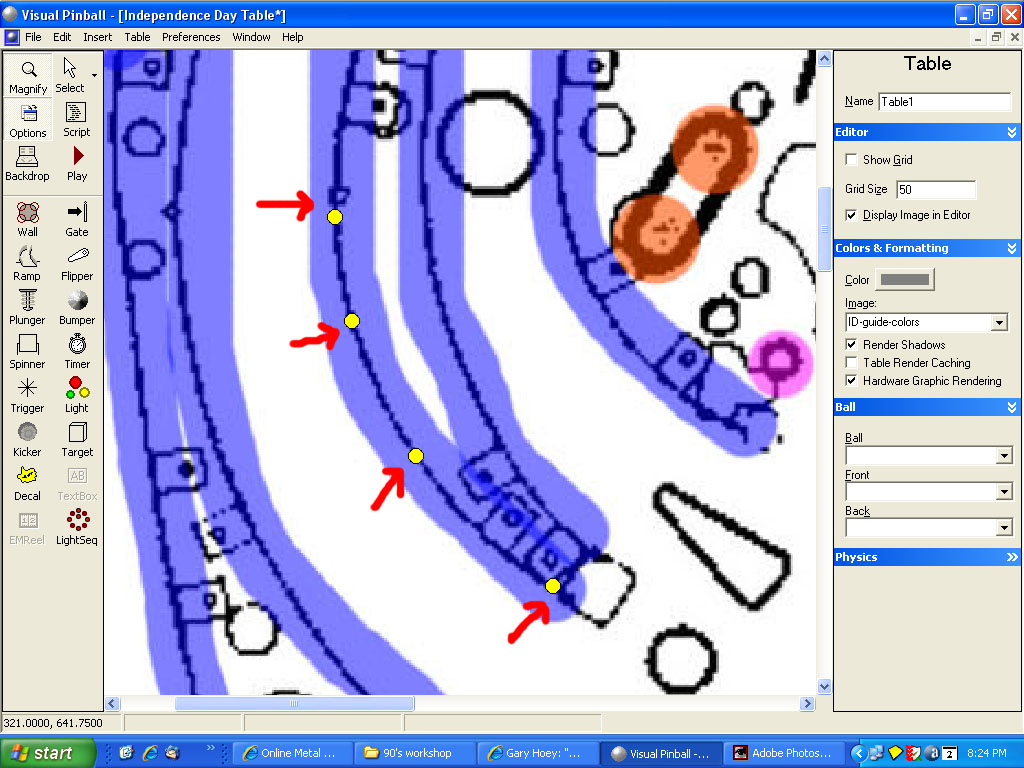
Add a light object to your table and set the radius to 4. Move it to the bottom o the guide we are going to build. Now copy and paste it up a little on the guide line. Your screen should look something like this:


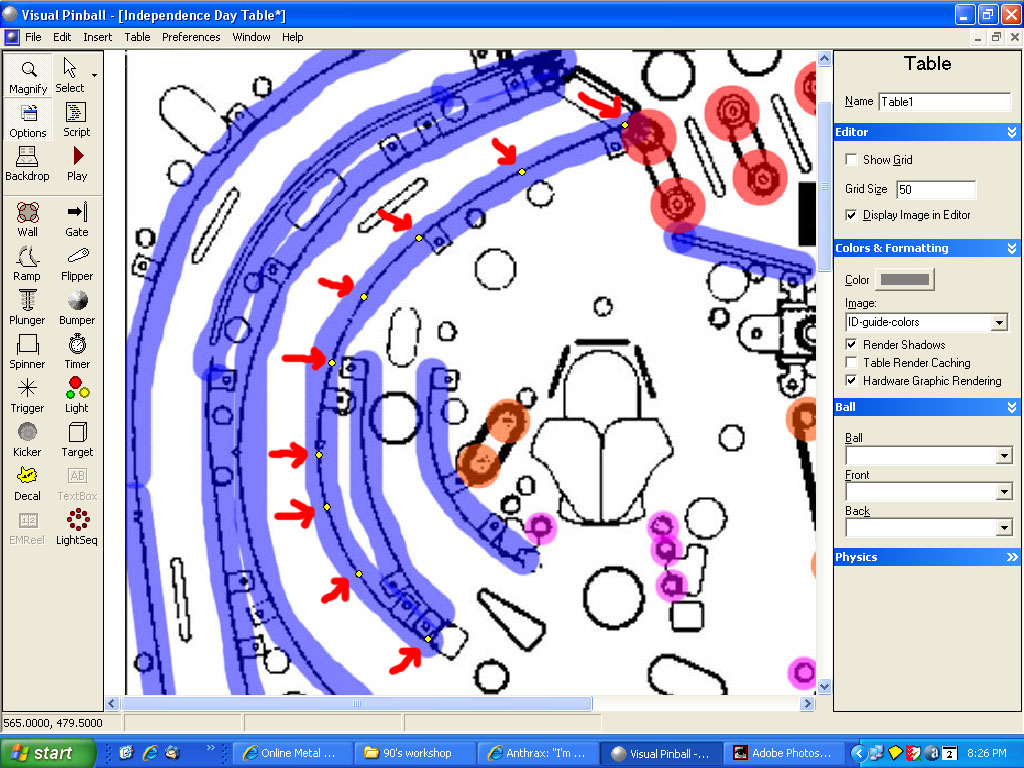
When you are all done, it should look like this:


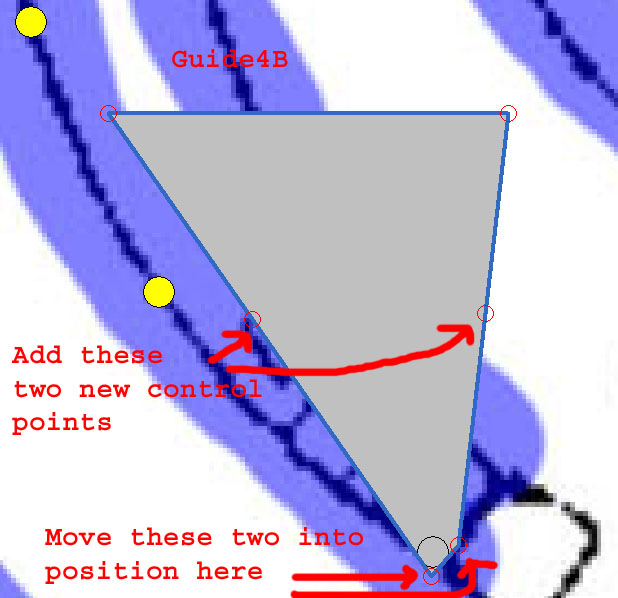
Add a wall object at the lower portion of the guide we are going to build. Under the State category (on the right side of the screen) change the elasticity from .3 to .1


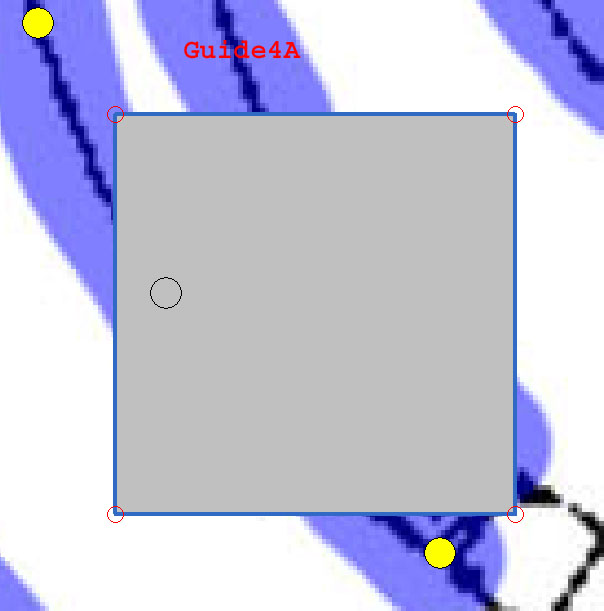
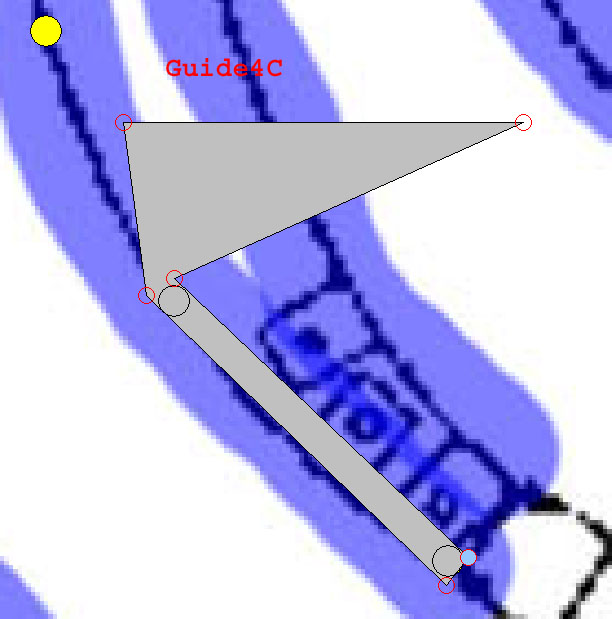
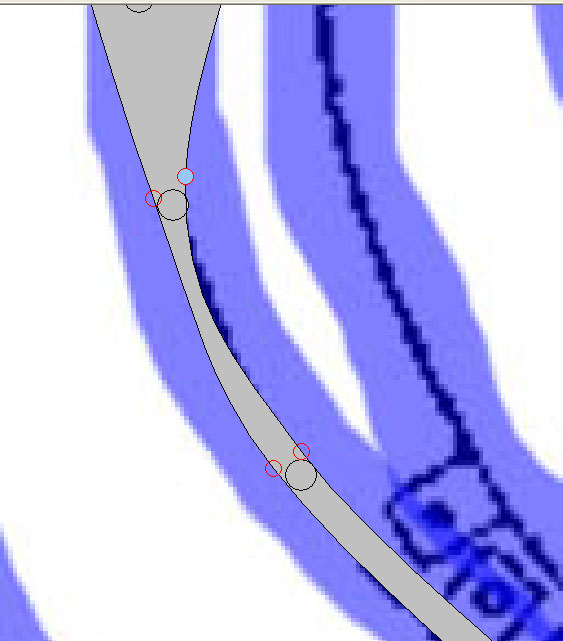
Grab the two bottom points and move them into position on the left and right side of the lower light object. Right click on the left edge of our wall (in the center from top to bottom) and add a point. Do the same for the right edge.


Now move the two points you just added to the left and right edge of the next light object


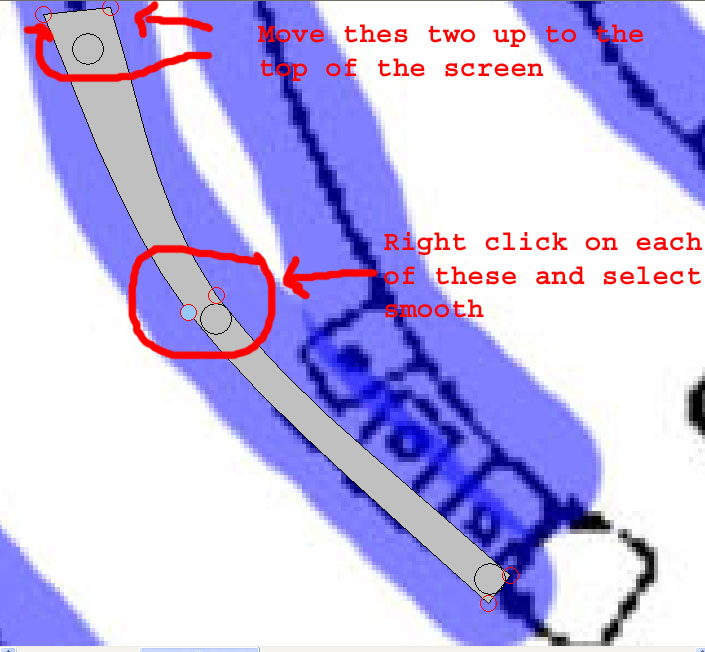
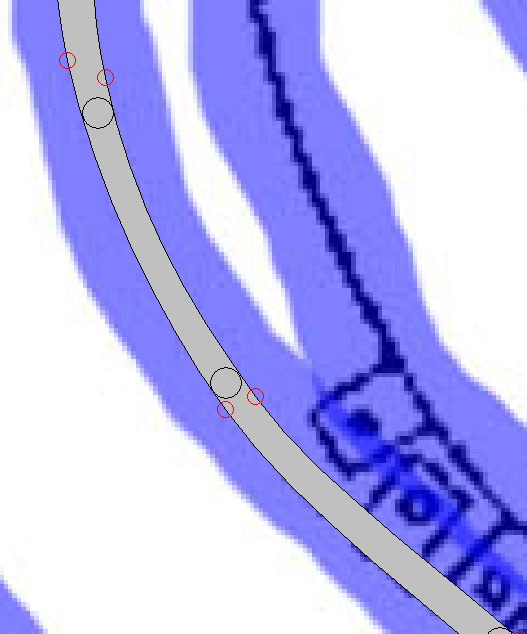
Right click on one of the two control points we just added and select smooth. Do the same for the other one. Move the top two control points up towards the top of the screen.


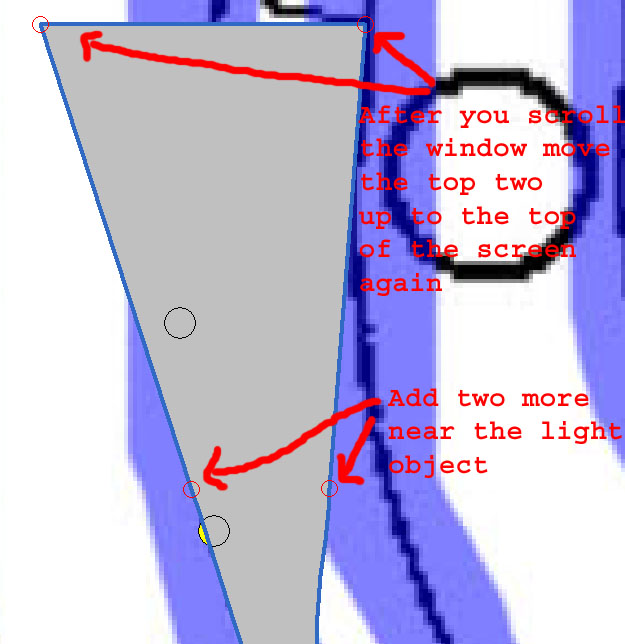
Scroll the window and move the top two control points up to the top of the screen (I sometimes move them so they are far apart just so it’s a little easier to add the new points below since our object will be a little wider). Add two more control points near the next light object in line.


Right click on the two we just added (one at a time) and select smooth. Move them into position on the outer edge of our light object. Now scroll down a bit so we can also see the light object just below. Look what happened. Not too good.


To fix this, we must move the control points up or down along our path; so we maintain proper thickness throughout. Now it looks a bit better (also, if you don’t have the top most control points quite as far apart as I had them it will help out too).


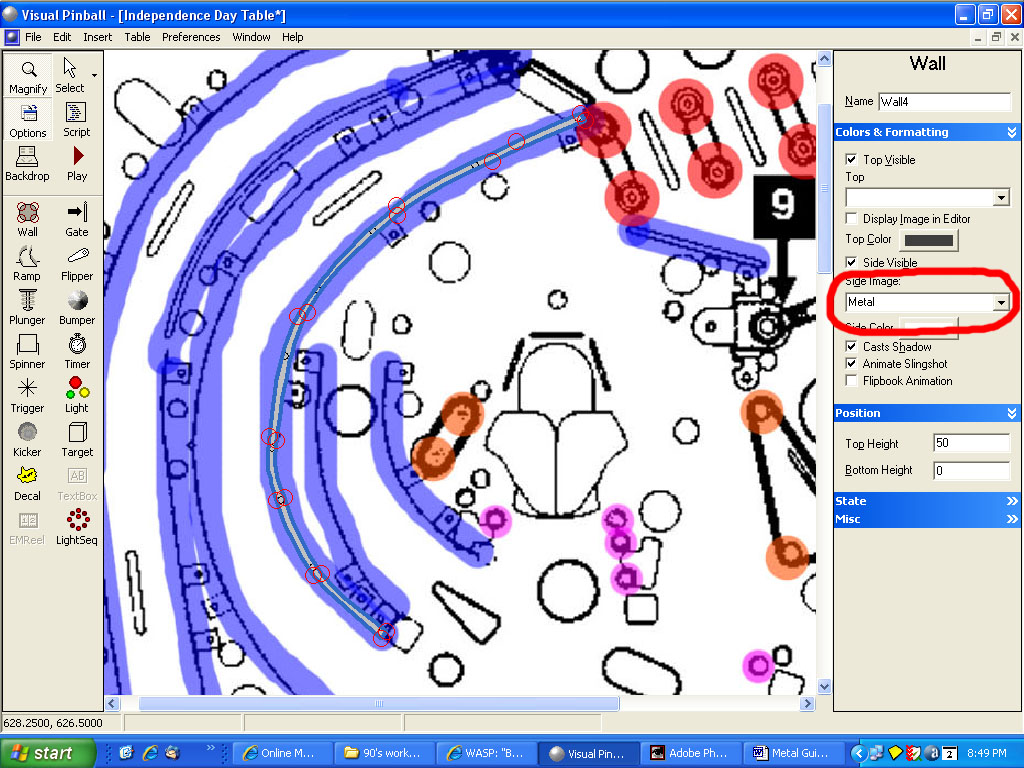
Now continue the process until you are at the top end. With your new guide object selected, go to the Colors & Formatting on the right side of the screen and under the Side Image select our Metal image.


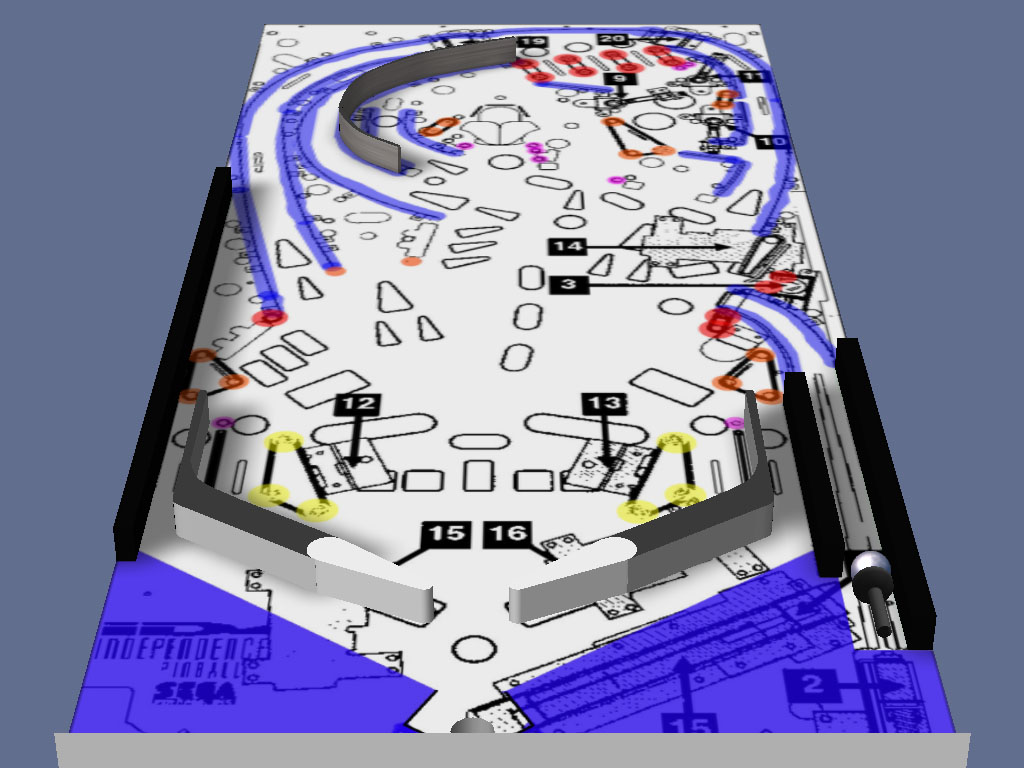
If you now click on the play button, you table should look like this:


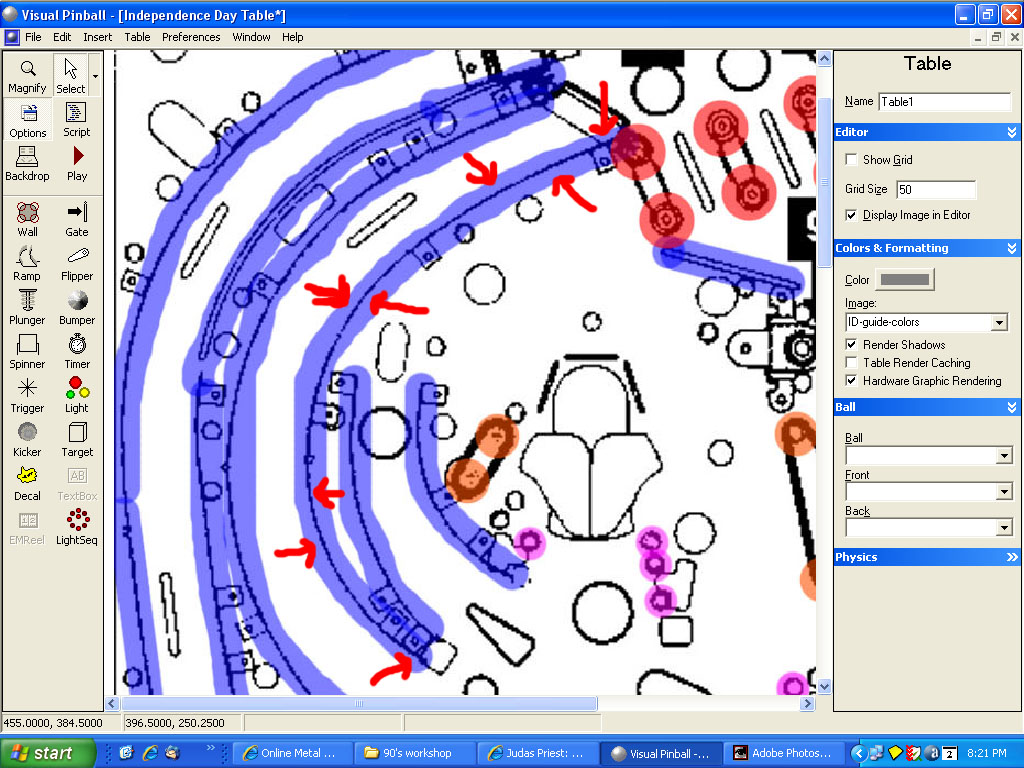
Continue this process for the rest of the guides marked in light blue/purple (not the bottom apron though).

When you are all done, your table should look like this:


Edited by wtiger, 03 May 2009 - 10:10 PM.


#69 neoblood

neoblood

    Enthusiast

  • Charter Member
  • 381 posts
  • Location:USA

  • Flag: United States of America

  • Favorite Pinball: bop

Posted 04 May 2009 - 12:17 AM

I kind of hit a snag with VP9. If I have hardware rendering on I can see the playfield pic without shading issues but I can't see the rendered flippers. If I have hardware rendering off the playfield is screwed up but I can see the flippers. Must be a video card driver related issue. I'm going to try a few drivers and see if it helps. Let me know if you have any other solutions to try besides the registry key.


I'll try the newer 182.50 nvidia drivers and see what happens.
A Pinball a day takes the boredom away

#70 wtiger

wtiger

    Pinball Fan

  • VIP
  • 1,148 posts
  • Location:Los Angeles, CA

  • Flag: United States of America

  • Favorite Pinball: Junkyard


Contributor

Posted 04 May 2009 - 04:58 AM

QUOTE (neoblood @ May 3 2009, 05:17 PM) <{POST_SNAPBACK}>
I kind of hit a snag with VP9. If I have hardware rendering on I can see the playfield pic without shading issues but I can't see the rendered flippers. If I have hardware rendering off the playfield is screwed up but I can see the flippers. Must be a video card driver related issue. I'm going to try a few drivers and see if it helps. Let me know if you have any other solutions to try besides the registry key.


I'll try the newer 182.50 nvidia drivers and see what happens.


I don't know much about fixing these kinds of problems. I think Destruk would be the one to give suggestions. I'm not sure if would do anything for you, but make sure you turn hardware rendering ON and save the table. Now close the table and re-open it up. Also, try entering a value in the rubber thickness field for the flippers.

I am using an Nvidia 8800GT (my version in device manager is showing 6.14.11.7516). I don't have the invisible flipper problem now (it seems like I did when VP9 first came out) but if I turn OFF hardware rendering then I get the playfield image shadowing and transparent ramps don't work either.

Edited by wtiger, 04 May 2009 - 04:58 AM.


#71 1up

1up

    Enthusiast

  • Charter Member
  • 192 posts
  • Location:Adelaide, Australia

  • Flag: Australia

  • Favorite Pinball: monopoly

Posted 04 May 2009 - 02:58 PM

QUOTE (neoblood @ May 4 2009, 01:17 AM) <{POST_SNAPBACK}>
I kind of hit a snag with VP9. If I have hardware rendering on I can see the playfield pic without shading issues but I can't see the rendered flippers. If I have hardware rendering off the playfield is screwed up but I can see the flippers. Must be a video card driver related issue. I'm going to try a few drivers and see if it helps. Let me know if you have any other solutions to try besides the registry key.


I'll try the newer 182.50 nvidia drivers and see what happens.


as wtiger said, try hardware render on, save the table, close VP completely and restart it. hopefully that'll do.

#72 1up

1up

    Enthusiast

  • Charter Member
  • 192 posts
  • Location:Adelaide, Australia

  • Flag: Australia

  • Favorite Pinball: monopoly

Posted 04 May 2009 - 03:11 PM

since the last few lessons, there's a few questions i've been meaning to ask...

1. is there a rule of thumb about which playfield image to use from the manuals to measure and get the correct playfield size?

2. is there a list of all/most playfield width & height measurements or even a place to get this info? maybe someone has collected a list they'd be willing to share. this would be useful for any authors trying to do a pinball remake.

3. why does the playfield have to be saved in JPG format and not BMP or any other format? what would happen? and does any decal images have to be in JPG or can they be in BMP?


#73 wtiger

wtiger

    Pinball Fan

  • VIP
  • 1,148 posts
  • Location:Los Angeles, CA

  • Flag: United States of America

  • Favorite Pinball: Junkyard


Contributor

Posted 05 May 2009 - 03:36 AM

QUOTE (1up @ May 4 2009, 08:11 AM) <{POST_SNAPBACK}>
since the last few lessons, there's a few questions i've been meaning to ask...

1. is there a rule of thumb about which playfield image to use from the manuals to measure and get the correct playfield size?

2. is there a list of all/most playfield width & height measurements or even a place to get this info? maybe someone has collected a list they'd be willing to share. this would be useful for any authors trying to do a pinball remake.

3. why does the playfield have to be saved in JPG format and not BMP or any other format? what would happen? and does any decal images have to be in JPG or can they be in BMP?


Answers as best I know them:

1. From what I remember from various posts the playfield images in manuals are not very accurate. I've never really compared several, so my guess would be it doesn't matter.

2. I have a text file from the old forum that has this information. See below.

3. A JPG image is a lot smaller than a BMP so your file size will be different. I kind of seem to remember something Destruk posted about possibly BMP files taking up less video card memory, but I'm not sure if I'm remembering correctly. For decal images if you want to have any transparency you need to save it in BMP. BMP is not compressed so your colors won't be changed when you save the file. JPG uses compression and is a a lossy format so you will lose some quality and if you painted a section with pure white so you could set the transparency to white in VP, after you save the file your white may not be pure white anymore (it may look to you as white, but the hex value will be slightly off) and therefore VP won't know that it is white and the transparency won't work.


Here's the info I have on playfield sizes. I'm not sure if the first part is from Scapino or someone else:

I did a little experiment, made a table 1000 units wide, had a ball roll to the flat bottom, copied to photoshop, and duplicated the balls from edge to edge along the bottom, and I came up with, based on the known fact that pinballs are 1 1/16" in diameter...

1000 VP units = 21.25" or 539.75 mm

therefore...

1 vp unit = .53975 mm

therefore...

Early Bally Wide body table playfield i.e. future spa is....

1167.2 VP Units Wide x 1908.3 VP units long.

Of coarse I could be wrong.

=========================================================
EMs

Bally 70s EM - standard = 20.25" x 41.00" = 952 x 1927 vpus = 506 x 1024 bestpic size
G 70s EM - standard = 20.25" x 41.00" = 952 x 1927 vpus = 506 x 1024 bestpic size


Early SSs

*G System 1 - standard = 20.25" x 42.00" = 952 x 1974 vpus = 494 x 1024 bestpic size
Early SS Stern - widebody = 23.875" x 45.00" = 1122 x 2115 vpus = 543 x 1024 bestpic size
Zaccaria - standard SS - 20.25" x 42.00" = 952 x 1974 vpus = 494 x 1024 bestpic size
*Pre WMS Bally - standard = 20.25" x 42.00" = 952 x 1974 vpus = 494 x 1024 bestpic size
*Pre WMS Bally - widebody = 26.75" x 40.50" = 1257 x 1904 vpus = 676 x 1024 bestpic size
*WMS System 1-11 - standard = 20.25" x 42.00" = 952 x 1974 vpus = 494 x 1024 bestpic size
WMS System 1-11 - widebody = 27.00" x 42.00" = 1269 x 1974 vpus = 658 x 1024 bestpic size
*Atari - widebody = 27.00" x 45.00" = 1269 x 2115 vpus = 614 x 1024 bestpic size
*G System 80 - standard = 23.75" x 46.50" = 1116 x 2186 vpus = 524 x 1024 bestpic size
*G System 80 - widebody = 26.75" x 46.50" = 1258 x 2186 vpus = 590 x 1024 bestpic size


Modern SSs

Capcom tables = 20.25" x 46.00" = 952 x 2162 vpus = 451 x 1024 bestpic size
*Data East - standard = 20.25" x 46.00" = 952 x 2162 vpus = 451 x 1024 bestpic size
Data East - widebody = 25.00" x 51.75" = 1175 x 2432 vpus = 494 x 1024 bestpic size
*Safecracker = 16.50" x 41.50" = 776 x 1950 vpus = 408 x 1024 bestpic size
*WPC (through 1987) - standard = 20.50" x 42.00" = 964 x 1974 vpus = 500 x 1024 bestpic size
*WPC (1987 on) - standard = 20.50" x 46.00" = 964 x 2162 vpus = 457 x 1024 bestpic size
**Apparently at least one of these is not like the others.. I measured the Drac PF and it was/is 20.25" x 45.00" = 952 x 2115 vpus = 461 x 1024 bestpic size
*WPC - superpin = 23.25" x 46.00" = 1093 x 2162 vpus = 518 x 1024 bestpic size
*Pin2K tables = 20.50" x 43.00" = 964 x 2021 vpus = 488 x 1024 bestpic size

---------------------------------------------
From WMS site

"Williams' standard playfield length increased from 42" to 46" in 1988"
===========================================================

just remember the ball=50 units=1.0625"=.54054mm and most any dimension should come out fine

===========================================================

Williams Varkon (1982)
24" across x 21" deep!
(Yes, it is wider than it is long. Plays like a cocktail table.)

===========================================================

According to the press info and documentation, the Hercules playfield took up 18 square feet, or 36 by 72 inches.

Actual cabinet size was 39" by 93", and 83" tall.

===========================================================

A few examples from Plumb's size conversion sheet:
-----------------------------------------------------------------
Pre WMS Standard Size Bally: 952 x 1974
Standard Williams through 1987: 964 x 1974
Standard Williams after 1987: 964 x 2162
Super Wide WPC: 1093 x 2162

===========================================================


#74 1up

1up

    Enthusiast

  • Charter Member
  • 192 posts
  • Location:Adelaide, Australia

  • Flag: Australia

  • Favorite Pinball: monopoly

Posted 06 May 2009 - 01:28 PM

wow, thats alot of useful info, especially the table dimensions, thanks wtiger

#75 neoblood

neoblood

    Enthusiast

  • Charter Member
  • 381 posts
  • Location:USA

  • Flag: United States of America

  • Favorite Pinball: bop

Posted 07 May 2009 - 12:10 AM

I installed nvidia vista 32 driver 182.09 and the matching stereoscopic drivers (for my glasses) and the table seems to be loading and displaying fine now. Don't know if the drivers fixed it or not but seems to be working now so I'll be starting back up 8 )
A Pinball a day takes the boredom away

#76 wtiger

wtiger

    Pinball Fan

  • VIP
  • 1,148 posts
  • Location:Los Angeles, CA

  • Flag: United States of America

  • Favorite Pinball: Junkyard


Contributor
Posted 07 May 2009 - 01:52 AM

How long should I wait until I post the next step(s)? I don't want to go too fast for anyone.

#77 neoblood

neoblood

    Enthusiast

  • Charter Member
  • 381 posts
  • Location:USA

  • Flag: United States of America

  • Favorite Pinball: bop

Posted 07 May 2009 - 02:27 AM

I'll be able to catch up ok. I actually did the last step already and then somehow didn't save it lol So next time I have a slot open I'll be able to get it done real quick. In theory tongue.gif
Whenever you feel comfortable with the next step, go ahead and post. I'm up to speed mentally, so I don't think it will take me long. If you want to upload your table for me to cheat with that would be ok too, whatever you guys feel like doing.
A Pinball a day takes the boredom away

#78 1up

1up

    Enthusiast

  • Charter Member
  • 192 posts
  • Location:Adelaide, Australia

  • Flag: Australia

  • Favorite Pinball: monopoly

Posted 07 May 2009 - 02:34 AM

i'm ready for the next step. so whenever you like, thats fine.

#79 neoblood

neoblood

    Enthusiast

  • Charter Member
  • 381 posts
  • Location:USA

  • Flag: United States of America

  • Favorite Pinball: bop

Posted 08 May 2009 - 02:57 AM

I'm all caught up now, everything is functioning nice.

A Pinball a day takes the boredom away

#80 wtiger

wtiger

    Pinball Fan

  • VIP
  • 1,148 posts
  • Location:Los Angeles, CA

  • Flag: United States of America

  • Favorite Pinball: Junkyard


Contributor

Posted 08 May 2009 - 03:55 AM

Lets go ahead and install the posts/pegs. Make sure you have your working table loaded in and the post.vpt file previously posted (or use your own post/peg creations).

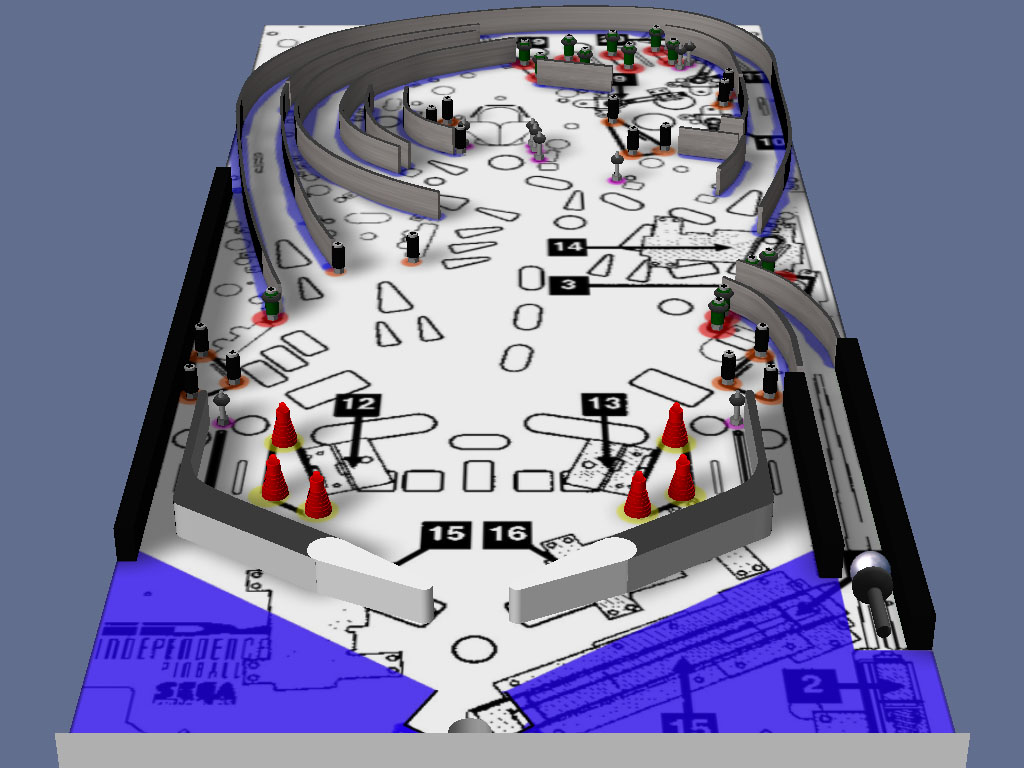
If you look at the ID-Guide-Colors image you will see several colored circles. I used a bit of transparency when I put them on, but the colors are yellow, orange, red, and purple. These colors correspond to the colored lights directly below the posts/pegs in the post.vpt file.


The total count for each color is:

Yellow – 6
Orange - 15
Red - 13
Purple - 9

Start with all the yellows. Copy the post/peg from the post.vpt file, switch over to your working table and paste it in and move it into position.

Note: to make the various posts easy to move, use the selection tool to make a selection around the post/peg object as well as the light below. When you then copy and paste it into your table, you can click in the center of the light object to move both the light and the post. This way you can move the post into position without having to zoom in a bunch. It’s a lot easier this way.


Repeat for all the posts.

When you are done, your table should look like this: