Jump to content


Photo
- - - - -

My first table (Hogan's Heroes)


  • Please log in to reply
366 replies to this topic

#41 PainkillerAlice

PainkillerAlice

    Multi-Level Madman

  • Platinum Supporter
  • 2,685 posts
  • Location:Indiana

  • Flag: United States of America

  • Favorite Pinball: I like multi-level pinball the most


  • Trophies:

Posted 22 January 2010 - 08:20 PM

Uploaded the WIP the other day. Feel free to check it out and all constructive comments welcome. Currently working on the gameplay aspect tweaking some things to make the gameplay smooth and putting all the objects in for the table. Then I will start on capturing more audio to use the clips in the table. Last will be the graphics, lights, and the rules planning. And last but not least, beg for an experienced author to help with scripting. biggrin.gif

Edited by Practicedummy, 22 January 2010 - 08:21 PM.


I could have been smart, but I never learned anything by being smart!


#42 faralos

faralos

    VPF Veteran

  • Members
  • PipPipPipPipPipPip
  • 7,838 posts
  • Location:Eastern Pa,USA

  • Flag: United States of America

  • Favorite Pinball: Flash (Williams) 1979, Flash2 Updated


  • Trophies:

Posted 22 January 2010 - 09:52 PM

To copy from one table to another load both tables into the editor. Then hold down your left button and draw a box around the image (it'll turn dark blue to show it's highlighted) go into the edit menu and hit on 'copy' use the 'window' menu and go into the other table, use either 'ctrl' 'v' to paste it in the exact same place on your second table or just right click and copy it, again draw a box around it to highlight it and you can then move it around. for small objects ( rubber posts, or objects with MANY parts; sling posts, rubbers etc) use a light with a radius of around 15 next to it to move it with. this will make sense when you try to move it a little bit at a time and don't want to get anything else to move with it like the pic shows now i can move that post all together and not worry about losing it or leaving parts behind!

I can help in the graphic dept if you want, check out some of my pins and let me know 'k?

Attached Files


Edited by faralos, 22 January 2010 - 10:20 PM.

"Don’t let the noise of others’ opinions drown out your own inner voice.
And most important, have the courage to follow your heart and intuition.”
----Steve Jobs


#43 PainkillerAlice

PainkillerAlice

    Multi-Level Madman

  • Platinum Supporter
  • 2,685 posts
  • Location:Indiana

  • Flag: United States of America

  • Favorite Pinball: I like multi-level pinball the most


  • Trophies:

Posted 23 January 2010 - 12:13 AM

QUOTE (faralos @ Jan 22 2010, 04:52 PM) <{POST_SNAPBACK}>
To copy from one table to another load both tables into the editor. Then hold down your left button and draw a box around the image (it'll turn dark blue to show it's highlighted) go into the edit menu and hit on 'copy' use the 'window' menu and go into the other table, use either 'ctrl' 'v' to paste it in the exact same place on your second table or just right click and copy it, again draw a box around it to highlight it and you can then move it around. for small objects ( rubber posts, or objects with MANY parts; sling posts, rubbers etc) use a light with a radius of around 15 next to it to move it with. this will make sense when you try to move it a little bit at a time and don't want to get anything else to move with it like the pic shows now i can move that post all together and not worry about losing it or leaving parts behind!

I can help in the graphic dept if you want, check out some of my pins and let me know 'k?

Ahhh! Thanks bud! Now I know what I did wrong on the copy the object department. I opened up 2 separate instances of VP and attempted to copy from one table in one instance of VP to another table in another instance of VP. What you are saying, if I am getting this right, is to open one table in VP and then using the same instance of VP, open another table. biggrin.gif

Thank you for the offer on the graphics department, I will call on you for any help in that department faralos!

Forgot one thing, I am creating this table using a 16:9 ratio TV as my monitor. Not sure in what way this will affect those with 4:3 ration monitors. Just a heads up. biggrin.gif

I could have been smart, but I never learned anything by being smart!


#44 faralos

faralos

    VPF Veteran

  • Members
  • PipPipPipPipPipPip
  • 7,838 posts
  • Location:Eastern Pa,USA

  • Flag: United States of America

  • Favorite Pinball: Flash (Williams) 1979, Flash2 Updated


  • Trophies:

Posted 23 January 2010 - 03:49 AM

I use a 4:3 but creating good graphics shouldn't matter it just means I can't play it. and yeah, open both tables within the same editor just use the 'window' and switch between the two, you can have numerous tables open at 1 time, to copy and move stuff around in. I have a master table with numerous custom things saved on it when I want something from it I just open it and copy from that one to my current wip, saves alot of time this way.

Edited by faralos, 23 January 2010 - 03:51 AM.

"Don’t let the noise of others’ opinions drown out your own inner voice.
And most important, have the courage to follow your heart and intuition.”
----Steve Jobs


#45 PainkillerAlice

PainkillerAlice

    Multi-Level Madman

  • Platinum Supporter
  • 2,685 posts
  • Location:Indiana

  • Flag: United States of America

  • Favorite Pinball: I like multi-level pinball the most


  • Trophies:

Posted 29 January 2010 - 02:41 PM

Re-doing the whole table from scratch but already made some good progress on the table. Had done some gameplay testing on the previous table and just couldn't get the gameplay going smoothly enough for my tastes. Kept some of the elements from the first table and copied them over. This time I have created the Underground playfield after studying the Elektra table and seeing how that was done, as was my original intent.

I could have been smart, but I never learned anything by being smart!


#46 PainkillerAlice

PainkillerAlice

    Multi-Level Madman

  • Platinum Supporter
  • 2,685 posts
  • Location:Indiana

  • Flag: United States of America

  • Favorite Pinball: I like multi-level pinball the most


  • Trophies:

Posted 31 January 2010 - 05:42 AM

Started importing some images to use on the table (JPEG format). I set the transparency color for one image and then start the table. I discover that the transparency didn't take and when I went to the image manager to check to see if I did something wrong, I found out that the transparency color was changed to gray. Anyone know what causes this?

I could have been smart, but I never learned anything by being smart!


#47 rdeejay

rdeejay

    Enthusiast

  • Members
  • PipPipPip
  • 162 posts
  • Location:New Zealand

  • Flag: New Zealand

  • Favorite Pinball: Fun House

Posted 31 January 2010 - 08:05 AM

Images with a transparent color need to be .bmp

#48 robert kundrat

robert kundrat

    Enthusiast

  • VIP
  • 258 posts

  • Flag: Hungary

  • Favorite Pinball: Attack From Mars


Posted 31 January 2010 - 02:05 PM

QUOTE (Practicedummy @ Jan 31 2010, 06:42 AM) <{POST_SNAPBACK}>
Started importing some images to use on the table (JPEG format). I set the transparency color for one image and then start the table. I discover that the transparency didn't take and when I went to the image manager to check to see if I did something wrong, I found out that the transparency color was changed to gray. Anyone know what causes this?


Remove your pics, and then import again. That stupid "grey transparency thing" happens sometimes in VP9.(I dont know the reason)
You don't need to change JPEG to BMP.

I'm still  here!


#49 rdeejay

rdeejay

    Enthusiast

  • Members
  • PipPipPip
  • 162 posts
  • Location:New Zealand

  • Flag: New Zealand

  • Favorite Pinball: Fun House

Posted 31 January 2010 - 02:47 PM

What i mean is that if he has an image and there is a color that needs to be transparent then it has to be .bmp .jpg won't do transparencies. But Pd might have some other problem though which may be remedied by your solution.

#50 robert kundrat

robert kundrat

    Enthusiast

  • VIP
  • 258 posts

  • Flag: Hungary

  • Favorite Pinball: Attack From Mars


Posted 31 January 2010 - 03:20 PM

QUOTE (rdeejay @ Jan 31 2010, 03:47 PM) <{POST_SNAPBACK}>
What i mean is that if he has an image and there is a color that needs to be transparent then it has to be .bmp .jpg won't do transparencies. But Pd might have some other problem though which may be remedied by your solution.


Here's an example. Left target on the table, Jpeg with transparency, and the right one, Bmp with transparency.
It works with Jpeg too. You need the correct transparency colour, and it works fine.


Attached File  targ.vpt   214KB   11 downloads


I'm still  here!


#51 PainkillerAlice

PainkillerAlice

    Multi-Level Madman

  • Platinum Supporter
  • 2,685 posts
  • Location:Indiana

  • Flag: United States of America

  • Favorite Pinball: I like multi-level pinball the most


  • Trophies:

Posted 31 January 2010 - 03:36 PM

QUOTE (robert kundrat @ Jan 31 2010, 10:20 AM) <{POST_SNAPBACK}>
QUOTE (rdeejay @ Jan 31 2010, 03:47 PM) <{POST_SNAPBACK}>
What i mean is that if he has an image and there is a color that needs to be transparent then it has to be .bmp .jpg won't do transparencies. But Pd might have some other problem though which may be remedied by your solution.


Here's an example. Left target on the table, Jpeg with transparency, and the right one, Bmp with transparency.
It works with Jpeg too. You need the correct transparency colour, and it works fine.


Attached File  targ.vpt   214KB   11 downloads

What colors can be used for transparency using the jpeg format?

I could have been smart, but I never learned anything by being smart!


#52 rdeejay

rdeejay

    Enthusiast

  • Members
  • PipPipPip
  • 162 posts
  • Location:New Zealand

  • Flag: New Zealand

  • Favorite Pinball: Fun House

Posted 31 January 2010 - 03:44 PM

Ok thanks i was only going by what i've read so far about VP and transparencies and while it might make white transparent it doesn't seem to like other colors in a jpg to be transparent when i tested earlier but it does with a bmp with any color.

#53 robert kundrat

robert kundrat

    Enthusiast

  • VIP
  • 258 posts

  • Flag: Hungary

  • Favorite Pinball: Attack From Mars


Posted 31 January 2010 - 04:23 PM

QUOTE (Practicedummy @ Jan 31 2010, 04:36 PM) <{POST_SNAPBACK}>
QUOTE (robert kundrat @ Jan 31 2010, 10:20 AM) <{POST_SNAPBACK}>
QUOTE (rdeejay @ Jan 31 2010, 03:47 PM) <{POST_SNAPBACK}>
What i mean is that if he has an image and there is a color that needs to be transparent then it has to be .bmp .jpg won't do transparencies. But Pd might have some other problem though which may be remedied by your solution.


Here's an example. Left target on the table, Jpeg with transparency, and the right one, Bmp with transparency.
It works with Jpeg too. You need the correct transparency colour, and it works fine.


Attached File  targ.vpt   214KB   11 downloads

What colors can be used for transparency using the jpeg format?


I use Black and white, but if you have these colors on your picture, try the green (Red:0, Green:255, Blue:0,)

I'm still  here!


#54 PainkillerAlice

PainkillerAlice

    Multi-Level Madman

  • Platinum Supporter
  • 2,685 posts
  • Location:Indiana

  • Flag: United States of America

  • Favorite Pinball: I like multi-level pinball the most


  • Trophies:

Posted 31 January 2010 - 06:06 PM

mmm.. still having issues with the transparencies but at least the selected color doesn't change back to gray. I'll have to put this on the shelf for now.

I could have been smart, but I never learned anything by being smart!


#55 robert kundrat

robert kundrat

    Enthusiast

  • VIP
  • 258 posts

  • Flag: Hungary

  • Favorite Pinball: Attack From Mars


Posted 31 January 2010 - 06:14 PM

QUOTE (Practicedummy @ Jan 31 2010, 07:06 PM) <{POST_SNAPBACK}>
mmm.. still having issues with the transparencies but at least the selected color doesn't change back to gray. I'll have to put this on the shelf for now.


Upload one of your non-working pics, and I will check what's the problem.

I'm still  here!


#56 faralos

faralos

    VPF Veteran

  • Members
  • PipPipPipPipPipPip
  • 7,838 posts
  • Location:Eastern Pa,USA

  • Flag: United States of America

  • Favorite Pinball: Flash (Williams) 1979, Flash2 Updated


  • Trophies:

Posted 31 January 2010 - 10:14 PM

you can use ANY color as the transparency as long as it matches exactly in VP! check out ball images they use green, I tend to use white as it's easier to do a fill in an art program with white but check in an art program what may look like white background may not be all white or may be an offshade. sometimes pics use blithering around an outline of an object ( usually grey pixels) to the naked eye it will look like a white background until you magnify it in an art program. To check this out use a blue fill and you'll see that not all of the background will fill, You must then use a brush to color ALL of the background in a single color, then save it (checking the color first so you know what color to use for a transparency). I use jpegs as well as bitmaps(with transparencies too), just remember in a jpg some of the color (or colors)may wash out as the picture isn't as exact as a bitmap.
"Don’t let the noise of others’ opinions drown out your own inner voice.
And most important, have the courage to follow your heart and intuition.”
----Steve Jobs


#57 wtiger

wtiger

    Pinball Fan

  • VIP
  • 1,148 posts
  • Location:Los Angeles, CA

  • Flag: United States of America

  • Favorite Pinball: Junkyard


Contributor

Posted 31 January 2010 - 11:09 PM

JPG is a lossy compression format which means that when you save an image your colors may not stay true. It may look white, but it isn't 100% white in the actual value of the color (this is the case for any color in your image). The reason it was mentioned to use a .bmp format when you want to have transparency is .bmp format doesn't change your colors like .jpg does. If you have a true white color or a true green color in your image and you save it as .bmp, the colors will stay true in their values so when you import it into VP and tell it say green is transparent (red=0, green=255, blue=0) your green will be transparent when the table is rendered/played. If your transparency works using a .jpg image, you got lucky and your transparent color happened to not get changed so something slightly off in value, but basically the same in appearance.

#58 faralos

faralos

    VPF Veteran

  • Members
  • PipPipPipPipPipPip
  • 7,838 posts
  • Location:Eastern Pa,USA

  • Flag: United States of America

  • Favorite Pinball: Flash (Williams) 1979, Flash2 Updated


  • Trophies:

Posted 01 February 2010 - 12:00 AM

ok he said it better go with that maybe that's why I keep on getting a blur around my images on drop targets and stuff, I'll stick with bitmaps from now on

Edited by faralos, 01 February 2010 - 12:01 AM.

"Don’t let the noise of others’ opinions drown out your own inner voice.
And most important, have the courage to follow your heart and intuition.”
----Steve Jobs


#59 wtiger

wtiger

    Pinball Fan

  • VIP
  • 1,148 posts
  • Location:Los Angeles, CA

  • Flag: United States of America

  • Favorite Pinball: Junkyard


Contributor

Posted 01 February 2010 - 12:22 AM

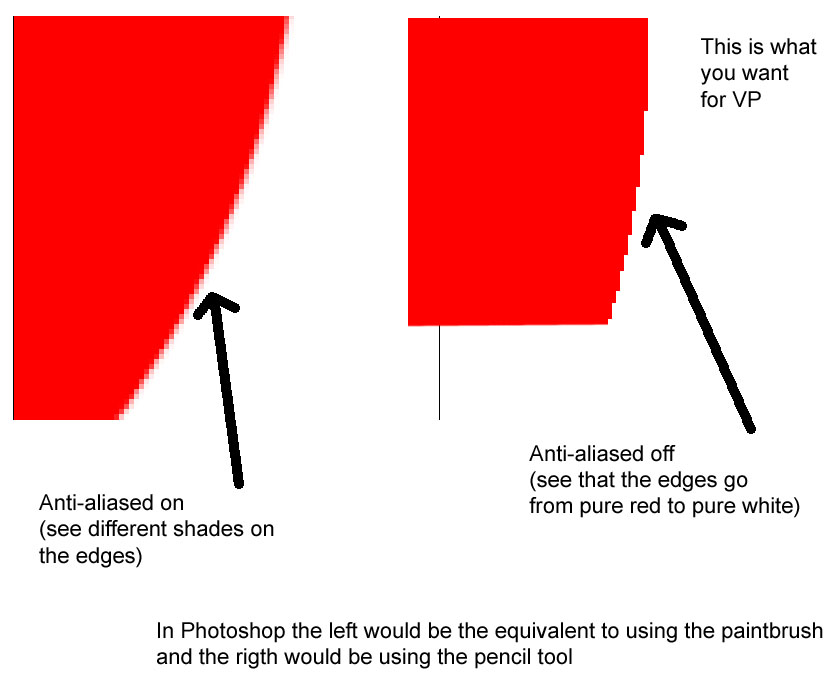
Sticking with .bmp alone won't cure your problem. If you have blur around your edges that means that you have anti-aliased on which uses various shades of colors to make an edge look smooth. This doesn't work for transparency in VP. You need to make sure that in your graphic program you turn off anti-aliased (if you can). You want hard transitions from the very edge in your image to where it transitions to your transparent color. See example below:


#60 StevOz

StevOz

    Pinball Fan

  • VIP
  • 1,721 posts
  • Location:Nirvana

  • Flag: Australia

  • Favorite Pinball: Scared Stiff


Posted 01 February 2010 - 01:54 AM

Using a the simple free image editor/viewer xnview..

http://www.xnview.com/

I have been able to correct some images for transparency, by selecting Image > Adjust > Levels, then moving the black point, so the slightly off whites become pure white. It does effect the whole image, increasing the contrast and doesn't always produce the desired result, still it can sometimes do the job, so it's worth a shot.

Files I have uploaded here...


http://www.vpforums....ownloads&mid=34


logoshort.gif