
- View New Content
-
Getting Started
-
Tutorials
Tutorial Categories
Tutorials Main Page Installation and Setup Downloadable TutorialsROM Adjustments
Number of Balls Adjustments Volume Adjustments
-
Visual Pinball Tables
VP 8 Desktop Tables
All VPM Recreations VP Recreations VP/VPM MODs VP Originals ROMsVP 9 Desktop Tables
All VPM Recreations VP Recreations VP/VPM MODs VP Originals ROMsVP9 Cabinet Tables
All Full Screen Cabinet Full Screen B2S Cabinet Spanned Cabinet Tables Media Packs ROMsVPX Tables
All VPinMAME Recreations VPX- - /VPinMAME - MOD Tables VPX Recreations VPX Originals Media Packs ROMs VR
-
Frontend Media & Backglass
Media Packs
Complete Media Packs Wheel Logos VideosBackglasses
dB2S Animated Backglasses UVP Animated Backglasses Topper Images
- Future Pinball Tables
-
Design Resources
Main Resources
Table Templates Playfield Images Image Library Sound Library Key CodesVP Guides
VP8 Guide - English VP8 Guide - Deutsch VP9 Guide - English VP9.1.x Guide - English VP Object Guide VPM DocumentationFuture Pinball Resources
Playfield Images 3D Model LibraryFuture Pinball Guides
FP Script Guide Big Draco Script Guide FP Table Design Guide FP DMD Guide
- Other Features
- Bug Tracker
- Image Gallery
- Blogs
-
More
80's Workshop: Graphical Workin'
Started By
Noah Fentz
, Apr 15 2009 01:00 AM
61 replies to this topic
#42
Posted 23 April 2009 - 11:05 PM
Good stuff Billpa.
You are doing a great job.
I can see you have removed the camera flash. If you notice the "E" you will see that the top of it is still white and not a gradient.
I recon you could copy the top underside of the "C" to replace the gradient.
As for the lightening over the letters, I think the method shown in Scapinos video, using the blending option, might help?
Thanks for the links, sikarkades. I'm sure they will come in great use.
Wise words Destruct. Thats another reason to call on the likes of you, if we get stuck. Thanks for looking in.
You are doing a great job.
I can see you have removed the camera flash. If you notice the "E" you will see that the top of it is still white and not a gradient.
I recon you could copy the top underside of the "C" to replace the gradient.
As for the lightening over the letters, I think the method shown in Scapinos video, using the blending option, might help?
Thanks for the links, sikarkades. I'm sure they will come in great use.
Wise words Destruct. Thats another reason to call on the likes of you, if we get stuck. Thanks for looking in.
#45
Posted 24 April 2009 - 12:28 AM
QUOTE (billlpa @ Apr 24 2009, 09:55 AM) <{POST_SNAPBACK}>
No worries WWW. All of that stuff will be gone in good time. Like I said, its far from done. I only wanted to show some progress as it was pretty quiet here.
Ha... I knew that, I was just giving the illusion of been involved
I knew you were on top of it all.
#46
Posted 24 April 2009 - 02:29 AM
QUOTE (sikarkades @ Apr 23 2009, 04:20 PM) <{POST_SNAPBACK}>
Can anyone find and/or acquire a decent picture of the apron? I am having trouble finding a clear enough one to decipher everything.
Here's a zip file (5mb) I put together. I think you will find some usefull ones there:
http://www.filedropp...cienceapronpics
Edited by wtiger, 24 April 2009 - 02:30 AM.
#47
Posted 25 April 2009 - 03:44 AM
Here is a pic I am working on for the back of the playfield. The piece is made of clear plastic and some of the image is transparent. I left those areas empty. Can the piece be made transparent with this as the decal? Is this the correct way of doing this? Feedback is appreciated. Please understand it is not 100% complete yet.
Attached Files
#48
Posted 25 April 2009 - 05:09 PM
QUOTE (sikarkades @ Apr 24 2009, 08:44 PM) <{POST_SNAPBACK}>
Can the piece be made transparent with this as the decal?
Sure, just pick a color not used (maybe pure green) and save your image as a bmp. When you import it into VP in the image manager, you would set the transparency to red=0, green=255, and blue=0
Attached Files
#49
Posted 20 May 2009 - 09:40 PM
When re-drawing plastics, should i leave the holes and make them transparent? Or black? Are the pieces that are "Used" to hold down the piece (Posts?) added later or to the image before it is imported? I made the background green so you can see the transparency I am using, i assume if posts are added the holes will disappear? I apoligize I am new at this. Also feedback is appreciated, I am learning, if I suck at this, I will not work on it anymore, but am gaining more time now that I am graduating college. Also, on this table there are some plastics used in layers, on the current VP table, the plastics do not appear to be in layers, namely ,the right plastic over the shooter lane, will we be able to produce it in this fashion or do the lower plastics not matter as much? Was the plastic made this way for a reason? Sorry for all of the questions, but I would like to get some of the work done. I have some minor cleanup to do on the black but this looks pretty close to me. Do these need to be drawn angle dependent or anything or are they just applied as decals?
Thanks again
Thanks again
Attached Files
#50
Posted 23 May 2009 - 04:56 AM
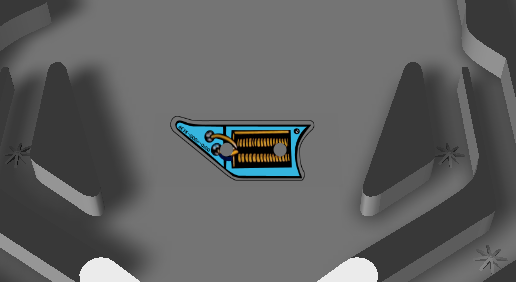
Here is another one I have worked on, is this the correct way this should be done? Also, does this blue look fine to use for the entire plastics set? I think it is closer than the other one I did and have corrected that one to match this blue. It looks as close as I can find with the resources I have found. For now I will continue doing this, once they are done and the backglass and playfield, most of the art will be complete. That is assuming I am doing this correctly.
Thanks
Thanks
Attached Files
#51
Posted 23 May 2009 - 05:09 AM
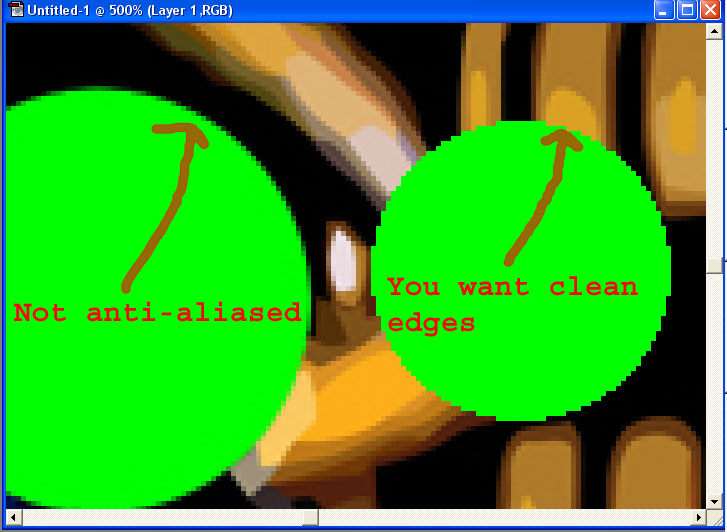
Make sure you save your graphics as .bmp so you don't lose the colors. Your transparent green needs to be pure green, so if you save it out as a JPG, your green may not stay true green. Also, when filling the areas that you want to be transparent, make sure you turn off antialias otherswise you will get a mixture of your green and it won't show properly as transparent in VP. If you paint your transparent green, use a pencil tool as opposed to a paintbrush. Again, your want pure green. I downloaded your image above as a BMP and loaded it into VP as a decal and none of your green came out transparent.
Edited by wtiger, 23 May 2009 - 05:17 AM.
#53
Posted 23 May 2009 - 03:29 PM
QUOTE (sikarkades @ May 22 2009, 10:18 PM) <{POST_SNAPBACK}>
Thanks understood, i just saved it as jpeg to show up faster on here. Thank you for the quick reply. My psd files can be saved as bmp.
That's kind of what I thought, but I wasn't 100% sure, and I wasn't sure if the way transparency worked was fully explained or understood. Keep up the good work. You are doing an outstanding job!
#54
Posted 23 May 2009 - 05:03 PM
I just came across two eBay listings - one for the plastics and the other for the apron. I think the plastic pictures are too small, but the apron pictures might be useful:
http://cgi.ebay.com/...yfi...:1|294:50
#56
Posted 24 May 2009 - 04:18 PM
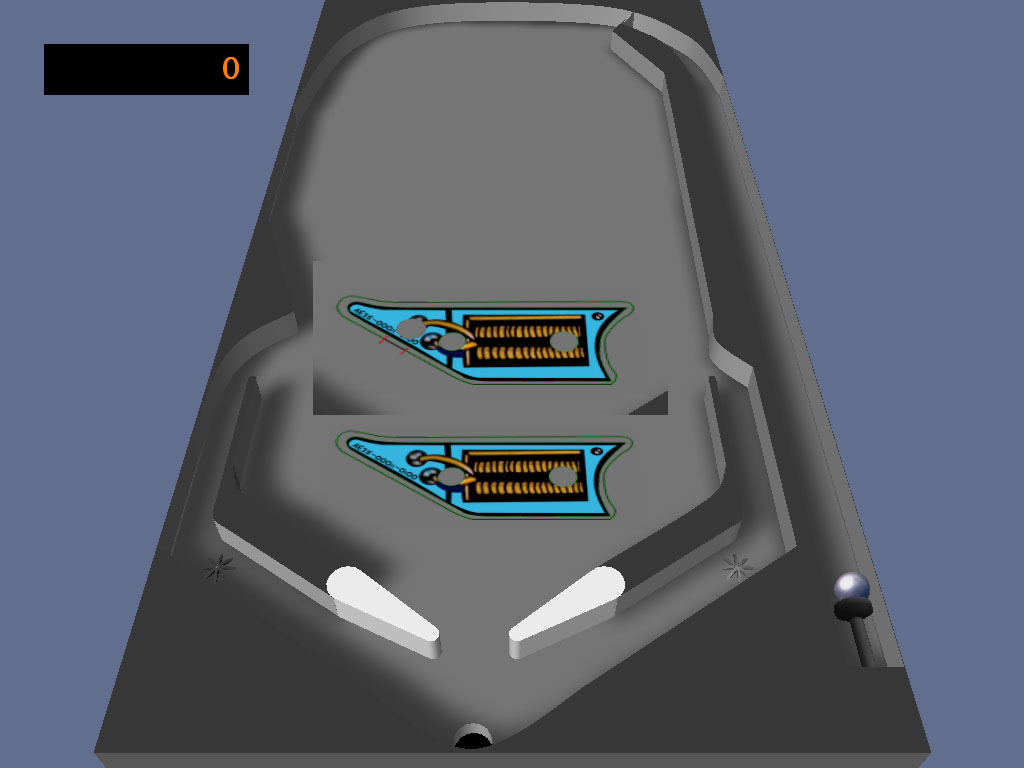
Your image still has issues with anti-aliasing. The image below has your image at the lower portion. Notice that the border appears to be green and not black. Also the holes have green on their outer edges as well. The above image is one I loaded into photoshop. I painted over a portion of your black edge with pure green, then made a pure black line using the pencil tool for both. I then used the pencil tool and made a circle cutout. Notice how the edges do not have the green:

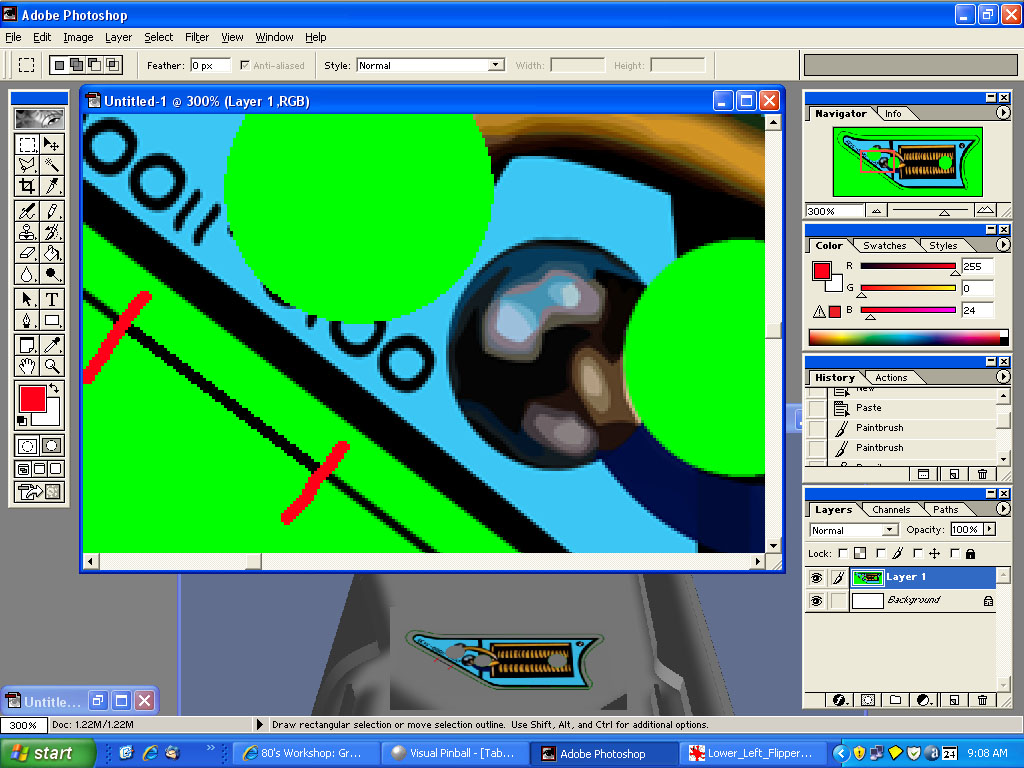
Below is the image in Photoshop. You can see between the red marks where I re-did the green and black line. You can also see the difference between the two circle cutouts:

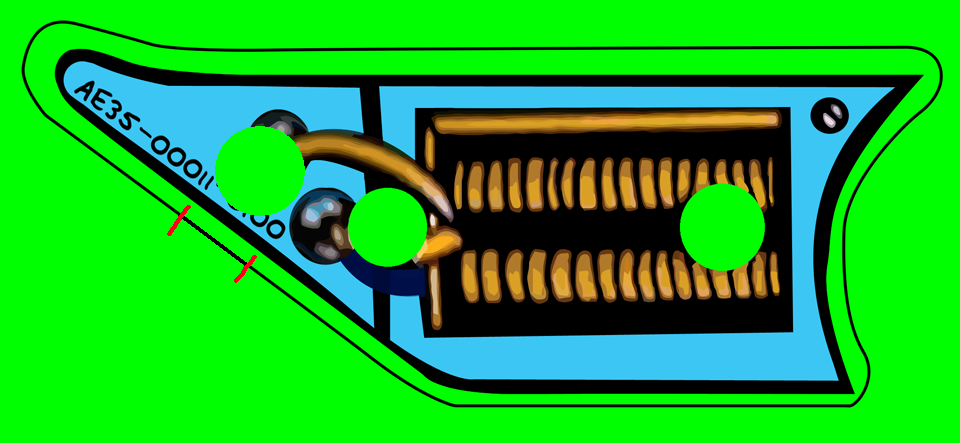
Here's your modified plastic in bmp format:

Below is the image in Photoshop. You can see between the red marks where I re-did the green and black line. You can also see the difference between the two circle cutouts:

Here's your modified plastic in bmp format:
#59
Posted 24 May 2009 - 09:15 PM
Ok, I worked on this one for a bit, placed it on the playfield like you had it, and it seems to look good now with no green. Let me know what you think of the results and if you see something I could improve on with my style let me know. Also, what is preferred 24 bit or 32 bit when saving the bmp?
#60
Posted 25 May 2009 - 12:25 AM
sikarkades,
That looks great! As for the 24 vs 32 bit, I have no idea whether you'd notice a difference in VP between the two, so my guess would be 24 bit. Maybe try an experiment using both and see if you can see a significant difference between the two vs the larger file size if you went to the 32 bit.


Top


Contributor


are all trademarks of VPFORUMS.