Jump to content


Photo
- - - - -

vpPlus / vp+ ???


  • Please log in to reply
83 replies to this topic

#41 Shooby Doo

Shooby Doo

    Pinball Fan

  • Members
  • PipPipPipPip
  • 1,347 posts
  • Location:ATL

  • Flag: United States of America

  • Favorite Pinball: Fathom

Posted 16 February 2010 - 09:19 PM

Does anyone know how to configure this through a router? It's over my head and won't connect. Simply putting in my IP or router IP doesn't work.

#42 grapper

grapper

    Enthusiast

  • Members
  • PipPipPip
  • 175 posts
  • Location:Sweden

  • Flag: Sweden

  • Favorite Pinball: Twilight Zone

Posted 16 February 2010 - 09:23 PM

QUOTE (Shooby Doo @ Feb 16 2010, 10:19 PM) <{POST_SNAPBACK}>
Does anyone know how to configure this through a router? It's over my head and won't connect. Simply putting in my IP or router IP doesn't work.

You need to port forward (router configuration) the following ports: 12345,12346.

Here is a good guide fo Vp+ that is worth reading: http://rich_gade.hom...Users_Guide.pdf

Also, if you don't know anything about port forwarding go to www.portforward.com. Excellent guides there.

Edited by grapper, 16 February 2010 - 09:34 PM.


#43 yogiholzer

yogiholzer

    Pinball Fan

  • VIP
  • 1,870 posts
  • Location:Hamburg

  • Flag: Germany

  • Favorite Pinball: All.

Contributor

Posted 16 February 2010 - 10:24 PM

QUOTE (Bob5453 @ Feb 16 2010, 09:46 PM) <{POST_SNAPBACK}>
Yogi, do you or anyone else, have the 1.1 VP+ version of Mad Mag?


I had a look at my backups, but I can't find. Additionally I have to admit that I can't remember a vpPlus version of Mad Mag. Sorry. Maybe I somehow missed it?
Click the picture frame to visit the pinball people gallery.

#44 Shooby Doo

Shooby Doo

    Pinball Fan

  • Members
  • PipPipPipPip
  • 1,347 posts
  • Location:ATL

  • Flag: United States of America

  • Favorite Pinball: Fathom

Posted 17 February 2010 - 07:25 PM

QUOTE (grapper @ Feb 16 2010, 04:23 PM) <{POST_SNAPBACK}>
QUOTE (Shooby Doo @ Feb 16 2010, 10:19 PM) <{POST_SNAPBACK}>
Does anyone know how to configure this through a router? It's over my head and won't connect. Simply putting in my IP or router IP doesn't work.

You need to port forward (router configuration) the following ports: 12345,12346.

Here is a good guide fo Vp+ that is worth reading: http://rich_gade.hom...Users_Guide.pdf

Also, if you don't know anything about port forwarding go to www.portforward.com. Excellent guides there.

Well, I did have a little bit of success. I got it to work over my network and it played really well.

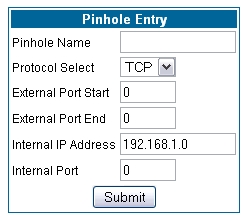
But reading up on port forwarding, I still don't completely understand. The Netopia website explains how to do it (they call it "pinholes"), but I don't understand the numbers that need to be entered vs. the ports VPplus needs. I don't feel comfortable messing with these settings, as my network is more important than VP. Here's where I get stuck:


#45 grapper

grapper

    Enthusiast

  • Members
  • PipPipPip
  • 175 posts
  • Location:Sweden

  • Flag: Sweden

  • Favorite Pinball: Twilight Zone

Posted 17 February 2010 - 08:02 PM

What's the name of your router? I can read up a little bit on it as I have not heard that expression before. Essentially what you are doing is forwarding traffic on specific ports through your router to one of your internal IP-adresses (where you will have a computer set up). Step 1 in port forwarding is making sure you are assigning specific IP:s to all your computers on the network. Otherwise your computer can get an IP-adress like 192.168.1.2 one time and 192.168.1.3 the next depending on how many are already connected. Then the port won't be forwarded to the right machine.

Edited by grapper, 17 February 2010 - 08:04 PM.


#46 Shooby Doo

Shooby Doo

    Pinball Fan

  • Members
  • PipPipPipPip
  • 1,347 posts
  • Location:ATL

  • Flag: United States of America

  • Favorite Pinball: Fathom

Posted 17 February 2010 - 08:32 PM

QUOTE (grapper @ Feb 17 2010, 03:02 PM) <{POST_SNAPBACK}>
What's the name of your router? I can read up a little bit on it as I have not heard that expression before. Essentially what you are doing is forwarding traffic on specific ports through your router to one of your internal IP-adresses (where you will have a computer set up). Step 1 in port forwarding is making sure you are assigning specific IP:s to all your computers on the network. Otherwise your computer can get an IP-adress like 192.168.1.2 one time and 192.168.1.3 the next depending on how many are already connected. Then the port won't be forwarded to the right machine.

This is the page for port forwarding regarding my router (netopia 3347nwg): http://www.netopia.c...es/CQG_025.html
When I get to "configure", I'm lost. I think I'm almost there though...

#47 rascal

rascal

    two-faced as they come

  • VIP
  • 1,374 posts
  • Location:Indiana USA

  • Flag: United States of America

  • Favorite Pinball: Bally Eight Ball


Posted 17 February 2010 - 09:51 PM

QUOTE (Shooby Doo @ Feb 17 2010, 01:25 PM) <{POST_SNAPBACK}>
QUOTE (grapper @ Feb 16 2010, 04:23 PM) <{POST_SNAPBACK}>
QUOTE (Shooby Doo @ Feb 16 2010, 10:19 PM) <{POST_SNAPBACK}>
Does anyone know how to configure this through a router? It's over my head and won't connect. Simply putting in my IP or router IP doesn't work.

You need to port forward (router configuration) the following ports: 12345,12346.

Here is a good guide fo Vp+ that is worth reading: http://rich_gade.hom...Users_Guide.pdf

Also, if you don't know anything about port forwarding go to www.portforward.com. Excellent guides there.

Well, I did have a little bit of success. I got it to work over my network and it played really well.

But reading up on port forwarding, I still don't completely understand. The Netopia website explains how to do it (they call it "pinholes"), but I don't understand the numbers that need to be entered vs. the ports VPplus needs. I don't feel comfortable messing with these settings, as my network is more important than VP. Here's where I get stuck:


You would want to make two pinholes through your router. You can name them whatever.
So from what you show here, you want the following.

Pinhole Name: vpPlus1
Protocol Select: TCP
External Port Start: 12345
External Port End: 12345
Internal IP Address: would be the IP address of the PC (not the router)
Internal Port: 12345

Pinhole Name vpPlus2
Protocol Select: TCP
External Port Start: 12346
External Port End: 12346
Internal IP Address: would be the IP address of the PC (not the router)
Internal Port: 12346

Also if you have any software firewall (Windows Firewall, Norton, or McAfee Internet suites) on the PC, you will need to open those ports through it.

Posted Image


#48 yogiholzer

yogiholzer

    Pinball Fan

  • VIP
  • 1,870 posts
  • Location:Hamburg

  • Flag: Germany

  • Favorite Pinball: All.

Contributor

Posted 17 February 2010 - 11:21 PM

Thanks for the input, rascal.

Are these settings also needed if UPnP is enabled? I thought not, but I guess exactly that was one mistake I did, when I tried yesterday.

Now I think I've made these settings correctly. I will try to test soon.


Click the picture frame to visit the pinball people gallery.

#49 rascal

rascal

    two-faced as they come

  • VIP
  • 1,374 posts
  • Location:Indiana USA

  • Flag: United States of America

  • Favorite Pinball: Bally Eight Ball


Posted 18 February 2010 - 11:26 AM

QUOTE (yogiholzer @ Feb 17 2010, 05:21 PM) <{POST_SNAPBACK}>
Thanks for the input, rascal.

Are these settings also needed if UPnP is enabled? I thought not, but I guess exactly that was one mistake I did, when I tried yesterday.

Now I think I've made these settings correctly. I will try to test soon.

If your router has UPnP support, then vpPlus will try to open the necessary ports for you (depends on how much UPnP support the router allows) . Also the person that is hosting needs to share their IP address to the Internet (the external router address, not their PC address). If you don't know how to find this, go to the following site and it will display your external IP address.
http://www.whatismyip.org/

Again, if you are running a software firewall on the PC itself, you need to open the ports 12345 and 12346 for TCP traffic through them or disable the firewall while you play.

These setting are most important for the host, as the joining member is sending a request to connect, so they are automatically opening outbound ports from their computer. To make sure that the connection is the best it can be, it would be safe to say that both members should open these ports.

Posted Image


#50 Shooby Doo

Shooby Doo

    Pinball Fan

  • Members
  • PipPipPipPip
  • 1,347 posts
  • Location:ATL

  • Flag: United States of America

  • Favorite Pinball: Fathom

Posted 18 February 2010 - 03:22 PM

QUOTE (rascal @ Feb 17 2010, 04:51 PM) <{POST_SNAPBACK}>
You would want to make two pinholes through your router. You can name them whatever.
So from what you show here, you want the following.

Pinhole Name: vpPlus1
Protocol Select: TCP
External Port Start: 12345
External Port End: 12345
Internal IP Address: would be the IP address of the PC (not the router)
Internal Port: 12345

Pinhole Name vpPlus2
Protocol Select: TCP
External Port Start: 12346
External Port End: 12346
Internal IP Address: would be the IP address of the PC (not the router)
Internal Port: 12346

Also if you have any software firewall (Windows Firewall, Norton, or McAfee Internet suites) on the PC, you will need to open those ports through it.

I appreciate the help guys.
I'm getting closer, but I get this error when I use those settings:

QUOTE
ERROR: Pinhole element VPplus1 internal address 192.******* is the same as the NAT Default server
Validation did not pass!

I have no idea what that means. I got my internal IP from typing in "ipconfig" in the command prompt.

#51 yogiholzer

yogiholzer

    Pinball Fan

  • VIP
  • 1,870 posts
  • Location:Hamburg

  • Flag: Germany

  • Favorite Pinball: All.

Contributor

Posted 18 February 2010 - 06:03 PM

Even if Comodo firewall isn't self explaining for me, I think (not sure) I now have the right settings there and in my router. I would like to test next.
Click the picture frame to visit the pinball people gallery.

#52 destruk

destruk

    VPF Veteran

  • VPF Staff
  • 6,338 posts
  • Location:Colorado Springs, CO

  • Flag: United States of America

  • Favorite Pinball: Ultrapin!


Posted 18 February 2010 - 06:07 PM

If you are running a software firewall on all your computers connected to the router, with static IP's, then you can just as easily set the router to yours as a DMZ Host. This will allow all traffic for all ports through to that specific pc without messing with ports for say, bit torrent, vpplus, and anything else that requires non-standard communication.

Build a fire, vipers love the heat.


#53 DesAngel

DesAngel

    Hobbyist

  • VIP
  • 40 posts
  • Location:USA

  • Flag: United States of America

  • Favorite Pinball: SeaWitch


Posted 18 February 2010 - 06:10 PM

are you perchance on a hughesnet sat. modem? I know they don't allow port forwarding which borks a lot a stuff for me. just a thought

D

#54 Shooby Doo

Shooby Doo

    Pinball Fan

  • Members
  • PipPipPipPip
  • 1,347 posts
  • Location:ATL

  • Flag: United States of America

  • Favorite Pinball: Fathom

Posted 18 February 2010 - 07:34 PM

I enabled UPNP support - we'll see if that works. I probably should have tried that first.

edit: that's a no-go

Edited by Shooby Doo, 18 February 2010 - 08:16 PM.


#55 anthias

anthias

    Pinball Fan

  • VIP
  • 814 posts

  • Flag: Australia

  • Favorite Pinball: Lizards In The City


Posted 19 February 2010 - 08:10 AM

I so gotta play some of this again. so what tables ppl playing most?

screnstoaug21small.gif

#56 yogiholzer

yogiholzer

    Pinball Fan

  • VIP
  • 1,870 posts
  • Location:Hamburg

  • Flag: Germany

  • Favorite Pinball: All.

Contributor

Posted 19 February 2010 - 07:10 PM

Hi anthias,

I don't have a clue, if a major group of people has already really tried to use vpPlus and then is really playing vpPlus tables in netplay mode at all. Replies in the related threads are low. I just try to advertise and to attract people for vpPlus once again. The number of thread views let's one think there's much more interest than shown in fact. Maybe, when the first deterrence from possible installation/setup problems has calmed down, more people are willing to test/try and to post about.

I plan to create an even more simple visual guide for vpPlus, if and when I've solved my own problems with it soon (Win 7, curious about router and firewall settings, translation).

vpPlus is too great to not support further developement. destruk already mentioned VPM in conjunction with vpPlus here. There's simply no other choice than to continuously support it. It's our responsibility!

Thanks for your care, your contributions and your tables!
Click the picture frame to visit the pinball people gallery.

#57 yogiholzer

yogiholzer

    Pinball Fan

  • VIP
  • 1,870 posts
  • Location:Hamburg

  • Flag: Germany

  • Favorite Pinball: All.

Contributor

Posted 19 February 2010 - 09:22 PM

Good news!!!

I was able to test/try vpPlus 1.2 with rascal today. I now have to assume that my own vpPlus installation/setup is ok and that all my router and firewall settings are ok too. So I have to say that it still works great on my outdated hardware running on OS Win 7 32 bit.

I lost all of the games we made badly. One reason is that I was excited much about the netplay mode and the chat feature of vpPlus. The other reason is that I'm a lousy player, so it wasn't a surprise. However, it was a lot of fun!

Thanks to rascal for the help and patience! Me as amateur now have to say, that it's not that hard to get vpPlus to work. If I can, you all can!
Click the picture frame to visit the pinball people gallery.

#58 rascal

rascal

    two-faced as they come

  • VIP
  • 1,374 posts
  • Location:Indiana USA

  • Flag: United States of America

  • Favorite Pinball: Bally Eight Ball


Posted 19 February 2010 - 09:41 PM

QUOTE (yogiholzer @ Feb 19 2010, 03:22 PM) <{POST_SNAPBACK}>
Good news!!!

I was able to test/try vpPlus 1.2 with rascal today. I now have to assume that my own vpPlus installation/setup is ok and that all my router and firewall settings are ok too. So I have to say that it still works great on my outdated hardware running on OS Win 7 32 bit.

I lost all of the games we made badly. One reason is that I was excited much about the netplay mode and the chat feature of vpPlus. The other reason is that I'm a lousy player, so it wasn't a surprise. However, it was a lot of fun!

Thanks to rascal for the help and patience! Me as amateur now have to say, that it's not that hard to get vpPlus to work. If I can, you all can!


Thanks for the games yogi, helps me make it through the day at work. Now I'm on vacation next week. Yahooooooooo!

Posted Image


#59 Shooby Doo

Shooby Doo

    Pinball Fan

  • Members
  • PipPipPipPip
  • 1,347 posts
  • Location:ATL

  • Flag: United States of America

  • Favorite Pinball: Fathom

Posted 20 February 2010 - 02:45 PM

QUOTE (yogiholzer @ Feb 19 2010, 04:22 PM) <{POST_SNAPBACK}>
Good news!!!

I was able to test/try vpPlus 1.2 with rascal today. I now have to assume that my own vpPlus installation/setup is ok and that all my router and firewall settings are ok too. So I have to say that it still works great on my outdated hardware running on OS Win 7 32 bit.

I lost all of the games we made badly. One reason is that I was excited much about the netplay mode and the chat feature of vpPlus. The other reason is that I'm a lousy player, so it wasn't a surprise. However, it was a lot of fun!

Thanks to rascal for the help and patience! Me as amateur now have to say, that it's not that hard to get vpPlus to work. If I can, you all can!


That's good to hear. I still don't know how to properly set up my router - it just won't work. I guess I'll keep reading up on "pinholes" and see if I can't figure it out.

#60 yogiholzer

yogiholzer

    Pinball Fan

  • VIP
  • 1,870 posts
  • Location:Hamburg

  • Flag: Germany

  • Favorite Pinball: All.

Contributor

Posted 22 February 2010 - 11:12 PM

I think rascal posted all what's needed to set up the router. I think there you only have to make sure, that you don't enter the IP address of your router, but the one of your computer at 'Internal IP Address'.

If and when these settings are made, you can/should disable UPnP in the vpPlus connection window (I mean the window/box that appears when you have fully started the table - vpPlus the table (gold edition) version 1.2 - and clicked the netplay button (the window/box, where 'Choose Network Play Mode' is shown on the top, independent of which mode you choose (host a game or connect to host at). You don't need to enable UPnP, because you've set up the router to open the ports manually. So leave it checked.

Also make sure that you start/try/test with VP 8.1 and not with VP 9.xx. And, if you've set up VP to run in compatibility mode, please undo that setting.

Software firewall: Depends on your settings. If you use a full automatic mode, the ports are probably blocked. Then you have to change the settings manually. The same is if you once manually denied the software firewall request to allow the program to use the ports. The answer is most probably stored.

I hope we can/will try once again soon.


Click the picture frame to visit the pinball people gallery.