Jump to content


Photo

Better Arcade Mode - MOD for Future Pinball


  • Please log in to reply
918 replies to this topic

#501 Gilrock

Gilrock

    Enthusiast

  • Platinum Supporter
  • 169 posts

  • Flag: United States of America

  • Favorite Pinball: Time Warp

Posted 20 August 2013 - 05:32 PM

First...they probably should move this topic to under Future Pinball section.  I keep having trouble finding it because it's under Introductions.  An introduction post with 500 replies.  Plus can they create a button to switch to a theme without all the dark colors...it's too easy to tell my screen isn't work related....lol.


I do have a Kinect I can try but it's a 360 version so the 0.8m limit might be a pain.


Gil


#502 ravarcade

ravarcade

    Enthusiast

  • Members
  • PipPipPip
  • 363 posts

  • Flag: Poland

  • Favorite Pinball: none

Posted 20 August 2013 - 06:51 PM

I do have a Kinect I can try but it's a 360 version so the 0.8m limit might be a pain.


Gil

I have 360 version too and 0.8m limit is important but for normal play it is enough.

You can move around table (1 -1.5 m from kinect) and see realy well "depth" of pinball table.


BAM page: http://www.ravarcade.pl

current BAM version: v1.5-317,  released: Oct 11, 2020


#503 dejanne

dejanne

    Hobbyist

  • Members
  • PipPip
  • 36 posts

  • Flag: Belgium

  • Favorite Pinball: indiana jones-road girls

Posted 20 August 2013 - 07:07 PM

hey rav, i tried 9-44 and with playfield reflection enabled and i could call up the bam menu but the lay-out is stuttering like a tv with bad signal


then i tried 9-45 and now i don't have to enable playfield reflection to call it up but the stuttering remains, the menu is not readable at all..


if you want i can post a vid of it..


#504 pocketpal

pocketpal

    Hobbyist

  • Members
  • PipPip
  • 25 posts
  • Location:Illinois, USA

  • Flag: United States of America

  • Favorite Pinball: Old Chicago

Posted 20 August 2013 - 07:25 PM

I just installed BAM v0.9-45 while I was home for lunch, and the 3D toggle hotkey works just like I had hoped!  Thanks!  :otvclap:


I have a new issue, however, and I don't know of anything on my end that could be causing it:  my backglasses are no longer displaying properly.  It's as if the Y-position has been offset by quite a bit.  The mode I always use, "Backglass Stretch," as well as some others, has the backglass centered properly in the X-dimension, but I only see the bottom of it at the top of my bg screen.  I'm using the "global" setting of "Backglass Stretch" in the "Config" menu, for what it's worth.


pocketpal___mini-pin.png


#505 ravarcade

ravarcade

    Enthusiast

  • Members
  • PipPipPip
  • 363 posts

  • Flag: Poland

  • Favorite Pinball: none

Posted 20 August 2013 - 08:40 PM

hey rav, i tried 9-44 and with playfield reflection enabled and i could call up the bam menu but the lay-out is stuttering like a tv with bad signal


then i tried 9-45 and now i don't have to enable playfield reflection to call it up but the stuttering remains, the menu is not readable at all..


if you want i can post a vid of it..

Yes. Short video can help,

I also nead info about Your PC:

- gfx card model

- gfx card drivers version

- os

- num of monitors. rotations on monitors in windows and in FP.


I just installed BAM v0.9-45 while I was home for lunch, and the 3D toggle hotkey works just like I had hoped!  Thanks!  :otvclap:


I have a new issue, however, and I don't know of anything on my end that could be causing it:  my backglasses are no longer displaying properly.  It's as if the Y-position has been offset by quite a bit.  The mode I always use, "Backglass Stretch," as well as some others, has the backglass centered properly in the X-dimension, but I only see the bottom of it at the top of my bg screen.  I'm using the "global" setting of "Backglass Stretch" in the "Config" menu, for what it's worth.

Maybe i break somthing with backglass. I have to check it, but no one else report to me this problem.


BAM page: http://www.ravarcade.pl

current BAM version: v1.5-317,  released: Oct 11, 2020


#506 Gilrock

Gilrock

    Enthusiast

  • Platinum Supporter
  • 169 posts

  • Flag: United States of America

  • Favorite Pinball: Time Warp

Posted 20 August 2013 - 11:31 PM

Trying to get the Kinect working is driving me crazy.  The driver is installed and shows up in device manager saying the device is working properly.  I start BAM and select a table.  While it's loading I hear a beep I'm not used to hearing so I thought it was communicating with the Kinect.  I goto the Plugin Kinect page and it says I don't have a Kinect connected.  When I exit the table and look back at device manager and click on Microsoft Kinect Camera it says this device is not connected but then immediately refreshes back to the device is working properly.  Now that I left the device manager open I can see it goes disconnected every 5 seconds after it says its connected for 2 seconds.  Just what I needed....one more headache to solve in this machine.


#507 Gilrock

Gilrock

    Enthusiast

  • Platinum Supporter
  • 169 posts

  • Flag: United States of America

  • Favorite Pinball: Time Warp

Posted 21 August 2013 - 12:04 AM

OK I got the Kinect device working by unplugging the LedWiz and pinDMD2.  At least I get to try it out and if it works maybe I buy a dedicated USB PCI card.


#508 dejanne

dejanne

    Hobbyist

  • Members
  • PipPip
  • 36 posts

  • Flag: Belgium

  • Favorite Pinball: indiana jones-road girls

Posted 21 August 2013 - 03:36 PM

this is the problem: http://www.youtube.c...eature=youtu.be

i run 3 screens with future dmd on a single gtx 660 card

os is win 7   32 bit

i have this problem with and without using pinballx


#509 sigma415

sigma415

    Hobbyist

  • Platinum Supporter
  • 48 posts
  • Location:Germany

  • Flag: Germany

  • Favorite Pinball: Monster Bash

Posted 21 August 2013 - 04:46 PM


hey rav, i tried 9-44 and with playfield reflection enabled and i could call up the bam menu but the lay-out is stuttering like a tv with bad signal


then i tried 9-45 and now i don't have to enable playfield reflection to call it up but the stuttering remains, the menu is not readable at all..


if you want i can post a vid of it..

Yes. Short video can help,

I also nead info about Your PC:

- gfx card model

- gfx card drivers version

- os

- num of monitors. rotations on monitors in windows and in FP.


I just installed BAM v0.9-45 while I was home for lunch, and the 3D toggle hotkey works just like I had hoped!  Thanks!  :otvclap:


I have a new issue, however, and I don't know of anything on my end that could be causing it:  my backglasses are no longer displaying properly.  It's as if the Y-position has been offset by quite a bit.  The mode I always use, "Backglass Stretch," as well as some others, has the backglass centered properly in the X-dimension, but I only see the bottom of it at the top of my bg screen.  I'm using the "global" setting of "Backglass Stretch" in the "Config" menu, for what it's worth.

Maybe i break somthing with backglass. I have to check it, but no one else report to me this problem.


With 9-45 I got exactly the same problem as pocketpal: Backglass shifted up on 2nd monitor, so only the lower part of BG is shown. (mode BG stretch)

- Nvidia GT640, driver 314.22

- cab configuration with 2 displays and PinDMD2

- Win7 x64

- no rotation in Windows, only in FP


 Using Win7 x64, VP 9.9.1 & VP Physmod5 & VP10, unified PinMAME 2.23, PinballX 2.12, PinDMD V2 (Real DMD), I-PAC2 button controller, Ledwiz with DOF R2, Nanotech Plunger

Like to create Real DMD Videos for PinballX: Tommy The Pinball Wizard (Data East 1994).gif


#510 Gilrock

Gilrock

    Enthusiast

  • Platinum Supporter
  • 169 posts

  • Flag: United States of America

  • Favorite Pinball: Time Warp

Posted 21 August 2013 - 09:34 PM

I know I saw instructions for how to build a little board with an IR LED and some other items and cannot figure out if it was buried in these 500 posts or on Rav's website.  Anyone remember where that is?


Thanks,

Gil


#511 pocketpal

pocketpal

    Hobbyist

  • Members
  • PipPip
  • 25 posts
  • Location:Illinois, USA

  • Flag: United States of America

  • Favorite Pinball: Old Chicago

Posted 21 August 2013 - 09:43 PM

I know I saw instructions for how to build a little board with an IR LED and some other items and cannot figure out if it was buried in these 500 posts or on Rav's website.  Anyone remember where that is?


Thanks,

Gil


I think it was likely buried in the almost 1000 posts of a similar thread on GoPinball.com.  I do wish this sort of information was all gathered and documented at his site for easier retrieval, but I understand that he is busy making BAM awesome and probably doesn't have time for much else!  ;)  Maybe someone else could put it all together for him and help keep it up to date.


EDIT:  I believe this post may be what you're after:


http://gopinball.com...t=3249&start=42


You'll have to copy & paste since VPForums apparently doesn't allow links to GoPinball, for some reason....


Edited by pocketpal, 21 August 2013 - 09:48 PM.

pocketpal___mini-pin.png


#512 Gilrock

Gilrock

    Enthusiast

  • Platinum Supporter
  • 169 posts

  • Flag: United States of America

  • Favorite Pinball: Time Warp

Posted 21 August 2013 - 09:54 PM

Thanks...I'm not seeing what I remember on that page...will take time to look through the rest.  I remember seeing a drawing that had schematics.


Gil


#513 pocketpal

pocketpal

    Hobbyist

  • Members
  • PipPip
  • 25 posts
  • Location:Illinois, USA

  • Flag: United States of America

  • Favorite Pinball: Old Chicago

Posted 21 August 2013 - 10:09 PM

Thanks...I'm not seeing what I remember on that page...will take time to look through the rest.  I remember seeing a drawing that had schematics.


Gil


On of these, maybe?


Free-Track 3-point headset:

http://www.gopinball...=4125&mode=view


4-LED Calibration board:

http://www.free-trac...lcled/led4s.gif


pocketpal___mini-pin.png


#514 Gilrock

Gilrock

    Enthusiast

  • Platinum Supporter
  • 169 posts

  • Flag: United States of America

  • Favorite Pinball: Time Warp

Posted 21 August 2013 - 11:20 PM

The calibration board schematic is on page 10 post 190 of this thread.  I thought I saw that same picture alongside a schematic for the tracking led. I'm sure I'll stumble on it right after I build a circuit.


Gil


#515 gtxjoe

gtxjoe

    VPF Veteran

  • VIP
  • 5,152 posts

  • Flag: United States of America

  • Favorite Pinball: Medieval Madness, AbraCadabra


Contributor

Posted 23 August 2013 - 02:16 AM

I am trying to get the Kinect mode to work.  It appears to successfully do the Easy points Low setup (looks down at screen in several positions and then returns to desired angle).  It tracks my head (yellow frame and blue eye dot), but the Cam position values always stay at 0.0, 0.0, 0.0.  Is there a setting I am missing?  


Thanks


Edited by gtxjoe, 23 August 2013 - 02:17 AM.


#516 neohusky

neohusky

    Enthusiast

  • Members
  • PipPipPip
  • 83 posts

  • Flag: Australia

  • Favorite Pinball: Addams Family

Posted 23 August 2013 - 03:54 AM

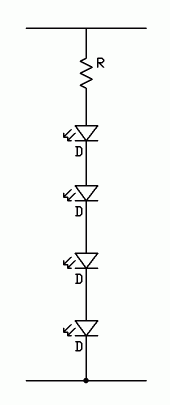
Here are various schematics and images of calibration boards that I have found useful in understanding the concepts. They are from various sources such as gopinball and free-track.

Posted Image
Posted ImagePosted ImagePosted ImagePosted Image

#517 Gilrock

Gilrock

    Enthusiast

  • Platinum Supporter
  • 169 posts

  • Flag: United States of America

  • Favorite Pinball: Time Warp

Posted 23 August 2013 - 03:55 AM

I think that means it didn't successfully calibrate.  If you don't see the table start to move when you move your head and it's tracking with the yellow box...then its not calibrated.  The way I finally calibrated with my Kinect is by using the 3 points method and I stood straight up and moved my head till I matched up the red dots on the screen.  You should see a red dot on the screen if its tracking your head with the yellow frame.  Hit enter at each point.  For the 3rd point if it was like mine the camera will not track you all the way up to match the points so I just moved forward as far as I could without it losing the yellow frame then hit enter.  Then go back to your Reality page and set the Y offset to the distance from the top of your table to your eye level.  Mine was at least 30 inches.  So basically its the same as Rav did in his video for Kinect except I didn't lean down on a book...I stood up and just compensated with the Y offset number.


But I didn't find the tracking range of the Kinect to be very good so I ordered a couple PS3Eye's and bought some IR leds and I'm modifying the cameras to remove the filters.  I'm held up until I can either buy a USB card or a powered USB hub to plug the cameras into.


Good Luck,

Gil


#518 ravarcade

ravarcade

    Enthusiast

  • Members
  • PipPipPip
  • 363 posts

  • Flag: Poland

  • Favorite Pinball: none

Posted 23 August 2013 - 06:53 AM

I am trying to get the Kinect mode to work.  It appears to successfully do the Easy points Low setup (looks down at screen in several positions and then returns to desired angle).  It tracks my head (yellow frame and blue eye dot), but the Cam position values always stay at 0.0, 0.0, 0.0.  Is there a setting I am missing?  


Thanks

Yes. It fails. What You can do:

- make sure, Your Kincet optical cam in on vertical axis on screen

- You can move Kinect 1 inch higher

- You can set [cam angle] to low to see screen surface in cam view before You start [Easy "3 points" low] (after setup You can increase [cam angle], it will not interfer tracking)

- You can also move little bit Kinect forward (or backward).


In [Easy "3 points" low] Kincet have to detect checkerboard on screen. It is view from "high" angle and is relatively small in Kinect camera. You can also turn off lights in room for setup only.


If You set [cam angle] low, and Kinect see 3/4 of screen surface without rotating cam, [Easy "3 points" low] will need 1-2 frame to set things up (will end process very quickly).


BAM page: http://www.ravarcade.pl

current BAM version: v1.5-317,  released: Oct 11, 2020


#519 ravarcade

ravarcade

    Enthusiast

  • Members
  • PipPipPip
  • 363 posts

  • Flag: Poland

  • Favorite Pinball: none

Posted 23 August 2013 - 08:59 PM

BAM Update!
 
 
Bug Fixes:
- Backbox scaling profiles was broken in last version - fixed. (Thanks to Pocketpal for pointing out the error)
- FP draws DMD only "white". Now BAM fix this error and now it is drawed in right color. (Thanks to Skyrider for pointing out the error)
 
New things:
- "Redefine Keys" in "Config" menu.
- In New Render Path now element with Spherical Environment Mapping now are drawed right way (Ball is drawed right way).


this is the problem: http://www.youtube.c...eature=youtu.be

i run 3 screens with future dmd on a single gtx 660 card

os is win 7   32 bit

i have this problem with and without using pinballx

I borrowed GTX 660 i will try to solve problem tomorrow


BAM page: http://www.ravarcade.pl

current BAM version: v1.5-317,  released: Oct 11, 2020


#520 ravarcade

ravarcade

    Enthusiast

  • Members
  • PipPipPip
  • 363 posts

  • Flag: Poland

  • Favorite Pinball: none

Posted 24 August 2013 - 11:51 AM

this is the problem: http://www.youtube.c...eature=youtu.be

i run 3 screens with future dmd on a single gtx 660 card

os is win 7   32 bit

i have this problem with and without using pinballx

I need help. I'm unable to reproduce error You see. Here is my setup tests:

Software:

BAM: v0.9-45 & v0.9-46 

GFX drivers for GTX 660 : 320.49 - last

Win 7 64bit

FutureDMD 1.3


Monitors in Windows detection order:

1. Projector 1280x720 no rotation in windows, connected via HDMI.  Un used in FP. I grab FutureDMD window to this screen.

2. TV 1368x768, rotated in windows 180 deg, connected via DVI. In Windows set as primary display. In FP set as Playfield rotated 90 deg. as Display 2

3. Monitor 1920x1200, no rotation, connected via D-SUB (with DVI-to-D-Sub adapter). in FP used as Backbox. as Display 3


GFX card connections:

1. HDMI only one port on my gfx card

2. DVI-I (one of two DVI ports on gfx card, but only one DVD-I, only one capable to connect DVI -> D-SUB adapter)  [ DVI-I = DVI-A(nalog) + DVI-D(igital) ]

3. DVI-D (one of two DVI ports on gfx card, but to this port i can't connect DVD -> D-SUB adapter, because this is only DVI-D(igital) port)


FP don't allow me to set right resolutions for monitors. I can't for example select 1920x1200 for backbox. If You have diffrent res for monitor in Windows and FP have diffrent res, FP will change resolution for this monitor. It will totaly break positions of game windows on monitors. For example part of playfield will be on other monitor. I have to avoid this problem. So I change monitor resoultion in FP registry settings. For me it was:

reg path: \HKEY_CURRENT_USER\Software\Future Pinball\GamePlayer

Width = 1368

Height = 768

SecondMonitorWidth = 1920

SecondMonitorHeight = 1200

This way when i start game, FP don't change screen res and all windows are in position i like.


Edited by ravarcade, 24 August 2013 - 11:51 AM.

BAM page: http://www.ravarcade.pl

current BAM version: v1.5-317,  released: Oct 11, 2020