Jump to content


Photo
* * * * - 6 votes

The VP 10.1 beta thread


  • Please log in to reply
868 replies to this topic

#421 toxie

toxie

    VPF Veteran

  • VP Dev Team
  • PipPipPipPipPipPip
  • 5,734 posts
  • Location:berlin, germany

  • Flag: Germany

  • Favorite Pinball: AFM

Posted 22 April 2016 - 09:41 AM

..And in there also do "setup defaults" first, cause it allows you to set the "cabinet" setup flag in there, which makes it act -exactly- the same as the old cabinet build.


#422 Drybonz

Drybonz

    Really bad at pinball, but having fun.

  • Members
  • PipPipPipPip
  • 1,538 posts

  • Flag: ---------

  • Favorite Pinball: Theatre of Magic

Posted 22 April 2016 - 10:18 AM

..And in there also do "setup defaults" first, cause it allows you to set the "cabinet" setup flag in there, which makes it act -exactly- the same as the old cabinet build.


Thanks guys... that one doesn't crash VP10 like the older cab version, but unfortunately, still does not save the DMD position on the second monitor.  Always opens on the first monitor.


#423 allknowing2012

allknowing2012

    Pinball Fan

  • Members
  • PipPipPipPip
  • 1,948 posts
  • Location:Waterloo, ON

  • Flag: Canada

  • Favorite Pinball: bucaneer

Contributor

Posted 22 April 2016 - 01:40 PM

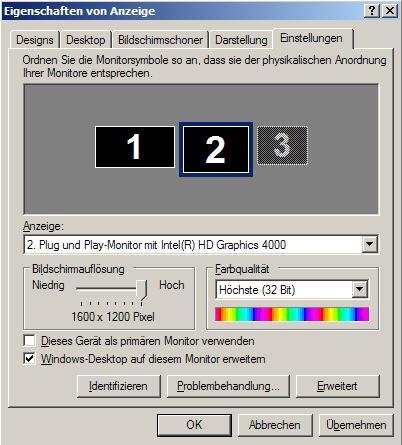
In your windows configuration - display setup .. do you have your main playfield on the left with the backglass then dmd monitor on the right - tops aligned.

Like this:  pf -> bg -> dmd

c8ftr88yzlaj10lvx.jpg


Edited by allknowing2012, 22 April 2016 - 01:44 PM.

* I don't know everything - I just have no life *
testimageNL


#424 toxie

toxie

    VPF Veteran

  • VP Dev Team
  • PipPipPipPipPipPip
  • 5,734 posts
  • Location:berlin, germany

  • Flag: Germany

  • Favorite Pinball: AFM

Posted 22 April 2016 - 02:52 PM


..And in there also do "setup defaults" first, cause it allows you to set the "cabinet" setup flag in there, which makes it act -exactly- the same as the old cabinet build.


Thanks guys... that one doesn't crash VP10 like the older cab version, but unfortunately, still does not save the DMD position on the second monitor.  Always opens on the first monitor.


Maybe because you ran that table with the new pinmame build initially without having setup the "cabinet" flag in the defaults yet?

In that case, right click on the DMD, and then change the cabinet flag there in the options/preferences (whatever it was called in that menu :)), press F3 to reset, then it should do what you want.


#425 Shoopity

Shoopity

    Pinball Fan

  • Members
  • PipPipPipPip
  • 691 posts
  • Location:Colorado

  • Flag: United States of America

  • Favorite Pinball: Medieval Madness

Contributor

Posted 22 April 2016 - 06:30 PM

So, I think I found a bug (that's been around for awhile):


In the PlaySound table method, there's an option for panning.  I thought it was supposed to be -1 for all the left and 1 for all the way to the right, but it seems like it's -1 to 0.1; is a decimal misplaced in that method?


#426 Drybonz

Drybonz

    Really bad at pinball, but having fun.

  • Members
  • PipPipPipPip
  • 1,538 posts

  • Flag: ---------

  • Favorite Pinball: Theatre of Magic

Posted 22 April 2016 - 10:51 PM

Maybe because you ran that table with the new pinmame build initially without having setup the "cabinet" flag in the defaults yet?

In that case, right click on the DMD, and then change the cabinet flag there in the options/preferences (whatever it was called in that menu :)), press F3 to reset, then it should do what you want.


You were right about that... I did have to change the settings while in that game.  Unfortunately, it made no difference.  DMD still opens on the wrong monitor.


As for my monitor configuration... I have 2 monitors.  The playfield is on the main monitor.  The backglass is on the other.  There is no third monitor.  My goal is to move the DMD off the playfield monitor but it always shows up there when I start the game.


#427 RYSr

RYSr

    Pinball Fan

  • Charter Member
  • 511 posts
  • Location:Mercerville (Central) NJ, USA

  • Flag: United States of America

  • Favorite Pinball: TZ - G&R - MB - CV - Metallica

Posted 22 April 2016 - 11:53 PM


Maybe because you ran that table with the new pinmame build initially without having setup the "cabinet" flag in the defaults yet?

In that case, right click on the DMD, and then change the cabinet flag there in the options/preferences (whatever it was called in that menu :)), press F3 to reset, then it should do what you want.

 

You were right about that... I did have to change the settings while in that game.  Unfortunately, it made no difference.  DMD still opens on the wrong monitor.


As for my monitor configuration... I have 2 monitors.  The playfield is on the main monitor.  The backglass is on the other.  There is no third monitor.  My goal is to move the DMD off the playfield monitor but it always shows up there when I start the game.


You missed allnowing2012's point.

Is your backglass monitor placed to the left of your primary playfield monitor in your windows display monitor window as shown. Ignore the 3rd inactive monitor on his example.

Rich


Edited by RYSr, 22 April 2016 - 11:55 PM.


#428 allknowing2012

allknowing2012

    Pinball Fan

  • Members
  • PipPipPipPip
  • 1,948 posts
  • Location:Waterloo, ON

  • Flag: Canada

  • Favorite Pinball: bucaneer

Contributor

Posted 23 April 2016 - 01:06 AM

Make sure the script in the game isnt coded to place the dmd there ... do a search for dmd in the script. Comment it out if its there.


* I don't know everything - I just have no life *
testimageNL


#429 Drybonz

Drybonz

    Really bad at pinball, but having fun.

  • Members
  • PipPipPipPip
  • 1,538 posts

  • Flag: ---------

  • Favorite Pinball: Theatre of Magic

Posted 23 April 2016 - 01:41 AM

Ok, guys I understand what you meant now... I actually went in (I use Display Fusion, but it works the same as windows monitor manager) and dragged the monitors to the other side of each other.  The DMD is sticking to the preferred monitor now.  Thanks a bunch for the help.


On a side note, that might be a good feature to add to VPINMAME in the future to make rotation and which monitor easier to configure.  Option to rotate right in the settings menu and maybe a monitor setting that didn't depend on monitor placement.  That would keep people from having to edit scripts and make weird monitor profiles just for pinball.


Anyway, thanks again for the help, it's up and running now.   :)


#430 toxie

toxie

    VPF Veteran

  • VP Dev Team
  • PipPipPipPipPipPip
  • 5,734 posts
  • Location:berlin, germany

  • Flag: Germany

  • Favorite Pinball: AFM

Posted 23 April 2016 - 08:48 AM

So, I think I found a bug (that's been around for awhile):


In the PlaySound table method, there's an option for panning.  I thought it was supposed to be -1 for all the left and 1 for all the way to the right, but it seems like it's -1 to 0.1; is a decimal misplaced in that method?


Weird, i'll check that later today..


As for the VPM requests: There is sooooo much that would need improvement in VPMs output system..  :/

I think we should rather go and make VPX ready for multi monitor, etc.


#431 allknowing2012

allknowing2012

    Pinball Fan

  • Members
  • PipPipPipPip
  • 1,948 posts
  • Location:Waterloo, ON

  • Flag: Canada

  • Favorite Pinball: bucaneer

Contributor

Posted 23 April 2016 - 02:51 PM

Ok, guys I understand what you meant now... I actually went in (I use Display Fusion, but it works the same as windows monitor manager) and dragged the monitors to the other side of each other.  The DMD is sticking to the preferred monitor now.  Thanks a bunch for the help.


On a side note, that might be a good feature to add to VPINMAME in the future to make rotation and which monitor easier to configure.  Option to rotate right in the settings menu and maybe a monitor setting that didn't depend on monitor placement.  That would keep people from having to edit scripts and make weird monitor profiles just for pinball.


Anyway, thanks again for the help, it's up and running now.   :)

Since the dmd position is stored as an offset to the pf - if it is not to the right of the pf monitor, it results in a negative offset and BOOM it wont save.

And now back to the beta 10.1 discussions :-)


Edited by allknowing2012, 23 April 2016 - 02:52 PM.

* I don't know everything - I just have no life *
testimageNL


#432 NEW

NEW

    Enthusiast

  • Members
  • PipPipPip
  • 180 posts

  • Flag: Argentina

  • Favorite Pinball: Centaur

Posted 23 April 2016 - 10:26 PM

Hello. Where do I find the link to download the latest version
regards
 
Cesar


#433 fuzzel

fuzzel

    spaghetti code

  • VP Dev Team
  • PipPipPipPipPip
  • 2,818 posts

  • Flag: Germany

  • Favorite Pinball: yes I have

Posted 23 April 2016 - 10:53 PM

check the #1 post of this thread


#434 NEW

NEW

    Enthusiast

  • Members
  • PipPipPip
  • 180 posts

  • Flag: Argentina

  • Favorite Pinball: Centaur

Posted 23 April 2016 - 11:15 PM

I have this problem when I load some tables, not about all.
That may be.
 
001_t.png
 
Cesar


#435 cmd

cmd

    Enthusiast

  • Members
  • PipPipPip
  • 107 posts

  • Flag: United States of America

  • Favorite Pinball: Jokerz!

Posted 24 April 2016 - 06:53 AM

@ VP 10 devs.:  After noticing performance issues with Win7 I downgraded to WinXP. Game play is much better but now I have to enable "Alternative Depth Buffer processing". Is this a known XP issue or is my config buggy?


Thanks for your continued development.


cmd.


#436 toxie

toxie

    VPF Veteran

  • VP Dev Team
  • PipPipPipPipPipPip
  • 5,734 posts
  • Location:berlin, germany

  • Flag: Germany

  • Favorite Pinball: AFM

Posted 24 April 2016 - 08:07 AM

This is not an issue.. It all depends on driver support vs graphics card model vs OS.. Thats why the option is basically there.. :)


#437 fuzzel

fuzzel

    spaghetti code

  • VP Dev Team
  • PipPipPipPipPip
  • 2,818 posts

  • Flag: Germany

  • Favorite Pinball: yes I have

Posted 24 April 2016 - 04:40 PM

rev2580 is up:


- add 'reset to defaults' to video preferences
- add true fullscreen support and basic fullscreen support for 10bit monitors (only sRGB is supported)


As for the fullscreen mode: if you activate this you won't see the pause window anymore only a small text is displayed. However the hotkeys for the pause window are still working but if get into the debug mode you are probably out of luck getting out of the menu only ALT+F4 helps here ;) But be aware of the fact that in true fullscreen mode you might get input lag if you use it together with VPINMAME and/or B2S.



#438 jimmyfingers

jimmyfingers

    Pinball Fan

  • VIP
  • 832 posts

  • Flag: Canada

  • Favorite Pinball: Comet


Posted 24 April 2016 - 07:48 PM

Cool to see some new options for exclusive full screen and maybe this can allow it to work with SLI properly now?  However, I tried to check out the exclusive fullscreen but noticed that no 120hz options show up in the preferences even though my monitor has that support and was currently configured for that resolution / refresh.  This was on my rotated HV (Hybrid View / single screen) set-up with 1440x2560.  At 60hz, as a test, it worked and then I tried setting in registry as 120hz (should work) but then the VPM game I was trying gave controller errors while starting (either with native pinmame or B2S).  However, when using the same registry hack for 120hz attempt, the default table (non-VPM) worked and I was able to get exclusive full screen at 120hz.


The VPM table I tried was first with B2S, so also either trying to display any VPM screen / window as it was an 80s table with LEDs done through B2S so the pinmame window itself was hidden / not being viewed.  Tried also with it in pure VPM mode and same issue with not starting and giving controller errors.


Is there a way that this new feature can be extended to work with 120hz?  Shouldn't be a pinmame limitation when running without an actual pinmame graphical window / outpu (.hiidden=1) and where the built-in VPM window or native one become a moot point as they are simply not drawn (I would think if any refresh rate issues between the two programs were the real problem that not displaying any window / output from pinmame should allow it to function).


Would be cool to test with better refresh rates than 60. 


#439 cmd

cmd

    Enthusiast

  • Members
  • PipPipPip
  • 107 posts

  • Flag: United States of America

  • Favorite Pinball: Jokerz!

Posted 24 April 2016 - 10:58 PM

This is not an issue.. It all depends on driver support vs graphics card model vs OS.. Thats why the option is basically there.. :)


Updated NVidia drivers, DotNet4 and Vlsual C+++. Still getting "unable to access texture surface". I'm wondering if Direct X 9.0c lacks the texturing/shading capabilities. :hmm:


cmd.


#440 jpsalas

jpsalas

    Grand Schtroumpf

  • VIP
  • 7,300 posts
  • Location:I'm Spanish, but I live in Oslo (Norway)

  • Flag: Norway

  • Favorite Pinball: I like both new and old, but I guess I prefer modern tables with some rules and goals to achieve.


Posted 25 April 2016 - 02:02 AM

Cool to see some new options for exclusive full screen and maybe this can allow it to work with SLI properly now?  However, I tried to check out the exclusive fullscreen but noticed that no 120hz options show up in the preferences even though my monitor has that support and was currently configured for that resolution / refresh.  This was on my rotated HV (Hybrid View / single screen) set-up with 1440x2560.  At 60hz, as a test, it worked and then I tried setting in registry as 120hz (should work) but then the VPM game I was trying gave controller errors while starting (either with native pinmame or B2S).  However, when using the same registry hack for 120hz attempt, the default table (non-VPM) worked and I was able to get exclusive full screen at 120hz.


The VPM table I tried was first with B2S, so also either trying to display any VPM screen / window as it was an 80s table with LEDs done through B2S so the pinmame window itself was hidden / not being viewed.  Tried also with it in pure VPM mode and same issue with not starting and giving controller errors.


Is there a way that this new feature can be extended to work with 120hz?  Shouldn't be a pinmame limitation when running without an actual pinmame graphical window / outpu (.hiidden=1) and where the built-in VPM window or native one become a moot point as they are simply not drawn (I would think if any refresh rate issues between the two programs were the real problem that not displaying any window / output from pinmame should allow it to function).


Would be cool to test with better refresh rates than 60. 


I can choose 60, 85, 120 and 144 Hz. But I use a single monitor.


If you want to check my latest uploads then click on the image below:


vp.jpg


Next table? A tribute table to Stern's Foo Fighters