Jump to content


Photo
- - - - -

UWQHD (3440x1440) 21:9 Playfield Cabinet Build Log

21:9 UWQHD Cabinet Build Log

  • Please log in to reply
100 replies to this topic

#21 Tesla

Tesla

    Pinball Fan

  • Silver Supporter
  • 1,529 posts
  • Location:Texas, USA

  • Flag: United States of America

  • Favorite Pinball: Star Trek - TNG

Posted 20 October 2025 - 05:17 AM

> They are built to actual pinball playfield dimensions (like 20.25 x 42 for Bally)


I suppose a better explanation and even more as expected. It's actually pretty amazing how yall keep everything sized properly and in-proportion (as the pieces go from reality to virtual).


So, Wide-Bodies would then be created to match THEIR (less skinny-looking) dimensions, I'm guessing.


16:9 sounds weird, but it's very close to 16:8 (which is 2:1). On a 32-incher, you would only have to trim-off about 1.5-inches to make it 2:1 (16:8).


So, what I noticed is that a Wide-Body table (like Star Tek - TNG) almost completely fits on 16:9 ... NO SIDE BOARDERS and like just an inch or so cropped-off the bottom. That tells me on a 16:10 monitor it would fit completely ... ie, more square, not more rectangle-ish.


So, apart from the fact that most TV's are 16:9 (as are most computer-monitors now-days) ... it makes since that most cabinet-builders use 16:9 ... Wide-Bodies look great and Display is not too far out of proportion for standard-width Tables (I run them with minimal side boarders and cropped up to the middle drain-hole at the bottom). Not sure how to better present my case that 16:9 is the best choice.


As for Instruction Cards, personally I think:

a. Start with the ones that are already expertly written (and remastered). I'm wanting to customize mine a bit (with my notes).

b. Present them on a separate screen or device ... plenty of small Arduino monitors out there, or my iPhone ... or an old iPhone with just WiFi (with images or PDFs in Cloud).


My "To Do" list is getting shorter by the week. I plan to come-up with something soon (well, at least it made the list) <smile>


Edited by Tesla, 20 October 2025 - 02:34 PM.


#22 BoltBait

BoltBait

    Software Developer

  • Members
  • PipPipPip
  • 459 posts
  • Location:Sacramento, CA

  • Flag: United States of America

  • Favorite Pinball: Elvira, Whitewater, Big Bang Bar, Fun House and All the old EM tables of the 70s that I played as a kid (including Buccaneer, Spirit of 76, and King Kool)

Posted 16 November 2025 - 02:55 AM

For the mean time, I need to put this project on hold for about a month due to traveling, etc.  But, mid November, I'm going to start getting serious about my next build.

 
And... I'm back in town and itching to start. 
 
I just ordered the MSI - MAG401QR 40" Ultrawide screen. Should be here next week.
 
While visiting my daughter, she gave me her old video card an NVIDIA GeForce RTX 2070 SUPER.  When I got home, a friend gave me a motherboard/processor (i7).  I'm shopping for a case (bench case), power supply and SSD. I'll be running Win10 which I already have.
 
Everything else (legs, controller, buttons, etc.) I'll be taking off my original build.
 
I'll also be taking the time to update all of the software on the machine. (I'm way behind on VPX and PinballY.)  I never have my pinball machine connected to the Internet.  Once setup, I disconnect from the Internet and disable the virus scanner for speed.  New tables are always transferred via memory key after being scanned on my main computer.
 
Once all the software is setup and working, I'll start ordering the new parts (lockdown bar/assembly, coin door, etc.).  Once that stuff arrives, I'll buy the wood to create the new case.  The last thing to buy will be the tempered glass.
 
Of course I'll document everything with pics and descriptions just like I did last time.


So, what I noticed is that a Wide-Body table (like Star Tek - TNG) almost completely fits on 16:9 ... NO SIDE BOARDERS and like just an inch or so cropped-off the bottom. That tells me on a 16:10 monitor it would fit completely ... ie, more square, not more rectangle-ish.
 
So, apart from the fact that most TV's are 16:9 (as are most computer-monitors now-days) ... it makes since that most cabinet-builders use 16:9 ... Wide-Bodies look great and Display is not too far out of proportion for standard-width Tables (I run them with minimal side boarders and cropped up to the middle drain-hole at the bottom). Not sure how to better present my case that 16:9 is the best choice.

 
I completely understand your argument, but I'm old and generally play the old, standard sized EM tables.  I think the 21:9 screen will be ideal for them.  (I should know for sure by Thanksgiving.)
 
I do run a few wide tables and I'll just have to scale them the best I can.


Pics incoming!


Edited by BoltBait, 16 November 2025 - 03:02 AM.

How I built my B2S Pinball Cabinet, step-by-step, with pictures!  Full-sized cabinet for ~$700. Believe me, if I can do it, so can you!

"Making anything with your hands goes wonderfully with whatever in your life you would consider your grind." ~Nick Offerman


#23 BoltBait

BoltBait

    Software Developer

  • Members
  • PipPipPip
  • 459 posts
  • Location:Sacramento, CA

  • Flag: United States of America

  • Favorite Pinball: Elvira, Whitewater, Big Bang Bar, Fun House and All the old EM tables of the 70s that I played as a kid (including Buccaneer, Spirit of 76, and King Kool)

Posted 25 November 2025 - 10:29 PM

I just ordered the MSI - MAG401QR 40" Ultrawide screen. Should be here next week.


And, it's here... finally!
 

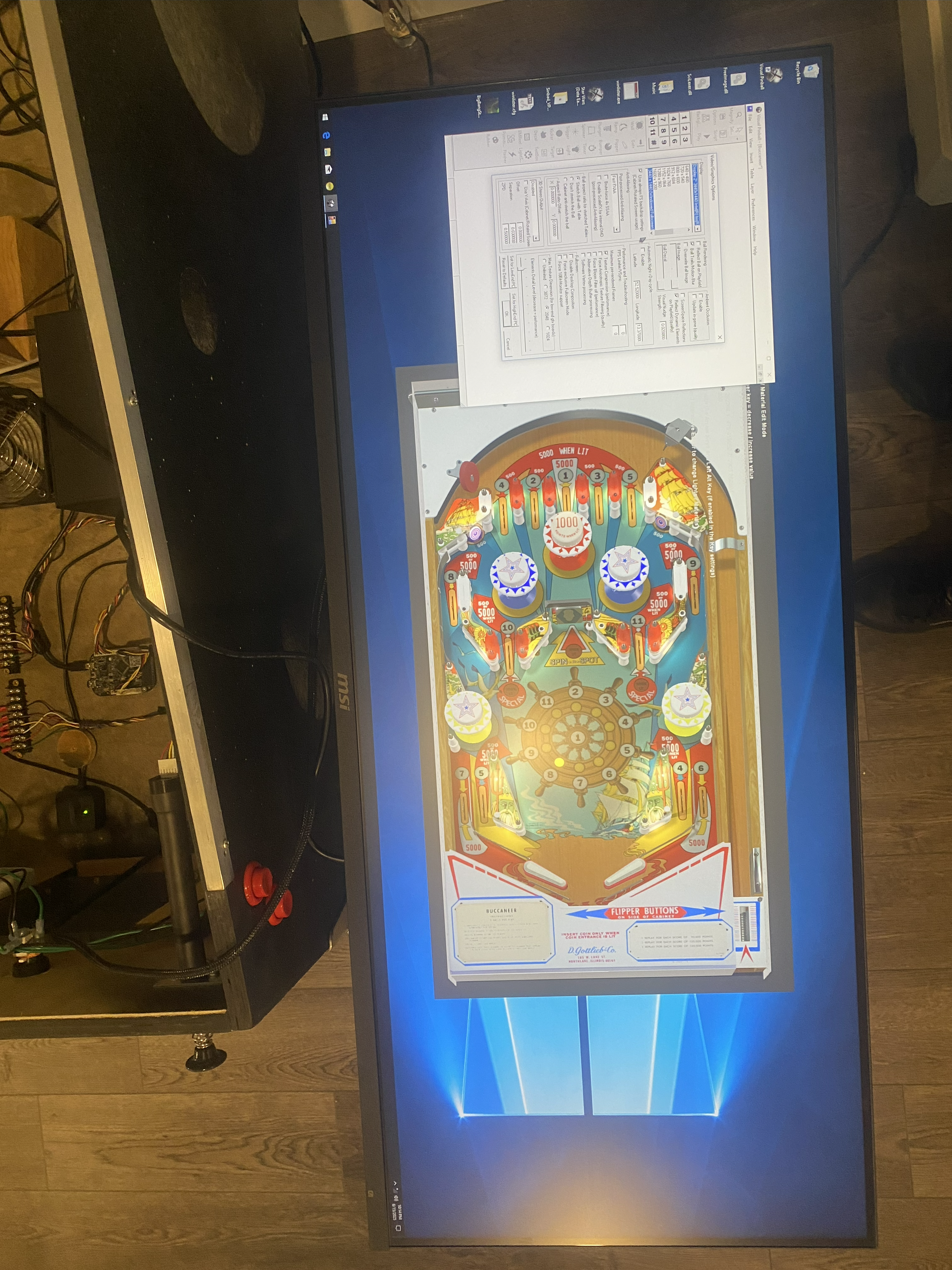
How well does Visual Pinball run at 21:9 (UWQHD: 3440x1440).

 
Not very well, I'm afraid...
 

Playfield.png


I'm running it in F6-Interactive scaling mode.  I just can't figure out how to make the playfield go full screen!


Any tips?


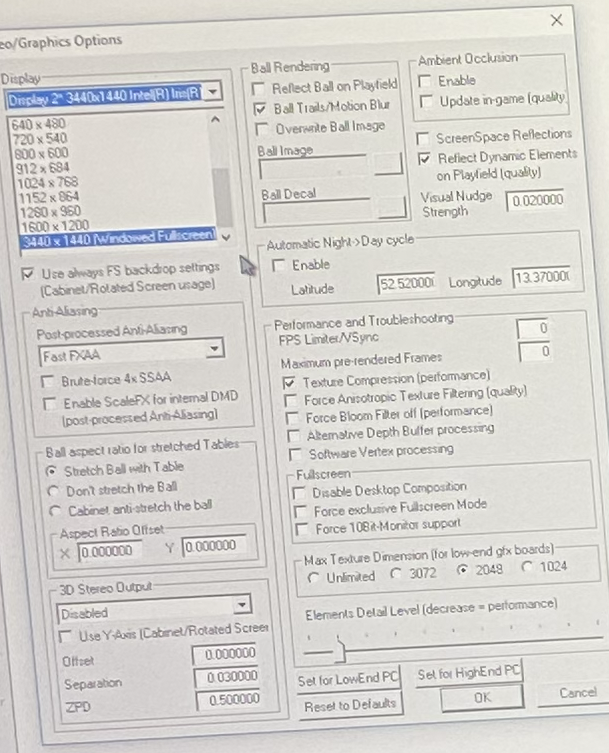
Here's my settings screen:


Settings.png


Sorry for the low quality, I'm using my cell phone.


I have poked around in settings and other places in the VPX application, I just can't find a way to make the playfield go full screen.


EDIT: I'm running VPX 10.6.0 (as well as VP9--several versions) in my cab. Would an upgrade fix this?  (I tend to avoid updates as long as everything's working.)


Edited by BoltBait, 25 November 2025 - 10:33 PM.

How I built my B2S Pinball Cabinet, step-by-step, with pictures!  Full-sized cabinet for ~$700. Believe me, if I can do it, so can you!

"Making anything with your hands goes wonderfully with whatever in your life you would consider your grind." ~Nick Offerman


#24 Tesla

Tesla

    Pinball Fan

  • Silver Supporter
  • 1,529 posts
  • Location:Texas, USA

  • Flag: United States of America

  • Favorite Pinball: Star Trek - TNG

Posted 26 November 2025 - 02:18 AM

Be sure your Windows is set to full (native) resolution and 100% Scaling (that basically means no-scaling).


Why isn't your Windows Desktop in Portrait-Mode? Do you normally run it Landscape like that?


In that VPX/Prefs/Video screenshot ... shouldn't that be showing 1440x3440 (9:21) in Portrait? Maybe it doesn't show normal when your Windows isn't in Portrait-Mode either ... I've never really tried my cabinet in Landscape Mode with VPX.


Did you reprogram your ScreenRes.txt ? Might not cause this immediate problem, but seems like you would need to eventually.


Edited by Tesla, 26 November 2025 - 02:59 AM.


#25 BoltBait

BoltBait

    Software Developer

  • Members
  • PipPipPip
  • 459 posts
  • Location:Sacramento, CA

  • Flag: United States of America

  • Favorite Pinball: Elvira, Whitewater, Big Bang Bar, Fun House and All the old EM tables of the 70s that I played as a kid (including Buccaneer, Spirit of 76, and King Kool)

Posted 26 November 2025 - 03:21 AM

Be sure your Windows is set to full (native) resolution and 100% Scaling (that basically means no-scaling).


That is exactly how I have it setup.


Why isn't your Windows Desktop in Portrait-Mode? Do you normally run it Landscape like that?


I have always run my screen this way.  I believe VP9 required it and VPX has always been fine with it.


In that VPX/Prefs/Video screenshot ... shouldn't that be showing 1440x3440 (9:21) in Portrait? Maybe it doesn't show normal when your Windows isn't in Portrait-Mode either ... I've never really tried my cabinet in Landscape Mode with VPX.


Did you reprogram your ScreenRes.txt ? Might not cause this immediate problem, but seems like you would need to eventually.


I will try tinkering with this stuff.  Thanks for giving me something to try.


How I built my B2S Pinball Cabinet, step-by-step, with pictures!  Full-sized cabinet for ~$700. Believe me, if I can do it, so can you!

"Making anything with your hands goes wonderfully with whatever in your life you would consider your grind." ~Nick Offerman


#26 scutters

scutters

    Pinball Fan

  • Members
  • PipPipPipPip
  • 551 posts

  • Flag: England

  • Favorite Pinball: Addams Family

Posted 26 November 2025 - 10:19 AM

Maybe it's a test setup thing with the screen presumably not primary and using intel iris as gpu... but i'd try checking Force Exclusive Fullscreen Mode in vpx prefs to see if that forces it to fullscreen.


#27 deadmanworking

deadmanworking

    Enthusiast

  • Members
  • PipPipPip
  • 232 posts

  • Flag: Germany

  • Favorite Pinball: Pinbot, Attack From Mars, Cactus Canyon

Posted 26 November 2025 - 12:36 PM


I just ordered the MSI - MAG401QR 40" Ultrawide screen. Should be here next week.


And, it's here... finally!
 

How well does Visual Pinball run at 21:9 (UWQHD: 3440x1440).

 
Not very well, I'm afraid...
 

Playfield.png


I'm running it in F6-Interactive scaling mode.  I just can't figure out how to make the playfield go full screen!


Any tips?


Here's my settings screen:


Settings.png


Sorry for the low quality, I'm using my cell phone.


I have poked around in settings and other places in the VPX application, I just can't find a way to make the playfield go full screen.


EDIT: I'm running VPX 10.6.0 (as well as VP9--several versions) in my cab. Would an upgrade fix this?  (I tend to avoid updates as long as everything's working.)


Landscape and 100% scaling ist the correct setup for the screen. 

Yes 10.6 is ancient and you're missing the settings for windowed with pixel settings or fullscreen etc. 
Suggest you follow this guide step by step to update to the current versions. This will have many performance and stability benefits as well: 
https://vpuniverse.c...and-b2s-server/


#28 BoltBait

BoltBait

    Software Developer

  • Members
  • PipPipPip
  • 459 posts
  • Location:Sacramento, CA

  • Flag: United States of America

  • Favorite Pinball: Elvira, Whitewater, Big Bang Bar, Fun House and All the old EM tables of the 70s that I played as a kid (including Buccaneer, Spirit of 76, and King Kool)

Posted 27 November 2025 - 09:54 PM

Landscape and 100% scaling is the correct setup for the screen. 

Yes 10.6 is ancient and you're missing the settings for windowed with pixel settings or full screen etc. 
Suggest you follow this guide step by step to update to the current versions. This will have many performance and stability benefits as well: 
https://vpuniverse.c...and-b2s-server/


I followed the linked tutorial to update everything.


The tutorial was missing one thing... I had to track down the VC_redist.x64.exe file from the MS website.


I've got some good news/bad news stuff:


Bad news

My current graphics card just can't handle the higher resolution.  I turned the graphics quality all the way down just to load the textures and they look terrible.

The standard build of VPX/64 didn't work well at all.  Half the textures didn't load at all even in low quality.


Good news

The GL version works great!

Check out this early picture of my setup (no tweaking yet):


LookingBetter.png


This is EXACTLY what I had in mind when I first saw that 21:9 screen.  I'm actually kind of excited right now.


I have a lot of work ahead of me...


While visiting my daughter, she gave me her old video card an NVIDIA GeForce RTX 2070 SUPER. RECEIVED

When I got home, a friend gave me a motherboard/processor (i7).  RECEIVED

I'm shopping for a case (bench case), power supply and SSD. Black Friday is tomorrow... here I come!  RECEIVED


I'll be running Win10 which I need to buy. DONE
 
I'll also be taking the time to update all of the software on the machine. (I'm way behind on VPX and PinballY.)  DONE
 
Everything else (legs, controller, buttons, etc.) I'll be taking off my original build.
Once all the software is setup and working, I'll start ordering the new parts (lockdown bar/assembly, coin door, etc.).  RECEIVED

Once that stuff arrives,

I'll buy the wood to create the new case. DONE


The last thing to buy will be the tempered glass.  EDIT: I may just have my existing glass cut down to size since the new cabinet will be a couple of inches narrower but just about the same height.
 
Of course I'll document everything with pics and descriptions just like I did last time.


I do run a few wide tables and I'll just have to scale them the best I can.


Pics incoming!


I really need to build my new system so I can crank up the graphics quality.  That'll let me know how it will really look when I'm done.  But, it's looking very promising TBH!


Edited by BoltBait, 14 December 2025 - 06:10 AM.

How I built my B2S Pinball Cabinet, step-by-step, with pictures!  Full-sized cabinet for ~$700. Believe me, if I can do it, so can you!

"Making anything with your hands goes wonderfully with whatever in your life you would consider your grind." ~Nick Offerman


#29 rickh

rickh

    Enthusiast

  • Gold Supporter
  • 436 posts
  • Location:Raleigh

  • Flag: United States of America

  • Favorite Pinball: I love them all

Posted 28 November 2025 - 01:39 PM

"Bad news

My current graphics card just can't handle the higher resolution.  I turned the graphics quality all the way down just to load the textures and they look terrible.

The standard build of VPX/64 didn't work well at all.  Half the textures didn't load at all even in low quality."


I am surprised that a GeForce RTX 2070 would choke on this display.   I use a 2560x1080 display for my office PC and with a Radeon 460 GPU it appears to work okay.   I understand this is much lower resolution than your display, but my graphics card is much slower than yours.  


Regards,


Rick


Rickey

Intense Arcade

http://www.intensearcade.com


#30 Tesla

Tesla

    Pinball Fan

  • Silver Supporter
  • 1,529 posts
  • Location:Texas, USA

  • Flag: United States of America

  • Favorite Pinball: Star Trek - TNG

Posted 28 November 2025 - 05:31 PM


I am surprised that a GeForce RTX 2070 would choke on this display.  


Agreed ... doesn't sound right does it? (good catch).

RTX-2070 should still be a viable video-card at 1080p and/or 1440p(2K) ... heck, maybe even 4K.


I thought he was running a little (and now older) mini-pc? Or maybe that was someone else.


So, it's a "real PC" now huh? Then maybe maybe the CPU-chip is a little too-old? 

Or, some people still like using spinning-HDD as boot/C-drives (instead of SSD).

Really, could be any number of things.


I'm running 1440p/2K on an old Intel-i7 and Nvidia GTX-1070 just fine (knock on wood).


Edited by Tesla, 28 November 2025 - 05:33 PM.


#31 BoltBait

BoltBait

    Software Developer

  • Members
  • PipPipPip
  • 459 posts
  • Location:Sacramento, CA

  • Flag: United States of America

  • Favorite Pinball: Elvira, Whitewater, Big Bang Bar, Fun House and All the old EM tables of the 70s that I played as a kid (including Buccaneer, Spirit of 76, and King Kool)

Posted 28 November 2025 - 08:53 PM

I am surprised that a GeForce RTX 2070 would choke on this display.


No! I have not put my new system together yet. I'm talking about my NUC running Intel Iris graphics.  I just hooked up the new screen to see if I could get VPX working at the new resolution.


BTW, I ordered all the stuff necessary to put the new system together (case, pw, ssd, etc.) and it should all arrive here tomorrow.


Edited by BoltBait, 28 November 2025 - 10:56 PM.

How I built my B2S Pinball Cabinet, step-by-step, with pictures!  Full-sized cabinet for ~$700. Believe me, if I can do it, so can you!

"Making anything with your hands goes wonderfully with whatever in your life you would consider your grind." ~Nick Offerman


#32 BoltBait

BoltBait

    Software Developer

  • Members
  • PipPipPip
  • 459 posts
  • Location:Sacramento, CA

  • Flag: United States of America

  • Favorite Pinball: Elvira, Whitewater, Big Bang Bar, Fun House and All the old EM tables of the 70s that I played as a kid (including Buccaneer, Spirit of 76, and King Kool)

Posted 02 December 2025 - 11:30 PM

I ordered all the stuff necessary to put the new system together (case, pw, ssd, etc.) and it should all arrive here tomorrow.


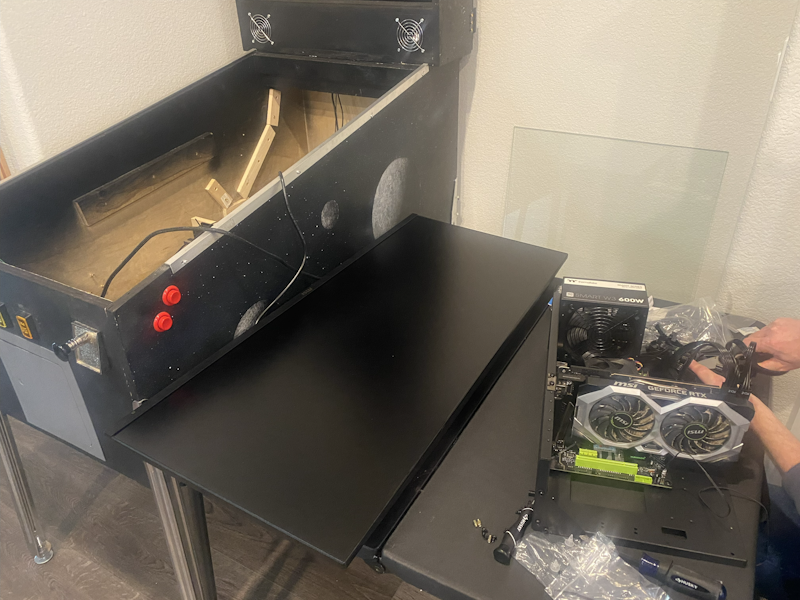
New PC arrived and I'm putting it all together today.  Windows 10 is installing updates on the new SSD right now.


NewPC.png


I ordered all the pinball machine parts (lockdown bar, coin door, side rails, etc.) and when they arrive I'll buy the wood for the new cabinet I'll be building.


I should be back in business before Christmas!


(Going through pinball withdrawal right now, NGL.  Playing Pinball Arcade on the laptop just isn't cutting it.) 


Edited by BoltBait, 02 December 2025 - 11:35 PM.

How I built my B2S Pinball Cabinet, step-by-step, with pictures!  Full-sized cabinet for ~$700. Believe me, if I can do it, so can you!

"Making anything with your hands goes wonderfully with whatever in your life you would consider your grind." ~Nick Offerman


#33 Tesla

Tesla

    Pinball Fan

  • Silver Supporter
  • 1,529 posts
  • Location:Texas, USA

  • Flag: United States of America

  • Favorite Pinball: Star Trek - TNG

Posted 03 December 2025 - 01:18 AM


1. I should be back in business before Christmas!


2. Playing Pinball Arcade on the laptop just isn't cutting it.) 


1. Nice


2. Back in the day, (and before I re-discovered VP, well the upgraded VPX actually) I played my share of The Pinball Arcade. I always thought FarSight Studios did pretty good with that and their engine was good for its time. I mainly played with the (pricey) Arcooda addon (and my biggest desktop monitor rotated to Portrait). 


#34 deadmanworking

deadmanworking

    Enthusiast

  • Members
  • PipPipPip
  • 232 posts

  • Flag: Germany

  • Favorite Pinball: Pinbot, Attack From Mars, Cactus Canyon

Posted 03 December 2025 - 04:04 PM

Windows 10? That OS is already end of life, recommend you go Win 11, I just reinstalled and chose the Windows 11 IoT Enterprise 2024 Edition which omits a lot of bloatware in the first place, runs like a charm

#35 humunut

humunut

    Hobbyist

  • Members
  • PipPip
  • 37 posts
  • Location:Owego, NY

  • Flag: United States of America

  • Favorite Pinball: LOTR

Posted 03 December 2025 - 04:38 PM

No thanks. We are now in the golden age of Windows 10, where you don't have to worry about some half-baked update screwing up your carefully configured installation. When I did a reinstallation earlier this year on my previous cab system, which up to then was disconnected from the internet, I found that some of the hardware was no longer supported by the current Windows 10!


#36 BoltBait

BoltBait

    Software Developer

  • Members
  • PipPipPip
  • 459 posts
  • Location:Sacramento, CA

  • Flag: United States of America

  • Favorite Pinball: Elvira, Whitewater, Big Bang Bar, Fun House and All the old EM tables of the 70s that I played as a kid (including Buccaneer, Spirit of 76, and King Kool)

Posted 04 December 2025 - 04:03 AM

Windows 10? ... recommend you go Win 11


No can do. The motherboard/processor I got from my friend is not compatible with Win 11.


I just installed Win10 (licensed) and did all the updates and disconnected from the Internet.  I turned off updates and virus scanning.  Everything that goes onto that system from now on goes through a memory key from my laptop.


My laptop runs Win11 with up-to-date virus scanning definitions.  So, my pinball machine is safe and FAST.


BTW, I'm not a fan of Win10--I much prefer Win11 as my daily driver.  It just won't work on my pinball machine.


How I built my B2S Pinball Cabinet, step-by-step, with pictures!  Full-sized cabinet for ~$700. Believe me, if I can do it, so can you!

"Making anything with your hands goes wonderfully with whatever in your life you would consider your grind." ~Nick Offerman


#37 Tesla

Tesla

    Pinball Fan

  • Silver Supporter
  • 1,529 posts
  • Location:Texas, USA

  • Flag: United States of America

  • Favorite Pinball: Star Trek - TNG

Posted 04 December 2025 - 03:30 PM


Windows 10? ... recommend you go Win 11


1. No can do. The motherboard/processor I got from my friend is not compatible with Win 11...  It just won't work on my pinball machine.


2. I just installed Win10 (licensed) and did all the updates and disconnected from the Internet.  I turned off updates and virus scanning.  Everything that goes onto that system from now on goes through a memory key from my laptop.


3. My laptop runs Win11 ... I'm not a fan of Win10--I much prefer Win11 as my daily driver. 


1. I used to think like that ... until it came to recycling perfectly good computers and laptops belonging to myself, old customers, and family members. It turns-out ... there are perfectly legit ways to get Windows-11 64bit on there. Ways provided by Microsoft (using no 3rd-party software or tricks).


You could put Ubuntu on them. But before you choose that route, I suggest you try it first (in some real-world scenarios).


2. Windows-11 was been out for quite a while by now. Windows-12 should be here in a couple of years. Upon release, you would then be 2-versions behind. What you propose sounds good, but not really a viable long-term solution for most people.


3. It's not like it is some mission-critical thing ... it's only the pinball-cabinet ... a secondary usage-role .


Edited by Tesla, 04 December 2025 - 04:12 PM.


#38 Itchigo

Itchigo

    Pinball Wizard

  • Members
  • PipPipPipPipPip
  • 2,782 posts
  • Location:Chicago, Illinois

  • Flag: United States of America

  • Favorite Pinball: All


  • Trophies:

Posted 04 December 2025 - 05:41 PM

I really hate how when something new comes out we're so eager to throw the baby out with the bath water. I run 7 on everything (cab and desktop) and it works just fine. Same thing for my personal devices and my cars. It works, why do I have to part with my hard earned money again??


Founder of Rogue Pinball! https://roguepinball.com/index.php                 Making Pinball great again!!


partylikeits1776-.jpg


#39 Tesla

Tesla

    Pinball Fan

  • Silver Supporter
  • 1,529 posts
  • Location:Texas, USA

  • Flag: United States of America

  • Favorite Pinball: Star Trek - TNG

Posted 04 December 2025 - 06:14 PM

I really hate how when something new comes out we're so eager to throw the baby out with the bath water. I run 7 on everything (cab and desktop) and it works just fine. Same thing for my personal devices and my cars. It works, why do I have to part with my hard earned money again??


I agree with you (mostly).


That's why I try to up-cycle my old computers and devices into secondary roles (pinball cabinet, Kodi-boxes, etc.).


But it needs to be a viable solution and not something I have to keep jacking-with every year. It can't be an attack-vector or weak-spot in my network (as I have mission-critical computers running on the same network and using same accounts).


All technology and software moves forward and that's why it's even a thing. No reason to think what you ended-up with (Windows-7) is the "best final version of a Windows-OS".


Windows-11, is just Windows-10 v.2.0 ... Windows-10 is Windows-8 v2.0, etc.


Also, they are stepping-stones ... we would not have Intel-i9's today without Pentiums. No iPhone 16's without iPhone-3 or even first Macs.


Edited by Tesla, 04 December 2025 - 06:20 PM.


#40 BoltBait

BoltBait

    Software Developer

  • Members
  • PipPipPip
  • 459 posts
  • Location:Sacramento, CA

  • Flag: United States of America

  • Favorite Pinball: Elvira, Whitewater, Big Bang Bar, Fun House and All the old EM tables of the 70s that I played as a kid (including Buccaneer, Spirit of 76, and King Kool)

Posted 13 December 2025 - 12:38 AM

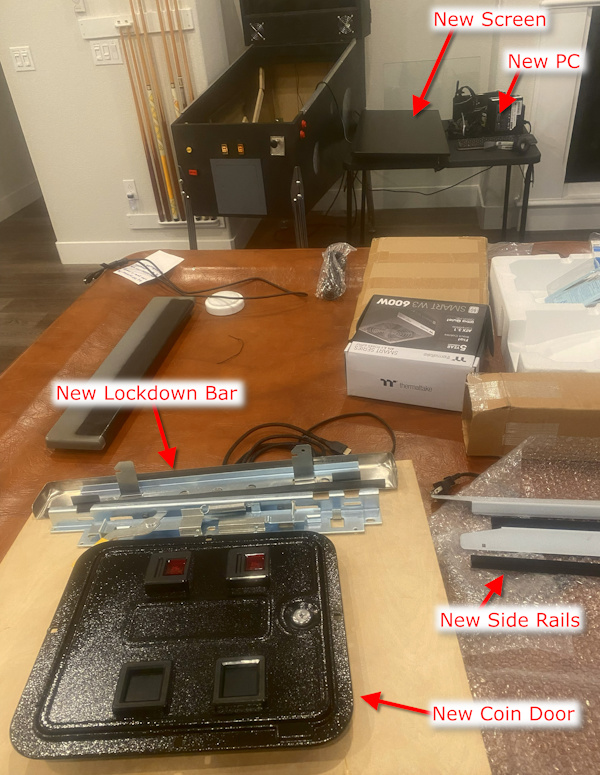
Christmas came early to the BoltBait household!  Look what just arrived:


EarlyChristmas.jpg


I think I'm going to make a trip to Home Depot tomorrow to buy some wood so I can start making the new cabinet!


Now that I have the new lockdown bar, I know EXACTLY how wide the machine needs to be. And, with the the new screen, I know how deep the machine will be.  (I may need to trim the side rails. Boy, those things are long!)


Edited by BoltBait, 13 December 2025 - 12:40 AM.

How I built my B2S Pinball Cabinet, step-by-step, with pictures!  Full-sized cabinet for ~$700. Believe me, if I can do it, so can you!

"Making anything with your hands goes wonderfully with whatever in your life you would consider your grind." ~Nick Offerman