
Jump to content


Photo
- - - - -

CPU Recommendation for 144hz Cabinets Playing VPW-Tier Tables

specs cabinet stutter cpu 144hz vpinballx visual pinball vpw

  • Please log in to reply
37 replies to this topic

#21 garnel

garnel

    Enthusiast

  • Gold Supporter
  • 267 posts
  • Location:Oregon

  • Flag: United States of America

  • Favorite Pinball: Medieval Madness

Posted 11 February 2024 - 07:13 PM

Have you tried assigning the first three cores to vpx as described in Chapter 17, "Performance Optimization"  in mjr's Pinball Build Guide? That worked in both of my cabs, with and without Frame Pacing, but I left Frame Pacing enabled anyway.                             

Both cab's have 5600X CPU's, one with an RTX 2070 and a Samsung 4K 60Hz display, the other with an RTX 3070, and a 120Hz 4k LG OLED playfield. No stuttering or flipper lag on either system - none.


While it would seem that reducing the number of cores assigned to VPX is counter intuative, in this case it makes them higher priority than non pinball interrupts - so the software responds immediately to VPX interrupts, ahead of all the other threads.

Otherwise it responds to interrupts in a round robin manner, making VPX wait it's turn, which can result in response lags.

Hope this helps.


#22 Lom87

Lom87

    Hobbyist

  • Members
  • PipPip
  • 10 posts

  • Flag: Germany

  • Favorite Pinball: Addams family

Posted 20 February 2024 - 08:48 PM

Have you tried assigning the first three cores to vpx as described in Chapter 17, "Performance Optimization"  in mjr's Pinball Build Guide? That worked in both of my cabs, with and without Frame Pacing, but I left Frame Pacing enabled anyway.                             

Both cab's have 5600X CPU's, one with an RTX 2070 and a Samsung 4K 60Hz display, the other with an RTX 3070, and a 120Hz 4k LG OLED playfield. No stuttering or flipper lag on either system - none.


While it would seem that reducing the number of cores assigned to VPX is counter intuative, in this case it makes them higher priority than non pinball interrupts - so the software responds immediately to VPX interrupts, ahead of all the other threads.

Otherwise it responds to interrupts in a round robin manner, making VPX wait it's turn, which can result in response lags.

Hope this helps.


Hey sorry i just missed your post, cause of the other/second site... No i did not do this, and did not know that this is possible! Thank you for this, i will try it soon!! :) I hope it helps..


#23 Lom87

Lom87

    Hobbyist

  • Members
  • PipPip
  • 10 posts

  • Flag: Germany

  • Favorite Pinball: Addams family

Posted 21 February 2024 - 06:37 PM

Ok tested it.. wont help..
i made screenshots but here is no way to import right?

So example VPW fish Tales Table

Gpu is by 80-90%
cpu @14%
ram 11/16gb

with spongebob table runs fine, gpu is at 45%


i tried with pinaffinity and without. no change. only different cores.

nvidia settings vsync is off, monitor inbuild everything off

it only stutters when all the light go on its soo bad

maybe its something totaly different? cable, graphic card, monitor but i dont think so

Next i will put in my old 3600 cpu, maybe it helps 🤷‍♂

Edited by Lom87, 22 February 2024 - 07:01 AM.


#24 csdf28

csdf28

    Enthusiast

  • Members
  • PipPipPip
  • 73 posts
  • Location:Abu Dhabi

  • Flag: United Kingdom

  • Favorite Pinball: Addams Family

Posted 28 February 2024 - 08:46 AM

With Fish Tales, have you tried turning off the Refraction Probes via the F12 menu?


#25 Tesla

Tesla

    Pinball Fan

  • Silver Supporter
  • 1,248 posts
  • Location:Texas, USA

  • Flag: United States of America

  • Favorite Pinball: Star Trek - TNG

Posted 28 February 2024 - 06:09 PM

Hey thx for reply


3. Everything is on 64 bit, so also Vpin Mame and what should be at 64 bit for the new 10.8 64bit tables.


I keep hearing about this.


So that's the deal, huh?


Should I build-up my next Intel/Nvidia cabinet as 64-bit VPX from the beginning?

Does anyone know when v10.8 becomes Stable-Release version on Windows-11?

This board still says v10.7.2 is latest.


#26 Tesla

Tesla

    Pinball Fan

  • Silver Supporter
  • 1,248 posts
  • Location:Texas, USA

  • Flag: United States of America

  • Favorite Pinball: Star Trek - TNG

Posted 28 February 2024 - 06:24 PM


4. normaly not, but where is the problem


Not sure if you have this on that Ryzen with 64-bit Windows 10/11...


but on my newer Intel systems,

I like to set Virtualization-Based-Security = DISABLED (will show in msinfo32).

Windows Security / Device Security / Core Isolation / Memory Integrity = OFF

You leave SecureBoot = ON


Windows Settings / Game-Mode = ON

Windows Settings / System / Display / Graphics /  HAGS = OFF


Try Nvidia Vertical-Sync on FAST if you don't like OFF.

Nvidia G-Sync requires Monitor and additional config.


#27 Lom87

Lom87

    Hobbyist

  • Members
  • PipPip
  • 10 posts

  • Flag: Germany

  • Favorite Pinball: Addams family

Posted 29 February 2024 - 10:16 AM

With Fish Tales, have you tried turning off the Refraction Probes via the F12 menu?


i can try that, in comparison this table runs better than the others


4. normaly not, but where is the problem

 
Not sure if you have this on that Ryzen with 64-bit Windows 10/11...
 
but on my newer Intel systems,
I like to set Virtualization-Based-Security = DISABLED (will show in msinfo32).
Windows Security / Device Security / Core Isolation / Memory Integrity = OFF
You leave SecureBoot = ON
 
Windows Settings / Game-Mode = ON
Windows Settings / System / Display / Graphics /  HAGS = OFF
 
Try Nvidia Vertical-Sync on FAST if you don't like OFF.
Nvidia G-Sync requires Monitor and additional config.

tryd this and things like this.

now it tested it with ryzen 3600 and 5600, no difference next thing is to change the ram.
then a completly other pc system (my gaming rig) maybe its some other thing

#28 wiesshund

wiesshund

    VPF Legend

  • Members
  • PipPipPipPipPipPipPip
  • 11,859 posts

  • Flag: United States of America

  • Favorite Pinball: How many can i have?

Posted 29 February 2024 - 05:40 PM


tryd this and things like this.

now it tested it with ryzen 3600 and 5600, no difference next thing is to change the ram.
then a completly other pc system (my gaming rig) maybe its some other thing


I think you need to go grab a spare HDD and try a clean windows load, and then a clean install of VPX and retest.

You R5 3600 should have been more than enough and your RTX 3060 running at a rez that is under 4k should have 0 issues (and if you are running 2K rez you probably dont need FSAA at anything higher than 100%)

And unless your RAM is flat out bad, it isnt going to matter much


If you feel the need to empty your wallet in my direction, i don't have any way to receive it anyways

Spend it on Hookers and Blow


#29 Tesla

Tesla

    Pinball Fan

  • Silver Supporter
  • 1,248 posts
  • Location:Texas, USA

  • Flag: United States of America

  • Favorite Pinball: Star Trek - TNG

Posted 29 February 2024 - 06:08 PM


I think you need to go grab a spare HDD and try a clean windows load, and then a clean install of VPX and retest.


Good call out as a basic troubleshooting step.


Now-days, only takes an hour-or-so to completely install Windows to a SSD.

Lean drivers and then VPX.

Test on that.


#30 jdv

jdv

    Enthusiast

  • Members
  • PipPipPip
  • 53 posts

  • Flag: ---------

  • Favorite Pinball: Haunted House

Posted 03 March 2024 - 10:27 AM

Hey guys, a very interesting thread, especially about single cores. 


Has anyone tried the newest gen of mini PCs?  They are single core and are "lean" in terms of bloatware, but don't have a dedicated/separate GPU.


If it'd work on the newer VPX games, it could be very useful just based on size alone....


Beelink SER7:


https://www.amazon.c...c63b24bcb5&th=1


#31 Lom87

Lom87

    Hobbyist

  • Members
  • PipPip
  • 10 posts

  • Flag: Germany

  • Favorite Pinball: Addams family

Posted 04 March 2024 - 07:34 PM

tryd this and things like this.

now it tested it with ryzen 3600 and 5600, no difference next thing is to change the ram.
then a completly other pc system (my gaming rig) maybe its some other thing

 
I think you need to go grab a spare HDD and try a clean windows load, and then a clean install of VPX and retest.
You R5 3600 should have been more than enough and your RTX 3060 running at a rez that is under 4k should have 0 issues (and if you are running 2K rez you probably dont need FSAA at anything higher than 100%)
And unless your RAM is flat out bad, it isnt going to matter much


yes i will reinstall everything, maybe it helps..

#32 Lom87

Lom87

    Hobbyist

  • Members
  • PipPip
  • 10 posts

  • Flag: Germany

  • Favorite Pinball: Addams family

Posted 11 March 2024 - 10:25 PM

ok i got it guys!
i set framepacing to 120hz and it runs best! no heavy drops! i know it should be 1 but then the drops are heavy. now its working

#33 Lom87

Lom87

    Hobbyist

  • Members
  • PipPip
  • 10 posts

  • Flag: Germany

  • Favorite Pinball: Addams family

Posted 14 March 2024 - 03:39 PM

no it should be 0 with framepacing.
now i thought i get the best out of my system and take my rtx 4070 but again massive framedrops. changed ram no change.
a friend of mine got an new intel prozessor and an 3070 and got exactly the same problems.
now for me its the program (10.8 64bit) No problems on my old system. 32bit runs fine.
maybe also it has something to do with my vsync settings. i stay with 32bit and the tables that runs good with 64bit and my 3060ti.

#34 Lom87

Lom87

    Hobbyist

  • Members
  • PipPip
  • 10 posts

  • Flag: Germany

  • Favorite Pinball: Addams family

Posted 15 March 2024 - 07:29 PM

For guys after me:
Got it finally: Got a program that totally disables the windows defender (defendercontrol) and now everything runs in 120fps stable (!!) every table!!! also the vpw tables! man after 2 month of experimenting and waste of time..

#35 wiesshund

wiesshund

    VPF Legend

  • Members
  • PipPipPipPipPipPipPip
  • 11,859 posts

  • Flag: United States of America

  • Favorite Pinball: How many can i have?

Posted 15 March 2024 - 10:03 PM

For guys after me:
Got it finally: Got a program that totally disables the windows defender (defendercontrol) and now everything runs in 120fps stable (!!) every table!!! also the vpw tables! man after 2 month of experimenting and waste of time..


Windows disables windows defender, if that is what one wishes to do.

Should not normally be a problem though.

Mine does not even look at VPX because i have told it not to


If you feel the need to empty your wallet in my direction, i don't have any way to receive it anyways

Spend it on Hookers and Blow


#36 robertms

robertms

    Control Enthusiast

  • Members
  • PipPipPipPip
  • 620 posts
  • Location:Chicago, IL

  • Flag: United States of America

  • Favorite Pinball: Steve Ritchie designs

Posted 16 March 2024 - 03:06 AM

Windows disables windows defender, if that is what one wishes to do.


Windows 10? How? Permanently?


Behold Godzilla! Check out my monster pincab project here: http://www.vpforums....topic=32236&hl=


#37 wiesshund

wiesshund

    VPF Legend

  • Members
  • PipPipPipPipPipPipPip
  • 11,859 posts

  • Flag: United States of America

  • Favorite Pinball: How many can i have?

Posted 18 March 2024 - 09:42 PM


Windows disables windows defender, if that is what one wishes to do.


Windows 10? How? Permanently?


How to Turn Off Windows Defender (Permanently)

If you’re looking to turn off Windows Defender for good, here’s what you need to do:

  1. Click Start.
  2. Type “Windows Security” and click the option under “Best match”.
  3. In the new window that opens, click Virus & threat protection.
  4. Under the Virus & threat protection heading, click Manage settings.
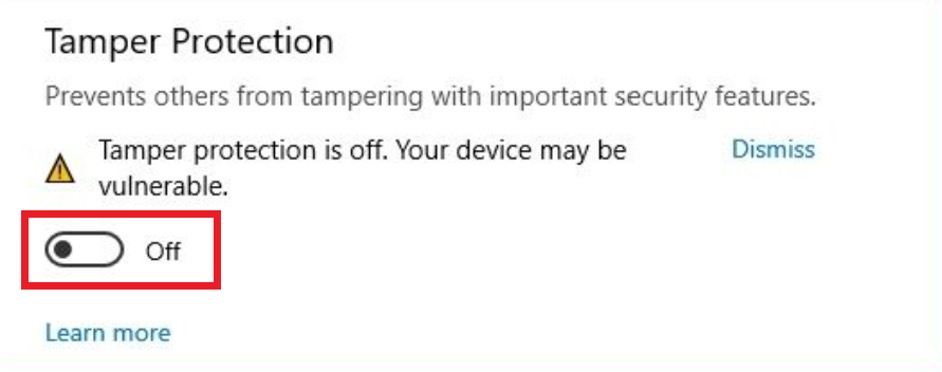
  5. Set the Tamper Protection toggle to the Off position.
    How-to-Turn-Off-Windows-Defender_Disable
  6. Click Start (again).
  7. Type “gpedit.msc” and click the option under “Best match”.
  8. Navigate to Computer Configuration > Administrative Templates > Windows Components > Microsoft Defender Antivirus.
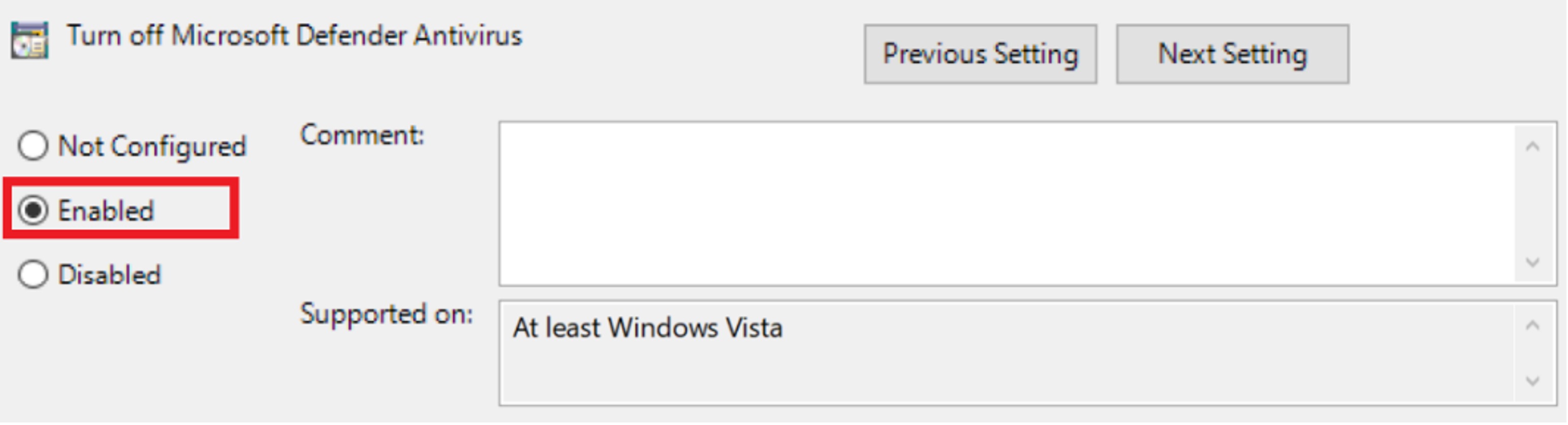
  9. Find “Turn off Microsoft Defender Antivirus” and double-click it.
  10. Click the Enabled checkbox (it’s to enable turning off Windows Defender).
    How-to-Turn-Off-Windows-Defender_Disable
  11. Click ApplyOK, then restart your computer.
 

After following the instructions above, Microsoft Defender will be permanently disabled, but you will still see the icon in the system tray on the taskbar — this is perfectly normal.


If  you have the Home edition of Windows, gpedit.msc doesn't exist. In that case, you should get the same effect by opening the registry (regedit) and navigate to the key:

HKEY_LOCAL_MACHINE\SOFTWARE\Policies\Microsoft\Windows Defender

You will then probably need to create the following 2 DWORD values:

DisableAntiSpyware set to 1

ServiceKeepAlive set to 0

Then restart.


If you feel the need to empty your wallet in my direction, i don't have any way to receive it anyways

Spend it on Hookers and Blow


#38 icksailes

icksailes

    Neophyte

  • Members
  • Pip
  • 6 posts

  • Flag: Argentina

  • Favorite Pinball: Taxi

Posted 29 March 2024 - 11:03 AM

I wish I had seen this post earlier while I was trying to disable defender permanently without success. I upgraded to W11 2 days ago and I am starting over again optimisation for VPX.
Do you guys know if the method in the previous post applies to W11 too ?

And what would be the essentials W11 optimisations for virtual cab PC ?


Cheers 


EDIT : Tried it on Windows 11 and it worked like a charm, thanks a lot !


Edited by icksailes, 29 March 2024 - 11:10 AM.


Also tagged with one or more of these keywords: specs, cabinet, stutter, cpu, 144hz, vpinballx, visual pinball, vpw