Jump to content


Photo
* * * - - 2 votes

World Poker Tour (Stern 2006)_Bigus(MOD)[Visual Pinball X MOD]

1973 playmatic magic

  • Please log in to reply
72 replies to this topic

#21 nateynatenate99

nateynatenate99

    Hobbyist

  • Members
  • PipPip
  • 29 posts

  • Flag: United States of America

  • Favorite Pinball: Attack From Mars

Posted 10 June 2024 - 05:17 PM

I've tested this endlessly and had no problem, so I have been looking. I've had my fair share of dodgy roms or maybe there's a registry issue - I really don't know. Check you don't have an old core.vbs or other scripts floating around your Tables folder. Good luck :)

I really appreciate you looking into it! I've tried different versions of the roms downloaded from different places, including direct from Stern and they all had the same issue.


BUT! I just downloaded freneticamnesiac's PhysMod5 table and tried that in PhysMod5 and it works as it should! So I guess I'll just go with that version for now. This remains a giant mystery to me though. But in case this info is useful to anyone, I don't have the Spin-a-Card shot issue with the PhysMod table, using the same rom.


Thanks again to everyone for trying to look into this and suggesting things to do. And a big giant thank you to all of you for all the amazing work you do on all of these amazing tables. Your generosity and ingenuity and creativity and talent and skill are endlessly appreciated!


Cheers.


Nate


#22 Pinballman

Pinballman

    Enthusiast

  • Gold Supporter
  • 304 posts

  • Flag: ---------

  • Favorite Pinball: Wizard of Oz

Posted 10 June 2024 - 09:56 PM


I've tested this endlessly and had no problem, so I have been looking. I've had my fair share of dodgy roms or maybe there's a registry issue - I really don't know. Check you don't have an old core.vbs or other scripts floating around your Tables folder. Good luck :)

I really appreciate you looking into it! I've tried different versions of the roms downloaded from different places, including direct from Stern and they all had the same issue.


BUT! I just downloaded freneticamnesiac's PhysMod5 table and tried that in PhysMod5 and it works as it should! So I guess I'll just go with that version for now. This remains a giant mystery to me though. But in case this info is useful to anyone, I don't have the Spin-a-Card shot issue with the PhysMod table, using the same rom.


Thanks again to everyone for trying to look into this and suggesting things to do. And a big giant thank you to all of you for all the amazing work you do on all of these amazing tables. Your generosity and ingenuity and creativity and talent and skill are endlessly appreciated!


Cheers.


Nate


  Where did you find this table?  Would like a working version until 3.6 is officially released.


Edited by Pinballman, 11 June 2024 - 12:13 AM.


#23 freneticamnesic

freneticamnesic

    A Faint Ghost Through the Raindrops

  • VIP
  • 3,370 posts
  • Location:Portland, OR

  • Flag: United States of America

  • Favorite Pinball: Star Trek, Black Hole, AFM, Fast Draw, Tron, AMH

  • 360 Gamer Tag: sixgunsounddd

Posted 11 June 2024 - 03:19 AM


I've tested this endlessly and had no problem, so I have been looking. I've had my fair share of dodgy roms or maybe there's a registry issue - I really don't know. Check you don't have an old core.vbs or other scripts floating around your Tables folder. Good luck :)

I really appreciate you looking into it! I've tried different versions of the roms downloaded from different places, including direct from Stern and they all had the same issue.


BUT! I just downloaded freneticamnesiac's PhysMod5 table and tried that in PhysMod5 and it works as it should! So I guess I'll just go with that version for now. This remains a giant mystery to me though. But in case this info is useful to anyone, I don't have the Spin-a-Card shot issue with the PhysMod table, using the same rom.


Thanks again to everyone for trying to look into this and suggesting things to do. And a big giant thank you to all of you for all the amazing work you do on all of these amazing tables. Your generosity and ingenuity and creativity and talent and skill are endlessly appreciated!


Cheers.


Nate


  Where did you find this table?  Would like a working version until 3.6 is officially released.


https://vpuniverse.c...our-stern-2006/


#24 freneticamnesic

freneticamnesic

    A Faint Ghost Through the Raindrops

  • VIP
  • 3,370 posts
  • Location:Portland, OR

  • Flag: United States of America

  • Favorite Pinball: Star Trek, Black Hole, AFM, Fast Draw, Tron, AMH

  • 360 Gamer Tag: sixgunsounddd

Posted 11 June 2024 - 03:37 AM

Thanks very much for this update, which I just downloaded, and started over with a fresh rom and nvram and b2s and everything. And I'm still having the same issue. As soon as I hit the spin-a-card shot, a superfluous second ball is released, the flippers go dead when the first of those 2 balls now on the playfield drains, and 2 new balls instead of one are released into the plunger lane to start the next ball. Am I really the only person to whom this is happening? I have no idea why or how that could be. I don't have this issue with any of the other 200ish tables I play. I'm really baffled and don't know what to do.


I'd like to figure this out! Does it only happen with the "Spin A Card" light is lit on the playfield and you hit the scoop?


#25 nateynatenate99

nateynatenate99

    Hobbyist

  • Members
  • PipPip
  • 29 posts

  • Flag: United States of America

  • Favorite Pinball: Attack From Mars

Posted 11 June 2024 - 04:00 AM


Thanks very much for this update, which I just downloaded, and started over with a fresh rom and nvram and b2s and everything. And I'm still having the same issue. As soon as I hit the spin-a-card shot, a superfluous second ball is released, the flippers go dead when the first of those 2 balls now on the playfield drains, and 2 new balls instead of one are released into the plunger lane to start the next ball. Am I really the only person to whom this is happening? I have no idea why or how that could be. I don't have this issue with any of the other 200ish tables I play. I'm really baffled and don't know what to do.


I'd like to figure this out! Does it only happen with the "Spin A Card" light is lit on the playfield and you hit the scoop?


Yes. Now that I'm able to see how it is supposed to operate when playing on the PhysMod 5 table, here's my best description/guess as to what is happening. When the Spin a Card light is lit and the ball hits the scoop, in the Phys Mod version, the ball disappears for a bit and there's a DMD animation and then the ball is ejected somewhere out the back of the playfield and play continues. In the VPX version, for me, when the ball hits the scoop, it bounces back onto the playfield and keeps rolling around while the DMD animation happens and then the second ball (which I think is supposed to be that first ball) is ejected out the back of the playfield and then there are 2 balls when there should only be one. Once one of them drains, the flippers go dead. And then both balls are put into the plunger lane for the next ball. I've sometimes plunged them and kept playing, and if I again hit the spin-a-card scoop, a superfluous 3rd ball will even enter the playfield (and the plunger lane will have 3 balls at the start of the next ball). I've tried alternative roms with earlier versions of code and different languages, and it always happens for me. But the PhysMod table does not have it happen.


I hope I've explained this so that it makes sense and is useful to those of you who can figure it out! It's been very baffling for me. Especially since it seems I'm the only person that it happens to!


Thanks again to everyone!


#26 freneticamnesic

freneticamnesic

    A Faint Ghost Through the Raindrops

  • VIP
  • 3,370 posts
  • Location:Portland, OR

  • Flag: United States of America

  • Favorite Pinball: Star Trek, Black Hole, AFM, Fast Draw, Tron, AMH

  • 360 Gamer Tag: sixgunsounddd

Posted 11 June 2024 - 05:55 AM

I understand. So I don't think it's the rom or table, I've just spent some time testing it and haven't been able to replicate it. The ball goes in, it goes through the routine, and then kicks out with no extra ball. That would be the kicker script, which is tied to core.vbs in your scripts folder. Best I can think is that it's a core.vbs script issue.


How your core.vbs got changed is beyond me, but that could potentially explain why it works in pm5 and not vpx - because you have a really old vbs from the pm5 era. 


Comparing the script of the two, there's clearly some differences in the kicker script. I could start telling you how to make them match but I think it's really going to come down to a vbs issue.


Go here https://github.com/v.../master/scripts

and grab the latest core.vbs and sam.vbs script, put them in your Visual Pinball/scripts folder and overwrite what's in there


If that does solve it, I'd recommend updating all of your vbs files

If this doesn't solve it I'd be more than willing to simplify the kicker script in the VPX table and share it with you to see if that solves it. 


#27 STAT

STAT

    Pinball and Arcade Freak

  • VIP
  • 4,981 posts
  • Location:Wels - Austria

  • Flag: Austria

  • Favorite Pinball: Twilight Zone

Posted 11 June 2024 - 07:50 AM

Think I had/have a 100% working table - if you remember Fren, I/we did some changes at this one in the past ...


#28 bigus1

bigus1

    Pinball Fan

  • Members
  • PipPipPipPip
  • 986 posts
  • Location:Brisbane, Australia

  • Flag: Australia

  • Favorite Pinball: Firepower

Posted 11 June 2024 - 10:54 AM

Maybe it has something to do with this version being an FSS table. I don't use B2S, so I don't know if it plays nicely with the onboard backglass/DMD. Just a thought, but that is a major difference to other versions. Also, I just re-enabled the upper flipper callbacks and I'm stuffed if I can see any ill effects, and I'd rather have the warning flips working if that's the case.


#29 bolt

bolt

    VPF Veteran

  • VIP
  • 5,160 posts
  • Location:Kiel / Schleswig Holstein

  • Flag: Germany

  • Favorite Pinball: JP's Deadpool, Harlem Globetrotters, Spiderman and much more

Posted 11 June 2024 - 11:25 AM

Hi Bigus can you help?


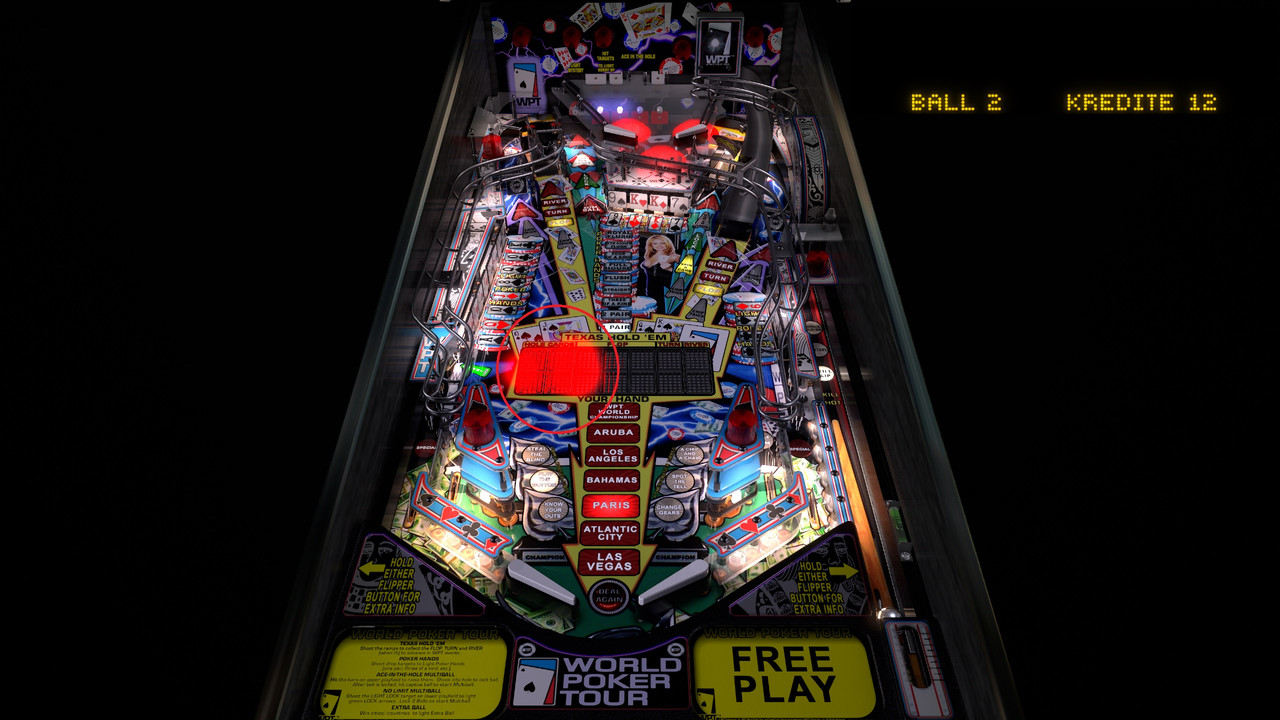
The LED Cards are only big red flasher and I can't see the cards.


OK, works fine with 10.7 and in 10.8 with red big flasher.


WPT-LCD.jpg


Edited by bolt, 11 June 2024 - 11:35 AM.

Posted Image

#30 bigus1

bigus1

    Pinball Fan

  • Members
  • PipPipPipPip
  • 986 posts
  • Location:Brisbane, Australia

  • Flag: Australia

  • Favorite Pinball: Firepower

Posted 11 June 2024 - 11:36 AM

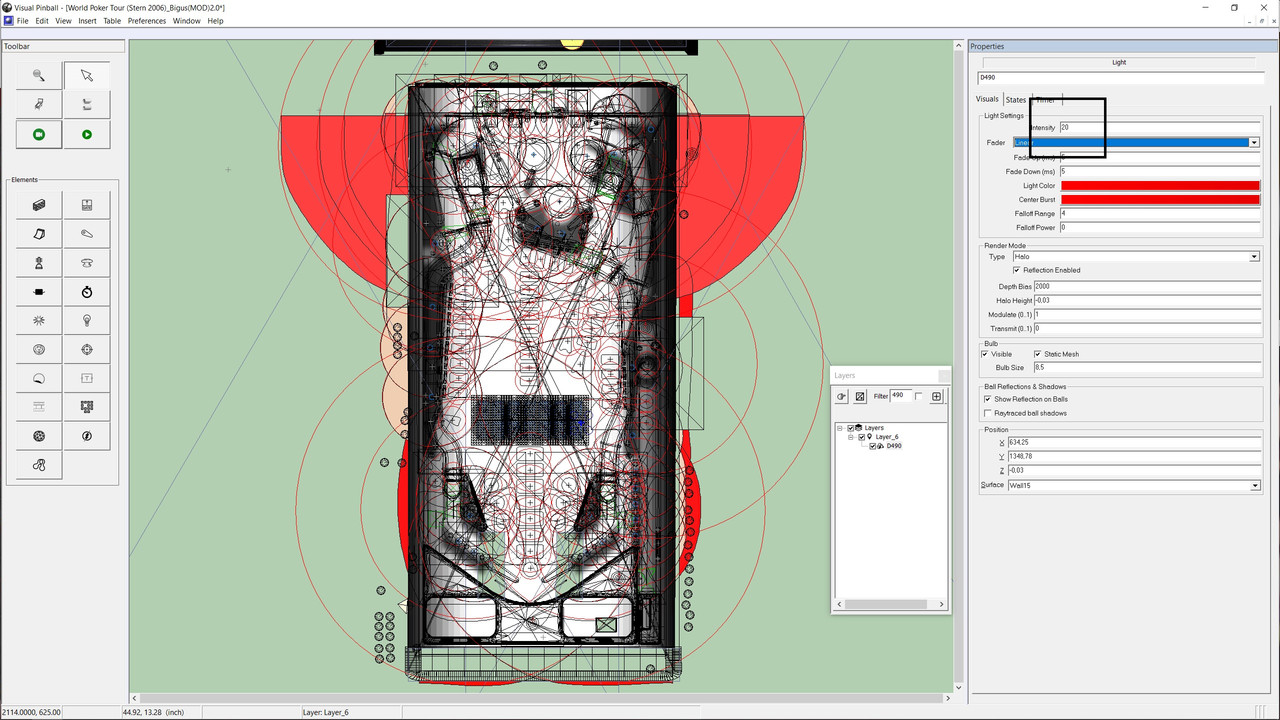
Open Layer 6 only and box-select all the 490 lights and reduce the intensity to 20 and see how that goes.  What are you running it with 7 or 8?


#31 nateynatenate99

nateynatenate99

    Hobbyist

  • Members
  • PipPip
  • 29 posts

  • Flag: United States of America

  • Favorite Pinball: Attack From Mars

Posted 11 June 2024 - 04:44 PM

I understand. So I don't think it's the rom or table, I've just spent some time testing it and haven't been able to replicate it. The ball goes in, it goes through the routine, and then kicks out with no extra ball. That would be the kicker script, which is tied to core.vbs in your scripts folder. Best I can think is that it's a core.vbs script issue.


How your core.vbs got changed is beyond me, but that could potentially explain why it works in pm5 and not vpx - because you have a really old vbs from the pm5 era. 


Comparing the script of the two, there's clearly some differences in the kicker script. I could start telling you how to make them match but I think it's really going to come down to a vbs issue.


Go here https://github.com/v.../master/scripts

and grab the latest core.vbs and sam.vbs script, put them in your Visual Pinball/scripts folder and overwrite what's in there


If that does solve it, I'd recommend updating all of your vbs files

If this doesn't solve it I'd be more than willing to simplify the kicker script in the VPX table and share it with you to see if that solves it. 

Thanks so much for all of this! I tried overwriting the core and sam vbs scripts, and I also turned off the b2s backglass. But I had the exact same issue happen again even so. It's really baffling to me! If you are willing to share a potential VPX kicker script, I'm certainly willing to try it. But I really can't understand it at all. I don't have this (or any other) problem with any other table, and it seems this table works fine for everyone but me! It's such a weird puzzle!


Thanks again so much for working on it!


#32 bolt

bolt

    VPF Veteran

  • VIP
  • 5,160 posts
  • Location:Kiel / Schleswig Holstein

  • Flag: Germany

  • Favorite Pinball: JP's Deadpool, Harlem Globetrotters, Spiderman and much more

Posted 11 June 2024 - 05:15 PM

Sorry bigus, what do you mean with 7 or 8?

I see one 490 only.


I set the value to 20 but nothing changed. all letters red flasher. I think I do something wrong.


wpt2.jpg


Posted Image

#33 digitalarts

digitalarts

    Pinball Fan

  • Members
  • PipPipPipPip
  • 861 posts
  • Location:Bavaria

  • Flag: Germany

  • Favorite Pinball: Judge Dredd (have the real one); all virtual EM's

Posted 11 June 2024 - 05:21 PM

Vpx7 or vpx8

#34 freneticamnesic

freneticamnesic

    A Faint Ghost Through the Raindrops

  • VIP
  • 3,370 posts
  • Location:Portland, OR

  • Flag: United States of America

  • Favorite Pinball: Star Trek, Black Hole, AFM, Fast Draw, Tron, AMH

  • 360 Gamer Tag: sixgunsounddd

Posted 11 June 2024 - 11:09 PM

Think I had/have a 100% working table - if you remember Fren, I/we did some changes at this one in the past ...


Me? Remember anything? I wish :)

I remember you made some changes but I can't recall what for, was there a kicker issue previously? On the VPX version? The script for the scoop kicker between the PM5 table and this table is totally different, so it's possible _this one_ has the fix while the PM5 doesn't (the PM5 version is like two lines of kicker code, this one is several subs) neither code looks broken to me though. 


#35 nateynatenate99

nateynatenate99

    Hobbyist

  • Members
  • PipPip
  • 29 posts

  • Flag: United States of America

  • Favorite Pinball: Attack From Mars

Posted 12 June 2024 - 12:27 AM


Think I had/have a 100% working table - if you remember Fren, I/we did some changes at this one in the past ...


Me? Remember anything? I wish :)

I remember you made some changes but I can't recall what for, was there a kicker issue previously? On the VPX version? The script for the scoop kicker between the PM5 table and this table is totally different, so it's possible _this one_ has the fix while the PM5 doesn't (the PM5 version is like two lines of kicker code, this one is several subs) neither code looks broken to me though. 


It seems if I'm the only one this is happening to that it can't be the code, right?


#36 bigus1

bigus1

    Pinball Fan

  • Members
  • PipPipPipPip
  • 986 posts
  • Location:Brisbane, Australia

  • Flag: Australia

  • Favorite Pinball: Firepower

Posted 12 June 2024 - 02:22 AM

Bolt, you need to close all layers then open layer 6 only. You will see the block of 490 lights that make the LED array. Right-click and draw a rectangle around the whole block, which will select all the 490 lights at once. Now change the intensity to 20 or so and test and adjust from there. I totally wish I hadn't mentioned anything to do with 10.8 in the update :/


#37 freneticamnesic

freneticamnesic

    A Faint Ghost Through the Raindrops

  • VIP
  • 3,370 posts
  • Location:Portland, OR

  • Flag: United States of America

  • Favorite Pinball: Star Trek, Black Hole, AFM, Fast Draw, Tron, AMH

  • 360 Gamer Tag: sixgunsounddd

Posted 12 June 2024 - 03:35 AM


Think I had/have a 100% working table - if you remember Fren, I/we did some changes at this one in the past ...


Me? Remember anything? I wish :)

I remember you made some changes but I can't recall what for, was there a kicker issue previously? On the VPX version? The script for the scoop kicker between the PM5 table and this table is totally different, so it's possible _this one_ has the fix while the PM5 doesn't (the PM5 version is like two lines of kicker code, this one is several subs) neither code looks broken to me though. 


It seems if I'm the only one this is happening to that it can't be the code, right?


I'm 90% certain it's your vbs scripts and not the code in this table, but anything is possible. If you switch your vbs scripts and still have the issue I'd be more than willing to continue researching this issue. 


#38 nateynatenate99

nateynatenate99

    Hobbyist

  • Members
  • PipPip
  • 29 posts

  • Flag: United States of America

  • Favorite Pinball: Attack From Mars

Posted 12 June 2024 - 04:17 AM


Think I had/have a 100% working table - if you remember Fren, I/we did some changes at this one in the past ...


Me? Remember anything? I wish :)

I remember you made some changes but I can't recall what for, was there a kicker issue previously? On the VPX version? The script for the scoop kicker between the PM5 table and this table is totally different, so it's possible _this one_ has the fix while the PM5 doesn't (the PM5 version is like two lines of kicker code, this one is several subs) neither code looks broken to me though. 


It seems if I'm the only one this is happening to that it can't be the code, right?


I'm 90% certain it's your vbs scripts and not the code in this table, but anything is possible. If you switch your vbs scripts and still have the issue I'd be more than willing to continue researching this issue. 


I did switch the vbs scripts and I do still have the issue. :/


#39 bigus1

bigus1

    Pinball Fan

  • Members
  • PipPipPipPip
  • 986 posts
  • Location:Brisbane, Australia

  • Flag: Australia

  • Favorite Pinball: Firepower

Posted 12 June 2024 - 04:50 AM

VP10.7 plus VPM3.5 is what it's built for and it works fine with that platform. A lot of folks have been compelled to load-up fully beta setups and have become beta testers by default. Lots of tables will work fine, but some won't and that's just how beta testing rolls. As I've said before, I will happily address any issues that remain once 10.8 is final and in the AIO installer, but In the meantime, I'm not too keen on running around stamping-out fires that may be doused externally after being highlighted by those doing the testing. Cheers :)


#40 freneticamnesic

freneticamnesic

    A Faint Ghost Through the Raindrops

  • VIP
  • 3,370 posts
  • Location:Portland, OR

  • Flag: United States of America

  • Favorite Pinball: Star Trek, Black Hole, AFM, Fast Draw, Tron, AMH

  • 360 Gamer Tag: sixgunsounddd

Posted 12 June 2024 - 05:24 AM

VP10.7 plus VPM3.5 is what it's built for and it works fine with that platform. A lot of folks have been compelled to load-up fully beta setups and have become beta testers by default. Lots of tables will work fine, but some won't and that's just how beta testing rolls. As I've said before, I will happily address any issues that remain once 10.8 is final and in the AIO installer, but In the meantime, I'm not too keen on running around stamping-out fires that may be doused externally after being highlighted by those doing the testing. Cheers :)


I'm using vpm3.6 and vpx8 with no issue

I don't believe nateynate has specified which version he's on, I assume not a beta version though


Also tagged with one or more of these keywords: 1973, playmatic, magic