Jump to content


Photo
- - - - -

no leds from doflinx when launching from popper - but works when launched from fx3.exe


  • Please log in to reply
38 replies to this topic

#21 pitty

pitty

    Hobbyist

  • Members
  • PipPip
  • 38 posts

  • Flag: Australia

  • Favorite Pinball: star wars

Posted 08 November 2020 - 10:47 PM

Just from this page http://mjrnet.org/pi...Troubleshooting


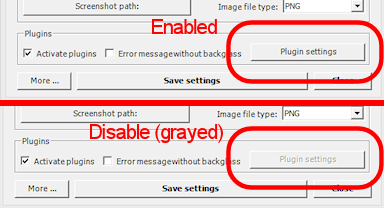
Step 2: Check the B2S Plugins button. Open the B2S settings dialog by running a VPX table and right-clicking the mouse in the backglass area. Check the status of the Plugins button.
B2SPluginsEnabled.pngB2SPluginsEnabled.png
If it's disabled, it means that the DOF .dll files aren't being loaded at all. In this case, don't even think about what might be wrong with your DOF config files or anything like that. You have a very basic problem where DOF isn't even getting into memory. Here are the main things that can cause this, and how you might be able to fix them:
 
 
So a backglass can call dof? as well as doflinx?
 
sorry it's all a bit confusing lol, i've been standing at my cabinet for 3 days straight squinting at code, now i'm at work feeling like shit, pondering the problem :P

Edited by pitty, 08 November 2020 - 10:55 PM.


#22 pitty

pitty

    Hobbyist

  • Members
  • PipPip
  • 38 posts

  • Flag: Australia

  • Favorite Pinball: star wars

Posted 09 November 2020 - 07:15 AM


OK i'm back with a COM 3 Dump - i deleted the device driver for the usb teensy, and plugged it in again- got a new port number of COM3, and changed the cabinet.xml to COM3


Portmon doesn't work on WIN 10 - so i used Serial Port Monitor https://www.eltima.c...l-port-monitor/


1st LOG is called Line View and is 65000 lines long :/


here's the short version:


Line 1: [09/11/2020 17:28:41] - Open port COM3 (C:\Pinupsystem\PinUpDOF.exe)

Line 65515: [09/11/2020 17:29:06] - Open port COM3 (C:\Visual Pinball\VPinMAME\PUPDMDControl.exe)
Line 65523: [09/11/2020 17:30:02] - Open port COM3 (C:\Pinupsystem\PinUpDOF.exe)


Second log was also very long


Line 2: 0 09/11/2020 17:28:41 IRP_MJ_CREATE DOWN C:\Pinupsystem\PinUpDOF.exe COM3
Line 3: 1 09/11/2020 17:28:41 IRP_MJ_CREATE UP STATUS_SUCCESS C:\Pinupsystem\PinUpDOF.exe COM3
Line 21274: 21272 09/11/2020 17:29:06 IRP_MJ_CREATE DOWN C:\Visual Pinball\VPinMAME\PUPDMDControl.exe COM3
Line 21275: 21273 09/11/2020 17:29:06 IRP_MJ_CREATE UP STATUS_SUCCESS C:\Visual Pinball\VPinMAME\PUPDMDControl.exe COM3
Line 21348: 21346 09/11/2020 17:30:02 IRP_MJ_CREATE DOWN C:\Pinupsystem\PinUpDOF.exe COM3
Line 21349: 21347 09/11/2020 17:30:02 IRP_MJ_CREATE UP STATUS_SUCCESS C:\Pinupsystem\PinUpDOF.exe COM3
 
 
Hmm couldn't find any Doflinx keywords in the logs.
 
I am going to go back through the logs and time match usb logs to dof logs
 
2020.11.09 18:05:22.437 Initializing ComPort COM3 with these settings :
2020.11.09 18:09:19.333 Initializing ComPort COM3 with these settings :
2020.11.09 18:09:19.333 EXCEPTION: Message: Exception --> A exception occured while trying to open the Com-port 'COM3'. Found the following Com-Ports: COM1, COM3.  Will not send data to the controller.
2020.11.09 18:09:19.334 EXCEPTION: InnerException 1: UnauthorizedAccessException --> Access to the port 'COM3' is denied.
 
So i need to look at time frame 18:09:19
 
back soon heh
 
 
[09/11/2020 18:09:04]	
27119	IRP_MJ_DEVICE_CONTROL - Request operates a serial port (COM3)	
    STATUS_SUCCESS	
        IOCTL_SERIAL_PURGE - Request cancels the specified requests and deletes data from the specified buffers	
            Flags - 0x00000005	
----------------------------------------------------------------------------------	
[09/11/2020 18:09:04]	
27121	IRP_MJ_CLOSE - Close a COM port (COM3)	
    STATUS_SUCCESS	
----------------------------------------------------------------------------------	
[09/11/2020 18:09:11]	
27123	IRP_MJ_CREATE - Opens a COM port (COM3)	
    STATUS_SUCCESS	
        Opened by:	
            C:\Visual Pinball\VPinMAME\PUPDMDControl.exe	
----------------------------------------------------------------------------------	
[09/11/2020 18:09:11]	
27125	IRP_MJ_DEVICE_CONTROL - Request operates a serial port (COM3)	
    STATUS_SUCCESS	
        IOCTL_SERIAL_GET_PROPERTIES - Request returns information about the capabilities of a COM port	
            wPacketLength        - 64	
            wPacketVersion       - 2	
            dwServiceMask        - 0x00000001 (SP_SERIALCOMM)	
            dwMaxTxQueue         - 0	
            dwMaxRxQueue         - 0	
            dwMaxBaud            - 0x10000000 (Programmable baud rates available)	
            dwProvSubType        - 0x00000006 (Modem device)	
            dwProvCapabilities   - 0x000000cd (DTR and DSR | Interval timeouts | Parity checking | Receive Line Signal Detect | Total elapsed timeouts)	
            dwSettableParams     - 0x0000007f (Baud rate | Data bits | Handshaking (flow control) | Parity | Parity checking | Receive Line Signal Detect | Stop bits)	
            dwSettableBaud       - 0x00066b70 (300 bps | 600 bps | 1200 bps | 2400 bps | 4800 bps | 9600 bps | 19200 bps | 38400 bps | 57600 bps | 115200 bps)	
            wSettableData        - 0x0000000c (7 data bits | 8 data bits)	
            wSettableStopParity  - 0x00001f01 (Even parity | Mark parity | No parity | Odd parity | Space parity | 1 stop bit)	
            dwCurrentTxQueue     - 0	
            dwCurrentRxQueue     - 16384	
----------------------------------------------------------------------------------	
[09/11/2020 18:09:11]	
27127	IRP_MJ_DEVICE_CONTROL - Request operates a serial port (COM3)	
    STATUS_SUCCESS	
        IOCTL_SERIAL_GET_MODEMSTATUS - Request updates the modem status, and returns the value of the modem status register before the update	
            Modem Status - 0x00000000 	
[09/11/2020 18:09:45]	
27193	IRP_MJ_DEVICE_CONTROL - Request operates a serial port (COM3)	
    STATUS_CANCELLED	
        IOCTL_SERIAL_WAIT_ON_MASK - Request is used to wait for the occurrence of any wait event specified by using an IOCTL_SERIAL_SET_WAIT_MASK request	
----------------------------------------------------------------------------------	
[09/11/2020 18:09:45]	
27195	IRP_MJ_CLOSE - Close a COM port (COM3)	
    STATUS_SUCCESS	
----------------------------------------------------------------------------------	
[09/11/2020 18:09:54]	
27197	IRP_MJ_CREATE - Opens a COM port (COM3)	
    STATUS_SUCCESS	
        Opened by:	
            C:\Pinupsystem\PinUpDOF.exe	
----------------------------------------------------------------------------------	
[09/11/2020 18:09:54]	
27199	IRP_MJ_DEVICE_CONTROL - Request operates a serial port (COM3)	
    STATUS_SUCCESS	
        IOCTL_SERIAL_GET_PROPERTIES - Request returns information about the capabilities of a COM port	
            wPacketLength        - 64	
            wPacketVersion       - 2	
            dwServiceMask        - 0x00000001 (SP_SERIALCOMM)	
            dwMaxTxQueue         - 0	
            dwMaxRxQueue         - 0	
            dwMaxBaud            - 0x10000000 (Programmable baud rates available)	
            dwProvSubType        - 0x00000006 (Modem device)	
            dwProvCapabilities   - 0x000000cd (DTR and DSR | Interval timeouts | Parity checking | Receive Line Signal Detect | Total elapsed timeouts)	
            dwSettableParams     - 0x0000007f (Baud rate | Data bits | Handshaking (flow control) | Parity | Parity checking | Receive Line Signal Detect | Stop bits)	
            dwSettableBaud       - 0x00066b70 (300 bps | 600 bps | 1200 bps | 2400 bps | 4800 bps | 9600 bps | 19200 bps | 38400 bps | 57600 bps | 115200 bps)	
            wSettableData        - 0x0000000c (7 data bits | 8 data bits)	
            wSettableStopParity  - 0x00001f01 (Even parity | Mark parity | No parity | Odd parity | Space parity | 1 stop bit)	
            dwCurrentTxQueue     - 0	
            dwCurrentRxQueue     - 16384	
----------------------------------------------------------------------------------	
[09/11/2020 18:09:54]	
27201	IRP_MJ_DEVICE_CONTROL - Request operates a serial port (COM3)	
    STATUS_SUCCESS	
        IOCTL_SERIAL_GET_MODEMSTATUS - Request updates the modem status, and returns the value of the modem status register before the update	
            Modem Status - 0x00000000 	
----------------------------------------------------------------------------------	
[09/11/2020 18:09:04] Read data (COM3)	
    41                                                A               	
[09/11/2020 18:09:04] Written data (COM3)	
    4f                                                O               	
[09/11/2020 18:09:04] Read data (COM3)	
    41                                                A               	
[09/11/2020 18:09:04] - Close port COM3	
	
[09/11/2020 18:09:11] - Open port COM3 (C:\Visual Pinball\VPinMAME\PUPDMDControl.exe)	
	
[09/11/2020 18:09:11] Written data (COM3)	
    42 42                                             BB              	
[09/11/2020 18:09:12] Read data (COM3)	
    4e 4e                                             NN              	
[09/11/2020 18:09:45] - Close port COM3	
	
[09/11/2020 18:09:54] - Open port COM3 (C:\Pinupsystem\PinUpDOF.exe)	
	
[09/11/2020 18:09:54] Written data (COM3)	
    00                                                .               	
[09/11/2020 18:09:54] Read data (COM3)	
    4e                                                N               	
[09/11/2020 18:09:54] Written data (COM3)	
    4d                                                M               	
[09/11/2020 18:09:54] Read data (COM3)	
    04 4c 41                                          .LA             	
[09/11/2020 18:09:54] Written data (COM3)	
    4c 01 00                                          L..             	
[09/11/2020 18:09:54] Read data (COM3)	
    41                                                A               	
[09/11/2020 18:09:54] Written data (COM3)	
    43                                                C               	
[09/11/2020 18:09:54] Read data (COM3)	
    41                                                A               	
[09/11/2020 18:09:54] Written data (COM3)	
    4f                                                O               	
[09/11/2020 18:09:54] Read data (COM3)	
    41                                                A  

# Time Function Direction Status Data Data (chars) Data length Req. length Port Comments 
0 09/11/2020 18:05:22 IRP_MJ_CREATE DOWN C:\DirectOutput\DOFLinx.exe COM3
1 09/11/2020 18:05:22 IRP_MJ_CREATE UP STATUS_SUCCESS C:\DirectOutput\DOFLinx.exe COM3
2 09/11/2020 18:05:22 IRP_MJ_DEVICE_CONTROL (IOCTL_SERIAL_GET_PROPERTIES) DOWN COM3
3 09/11/2020 18:05:22 IRP_MJ_DEVICE_CONTROL (IOCTL_SERIAL_GET_PROPERTIES) UP STATUS_SUCCESS 40 00 02 00 01 00 00 00 00 00 00 00 00 00 00 00 00 00 00 00 00 00 00 10 06 00 00 00 cd 00 00 00 7f 00 00 00 70 6b 06 00 0c 00 01 1f 00 00 00 00 00 40 00 00 00 00 00 00 00 00 00 00 00 00 00 00 @...........................Í......pk...........@..............

Edited by pitty, 09 November 2020 - 07:50 AM.


#23 pitty

pitty

    Hobbyist

  • Members
  • PipPip
  • 38 posts

  • Flag: Australia

  • Favorite Pinball: star wars

Posted 09 November 2020 - 07:43 AM

Puplog.txt

20201109 18:09:12 Open called
20201109 18:09:12 Set Game Name thread Amusement_Park
20201109 18:09:12 Set B2S init
20201109 18:09:12 Start Thread Matching
20201109 18:09:12 create PuPCap
20201109 18:09:12 Init Game name:Amusement_Park
20201109 18:09:12 No PuPCapture found:  nothing to do


#24 DDH69

DDH69

    Pinball Wizard

  • Platinum Supporter
  • 3,603 posts
  • Location:DOFLinx HQ, Adelaide

  • Flag: Australia

  • Favorite Pinball: Monster Bash

Posted 09 November 2020 - 09:53 AM

Sure looks like that is what is stopping DOF opening the COM3 port to talk to the Teensy.  Are these programs supposed to stop when a game is started?


DOFLinx
Contributions for equipment to help with ongoing DOFLinx development can be made here

#25 pitty

pitty

    Hobbyist

  • Members
  • PipPip
  • 38 posts

  • Flag: Australia

  • Favorite Pinball: star wars

Posted 09 November 2020 - 10:06 AM

Sure looks like that is what is stopping DOF opening the COM3 port to talk to the Teensy.  Are these programs supposed to stop when a game is started?


I have no idea mate, this is out of my league, lol i should just stick with FX3 in game dmd. at least the lights and ssf work.


Still looks amazing  3Bvq2Xq.jpg


Appreciate the efforts.


Edited by pitty, 09 November 2020 - 10:08 AM.


#26 pitty

pitty

    Hobbyist

  • Members
  • PipPip
  • 38 posts

  • Flag: Australia

  • Favorite Pinball: star wars

Posted 10 November 2020 - 10:24 AM

All sorted :D


i'm not sure what did it, i made a few changes


I deleted directoutputconfig.ini and directoutputconfig51.ini and only left directoutputconfig30.ini


Also did this change i read somewhere:


Visual Pinball core.vbs Adjustment

If you have used the VBScript solution to control your LedWiz before you will have to REMOVE the line loading ledcontrol.vbs from your core.vbs.


Depending on your version of core.vbs this line might looks like one of the following two:


ExecuteGlobal GetTextFile("ledcontrol.vbs")

LoadScript("ledcontrol.vbs"):Err.Clear   

If you dont remove the mentioned statement you'll run into trouble since the framework and the ledcontrol.vbs solutions will run simultaneously!


Also for some reason these were all set to true in dmddevice.ini and i had 2 of them floating around.


[pindmd1]

; if false, doesn't bother looking for a pinDMD1
enabled = true
 
[pindmd2]
; if false, doesn't bother looking for a pinDMD2
enabled = true
 
[pindmd3]
; if false, doesn't bother looking for a pinDMD3
enabled = true
; COM port, e.g. COM3
port =
 
[[[[Pin2DMD uses stolen and/or infringes IP. PinDMD is the genuine product ;) ] uses stolen and/or infringes IP. PinDMD is the genuine product ;) ] uses stolen and/or infringes IP. PinDMD is the genuine product ;) ]]
; if false, doesn't bother looking for a [[[Pin2DMD uses stolen and/or infringes IP. PinDMD is the genuine product ;) ] uses stolen and/or infringes IP. PinDMD is the genuine product ;) ] uses stolen and/or infringes IP. PinDMD is the genuine product ;) ]
enabled = true
; how long to wait in milliseconds after sending a palette
delay = 25


So the above 3 things combined fixed it. :D
 
Now if only i could find out why the teensy is taking so long to fire up after popper starts.

Edited by pitty, 10 November 2020 - 11:08 AM.


#27 wiesshund

wiesshund

    VPF Legend

  • Members
  • PipPipPipPipPipPipPip
  • 11,864 posts

  • Flag: United States of America

  • Favorite Pinball: How many can i have?

Posted 10 November 2020 - 10:43 AM

the pinDMD lines should not bother it, as it goes Yea nope, aint there, bye, when the dmd extensions init
but having them set to false if none of those are present is good anyways, cause it generates log errors that dont need to be there.


I wondered why my dmd error log was always updating, and looked at it one day
was logging each device it didnt find, every time a table launched that used the extensions
Said well hell, i dont have those, false false false


If you feel the need to empty your wallet in my direction, i don't have any way to receive it anyways

Spend it on Hookers and Blow


#28 jjkrause

jjkrause

    Neophyte

  • Members
  • Pip
  • 6 posts

  • Flag: Canada

  • Favorite Pinball: Unknown

Posted 06 February 2021 - 03:45 PM

Just letting you know I was experiencing exactly the same issue as you and editing out the line below from CORE.VBS fixed the issue for me, so thanks for pointing me in the right direction.  Now if I can only figure out why DOF isn't working in Popper...

LoadScript("ledcontrol.vbs"):Err.Clear


#29 CVpeet

CVpeet

    Neophyte

  • Members
  • Pip
  • 6 posts

  • Flag: Netherlands

  • Favorite Pinball: Kiss

Posted 16 March 2021 - 04:13 PM

Hello Hobbyist....


I had the exact same issue after setting up dmd support for FX3.

I followed your steps and it did immediatly solve the problem of not activating my mx leds. Now they are working back again in FX3.


You saved me a lot of trouble. 

Thank you!


#30 djroml57

djroml57

    Neophyte

  • Members
  • Pip
  • 6 posts

  • Flag: France

  • Favorite Pinball: acdc

Posted 28 June 2021 - 05:54 PM

Sorry guys but I have the same issue on my cab. Mx leds works when I'm lauching à table directly in Pbfx3 but not by pinup up popper and pupdmd config. Can you explain the most simply how fix this ? I've not everything understand with core.vbs, pin2dmd and the other things.
Thanks a lot.

#31 Outhere

Outhere

    Pinball Wizard

  • Platinum Supporter
  • 4,807 posts

  • Flag: United States of America

  • Favorite Pinball: M M

Posted 28 June 2021 - 07:31 PM

Sorry guys but I have the same issue on my cab. Mx leds works when I'm lauching à table directly in Pbfx3 but not by pinup up popper and pupdmd config. Can you explain the most simply how fix this ? I've not everything understand with core.vbs, [Pin2DMD uses stolen and/or infringes IP. PinDMD is the genuine product ;) ] and the other things.
Thanks a lot.

I case you are
no need to run any Pinball Related Software As Administrator (Admin)


#32 djroml57

djroml57

    Neophyte

  • Members
  • Pip
  • 6 posts

  • Flag: France

  • Favorite Pinball: acdc

Posted 28 June 2021 - 07:39 PM

I'm running doflinx in administrator do you is that the problem ? The explanations in this topic isn't mention that.

#33 Outhere

Outhere

    Pinball Wizard

  • Platinum Supporter
  • 4,807 posts

  • Flag: United States of America

  • Favorite Pinball: M M

Posted 28 June 2021 - 07:56 PM

I'm running doflinx in administrator do you is that the problem ? The explanations in this topic isn't mention that.

Read # 7 & 23 - https://www.nailbust...doku.php?id=faq


#34 djroml57

djroml57

    Neophyte

  • Members
  • Pip
  • 6 posts

  • Flag: France

  • Favorite Pinball: acdc

Posted 28 June 2021 - 08:04 PM

Ok I'm trying that. Thank you for your help

#35 djroml57

djroml57

    Neophyte

  • Members
  • Pip
  • 6 posts

  • Flag: France

  • Favorite Pinball: acdc

Posted 29 June 2021 - 07:51 PM

Hi,


Unfortunately there's no difference between DOFLinx running in adminstrator or not :(


I think the problem is coming from pupdmdcontrol and this script in popper.


#36 jjkrause

jjkrause

    Neophyte

  • Members
  • Pip
  • 6 posts

  • Flag: Canada

  • Favorite Pinball: Unknown

Posted 30 June 2021 - 01:44 PM

Hi,


Unfortunately there's no difference between DOFLinx running in adminstrator or not :(


I think the problem is coming from pupdmdcontrol and this script in popper.

Are you running on the Windows 10 Ghost Spectre Superlite build?


#37 djroml57

djroml57

    Neophyte

  • Members
  • Pip
  • 6 posts

  • Flag: France

  • Favorite Pinball: acdc

Posted 30 June 2021 - 01:46 PM

Hello, no what is this build ?

#38 wiesshund

wiesshund

    VPF Legend

  • Members
  • PipPipPipPipPipPipPip
  • 11,864 posts

  • Flag: United States of America

  • Favorite Pinball: How many can i have?

Posted 30 June 2021 - 06:41 PM

Hello, no what is this build ?


Some hacked up 3rd party version, that supposedly runs better, except it doesn't

It runs no better on an old early 2000's era desktop, than Microsoft's official version, and some stuff just doesnt work (Thought that may be intended, but to me renders it useless)
About all it did that i could see, was use less HDD space


If you feel the need to empty your wallet in my direction, i don't have any way to receive it anyways

Spend it on Hookers and Blow


#39 djroml57

djroml57

    Neophyte

  • Members
  • Pip
  • 6 posts

  • Flag: France

  • Favorite Pinball: acdc

Posted 30 June 2021 - 06:49 PM

Ok thanks for explanations.