Jump to content


Photo
* * * * * 4 votes

High Speed MOD [Visual Pinball X]

Hero GIJOE

  • Please log in to reply
38 replies to this topic

#21 kds70

kds70

    Enthusiast

  • Members
  • PipPipPip
  • 176 posts
  • Location:Germany

  • Flag: Germany

  • Favorite Pinball: Eight Ball Deluxe

Posted 03 February 2020 - 04:48 PM

Thanks for this update ... amazing before and amazing now :love39:


-------------------

VPin: Williams Time Warp Cabinet (1979), 4K playfield: 40″ Iiyama X4071UHSU, backglass: 32″ LG, Pin"2"DMD, Pincontrol1, LEDWiz, leaf switches / buttons, nudging, tilt, plunger, 10 siemens contactors, knocker, shaker, gear, rgb flasher, PC: Intel i5 [email protected], 8 GB Ram, Zotac GTX 1070 Mini, Win10
Real Pin: Eight Ball Deluxe LE, Centaur 2, Mr. & Mrs. Pac-Man, Rolling Stones, Funhouse


#22 Pinballman

Pinballman

    Enthusiast

  • Gold Supporter
  • 304 posts

  • Flag: ---------

  • Favorite Pinball: Wizard of Oz

Posted 03 February 2020 - 09:45 PM

Kind of puzzled as the 1.2 table runs fine, yet the 1.3 runs very choppy and takes 2 seconds for a flipper to work after hitting button.  Anyone else experiencing this, or know why this is happening?  Thanks!


#23 chokeee

chokeee

    Enthusiast

  • Members
  • PipPipPip
  • 333 posts

  • Flag: Poland

  • Favorite Pinball: High Speed

Posted 04 February 2020 - 08:34 AM

Turn AA off in the table options.

#24 vogliadicane

vogliadicane

    Pinball Fan

  • Members
  • PipPipPipPip
  • 517 posts
  • Location:Velbert

  • Flag: Germany

  • Favorite Pinball: The Addams Family

Posted 04 February 2020 - 10:02 AM

Great update for an already great table. The new insert lights look actually much better!


#25 Pinballman

Pinballman

    Enthusiast

  • Gold Supporter
  • 304 posts

  • Flag: ---------

  • Favorite Pinball: Wizard of Oz

Posted 05 February 2020 - 01:12 AM

Turn AA off in the table options.

Thank you, I'll try that.


#26 naeromagus

naeromagus

    Enthusiast

  • Members
  • PipPipPip
  • 88 posts

  • Flag: ---------

  • Favorite Pinball: the funhouse

Posted 10 February 2020 - 07:32 AM

Great fast playing update to an already great mod. I'm Really digging the updates. Thanks

#27 JLouLoulou

JLouLoulou

    Enthusiast

  • Silver Supporter
  • 201 posts
  • Location:Center of France

  • Flag: France

  • Favorite Pinball: Simply play pinball

Posted 11 February 2020 - 08:44 AM

Great Update!! I love new physics, maybe a bit too fast but it's not a problem. It could be cool to have the same physics on High Speed II : The Gateway

Envoyé de mon Redmi Pro en utilisant Tapatalk

#28 Mike DA Spike

Mike DA Spike

    Pinball Fan

  • Platinum Supporter
  • 1,280 posts
  • Location:Hoofddorp

  • Flag: Netherlands

  • Favorite Pinball: Too many to mention

Posted 04 July 2020 - 09:20 AM

Not sure what is changed between 1.3 and 1.4 (besides the changelog you posted), but v1.4 runs at 46 fps.
On 1.3 I had AA set to on and runs 60fps, but no luck with 1.4 (turning of AA runs at 60fps )
Never the less, thanks for this release !


331ddabcc742f0ba74791e946eb0f791.gif Try PinballX Database manager as a replacement of PinballX's game list manager
With special thanks to Scutters 


#29 hitman2304

hitman2304

    Enthusiast

  • Members
  • PipPipPip
  • 151 posts
  • Location:Poland

  • Flag: Poland

  • Favorite Pinball: AFM,Monster Bash,Medieval Madness,TOM.

Posted 04 July 2020 - 05:44 PM

Table looks almost photorealistic and has great physics :otvclap:


#30 lukpcn

lukpcn

    Enthusiast

  • Members
  • PipPipPip
  • 249 posts

  • Flag: Poland

  • Favorite Pinball: I love all !!! :)

  • PS3 Gamer Tag: N/A
  • 360 Gamer Tag: N/A

Posted 04 July 2020 - 08:05 PM

for me 1.4 in not playable anymore :(

4k resolution NVidia GTX 1070 on 1.3 I have stable 60fps with vsync...

on 1.4 it's 46 fps so this new version isn't playable for me anymore :(


Regards

Luk

My Pinball Youtube Channel: https://www.youtube....lPinballFanatic


#31 laylow

laylow

    VP Veteran

  • Members
  • PipPipPipPip
  • 538 posts
  • Location:Blackpool

  • Flag: England

  • Favorite Pinball: 1978 >

Posted 04 July 2020 - 08:16 PM

for me 1.4 in not playable anymore :(

4k resolution NVidia GTX 1070 on 1.3 I have stable 60fps with vsync...

on 1.4 it's 46 fps so this new version isn't playable for me anymore :(

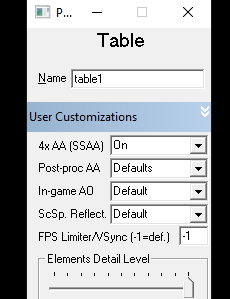
Turn off AA in the table settings, you don't need it with a 4K screen.


#32 lukpcn

lukpcn

    Enthusiast

  • Members
  • PipPipPip
  • 249 posts

  • Flag: Poland

  • Favorite Pinball: I love all !!! :)

  • PS3 Gamer Tag: N/A
  • 360 Gamer Tag: N/A

Posted 04 July 2020 - 08:27 PM


for me 1.4 in not playable anymore :(

4k resolution NVidia GTX 1070 on 1.3 I have stable 60fps with vsync...

on 1.4 it's 46 fps so this new version isn't playable for me anymore :(

Turn off AA in the table settings, you don't need it with a 4K screen.


I don't have AA on with 4k


Regards

Luk

My Pinball Youtube Channel: https://www.youtube....lPinballFanatic


#33 laylow

laylow

    VP Veteran

  • Members
  • PipPipPipPip
  • 538 posts
  • Location:Blackpool

  • Flag: England

  • Favorite Pinball: 1978 >

Posted 04 July 2020 - 09:08 PM


for me 1.4 in not playable anymore :(

4k resolution NVidia GTX 1070 on 1.3 I have stable 60fps with vsync...

on 1.4 it's 46 fps so this new version isn't playable for me anymore :(

Turn off AA in the table settings, you don't need it with a 4K screen.


I don't have AA on with 4k


In the High Speed table settings it is set to on


Knipsel.png


Edited by laylow, 04 July 2020 - 09:24 PM.


#34 lukpcn

lukpcn

    Enthusiast

  • Members
  • PipPipPip
  • 249 posts

  • Flag: Poland

  • Favorite Pinball: I love all !!! :)

  • PS3 Gamer Tag: N/A
  • 360 Gamer Tag: N/A

Posted 05 July 2020 - 07:58 AM


for me 1.4 in not playable anymore :(

4k resolution NVidia GTX 1070 on 1.3 I have stable 60fps with vsync...

on 1.4 it's 46 fps so this new version isn't playable for me anymore :(

Turn off AA in the table settings, you don't need it with a 4K screen.


I don't have AA on with 4k


In the High Speed table settings it is set to on


Knipsel.png


In the High Speed table settings it is set to on


Thanks a lot, that was it !


Regards

Luk

My Pinball Youtube Channel: https://www.youtube....lPinballFanatic


#35 Mike DA Spike

Mike DA Spike

    Pinball Fan

  • Platinum Supporter
  • 1,280 posts
  • Location:Hoofddorp

  • Flag: Netherlands

  • Favorite Pinball: Too many to mention

Posted 29 May 2022 - 07:34 AM

Table plays really smooth on basic settings. 
I only changed the POV for cabinet users a it didn't show nicely on my cab 
 

	<fullscreen>
		<inclination>18.000025</inclination>
		<fov>20.600021</fov>
		<layback>39.999924</layback>
		<rotation>270.000000</rotation>
		<xscale>1.098000</xscale>
		<yscale>1.095999</yscale>
		<zscale>1.000000</zscale>
		<xoffset>-20.000000</xoffset>
		<yoffset>0.000000</yoffset>
		<zoffset>-90.000000</zoffset>
	</fullscreen>

331ddabcc742f0ba74791e946eb0f791.gif Try PinballX Database manager as a replacement of PinballX's game list manager
With special thanks to Scutters 


#36 Gravy

Gravy

    Pinball Fan

  • VIP
  • 1,147 posts

  • Flag: Australia

  • Favorite Pinball: Simpsons pinball party


Posted 30 May 2022 - 01:17 AM

Thanks for a great update Chokeee. The version numbering is a little weird in the file name and also table details, doesn't match the 3.0 release and gets a bit confusing.

I also adjusted the POV to give me better depth in 3D anaglyph mode. If anyone is playing 3D, give these settings a try and see what you think.
 

	<fullscreen>
		<inclination>4.000010</inclination>
		<fov>27.399952</fov>
		<layback>69.999924</layback>
		<rotation>270.000000</rotation>
		<xscale>0.906003</xscale>
		<yscale>1.030000</yscale>
		<zscale>1.000000</zscale>
		<xoffset>-37.600067</xoffset>
		<yoffset>0.000000</yoffset>
		<zoffset>-460.000000</zoffset>
	</fullscreen>

Edited by Gravy, 30 May 2022 - 01:21 AM.

Pinball Addict


#37 worker

worker

    Hobbyist

  • Members
  • PipPip
  • 24 posts

  • Flag: Hungary

  • Favorite Pinball: indiana jones

Posted 30 May 2022 - 02:54 PM

Thanks for the update!
I also use anaglyph in 3d with green / magenta glasses.
The following POV and 3d settings are right for me:
 
Anaglyph green/magenta, Separation 0.025, ZPD 0.85
Inclination 4.0, Field of View 45.0, Layback 90.0,
XY Rotation 270, X scale 0.836, Y scale 1.0, Z scale 1.0,
X Offset -80, Y Offset 0, Z Offset -440.
 
I had stuttering problems with the factory graphics settings, but in the table options - visuals section I unchecked the "Reflect elements on playfield" option and so it runs at a fixed 60fps on a full hd display.


#38 lukpcn

lukpcn

    Enthusiast

  • Members
  • PipPipPip
  • 249 posts

  • Flag: Poland

  • Favorite Pinball: I love all !!! :)

  • PS3 Gamer Tag: N/A
  • 360 Gamer Tag: N/A

Posted 31 May 2022 - 08:56 AM

Tested this version yesterday, it is fantastic!


Regards

Luk

My Pinball Youtube Channel: https://www.youtube....lPinballFanatic


#39 ryesteve

ryesteve

    Enthusiast

  • Members
  • PipPipPip
  • 169 posts

  • Flag: United States of America

  • Favorite Pinball: Attack From Mars

Posted 03 June 2022 - 02:37 AM

Thanks for the POV suggestions.  It'll definitely save me some time.


Also tagged with one or more of these keywords: Hero, GIJOE