Jump to content


Photo
- - - - -

Pinscape Labs update - Plunger Sensors: A New Hope


  • Please log in to reply
71 replies to this topic

#21 Barsk

Barsk

    Neophyte

  • Members
  • Pip
  • 2 posts

  • Flag: Sweden

  • Favorite Pinball: Star Trek

Posted 19 September 2017 - 09:02 AM

Sorry for the late answer. Did not subscribe to thread properly. Done that now.


Yeah, the fun of developing my own solution is something I'm going to miss. But since this is a field of expertise that I am not too experienced with it would be a daunting task. I've made a few Arduino and MicroChip standalone solutions. But this is a step up in complexity. Maybe I can help with some contributions to the project in the future. No promises.

About the vinyl cutting approach. What I get from the cutter is very, very accurate. It is then transferred with transfer tape to the metal foil (or acrylic). If I can get the transfer with those tiny bars down without any of them coming loose then is should be "perfect".  So there is no hand cutting here, It is done by machine with CNC like accuracy. It might fail due to the bars being too narrow for the cutter to handle or the transfer process becoming too hard. I'll make some tests. If it works the contrast of this solution would be better than having a transparent film on top I think.


Another alternative for acrylic I think is to use a circuit board (PCB). Polish up the copper, Apply the bars and spray with clear paint so it will not corrode, and protect the bars from coming loose. Just a thought. In fact there is thin flexible copper film available that can be used as a a flexible PCB in clothes. Might work as a base for the bars as well. Easy to cut.  Acrylic mirror might be the best, but I am not sure how I will have it cut. Never heard of anyone having a laser cutter nearby... A dremel is probably the best I can come up with.
But if smoothness is the thing for the friction problem then I guess it is best to find a plastic or metal guide that is of proper dimensions, use it as-is and glue the scale part on top.


What is the state of this sensor project as of now? THE solution, or is the glide pot sensor the way to go?


#22 mjr

mjr

    Pinball Wizard

  • Members
  • PipPipPipPipPip
  • 3,323 posts

  • Flag: United States of America

  • Favorite Pinball: Medieval Madness

Posted 19 September 2017 - 05:00 PM

About the vinyl cutting approach. What I get from the cutter is very, very accurate. It is then transferred with transfer tape to the metal foil (or acrylic). If I can get the transfer with those tiny bars down without any of them coming loose then is should be "perfect".  So there is no hand cutting here, It is done by machine with CNC like accuracy. It might fail due to the bars being too narrow for the cutter to handle or the transfer process becoming too hard. I'll make some tests. If it works the contrast of this solution would be better than having a transparent film on top I think.


Oh, I didn't realize you were talking about a machine cutter.  I agree that sounds like a good thing to try.  I think you're right that you'd get good contrast out of it (as long as the vinyl isn't itself too shiny).


Another alternative for acrylic I think is to use a circuit board (PCB). Polish up the copper, Apply the bars and spray with clear paint so it will not corrode, and protect the bars from coming loose. Just a thought. In fact there is thin flexible copper film available that can be used as a a flexible PCB in clothes. Might work as a base for the bars as well. 


That's an interesting idea as well.


Acrylic mirror might be the best, but I am not sure how I will have it cut. Never heard of anyone having a laser cutter nearby... A dremel is probably the best I can come up with.


You don't necessarily have to find anyone local, as there are services where you can upload a design and have it made and shipped to you.  I use ponoko.com - probably not the right choice for you since shipping is probably prohibitive outside the US, but there are probably similar companies close to you.  You should also look at sites like toolhub.com that broker these services.


What is the state of this sensor project as of now? THE solution, or is the glide pot sensor the way to go?


I think the AEDR is a pretty ideal solution technically; the downside is the degree of difficulty.  The pot is easy and cheap, and AEDR-8300 is more accurate.  So my recommendation would be to build the AEDR if you're okay with the bigger project, but go with the pot if you want to keep it relatively easy.


Edited by mjr, 19 September 2017 - 05:02 PM.


#23 JasonLyvers

JasonLyvers

    Enthusiast

  • Members
  • PipPipPip
  • 69 posts

  • Flag: United States of America

  • Favorite Pinball: Space Invaders

Posted 04 December 2017 - 04:07 PM

Is this project still alive?  I'm finally looking for a plunger for my new build - want to try this if it's still moving forward.


#24 mjr

mjr

    Pinball Wizard

  • Members
  • PipPipPipPipPip
  • 3,323 posts

  • Flag: United States of America

  • Favorite Pinball: Medieval Madness

Posted 04 December 2017 - 06:25 PM

Is this project still alive?  I'm finally looking for a plunger for my new build - want to try this if it's still moving forward.


Well, it's more "finished" than "moving forward" at this point, as there's nowhere forward for it to move to. :)  But yes, it's "alive" in that I think it's the best sensor option available at the moment.  It works great; the main downside is the degree of difficulty.  The second best option is the slide potentiometer.



#25 volley

volley

    Hobbyist

  • Silver Supporter
  • 22 posts

  • Flag: United States of America

  • Favorite Pinball: The Hobbit

Posted 16 May 2018 - 02:42 PM

I don’t suppose the circuit board and sensor on Amazon could be used could it?

https://www.amazon.c...l/dp/B06XH7YQ71

I doubt, but just wanted to check.

#26 mjr

mjr

    Pinball Wizard

  • Members
  • PipPipPipPipPip
  • 3,323 posts

  • Flag: United States of America

  • Favorite Pinball: Medieval Madness

Posted 16 May 2018 - 04:55 PM

I don’t suppose the circuit board and sensor on Amazon could be used could it?
https://www.amazon.c...l/dp/B06XH7YQ71


Those might work, but I'm guessing there's a slight snag.  They don't seem to include schematics on the product page, so this is just a guess, but see those two little surface-mount resistors near the bottom of the photo?  Those are probably pull-ups for the signal channels, connected to Vcc.  That creates the snag:  the AEDR8300 chip requires Vcc to be 5V, so if they're pulling the data channels up to Vcc, you can't connect them directly to the KL25Z because it can't tolerate 5V on its GPIO pins.  So you'd have to add some parts to drop the signal line voltages down to 3.3V. 


It's not hopeless, because you can buy logic level shifter chips for exactly this purpose.  You can find examples on sites like Adafruit and Pololu.  Connect a level converter on each channel and I think it'll work fine.


The only other issue I see is that the physical form factor of this board wouldn't fit the 3D-printed part in my plans, so you'd have to make some slight adjustments to the plans to get the mounting holes to line up. 


(They also made an unfortunate choice, in my opinion, in where they put the pin connectors.  That might seem arbitrary, but it's actually pretty important for getting the geometry right with the carrier, because the chip has to be oriented a certain way relative to the bar code scale.  The problem is that the way they positioned the pins puts them in the path of the scale, so the pins and connector are going to get in the way of the scale if you're not careful.  If you solder the pins so they stick out the *back* of the board rather than in front, it's might be workable, but then you have to be sure to leave a big enough hole for the pins + connector in the back of the 3D-printed carrier part.)


So I think it's doable; it might just take a little extra work to adapt it.


Edited by mjr, 16 May 2018 - 05:07 PM.


#27 jjmaden1

jjmaden1

    Neophyte

  • Members
  • Pip
  • 1 posts

  • Flag: ---------

  • Favorite Pinball: Addam's Family

Posted 02 December 2018 - 09:02 PM

Did anyone happen to make up a batch of boards and/or scales and have any left for sale?


#28 elabree

elabree

    Hobbyist

  • Members
  • PipPip
  • 34 posts

  • Flag: Netherlands

  • Favorite Pinball: Revenge from Mars

Posted 06 August 2019 - 05:26 PM

Hi Mike,
You really did your best here !!!  I think the plunger is one of the most dificult items to DIY.


Let me 1st make a big compliment about the great designs you have made in hardware, software and documentation. Your buildguide is really a big help for any virtual pin cabinet builder.

Currently I only have a launch button on my cabinet. There are so many challenges in het build process that I kept postphoning the plunger. But now I am looking at your nice AEDR-8300 design !
 

I have encountered one issue: Since importing stuff from the US is very expensive and cumbersome due to customs paperwork and shipping costs, I have send the GuideRailCuttingTemplates to a company in the Netherlands. They have the 3mm mirrored acrylic material and a laser cutter. Unfortunately they can't read the .svg files correctly. I have got a response that they get a big right angled shape of about 2260 mm which is outrageous. I don't know how to see that for myself since I can't open the files on my os-x computer. That company asked for a .dxf or .ai file to work with.


Any advice on how to process the files or does anyone know where I can get the lasercutting done in the Netherlands ?
 

Regards,

Egon :coffee1:


Edited by elabree, 06 August 2019 - 05:37 PM.


#29 STV

STV

    Enthusiast

  • Members
  • PipPipPip
  • 436 posts

  • Flag: United States of America

  • Favorite Pinball: Varies. 140 in the list ATM.

Posted 07 August 2019 - 01:21 AM

I'll recommend using the 10k linear potentiometer solution instead of the AEDR8300.


I did the AEDR on my first build and it worked great for a good long time.  I think 14-16 months.  But it ended up being at my place of work, so it was getting used heavily most days.  What ended up happening eventually is as the 3d printed parts settled, and things loosened,  the things started rubbing and 3d printer plastic started turning to dust and eventually the mechanics just wore things sideways and it was jamming and hitching and giddyuping and skipping and such.  It's a difficult mounting challenge to get it so this doesn't happen.    


With a better more solid construction it might have lasted longer.   But for sure the 10k pot is easier to mount more solidly.  I've done three of those now and they don't look like any failure is imminent.  It's a much more robust physical connection between plunger and pinscape.  Here is the mouser.com part number I used.  688-RSA0N11S9A0K   


#30 STV

STV

    Enthusiast

  • Members
  • PipPipPip
  • 436 posts

  • Flag: United States of America

  • Favorite Pinball: Varies. 140 in the list ATM.

Posted 07 August 2019 - 01:31 AM

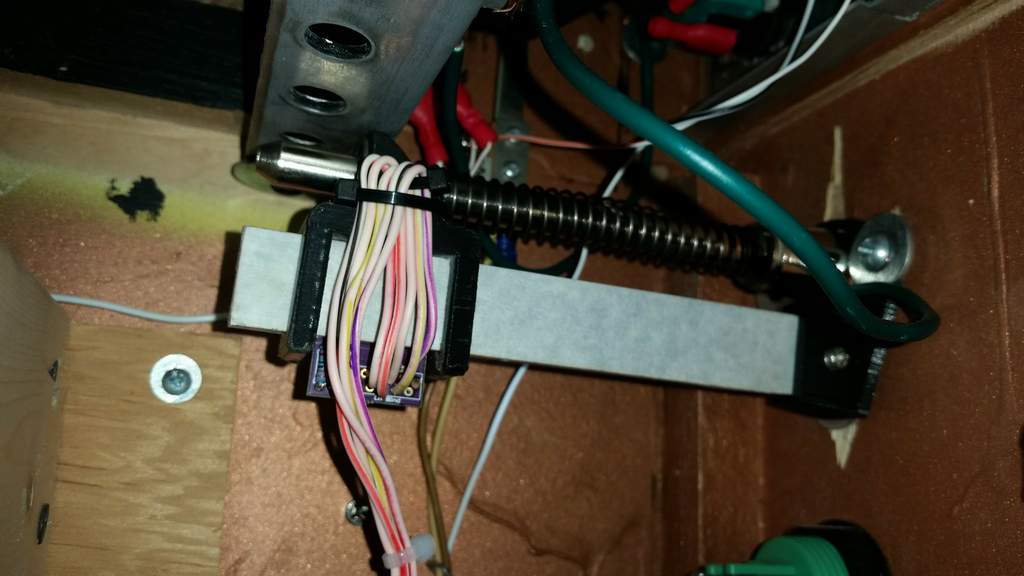
For reference, pics of each:
 
The white acrylic is stationary, the fine printed lines are on the other side.  And the sensor slides to the right and left as the plunger is pulled out and released.
 
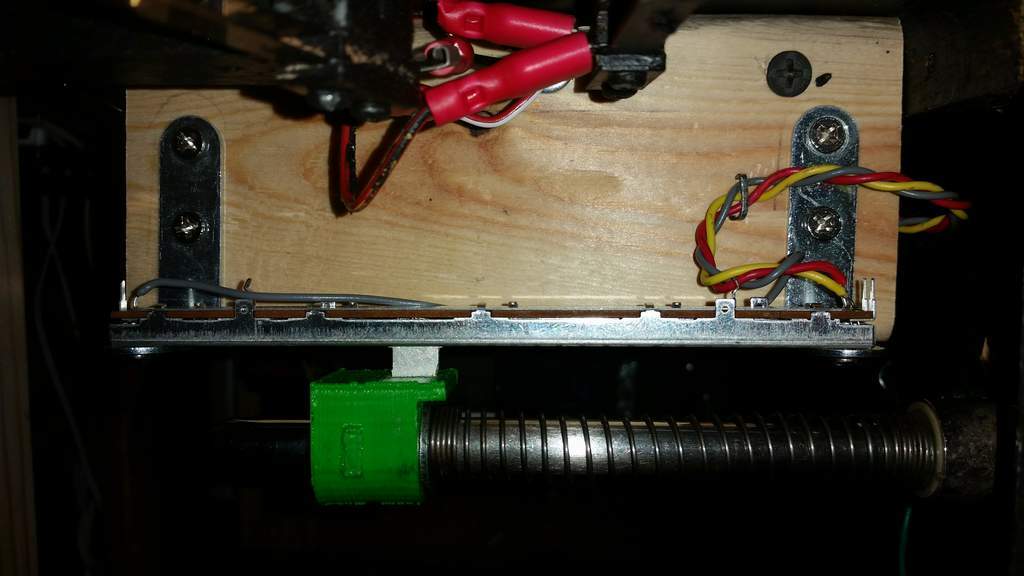
And the 10k pot:
That green printed piece I just happened to have laying around from a zebs thing that didn't work.  Other solutions are a simple metal braket that you wrap around and bend and then use a cotter pin to connect to the pot.  (pro tip - cotter pin)  a screw will come loose with all the motion. 
 
Bent metal and cotter pin in a friends rig:
vpincotterpin_t.jpg


#31 STV

STV

    Enthusiast

  • Members
  • PipPipPip
  • 436 posts

  • Flag: United States of America

  • Favorite Pinball: Varies. 140 in the list ATM.

Posted 07 August 2019 - 01:42 AM

AEDR bracket pic of when I took it out...  Like I said it worked great for over a year.  If the mounting challenge can be solved it'd be a fine solution.  Until then the 10k pot is easier, just as good functionality-wise and longer lasting. 


aderbracketeol_t.jpg


#32 mjr

mjr

    Pinball Wizard

  • Members
  • PipPipPipPipPip
  • 3,323 posts

  • Flag: United States of America

  • Favorite Pinball: Medieval Madness

Posted 07 August 2019 - 05:44 PM

I did the AEDR on my first build and it worked great for a good long time.  I think 14-16 months.  But it ended up being at my place of work, so it was getting used heavily most days.  What ended up happening eventually is as the 3d printed parts settled, and things loosened,  the things started rubbing and 3d printer plastic started turning to dust and eventually the mechanics just wore things sideways and it was jamming and hitching and giddyuping and skipping and such.


Sorry to hear it didn't last longer!  On the other hand, I guess if it lasted for over a year in a high-volume location, maybe that's a good sign that it should last for many years in a more typical home setup.


Out of curiosity, what kind of 3D printer material did you use?  Was it ABS or PLA on a home 3D printer?  I ask because I've had a couple of parts made on both 3dhubs (home printers with PLA) and Shapeways (which uses higher-end commercial equipment and PA12 nylon), and the Shapeways nylon material is very obviously superior in terms of stability - the PA12 nylon parts feel similar to traditional molded plastic parts, whereas the PLA parts feel kind of like plastic sawdust held together with Elmer's glue.  Just based on how the respective parts look and feel, I'd expect the Shapeways version to be a bit more robust over time than a PLA or ABS version.  So it would be interesting to know what your were using, as a baseline.  If you were using a PA12 build then maybe I should warn people away from ABS/PLA entirely so they don't have parts that'll crumble to dust in two weeks!


One more reason to be sad about the demise of the old TSL1410R sensor, which was totally contact-free optical with no mechanical linkages required.


I have encountered one issue: Since importing stuff from the US is very expensive and cumbersome due to customs paperwork and shipping costs, I have send the GuideRailCuttingTemplates to a company in the Netherlands. They have the 3mm mirrored acrylic material and a laser cutter. Unfortunately they can't read the .svg files correctly. I have got a response that they get a big right angled shape of about 2260 mm which is outrageous. I don't know how to see that for myself since I can't open the files on my os-x computer. That company asked for a .dxf or .ai file to work with.


Any advice on how to process the files or does anyone know where I can get the lasercutting done in the Netherlands ?


I used the free program Inkscape to produce the .svg files, and Inkscape looks like it'll save to .dxf (among many other formats), so maybe you can try downloading Inkscape and saving the file to .dxf.


I'd just do it and send you a copy, but it might be better for you to get that set up, because I have a strong feeling that the vendor is going to come up with three or four more hoops for you to jump through before you're done.  The US vendor I've been using (Ponoko) has a particular format they require with certain line widths and colors (!!!) to indicate different types of cuts.  I wouldn't be at all surprised if your vendor has a completely different set of conventions they're going to ask you to follow.  So if you can set up Inkscape on your PC and have it ready, that should make it easy for you to make the necessary adjustments for your vendor once you figure out what they require.


One other thing to note is that my .svg files have the Ponoko template embedded - when you open it in Inkscape you'll see what I mean; it's the orange background text and outline.  That might be part of what's confusing your vendor.  You'll probably want to delete all of that, and possibly replace it with the equivalent template your vendor provides.


#33 STV

STV

    Enthusiast

  • Members
  • PipPipPip
  • 436 posts

  • Flag: United States of America

  • Favorite Pinball: Varies. 140 in the list ATM.

Posted 07 August 2019 - 05:52 PM

PLA,   It was PLA from a friends home 3D printer.  :)    


#34 elabree

elabree

    Hobbyist

  • Members
  • PipPip
  • 34 posts

  • Flag: Netherlands

  • Favorite Pinball: Revenge from Mars

Posted 07 August 2019 - 06:03 PM

Hi STV,

Thanks for the advise and the pictures. I really feel like a beginner. Electronics and software are not a problem for me, but I find the mechanical stuff a challenge. Accuracy and proper finishing are my weak spots.

I wanted to try the AEDR solution because it should be relyable since the sensor is contactless. You are showing clearly that I can expect wearing of the moving parts. I guess that's the weak spot in the design: there is friction between the sensor bracket and the guide rail.


Your solution with the 10k pot really looks easy. The only challenge is to mount it properly aligned with the plunger to minimize the forces on the slider. The pot will wear anyhow but since mounting is easy, it can be replaced when that happens.


I guess the hard part with all solutions is the location of the plunger with respect to the right flipper button, but most of the work was already done by Mike (so thanks again to make pinscape available for all diy enthousiasts :db:)


#35 elabree

elabree

    Hobbyist

  • Members
  • PipPip
  • 34 posts

  • Flag: Netherlands

  • Favorite Pinball: Revenge from Mars

Posted 07 August 2019 - 06:18 PM

Hi Mike,
Thanks for the tips. I will install inkscape and look at your design.

At first glance the lasercutting seemed the most difficult to me. So I did not bother too much yet about the other parts.

I have spotted a lasercutting service here who publishes an inkscape template, so that seems promising. Later on it would be nice to know the best choice for the bracket material, so I'll keep following this topic.


One question: did you consider engraving of the scale on the guide rail ? I really don't know if that's possible or would work for this pattern... Probably the lasercutter is not accurate enough.


Edited by elabree, 07 August 2019 - 06:18 PM.


#36 mjr

mjr

    Pinball Wizard

  • Members
  • PipPipPipPipPip
  • 3,323 posts

  • Flag: United States of America

  • Favorite Pinball: Medieval Madness

Posted 07 August 2019 - 07:39 PM

Thanks for the tips. I will install inkscape and look at your design.

At first glance the lasercutting seemed the most difficult to me. So I did not bother too much yet about the other parts.

I have spotted a lasercutting service here who publishes an inkscape template, so that seems promising. Later on it would be nice to know the best choice for the bracket material, so I'll keep following this topic.


Great - let me know if I can help clarify anything about the template.  It's pretty simple, basically just a rectangle with a little circular cutout, so hopefully it'll be straightforward to translate to the new template.


One question: did you consider engraving of the scale on the guide rail ? I really don't know if that's possible or would work for this pattern... Probably the lasercutter is not accurate enough.


As a matter of fact, I did try that.  It would make the overall build much tidier.  Unfortunately it didn't work - the sensor couldn't read it.  It's hard to tell exactly what the problem was.  My guess looking at the result was that the reflective material is too thin a layer - it ends up not being reflective enough when cut into such thin lines.  It looked like the lines were accurately cut; they just looked too faint.   The other possibility is that it's the distance.  The sensor's optimal focus is at about 1.5mm, whereas the Ponoko material is 3mm thick and reflective on the back side.  So the lines end up being about 4mm away from the sensor (the thickness of the material plus the gap between the sensor and the front surface of the acrylic).  Ponoko has a different material that I might try this experiment with again at some point - it's a black plastic with metallized front surface.  I'm not entirely optimistic about that because the metallic surface is more of a brushed metal finish, not a mirrored finish, and the AEDR8300 needs a very high specular reflectance - in my early testing it basically didn't work with anything less than a polished mirror surface.  I also think the black plastic itself might be too reflective to provide enough contrast, at least as far as the laser perceives it.  But it could be worth a try at some point.


#37 elabree

elabree

    Hobbyist

  • Members
  • PipPip
  • 34 posts

  • Flag: Netherlands

  • Favorite Pinball: Revenge from Mars

Posted 08 August 2019 - 04:18 AM

You really try everything :). 20 years ago I did some projects having issues with optical sensors. Most of the time the sensor detects something different than what you can see, also depending on the wavelength. We had a photo interrupter once that could not detect a plastic card. Depending on the material the light came straight through the plastic. Also saw perfect black and white encoder discs not being detected by a reflective sensor depending on the surface properties instead of the color. Possibly the engraved lines cause scattering of the light due to surface roughness. I will let you know when there is progress with the lasercutting.


#38 elabree

elabree

    Hobbyist

  • Members
  • PipPip
  • 34 posts

  • Flag: Netherlands

  • Favorite Pinball: Revenge from Mars

Posted 24 August 2019 - 04:41 AM

OK: success :lusty::

The guiderail is not that difficult at all. I did the following to translate the design for a different manufacturer:

- Open the GuideRailCuttingTemplate-x1.svg with Inkscape (you'll see the template, but the GuideRail is not visible.

- Open the linestyle menu (shift-ctrl-F) and select the (invisible) GuideRail (try until you see the outline (rectangular) with a small square (hole). 

- Change the line width to 0.2 mm. That should display the outline + circle for the hole.


Now 1st check the manufacturers instructions and design rules. In my case they also had a template for Inkscape. Then:

- Create a new drawing with the manufacturers template (Also keep the GuideRailCuttingTemplate-x1.svg open)

- Select only the guiderail and copy-paste to the new drawing.

- Make sure to obey the design rules of the manufacturer (layers, colors, etc...) and safe the new file.

- In my case the instructions told me to export to pdf format.


The guiderails I ordered came out just fine. I did not use the x11 template because of a manufacturer design rule: when the design contains multiple copies of the same shape or multiple different objects keep a distance of 2 mm between them. When sharing cutlines the objects will come loose or fall down during cutting. This causes inaccuracy and/or rough edges.


I have also ordered the brackets. One set in PLA, the other one with nGen (which is about 2x more expensive). Both materials looking good. The PLA is more brittle. I expect the nGen will wear less but the prints are less accurate.

Looking at the guiderail I see/feel sharp edges. Possibly this may cut into the sensorBracket, so maybe I'll try to smoothen the edges a bit before mounting.


I have some extra guiderails. If you live in the EU and want one => contact me by PM.


Edited by elabree, 24 August 2019 - 06:05 AM.


#39 mjr

mjr

    Pinball Wizard

  • Members
  • PipPipPipPipPip
  • 3,323 posts

  • Flag: United States of America

  • Favorite Pinball: Medieval Madness

Posted 24 August 2019 - 05:48 PM

elabree - great, sounds like excellent progress!


#40 elabree

elabree

    Hobbyist

  • Members
  • PipPip
  • 34 posts

  • Flag: Netherlands

  • Favorite Pinball: Revenge from Mars

Posted 15 September 2019 - 07:29 AM

Hi there,

I have completed the complete plunger sensor (thanks to the clear instructions in the buildguide). And it is working perfectly (great software MJR !).

The beauty of it is that I learned a lot of DIY skills but feel the need to share some experience here:

1. I am using a Gottlieb cabinet. The shooter is mounted with only 2 bolts with a spacing of  about 0.5 mm more than the holes in the guide bracket: this was easy to fix by enlarging the holes a bit

2. On that cabinet the bracket for the lockbar was in the way: I needed to cut away a piece of that

3. I could not print the scale properly on my laserprinter, the toner did not stick on the foil properly. The printer at work did the job. Maybe good to check this before building everything because the scale is an essential part of the sensor.

4. The hole in my guiderail was too big (diam. ~ 6mm). I cut off a small piece from a fisher plug to fill the gap between the 3mm bolt and the hole in de rail.

5. When I shifted the Sensor bracket, the scale came loose. It appeared that I needed to cut it smaller. Basically there should not be physical contact between the scale and the sensor bracket.

6. Then there was some bulging of the scale. Because I could not fix the scale properly with scotch tape on both ends I have used some glue to fix it all the way. Note that the glue dissolves the printed scale so I did it a second time on the other side :-)

7. Soldering of the AEDR was easier than expected (thanks to the excellent instructions in the buildguide). Note that I bought some at Mouser in case something went wrong. But when I wanted to try the 1st one it appeared that they where all in 1 bag and needed to be soldered in one stroke.... The application of the solderpaste was a challenge for me. Too much paste gives trouble because the sensor starts to float on it (you want it flat on the pcb). Too little means no contact but adding some paste and heating up will fix that easier. So: don't apply too much because that's more difficult to fix. Finally my AEDR's are all working.

No moist related issues, be prepared before opening the bag is really a good advise in the buildguide.


Edited by elabree, 15 September 2019 - 07:55 AM.