Jump to content


Photo

90's Workshop: Buildin' The Table


  • Please log in to reply
369 replies to this topic

#21 wtiger

wtiger

    Pinball Fan

  • VIP
  • 1,148 posts
  • Location:Los Angeles, CA

  • Flag: United States of America

  • Favorite Pinball: Junkyard


Contributor

Posted 18 April 2009 - 11:46 PM

QUOTE (faralos @ Apr 18 2009, 04:27 PM) <{POST_SNAPBACK}>
oh man am I lost already! ok Am I to download indendence day from here, then start to mod that one? or am I to start with a new table as Noah suggests? help please (I'll bet I'll be your biggest stumbling block tongue.gif)


Neither. I don't see any post here that says to do either of what you are asking yet.

#22 faralos

faralos

    VPF Veteran

  • Members
  • PipPipPipPipPipPip
  • 7,838 posts
  • Location:Eastern Pa,USA

  • Flag: United States of America

  • Favorite Pinball: Flash (Williams) 1979, Flash2 Updated


  • Trophies:

Posted 19 April 2009 - 12:06 AM

ok I just downloaded the playfield as per YOUR suggestion and messed around with the width till it matches my light. so the width is 890 and my light is 35. is that ok? and this is the light in the upper middle top ( I found the table image, stripped of course, the resuorces, roms and the table itself on here, thanks anyway. YOU suggested we do this, wtiger... just fyi

Edited by faralos, 19 April 2009 - 12:15 AM.

"Don’t let the noise of others’ opinions drown out your own inner voice.
And most important, have the courage to follow your heart and intuition.”
----Steve Jobs


#23 neoblood

neoblood

    Enthusiast

  • Charter Member
  • 381 posts
  • Location:USA

  • Flag: United States of America

  • Favorite Pinball: bop

Posted 19 April 2009 - 12:19 AM

Get vp9 installed and use the picture at the bottom of his homework post, the one with the simple graphics and the 3 roundish doodads at the upper right. Then just follow his instructions. You'll get it.
A Pinball a day takes the boredom away

#24 wtiger

wtiger

    Pinball Fan

  • VIP
  • 1,148 posts
  • Location:Los Angeles, CA

  • Flag: United States of America

  • Favorite Pinball: Junkyard


Contributor

Posted 19 April 2009 - 12:23 AM

QUOTE (faralos @ Apr 18 2009, 05:06 PM) <{POST_SNAPBACK}>
ok I just downloaded the playfield as per YOUR suggestion and messed around with the width till it matches my light. so the width is 890 and my light is 35...


Faralos, good job! The width number you came up with is right on target.

#25 faralos

faralos

    VPF Veteran

  • Members
  • PipPipPipPipPipPip
  • 7,838 posts
  • Location:Eastern Pa,USA

  • Flag: United States of America

  • Favorite Pinball: Flash (Williams) 1979, Flash2 Updated


  • Trophies:

Posted 19 April 2009 - 01:11 AM

Woohoo! ok boss now what's next?
cool.gif
one question though, on your pic all I see are the lights on mine I get the entire playfield image how can I get just the lights, or is it supposed to have the whole image and yours is just an example for the light and width?

Edited by faralos, 19 April 2009 - 01:14 AM.

"Don’t let the noise of others’ opinions drown out your own inner voice.
And most important, have the courage to follow your heart and intuition.”
----Steve Jobs


#26 wtiger

wtiger

    Pinball Fan

  • VIP
  • 1,148 posts
  • Location:Los Angeles, CA

  • Flag: United States of America

  • Favorite Pinball: Junkyard


Contributor

Posted 19 April 2009 - 05:57 PM

QUOTE (faralos @ Apr 18 2009, 06:11 PM) <{POST_SNAPBACK}>
Woohoo! ok boss now what's next?
cool.gif
one question though, on your pic all I see are the lights on mine I get the entire playfield image how can I get just the lights, or is it supposed to have the whole image and yours is just an example for the light and width?


You downloaded the actual playfield from the resources section rather than downloading the example pseudo playfield image that was in my post. No harm though.

Edited by wtiger, 19 April 2009 - 05:58 PM.


#27 wtiger

wtiger

    Pinball Fan

  • VIP
  • 1,148 posts
  • Location:Los Angeles, CA

  • Flag: United States of America

  • Favorite Pinball: Junkyard


Contributor

Posted 19 April 2009 - 06:25 PM

Our next exercise is something that I found very helpful early on. It's about making circles. When I first started I would make circles with the wall tool by adding a light object somewhere on the playfield and then add a wall. I would then add points and try to move them around and follow the contour of the light. One day I came across a very nice tutorial by a guy named Stein. It's called "numerically perfect circles". His tutorial goes through the process of making circles by placing wall control points in the exact mathematical x,y position. Here's a link to his tutorial:

http://www.vpgd.net/...ect_circles.htm

Go ahead and read his tutorial and practice making circle objects with different numbers of control points (the more you have, the more precise they will be). I think for most of my objects used in my Elvis table, I went with 8 total control points for my circles for the small post and rubber objects. After everyone is finished making circles we will hopefully start making some post objects (unless someone has some other ideas or direction they want to go). Please post any comments/feedback, questions, ideas, etc.

#28 wtiger

wtiger

    Pinball Fan

  • VIP
  • 1,148 posts
  • Location:Los Angeles, CA

  • Flag: United States of America

  • Favorite Pinball: Junkyard


Contributor

Posted 19 April 2009 - 08:12 PM

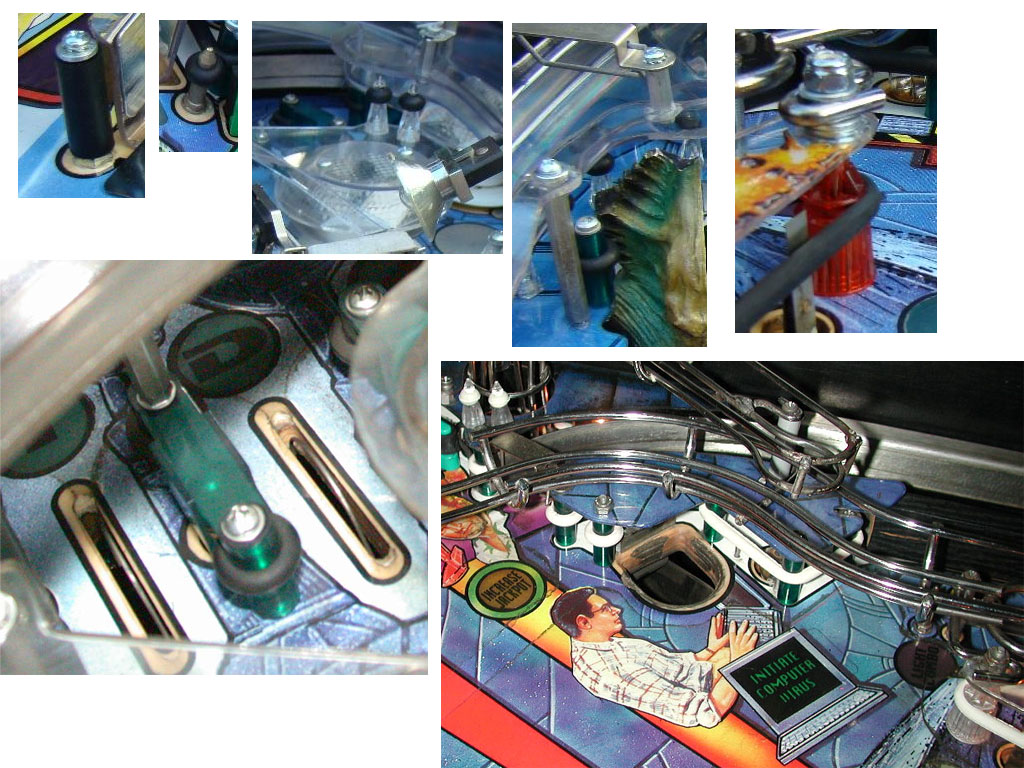
I went ahead and took a look through my images of ID to see what the various posts are on the playfield. The image below is what I came up with for the various ones used.


For the next exercise we will attempt to duplicate these using the wall tool and various size circles objects that you created from Stein's tutorial. Make sure you save some of the circles you created in a table so you can use them later.

#29 faralos

faralos

    VPF Veteran

  • Members
  • PipPipPipPipPipPip
  • 7,838 posts
  • Location:Eastern Pa,USA

  • Flag: United States of America

  • Favorite Pinball: Flash (Williams) 1979, Flash2 Updated


  • Trophies:

Posted 19 April 2009 - 11:06 PM

ok just made some circles are these ok? or did you mean to make many of them? ok here's a few more...

Attached Files


Edited by faralos, 19 April 2009 - 11:14 PM.

"Don’t let the noise of others’ opinions drown out your own inner voice.
And most important, have the courage to follow your heart and intuition.”
----Steve Jobs


#30 1up

1up

    Enthusiast

  • Charter Member
  • 192 posts
  • Location:Adelaide, Australia

  • Flag: Australia

  • Favorite Pinball: monopoly

Posted 20 April 2009 - 02:58 PM

QUOTE (wtiger @ Apr 19 2009, 07:25 PM) <{POST_SNAPBACK}>
http://www.vpgd.net/...ect_circles.htm
Go ahead and read his tutorial and practice making circle objects with different numbers of control points (the more you have, the more precise they will be). I think for most of my objects used in my Elvis table, I went with 8 total control points for my circles for the small post and rubber objects. After everyone is finished making circles we will hopefully start making some post objects (unless someone has some other ideas or direction they want to go). Please post any comments/feedback, questions, ideas, etc.


that was a very good guide on how to make perfect circles. i tried it out and it worked perfectly.
just to confirm.. should we be trying to replicate those post images yet or is there a certain way to make those.

#31 Noah Fentz

Noah Fentz

    'Rasslin' Fan

  • VPF Administrator
  • 12,266 posts
  • Location:South Lyon, MI

  • Flag: United States of America

  • Favorite Pinball: Whitewater

  • PS3 Gamer Tag: noahfentz


Contributor

Posted 20 April 2009 - 03:06 PM

Go for it. If you have any questions, just ask.

You could grab some from a table and disassemble them to get ideas.

IdleReel.gif RumbleDMD.jpg HS2-DMD.jpg SBM.jpg ww_logo.jpg EK.jpg

 
T2.jpg Sorcerer.jpg Breakshot.jpg Firepower.jpg GorGar.jpg StarTrek.jpg


My Photobucket Resources
Whether You Believe You Can, Or You Can't, You Are Right." - Henry Ford
The future of pinball lives, it just needs to be nurtured!
If you're here to stab me in the back, you're going to have to get in line.


#32 wtiger

wtiger

    Pinball Fan

  • VIP
  • 1,148 posts
  • Location:Los Angeles, CA

  • Flag: United States of America

  • Favorite Pinball: Junkyard


Contributor

Posted 21 April 2009 - 02:34 AM

QUOTE (1up @ Apr 20 2009, 07:58 AM) <{POST_SNAPBACK}>
that was a very good guide on how to make perfect circles. i tried it out and it worked perfectly.
just to confirm.. should we be trying to replicate those post images yet or is there a certain way to make those.


Yeah, as Noah said, go ahead and give it a try.

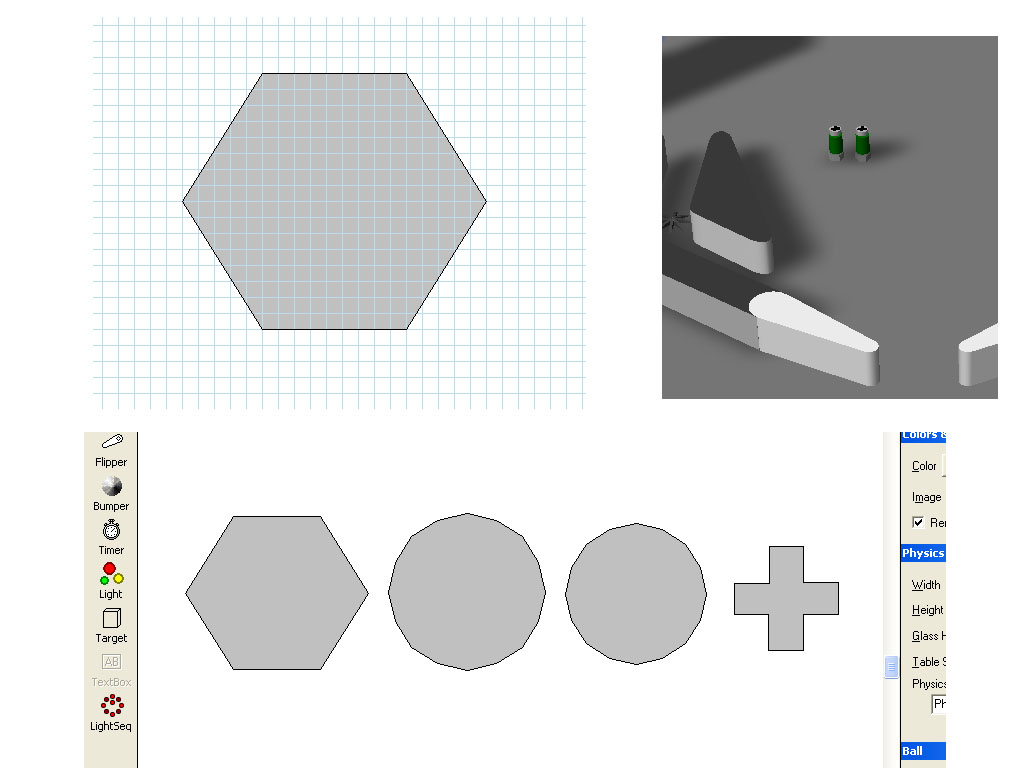
Posts are usually set to 50 VP units high which match the height of the ball. Go ahead and try a simple one first. The one in the upper left corner has a nut on the bottom, then a round cylinder and then a screw on the top. For the nut on the bottom, make the height go from 0 to 10 and see how that works. The cylinder above would go from 10 to say 40 and finally the scew on the top would be 40 to 49. You can the attempt to make a black cross shaped for the top of the screw and have it go from 49 to 50. Go ahead and experiment with different radius and heights and see what you come up with.

Here's an example I put together somewhat quickly. For the nut, I turned the grid on and set it to 1 for the size (see upper left image in picture). To the right is how the object looks in VP when rendered. At the bottom are the pieces that make up the object:

Edited by wtiger, 21 April 2009 - 03:14 AM.


#33 neoblood

neoblood

    Enthusiast

  • Charter Member
  • 381 posts
  • Location:USA

  • Flag: United States of America

  • Favorite Pinball: bop

Posted 22 April 2009 - 12:35 AM

QUOTE (wtiger @ Apr 19 2009, 02:25 PM) <{POST_SNAPBACK}>
Our next exercise is something that I found very helpful early on. It's about making circles. When I first started I would make circles with the wall tool by adding a light object somewhere on the playfield and then add a wall. I would then add points and try to move them around and follow the contour of the light. One day I came across a very nice tutorial by a guy named Stein. It's called "numerically perfect circles". His tutorial goes through the process of making circles by placing wall control points in the exact mathematical x,y position. Here's a link to his tutorial:

http://www.vpgd.net/...ect_circles.htm

Go ahead and read his tutorial and practice making circle objects with different numbers of control points (the more you have, the more precise they will be). I think for most of my objects used in my Elvis table, I went with 8 total control points for my circles for the small post and rubber objects. After everyone is finished making circles we will hopefully start making some post objects (unless someone has some other ideas or direction they want to go). Please post any comments/feedback, questions, ideas, etc.


That is really great use of the interface.

Some other trig that might come in handy that I use everyday at work:

A-squared + B-squared = C-squared .. so if you have two sides of something and would like to know what a 3rd side inside of it is, you would do this math. Or for precision you could use this to figure out the cross corner distance between points on a square. For example if a square has 4 sides each 4 inches across how long is the diagonal between corners? It would be the [square root] of (4-squared +4-squared) = answer. This trig has about 2 dozen uses and is very helpful for fitting "stuff" inside of "stuff" or wondering why "stuff" don't do "stuff" that you want it to 8 )
A Pinball a day takes the boredom away

#34 neoblood

neoblood

    Enthusiast

  • Charter Member
  • 381 posts
  • Location:USA

  • Flag: United States of America

  • Favorite Pinball: bop

Posted 22 April 2009 - 01:22 AM

I have a question.. Is there a way to lock wall shapes to each other? Or shrink them as a group to a smaller size?
A Pinball a day takes the boredom away

#35 wtiger

wtiger

    Pinball Fan

  • VIP
  • 1,148 posts
  • Location:Los Angeles, CA

  • Flag: United States of America

  • Favorite Pinball: Junkyard


Contributor

Posted 22 April 2009 - 02:05 AM

QUOTE (neoblood @ Apr 21 2009, 06:22 PM) <{POST_SNAPBACK}>
I have a question.. Is there a way to lock wall shapes to each other? Or shrink them as a group to a smaller size?


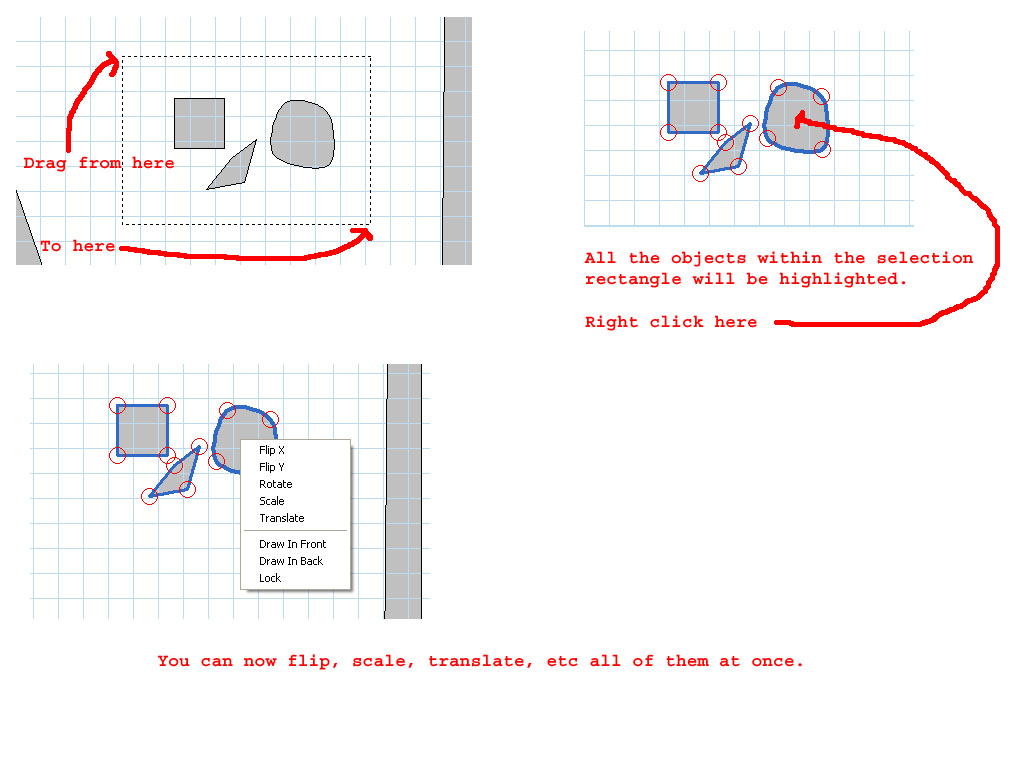
No, you can't lock wall shapes to each other or "group" multiple items together so they act as one. You can move (translate), scale, rotate several objects together. You do this by making a selection rectangle around them with the selection tool (kind of like selecting multiple files/folders on your desktop). Once you have all the items selected, right click on the gray portion of any one of the objects you selected and you can then perform the appropriate action you want. See the image below:


You can also select multiple objects by using the shift key. Left click on one object, hold down the shift key and left click on another. Keep going until you have all selected you want. If you need to, you can zoom in or out and it won't unselect what you already have selected.

#36 neoblood

neoblood

    Enthusiast

  • Charter Member
  • 381 posts
  • Location:USA

  • Flag: United States of America

  • Favorite Pinball: bop

Posted 22 April 2009 - 03:47 AM

Can you only scale them in the positive? My brain is fried today, can't fit the "shrink button".
A Pinball a day takes the boredom away

#37 wtiger

wtiger

    Pinball Fan

  • VIP
  • 1,148 posts
  • Location:Los Angeles, CA

  • Flag: United States of America

  • Favorite Pinball: Junkyard


Contributor

Posted 22 April 2009 - 04:12 AM

QUOTE (neoblood @ Apr 21 2009, 08:47 PM) <{POST_SNAPBACK}>
Can you only scale them in the positive? My brain is fried today, can't fit the "shrink button".


If you enter -2 for the scale, VP will ignore the "-" and just use the 2. If you want something smaller, enter .5 or .25. Is that what you mean?

#38 destruk

destruk

    VPF Veteran

  • VPF Staff
  • 6,338 posts
  • Location:Colorado Springs, CO

  • Flag: United States of America

  • Favorite Pinball: Ultrapin!


Posted 22 April 2009 - 06:22 AM

When moving control points around, don't cross control point connecting lines. Try to imagine all life as you know it stopping instantaneously and every molecule in your body exploding at the speed of light.... ok, well, not that bad, just the collision model of vp would be screwed up for that wall if the object was turned inside out.

Build a fire, vipers love the heat.


#39 neoblood

neoblood

    Enthusiast

  • Charter Member
  • 381 posts
  • Location:USA

  • Flag: United States of America

  • Favorite Pinball: bop

Posted 22 April 2009 - 05:37 PM

QUOTE (wtiger @ Apr 22 2009, 12:12 AM) <{POST_SNAPBACK}>
If you enter -2 for the scale, VP will ignore the "-" and just use the 2. If you want something smaller, enter .5 or .25. Is that what you mean?


QUOTE (destruk @ Apr 22 2009, 02:22 AM) <{POST_SNAPBACK}>
When moving control points around, don't cross control point connecting lines. Try to imagine all life as you know it stopping instantaneously and every molecule in your body exploding at the speed of light.... ok, well, not that bad, just the collision model of vp would be screwed up for that wall if the object was turned inside out.


Yes that's what I meant. Thanks for the info.
A Pinball a day takes the boredom away

#40 faralos

faralos

    VPF Veteran

  • Members
  • PipPipPipPipPipPip
  • 7,838 posts
  • Location:Eastern Pa,USA

  • Flag: United States of America

  • Favorite Pinball: Flash (Williams) 1979, Flash2 Updated


  • Trophies:

Posted 22 April 2009 - 09:14 PM

[quote name='wtiger'
No, you can't lock wall shapes to each other or "group" multiple items together so they act as one.

Can one put them together in a collection saving them as a group with that command? I don't know all too much with coding either, just thought I'd ask.

Edited by faralos, 22 April 2009 - 09:15 PM.

"Don’t let the noise of others’ opinions drown out your own inner voice.
And most important, have the courage to follow your heart and intuition.”
----Steve Jobs