Jump to content


Photo
* * * * * 40 votes

The VP 10.7 beta thread


  • Please log in to reply
4027 replies to this topic

#3281 Mrtr32

Mrtr32

    Enthusiast

  • Members
  • PipPipPip
  • 251 posts

  • Flag: Canada

  • Favorite Pinball: Funhouse

Posted 14 June 2022 - 04:46 PM

Thanks to toxie, vbousquet and fuzzel for your hard work on this update! :dblthumb:

I can confirm. All the problematics tables from vpw load and work great at 4k with the lastest VPinballX-10.7.1-197-a6db14a build on my cab!


Edited by Mrtr32, 14 June 2022 - 05:04 PM.


#3282 toxie

toxie

    VPF Veteran

  • VP Dev Team
  • PipPipPipPipPipPip
  • 5,734 posts
  • Location:berlin, germany

  • Flag: Germany

  • Favorite Pinball: AFM

Posted 14 June 2022 - 08:06 PM

Sorry to have to ask, because I'm sure it's been discussed, but I can't find it.  Is there a guide somewhere to configuring the global physics override sets?  I.e. different settings that would represent different eras/types of tables?

There was a package somewhere that featured some sets, but i also cannot find it anymore.  :/


#3283 Takezo

Takezo

    Hobbyist

  • Members
  • PipPip
  • 18 posts

  • Flag: Brazil

  • Favorite Pinball: No Good Gofers

Posted 18 June 2022 - 08:42 PM

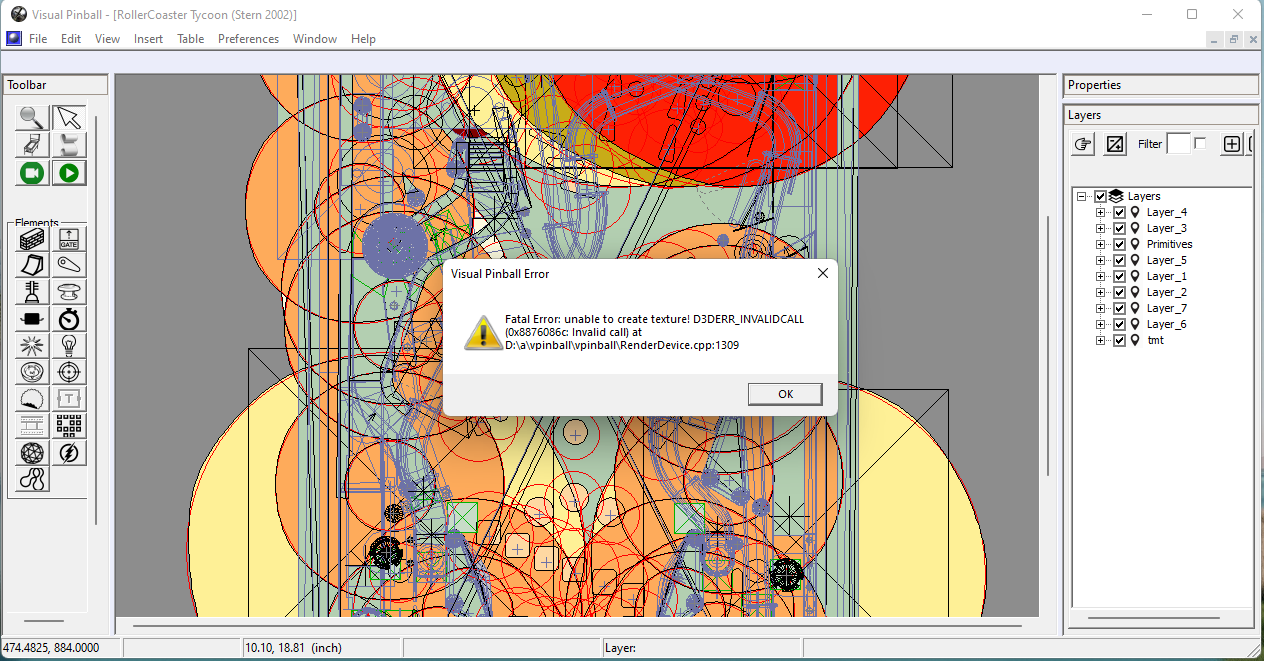
anyway to solve this?


It happens with some tables like roller coaster and big bang bar on vpx
 

pib.png


#3284 jpsalas

jpsalas

    Grand Schtroumpf

  • VIP
  • 7,333 posts
  • Location:I'm Spanish, but I live in Oslo (Norway)

  • Flag: Norway

  • Favorite Pinball: I like both new and old, but I guess I prefer modern tables with some rules and goals to achieve.


Posted 18 June 2022 - 09:09 PM

anyway to solve this?


It happens with some tables like roller coaster and big bang bar on vpx


pib.png


I guess that's not my table, but the MOD recently released. And the reason is because your computer runs out of graphics memory. There are some huge graphics in there.


Usually there are 3 solutions to the problem:


1.- buy a new graphic card with tons of video ram :) which is not cheap :)


2.- Reduce the size of the images using the VPX built inn texture manager. Try limiting first to 3072, and if still crashes, then 2048 or even 1024.


3. This is perhaps the best option, at least for me, and it is to export the huge images and reduce them with any graphic program (Gimp, paint, photoshop...). I guess reducing the size of the one called "plastics" will do the trick, since it is 5404x12000 and that's huge :) But there are also a lot of other images that are not used if you are not running a VR system, which can simply be removed or reduced in size. Also some "flasher..." textures could be reduced.


Well, here you have some options :)


If you want to check my latest uploads then click on the image below:


vp.jpg


#3285 wiesshund

wiesshund

    VPF Legend

  • Members
  • PipPipPipPipPipPipPip
  • 11,871 posts

  • Flag: United States of America

  • Favorite Pinball: How many can i have?

Posted 19 June 2022 - 12:20 AM

5404x12000 is mad overkill, that is over 8K 4,320 x 7,680

I agree with JP
Export anything of that kind of dimensions
reduce to 1729 x 3840 (close as that image comes to 4k) and you can even save it as WebP if your graphics app allows to reduce size more.
For any other images or large crazy size, resize the large dimension to 3840 and let your graphics app maintain aspect ration


If 4k dimensions are too much for your GPU, then try 2560 instead of 3840, that will still be 2K graphics


I can understand working at 5404x12000 while creating the art
but not the final production.


If you feel the need to empty your wallet in my direction, i don't have any way to receive it anyways

Spend it on Hookers and Blow


#3286 jpsalas

jpsalas

    Grand Schtroumpf

  • VIP
  • 7,333 posts
  • Location:I'm Spanish, but I live in Oslo (Norway)

  • Flag: Norway

  • Favorite Pinball: I like both new and old, but I guess I prefer modern tables with some rules and goals to achieve.


Posted 19 June 2022 - 02:42 AM

By the way that image is the one I made for my table, only enlarged, so you can reduce it or simply grab the plastics image from my table.


If you want to check my latest uploads then click on the image below:


vp.jpg


#3287 djredick

djredick

    Enthusiast

  • Silver Supporter
  • 207 posts

  • Flag: United States of America

  • Favorite Pinball: Xenon

Posted 19 June 2022 - 03:06 AM

Not sure if this has been reported or not (TLDR), but just tried r196 beta and it is not loading B2S files.  Had the same issue with an earlier beta release (117, I think?).


Glad to see a 64-bit version, though!


#3288 jpsalas

jpsalas

    Grand Schtroumpf

  • VIP
  • 7,333 posts
  • Location:I'm Spanish, but I live in Oslo (Norway)

  • Flag: Norway

  • Favorite Pinball: I like both new and old, but I guess I prefer modern tables with some rules and goals to achieve.


Posted 19 June 2022 - 03:35 AM

Not sure if this has been reported or not (TLDR), but just tried r196 beta and it is not loading B2S files.  Had the same issue with an earlier beta release (117, I think?).


Glad to see a 64-bit version, though!


The reason it doesn't load B2S files is because you are using the 64 bits version, and the db2s is only 32 bit. So to load a db2s file you need to use the 32 bits VPX version. To use VPX 64 bits you need to use only 64 bits programs, and just now the db2s system is only 32 bits. Just now there is no real  benefic using a 64 bits VPX.


If you want to check my latest uploads then click on the image below:


vp.jpg


#3289 djredick

djredick

    Enthusiast

  • Silver Supporter
  • 207 posts

  • Flag: United States of America

  • Favorite Pinball: Xenon

Posted 19 June 2022 - 04:03 AM

Gotcha.  Thanks JP.


#3290 wiesshund

wiesshund

    VPF Legend

  • Members
  • PipPipPipPipPipPipPip
  • 11,871 posts

  • Flag: United States of America

  • Favorite Pinball: How many can i have?

Posted 19 June 2022 - 10:20 AM

Gotcha.  Thanks JP.


Actually B2S Server does exist in 64bit (Youd probably have to self compile, no current maintained 64bit build), as does freezys, and flexDMD is already 32/64 and vpinMAME comes in 64bit

But dont.
Everything will see great, until you start running some Stern ROMs and i think perhaps some williams.
In the 64bit VpinMAME at91jit does not work right.
Sometimes it can just crash out, othertimes the DMD gets way out of sync with what is really going on with the table.
DMD still saying shoot the right ramp, and you already did, or game is over and DMD is still running scores from a minute ago, and some other things.


Also, VPX gets no advantage to being 64bit
All the things that 64bit would give it, it does not make use of, primarily it just does not use that amount of memory


If you feel the need to empty your wallet in my direction, i don't have any way to receive it anyways

Spend it on Hookers and Blow


#3291 toxie

toxie

    VPF Veteran

  • VP Dev Team
  • PipPipPipPipPipPip
  • 5,734 posts
  • Location:berlin, germany

  • Flag: Germany

  • Favorite Pinball: AFM

Posted 19 June 2022 - 12:22 PM

It could use that memory on the CPU with 64bit, but i don't know about the video RAM via DX9 though.

And as you say, the major downside is the missing efficient AT91 JIT support (for newer Stern machines).


btw: new build with a severe/fixed bmp saving bug: https://github.com/v...7.1-203-23e9ca0 (plese download the "release x86" variant: https://github.com/vpinball/vpinball/releases/download/v10.7.1-203-23e9ca0/VPinballX-10.7.1-203-23e9ca0-Release-win-x86.zip ).


#3292 Robsoie

Robsoie

    Enthusiast

  • Members
  • PipPipPip
  • 73 posts

  • Flag: ---------

  • Favorite Pinball: Addams Family, Goldorak, Flash Gordon

Posted 19 June 2022 - 02:08 PM

It's impressive how a table can lack optimisation to the point that by itself it will get VPX running out of memory ... when you could play whole Morrowind and Oblivion on 32 bits system without such thing .


Maybe for those still wanting to play such unoptimised tables, there's the possibilty of patching VPX with the 4gb patch so at least instead of being limited by the normal 32bits memory limit, it will be able to use up to 4gb of your RAM :

https://ntcore.com/?page_id=371


Maybe very large texture could work if they were in a format that is performance friendly (like DDS that many games use) , but JPG/PNG when they come in very high resolution can butcher memory in no time (open a JPG or PNG file and look at the place it takes in the RAM vs the actual file size, the difference can be very big as things are uncompressed in memory, unlike by example DDS as i said that keep its compression in ram).


Edited by Robsoie, 19 June 2022 - 02:15 PM.


#3293 bmheyob

bmheyob

    Hobbyist

  • Silver Supporter
  • 34 posts

  • Flag: ---------

  • Favorite Pinball: baby pacman

Posted 19 June 2022 - 02:47 PM

I tried Toxie's latest VPX version from today's post, but I had some trouble.
I tested Masters of the Universe (a table with choppy memory issues for me).

When I loaded Masters of the Universe, my playfield graphics were black (missing).


#3294 Mrtr32

Mrtr32

    Enthusiast

  • Members
  • PipPipPip
  • 251 posts

  • Flag: Canada

  • Favorite Pinball: Funhouse

Posted 19 June 2022 - 03:19 PM

@bmheyob


Do you have this lastest today build?


https://github.com/v...7.1-203-23e9ca0


#3295 bmheyob

bmheyob

    Hobbyist

  • Silver Supporter
  • 34 posts

  • Flag: ---------

  • Favorite Pinball: baby pacman

Posted 19 June 2022 - 03:28 PM

Mrtr32: Yes I have the lastest build (and the latest posted by Toxie today).
I do not have the playfield problem with the latest build, but I do have the problem with Toxie's build (posted today).


Although I can see my playfield with the lastest (non-toxie) build, I think I'm going to go back to my prior VPX version.

I too am missing the Stern DMDs with the latest build.


#3296 wiesshund

wiesshund

    VPF Legend

  • Members
  • PipPipPipPipPipPipPip
  • 11,871 posts

  • Flag: United States of America

  • Favorite Pinball: How many can i have?

Posted 19 June 2022 - 05:56 PM

It could use that memory on the CPU with 64bit, but i don't know about the video RAM via DX9 though.

And as you say, the major downside is the missing efficient AT91 JIT support (for newer Stern machines).


It could, but i dont think i have a single table that even presses 32bit memory limits

Video texture Vram access wont really care what biteses you makes it
But if using PNG/JPG and you start dropping in massive texture sizes, it will be a memory slaughter fest, you would have to have DDS support


Of course, i am not really sure why there are some tables out there packing around 8K and 12K textures
that is fine when creating the texture, but they should really be rendered down to 4K at most, when going into the release table

I have seen some tables that have 8K images for small parts, like bumpercaps or slingshot plastics even.
No need for that, its going to be rendered on screen as a small part.


If you feel the need to empty your wallet in my direction, i don't have any way to receive it anyways

Spend it on Hookers and Blow


#3297 jpsalas

jpsalas

    Grand Schtroumpf

  • VIP
  • 7,333 posts
  • Location:I'm Spanish, but I live in Oslo (Norway)

  • Flag: Norway

  • Favorite Pinball: I like both new and old, but I guess I prefer modern tables with some rules and goals to achieve.


Posted 19 June 2022 - 06:26 PM

Mrtr32: Yes I have the lastest build (and the latest posted by Toxie today).
I do not have the playfield problem with the latest build, but I do have the problem with Toxie's build (posted today).


Although I can see my playfield with the lastest (non-toxie) build, I think I'm going to go back to my prior VPX version.

I too am missing the Stern DMDs with the latest build.


No problems with the latest built here, VPinballX-10.7.1-203-23e9ca0-Release-win-x86


Are you also using the 64 bits VPX version? As I do not have problems with the Stern ROMS.


If you want to check my latest uploads then click on the image below:


vp.jpg


#3298 Mrtr32

Mrtr32

    Enthusiast

  • Members
  • PipPipPip
  • 251 posts

  • Flag: Canada

  • Favorite Pinball: Funhouse

Posted 19 June 2022 - 06:37 PM

No problems with the lastest build for me too!


All tables work as expected!


#3299 wiesshund

wiesshund

    VPF Legend

  • Members
  • PipPipPipPipPipPipPip
  • 11,871 posts

  • Flag: United States of America

  • Favorite Pinball: How many can i have?

Posted 19 June 2022 - 06:39 PM

Unless he also put in 64bit vpinmame?
in which case he shall be in stern ROM woe regardless


If you feel the need to empty your wallet in my direction, i don't have any way to receive it anyways

Spend it on Hookers and Blow


#3300 toxie

toxie

    VPF Veteran

  • VP Dev Team
  • PipPipPipPipPipPip
  • 5,734 posts
  • Location:berlin, germany

  • Flag: Germany

  • Favorite Pinball: AFM

Posted 19 June 2022 - 08:29 PM

As for DDS: You can at least use this on video RAM, by enabling texture compression in the video preferences.


Maybe for those still wanting to play such unoptimised tables, there's the possibilty of patching VPX with the 4gb patch so at least instead of being limited by the normal 32bits memory limit, it will be able to use up to 4gb of your RAM :

https://ntcore.com/?page_id=371


This part is already enabled since ages in the official builds, so no need to do this manually, but thanks for the hint.

