
Hmmm.. There must be some oversight somewhere where its not clearing that the key was released..
I'll check if i can add some debug code for you guys.
Thanks Toxie. I very much appreciate the efforts. 


 40 votes

Authoring Padawan



Posted 09 January 2022 - 04:41 PM
Hmmm.. There must be some oversight somewhere where its not clearing that the key was released..
I'll check if i can add some debug code for you guys.
Thanks Toxie. I very much appreciate the efforts.
My VP Pincab /MAME Arcade Specs: Dell T3400 workstation with Core2 Quad core 3.0GHZ (Q9650) CPU - 8GB of RAM - Nvidia GTX 970
40" PF Sony gaming LED TV, Dual 21" Dell monitors in the backbox - Pinscape dual boards - Full DOF - Full MAME arcade support.
VPF Legend


Posted 10 January 2022 - 03:59 AM
Hmmm.. There must be some oversight somewhere where its not clearing that the key was released..
I'll check if i can add some debug code for you guys.
Or you can leave it, i already nicknamed it "Toxie's Revenge"
It's the punishment for asking for 10,000 silly little features
If you feel the need to empty your wallet in my direction, i don't have any way to receive it anyways
Spend it on Hookers and Blow
Enthusiast


Posted 10 January 2022 - 09:19 AM
I missed the release during the holidays.
Thank you to the team !!!!!!!!
I tried on my computer, it's working perfectly.
Next move will be the pincab.
Thank's again for your work !
Pinball Fan




Posted 10 January 2022 - 11:08 AM
Many thanks to the VPX team for the new release.
I upgrade VPX 10.6 to 10.7
version : VPX rev367 (e242d7c)
Now, I can't edit script
Button Toggle script editor not working.
I see an empty window on status bar.
Thank you for your help.
This bug also exists for me in 10.6 and I have not pinpointed exactly what triggers it as yet but it could be something to do with having a dual monitor setup then moving the script window to the second monitor and disconnecting that monitor whilst the editor is still open (not exactly sure if this is the cause but has happened to me many times and I am often disconnecting monitors as I have my cab connected to my work PC when I want to play. Perjhaps it may also be caused by closing the script window on the second window using the X, then disconnecting the second monitor so that when I try to reopen the script it is attempting to reopen on the second monitor which is no longer connected?
When it happens, I roll over the empty script window on the task bar, then right click mouse and choose either restore or maximise and the script window will then appear, then try resizing the window.
Edited by Gravy, 10 January 2022 - 11:11 AM.
Pinball Addict
VPF Legend
Posted 10 January 2022 - 11:54 PM
This bug also exists for me in 10.6 and I have not pinpointed exactly what triggers it as yet but it could be something to do with having a dual monitor setup then moving the script window to the second monitor and disconnecting that monitor whilst the editor is still open (not exactly sure if this is the cause but has happened to me many times and I am often disconnecting monitors as I have my cab connected to my work PC when I want to play. Perjhaps it may also be caused by closing the script window on the second window using the X, then disconnecting the second monitor so that when I try to reopen the script it is attempting to reopen on the second monitor which is no longer connected?
When it happens, I roll over the empty script window on the task bar, then right click mouse and choose either restore or maximise and the script window will then appear, then try resizing the window.
As VPX remembers raw pixel values, yes, if your edit window is off in virtual space that is no longer present, it will remain there and you wont see it
VPX has a function to set the wind locations back to default
I think you can also pick the non visible script window in the taskbar and then do winkey + left arrow, and tap the arrow a few times to SNAP it into your active screen, faster than right click + move.
possibility of autoplunger rotation ?
missing links between if and end if
and sub and end sub
Dont think VPX has logic bars in the editor?
Dont see them in 10.6 either, just the little collapsible hash marks
If you feel the need to empty your wallet in my direction, i don't have any way to receive it anyways
Spend it on Hookers and Blow
VPF Veteran


Posted 11 January 2022 - 09:06 AM
Does the new reset window positions button in the UI prefs not also work?
(if not then we should add it i think, so please test)
So does this work for the script window, too, for you guys?
VPF Legend
Posted 11 January 2022 - 09:16 AM
Does the new reset window positions button in the UI prefs not also work?
(if not then we should add it i think, so please test)
So does this work for the script window, too, for you guys?
No, it does not
it resets the tools options and layers panels, then exits vpx
but the code window, i can put in hex values to shove it around where ever in the registry
then run vpx and reset editor windows, and it remains where ever i shoved it off into
Also, if you are editing a table, and reset the editor windo positions, it exits VPX with OUT asking about saving 1st, its just POOF exited
that might not be quite a good thing
If you feel the need to empty your wallet in my direction, i don't have any way to receive it anyways
Spend it on Hookers and Blow
Grand Schtroumpf


Posted 11 January 2022 - 12:44 PM
About the window and panels position:
I use a lot a program called TotalCommander, it is a file manager, and it has two options that I think are very useful: save position and save settings. The program saves its windows position and settings to a file, since the program was developed before the registry was a hit . But what I like is that it never saves the changes you make to the layout or screen placement unless you choose "save position". You can change position, make the windows smaller, bigger, dock it to a side, and all you need to do to restore all the windows is to quit the program and start it again, and then all is back to the settings you saved.
In VPX, when I'm writing the script, I use to dock the editor and the script side by side, the editor to the left and the script editor to the right. This way I can check the names of the switches and lights much easier. If I quit VPX, then the next time I start the editor, all the windows and panels are a mess. I have learned to save the registry, so I simply load it before I open the editor so I get everything in place. I mean a good idea should be to do not save the position of the panels when you simply move them or resize the window, but to add a "save panels", so the user can save the panels just like he want. This way if the panels get corrupted or has wrong positions then you simply quit VPX and run it again. No need for a "restore" option.
About the script editor not showing, I think this is mostly a Windows problem, since it has happened to me many times, and not only with VPX, but with Excel and other programs. Usually I can get the windows to show by using the Windows 10 keys WIN and the arrow keys, which dock the current window to the sides or maximize or minimize it. But the "save positions" could also save the script editor position
Anyway it is just an idea
If you want to check my latest uploads then click on the image below:

Hobbyist


Posted 11 January 2022 - 07:31 PM
Thank you Devs for all of the great 10.7 work!
Unfortunately, I discovered what appears to be a major 10.7(final) BUG that corroborates a couple random observations people have stated here recently.
It appears that multiple POV settings are actually affecting underlying mechanism (materials) physical dimensions and NOT just their graphical output appearance.
Some people have posited that it was incline that was responsible for the issue, but I don't think it is just isolated to incline.
To Recreate my findings...
I created a POV file (Attached) for: Medieval Madness Skitso Mod 1.1
https://vpuniverse.c...ess-skitso-mod/
I changed x,y,z scale and offset as well as layback, but I did NOT adjust incline.
BTW.. I tested this on multiple versions of MM, but Skitso seems to be my go to version at the moment.
If you play the table unchanged... it works fine, but if you play it with my POV file or manually change POV and save the table... you get switch malfunctions on the castle gates and when the ball goes in the moat... it can't find the up-kicker and just cycles over and over.
Anyway, I hope this helps.
 Medieval Madness Skitso mod 1.1.pov.txt 1.72KB
6 downloads
Medieval Madness Skitso mod 1.1.pov.txt 1.72KB
6 downloads
Edited by richintx, 11 January 2022 - 07:32 PM.
Enthusiast


 Contributor
Posted 11 January 2022 - 08:17 PM
Thank you Devs for all of the great 10.7 work!
Unfortunately, I discovered what appears to be a major 10.7(final) BUG that corroborates a couple random observations people have stated here recently.
It appears that multiple POV settings are actually affecting underlying mechanism (materials) physical dimensions and NOT just their graphical output appearance.
Some people have posited that it was incline that was responsible for the issue, but I don't think it is just isolated to incline.
To Recreate my findings...
I created a POV file (Attached) for: Medieval Madness Skitso Mod 1.1
https://vpuniverse.c...ess-skitso-mod/
I changed x,y,z scale and offset as well as layback, but I did NOT adjust incline.
BTW.. I tested this on multiple versions of MM, but Skitso seems to be my go to version at the moment.
If you play the table unchanged... it works fine, but if you play it with my POV file or manually change POV and save the table... you get switch malfunctions on the castle gates and when the ball goes in the moat... it can't find the up-kicker and just cycles over and over.
Anyway, I hope this helps.
Z-scale is known to affect the physics of tables. IMO it should be locked at 1 and removed from the PoV options until/unless it is changed to a purely visual setting.
All of the others are purely visual, however, including Incline. I've tested them all individually on 10.6.2 and 10.7 to confirm.
VPF Veteran

Posted 11 January 2022 - 08:31 PM
Wylte is 100% correct, but, I want to add that changing pov on some of the most advanced table will in many cases also screw other visuals. The best authors pre-render textures from a given pov, and when you change it; you might get artifacts. Something to at least be aware of.
From now on. I won't help anyone here at VPF. Please ask Noah why that is.
VPF Legend
Posted 11 January 2022 - 08:59 PM
Thank you Wylte! I'll try adjusting without Z scale. Do you know if Z offset also affects physics? I guess I'll give it a try.
Never touch Z Scale.
Z offset is simply moving the camera closer to the table
Z Scale is either ripping the table apart vertically or smashing it flat vertically
If you feel the need to empty your wallet in my direction, i don't have any way to receive it anyways
Spend it on Hookers and Blow
Enthusiast
Contributor
Posted 11 January 2022 - 10:38 PM
Wylte is 100% correct, but, I want to add that changing pov on some of the most advanced table will in many cases also screw other visuals. The best authors pre-render textures from a given pov, and when you change it; you might get artifacts. Something to at least be aware of.
t.me/horsepin

Posted 13 January 2022 - 06:45 AM
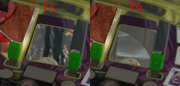
Anyone else have issue, fix, trick for rendering under the playfield? I just noticed these objects are only rendered when viewing the game with F6.
Bump maps are the new auto-tune 
VPX - RSS Updates ---- blog.flippingflips.xyz/en/ -- Visual Pinball No.1 (2021) . Est.2000


Community Forum Software by IP.Board
Licensed to: VPForums.org
 are all trademarks of VPFORUMS.
 Top
Top


