Jump to content


Photo
* * * * * 13 votes

VP with VR headset


  • Please log in to reply
2044 replies to this topic

#281 Rawd

Rawd

    Pinball Wizard

  • VIP
  • 4,313 posts
  • Location:Edmonton, Canada

  • Flag: Canada

  • Favorite Pinball: Triple Strike


Posted 10 March 2019 - 09:34 PM


I've been messing with G5K's Attack from Mars, and now 3rdAxis and I are modding out the VR room to make it a bit more table specific.   I'm just having some fun messing around with stuff....
 
This table was so well done, and it looks really nice in VR.  There are not any of the nasty artifacts or glitching that shows up on some tables.
 
I hate to say it...... but my VP cabinet feels a bit 'flat' after playing so much in VR  haha :)
 
Thanks again to everyone working on VRVPX, and thanks again to 3rdAxis for making this room to play in.
 
https://www.youtube....h?v=c2IMKDr9Fz8


I sold my VP cabinet two years ago when I first got my Rift and tried Pinball FX2 just with the hope that this would happen. VP in VR beats out any cabinet in my opinion. Soon we will have headsets with 3X the resolution of the Rift and that will make a big difference as well. Just need a PinSim or something like it with full force feedback and nudging and this is the best digital pinball experience there is.


I am ordering all the parts for DOF, nudge, tilt and plunger for my VR cab.  Good times ahead.


#282 3rdaxis

3rdaxis

    Pinball Fan

  • VIP
  • 718 posts

  • Flag: United States of America

  • Favorite Pinball: The Addams Family

  • PS3 Gamer Tag: Thirdaxis01

Posted 10 March 2019 - 11:26 PM

TAF v2.1 VR v0.5.2 posted. https://vpinball.com...-family-vr-vpx/


V0.5.2 Changelog:


Optimized room primitives, final primitive alignment, compressed all room images.

Removed unused elements from original table and accompanying images (cabinet mode items)

Corrected lighting emission scale and shading.

Disabled ball shadows (option in script to turn back on)

Removed train mod, removed phone mod plus all images.

Moved "T_H_I_N_G" lights to correct position.

Added other various items to the room. 

Reduction in overall file size by 64mb.


Edited by 3rdaxis, 11 March 2019 - 05:09 PM.


#283 japdos

japdos

    Hobbyist

  • Members
  • PipPip
  • 29 posts

  • Flag: ---------

  • Favorite Pinball: wcs94

Posted 11 March 2019 - 12:09 AM

Amazing work.

I've tested the firtst VR version 2.0 and 2.1 (previous to 0.5.2) and I have to say that I could play "more o less" stable in v2.0 (closer to 90fps) but v2.1 has important fps dropdown, always <45 (Asynchronous Time Warp is making its best but it's not enough)


Also I noticed in original TAF version (non VR from 3rdaxis and co..) , I could place the DMD centered on its place, but not in these VR modded versions, where it is sometimes placed below and sometimes placed above the right place.


SuperSampling is the best option to enhance resolution but even having recommend Steam value at 1.5, I have to decrease it to <1.0 in order to play. (In original TAF I could reach 3.0 supersampling! but I'm conscient there were missing 3d toys on the table, of course)

(Pending to test this new 0.5.2. I hope it will be more optimized, although I guess increasing 3d elements in the room it will decreases performance.)


IMHO floor and wall are a must, but all other 3d items beyond TAF itself will penalize performance and I'd prefer not having them on the room, unfortunatly. (Maybe there is not enough power to move it well yet)

(i7 6700k @4.0ghz (no OC) 1070gtx 16gb)


#284 3rdaxis

3rdaxis

    Pinball Fan

  • VIP
  • 718 posts

  • Flag: United States of America

  • Favorite Pinball: The Addams Family

  • PS3 Gamer Tag: Thirdaxis01

Posted 11 March 2019 - 12:27 AM

You can delete all the other room items and I'm sure you'll get a good bump in performance. The only three items that are tired to the script are VRDoorHandle_8, VRDKTube and VRFire. The door handle isn't much and the Tube and Fire are tied to an array of images that can also be deleted. (DK 1-21, FP 1-13) But these primitives will also have to be commented out in the script. Lines 733-751.


Edited by 3rdaxis, 11 March 2019 - 12:40 AM.


#285 The Loafer

The Loafer

    Pinball Wizard

  • VIP
  • 3,471 posts
  • Location:Embrun, Ontario, Canada

  • Flag: ---------

  • Favorite Pinball: Superman, Firepower & Tron


Posted 11 March 2019 - 04:03 AM

Wow what a difference that made holy cow. I get a little stutter on AFM in the same VR room @ 2.0. 1.5 seems to work well. 


I'm not sure of the exact number but on stock Vive or rift, one of the steam VR or Oculus devs I think had stated that anything above 1.7 shoudn't really show any further improvements.  That's a tricky memory I'm probably remembering wrong but there is probably a diminishing returns cap where the tradeoff (with framerate) is just not worth it.


So I was all set to try this today and of course I get my own personal worse Vertigo attack Ive yet had. Any movement, ANY led to my body trying to throw up.  So no test of VR tonight, I doubt I'd last 2 min in here! LOL  Hopefully will finally test this later this week


#286 gear323

gear323

    VPXVR is awesome.

  • Members
  • PipPipPip
  • 324 posts
  • Location:New Jersey

  • Flag: United States of America

  • Favorite Pinball: All

Posted 11 March 2019 - 04:08 AM

Didn't try this one yet but will in the morning.  Was the analog plunger animation issue fixed in this version?


Edited by gear323, 11 March 2019 - 04:09 AM.


#287 Rawnei

Rawnei

    Enthusiast

  • Platinum Supporter
  • 320 posts
  • Location:Stockholm, Sweden

  • Flag: Sweden

  • Favorite Pinball: There's too many good ones but I really love the atmosphere in Cirque Voltaire!

Posted 11 March 2019 - 05:47 AM

You can delete all the other room items and I'm sure you'll get a good bump in performance. The only three items that are tired to the script are VRDoorHandle_8, VRDKTube and VRFire. The door handle isn't much and the Tube and Fire are tied to an array of images that can also be deleted. (DK 1-21, FP 1-13) But these primitives will also have to be commented out in the script. Lines 733-751.


Nice work! For me just having the neighboring tables, the wall roof and floor adds enough immersion.


Edited by Rawnei, 11 March 2019 - 05:55 AM.


#288 Karlor

Karlor

    Goon Squad

  • Platinum Supporter
  • 397 posts

  • Flag: United States of America

  • Favorite Pinball: The Machine Bride, Freddy, TOTAN, Twister, Batman, TZ, Ghostbusters

Posted 11 March 2019 - 05:55 AM

Would there be a way to implement some kind of tracked nudge using a motion controller? Just have a mount and be able to zero it, then it would track pretty much what ever you do to your cab wouldn't it?


 I'm just going to set this here and go get a cup of coffee.. DONT TOUCH ANYTHING!! :pardon:  NOT MY LINKS BUT ENJOY  :crazy:

:love39:  *** https://archive.org/details/pinmame31 *** :twiddling:


#289 3rdaxis

3rdaxis

    Pinball Fan

  • VIP
  • 718 posts

  • Flag: United States of America

  • Favorite Pinball: The Addams Family

  • PS3 Gamer Tag: Thirdaxis01

Posted 11 March 2019 - 08:51 AM


Wow what a difference that made holy cow. I get a little stutter on AFM in the same VR room @ 2.0. 1.5 seems to work well. 


I'm not sure of the exact number but on stock Vive or rift, one of the steam VR or Oculus devs I think had stated that anything above 1.7 shoudn't really show any further improvements.  That's a tricky memory I'm probably remembering wrong but there is probably a diminishing returns cap where the tradeoff (with framerate) is just not worth it.


So I was all set to try this today and of course I get my own personal worse Vertigo attack Ive yet had. Any movement, ANY led to my body trying to throw up.  So no test of VR tonight, I doubt I'd last 2 min in here! LOL  Hopefully will finally test this later this week


I start to see lag after 1.5 but I also had a hard time noticing any difference between 1.5 and say 1.1. Seems like anything above 100% just pops it into place. But my eyes aren't the best (maybe a good thing:)


That sounds awful. I had some motion sickness years ago when I first got VR but have since gotten my VR legs and never had an issue. Try eating some ginger maybe. The sofa and chair are lined up to the sofa and chair in my living room so I can sit down and take a break while enjoying the room. Even fell asleep in there yesterday, lol.


Didn't try this one yet but will in the morning.  Was the analog plunger animation issue fixed in this version?


No sorry, no analog plunger yet. I'll see if I can ask Slydog if he's still working on it. I know he's been busy. 


Would there be a way to implement some kind of tracked nudge using a motion controller? Just have a mount and be able to zero it, then it would track pretty much what ever you do to your cab wouldn't it?


I think the way it is now the nudge moves the camera or, the headset. Talk about vomit inducing. Not sure it's at all possible to move the entire machine as it should be . It desperately does need nudge but i'll take what i can get. It might be possible to tie the accelerometer to the activeball velocity but I don't have one so who knows. 


Edited by 3rdaxis, 11 March 2019 - 08:54 AM.


#290 3rdaxis

3rdaxis

    Pinball Fan

  • VIP
  • 718 posts

  • Flag: United States of America

  • Favorite Pinball: The Addams Family

  • PS3 Gamer Tag: Thirdaxis01

Posted 11 March 2019 - 10:32 AM

Hot fix V0.5.4: https://drive.google...iew?usp=sharing

The "T-H-I-N-G" lights in backbox are now aligned and have the corrected images.

Turning off the Packard mod made a noticeable improvement in performance (can be turned off in the F6 menu).

Other minor fixes and tweaking.


Added G5K's warm color grading images. Quote:


Having seen some of the photos from Addams being quite blue I made a few LUTs to try and warm up the lighting. The ones with ‘bright’ shouldn’t change your highlight point, the ones with ‘dull’ will rolloff the highlight and make it less bright and warmer. On my monitor I’ve already got it set fairly neutral to warm and found my blues went a bit purple for my taste so made some options that left the blues alone. All explained in filenames but ultimately its the eye on whether it is getting better, worse or different 1f642.png :)

Process; open table, select image manager from top menu, import images. Click on backdrop in toolbar, open options palette if not already open, 3/4 way down there is a colorlookup drop down. Select one (these will all go to top of the list because of underscore). I would then saveas before trying as depending on if you’ve run it it might crash and you’ll have to redo. The joys of authoring in VPX.

ps. The best results will come with calibrating your monitor to be less blue.


thing.jpg


Edited by 3rdaxis, 11 March 2019 - 05:10 PM.


#291 Rawd

Rawd

    Pinball Wizard

  • VIP
  • 4,313 posts
  • Location:Edmonton, Canada

  • Flag: Canada

  • Favorite Pinball: Triple Strike


Posted 11 March 2019 - 02:30 PM

You can turn Bangback off to turn off the camera nudge in VPX (during a tilt)  (your tilt button needs to be changed from T in the Keys.VBS file).   I think any nudge system should work.   Bangback should be turned off on any cabinet.


Edited by Rawd, 11 March 2019 - 03:00 PM.


#292 Rawnei

Rawnei

    Enthusiast

  • Platinum Supporter
  • 320 posts
  • Location:Stockholm, Sweden

  • Flag: Sweden

  • Favorite Pinball: There's too many good ones but I really love the atmosphere in Cirque Voltaire!

Posted 11 March 2019 - 06:26 PM

Hot fix V0.5.4: https://drive.google...iew?usp=sharing

The "T-H-I-N-G" lights in backbox are now aligned and have the corrected images.

Turning off the Packard mod made a noticeable improvement in performance (can be turned off in the F6 menu).

Other minor fixes and tweaking.


Added G5K's warm color grading images. Quote:


Having seen some of the photos from Addams being quite blue I made a few LUTs to try and warm up the lighting. The ones with ‘bright’ shouldn’t change your highlight point, the ones with ‘dull’ will rolloff the highlight and make it less bright and warmer. On my monitor I’ve already got it set fairly neutral to warm and found my blues went a bit purple for my taste so made some options that left the blues alone. All explained in filenames but ultimately its the eye on whether it is getting better, worse or different 1f642.png :)

Process; open table, select image manager from top menu, import images. Click on backdrop in toolbar, open options palette if not already open, 3/4 way down there is a colorlookup drop down. Select one (these will all go to top of the list because of underscore). I would then saveas before trying as depending on if you’ve run it it might crash and you’ll have to redo. The joys of authoring in VPX.

ps. The best results will come with calibrating your monitor to be less blue.


thing.jpg


In an attempt to increase the realness of the fake tables I did some things. :)


First I took VPX overhead screenshots of TOM and AFM with all the lights and suchs, upped the brightness a bit and replaced them as the playfield on each table, I've attached them here if you're interested.


Then I changed the opacity of the glass on the sidetables from 0.5 to 0.1 so that the playfield doesn't become so dark.


Finally I angled the playfields a bit and moved them a bit upwards (Z: 160, RotX: 175).


Pretty happy with the result!


Edit: I went a bit overboard with the brightness on TOM playfield so toned it down a bit.

Attached Files


Edited by Rawnei, 11 March 2019 - 06:35 PM.


#293 3rdaxis

3rdaxis

    Pinball Fan

  • VIP
  • 718 posts

  • Flag: United States of America

  • Favorite Pinball: The Addams Family

  • PS3 Gamer Tag: Thirdaxis01

Posted 11 March 2019 - 07:10 PM

Sweet!, thanks brother. I'll throw them in toot sweet. 


#294 Karlor

Karlor

    Goon Squad

  • Platinum Supporter
  • 397 posts

  • Flag: United States of America

  • Favorite Pinball: The Machine Bride, Freddy, TOTAN, Twister, Batman, TZ, Ghostbusters

Posted 12 March 2019 - 01:07 AM


Would there be a way to implement some kind of tracked nudge using a motion controller? Just have a mount and be able to zero it, then it would track pretty much what ever you do to your cab wouldn't it?


I think the way it is now the nudge moves the camera or, the headset. Talk about vomit inducing. Not sure it's at all possible to move the entire machine as it should be . It desperately does need nudge but i'll take what i can get. It might be possible to tie the accelerometer to the activeball velocity but I don't have one so who knows. 

That last bit sounds like the ticket, about using the accelerator to interact with the ball velocity. As 1:1 movement would be doable just kind of maybe odd and not as realistic as it might seem on paper.  But having a way to mount a motion controller in the center-ish of your mini cab then have it rigged up so when you give you cab a whack it figures out the "hardness" of your wack then alters the balls travel.. but yeah it's over my head but would be pretty slick.


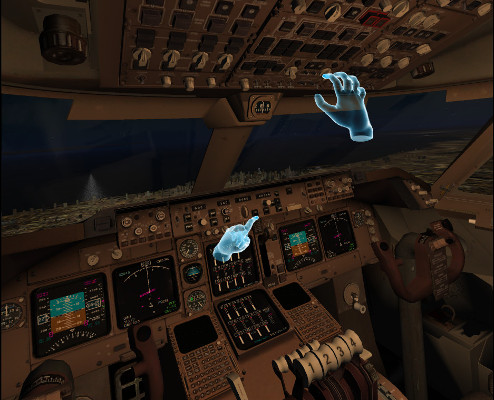
Also have people here heard of a peripheral called the Leap Motion? It's pretty cool and not too expensive really. Its basically a way to have hand tracking for pretty much anything as long as the software is coded up right. They've been out a while and still at it so that's a good sign, they even update still so its a valid buy.. hell a clever person could maybe come up with a cool use for regular pin cabs.. but the main draw is having hologram hands in VR.. the best example of implementation so far is FlyInside. An add on for FSX and PD3-4 flight sims.. implementing something like this would be pretty fun :D


shot-747-hands.jpg


 I'm just going to set this here and go get a cup of coffee.. DONT TOUCH ANYTHING!! :pardon:  NOT MY LINKS BUT ENJOY  :crazy:

:love39:  *** https://archive.org/details/pinmame31 *** :twiddling:


#295 Rawnei

Rawnei

    Enthusiast

  • Platinum Supporter
  • 320 posts
  • Location:Stockholm, Sweden

  • Flag: Sweden

  • Favorite Pinball: There's too many good ones but I really love the atmosphere in Cirque Voltaire!

Posted 12 March 2019 - 01:50 AM


Would there be a way to implement some kind of tracked nudge using a motion controller? Just have a mount and be able to zero it, then it would track pretty much what ever you do to your cab wouldn't it?


I think the way it is now the nudge moves the camera or, the headset. Talk about vomit inducing. Not sure it's at all possible to move the entire machine as it should be . It desperately does need nudge but i'll take what i can get. It might be possible to tie the accelerometer to the activeball velocity but I don't have one so who knows. 

That last bit sounds like the ticket, about using the accelerator to interact with the ball velocity. As 1:1 movement would be doable just kind of maybe odd and not as realistic as it might seem on paper.  But having a way to mount a motion controller in the center-ish of your mini cab then have it rigged up so when you give you cab a whack it figures out the "hardness" of your wack then alters the balls travel.. but yeah it's over my head but would be pretty slick.


Also have people here heard of a peripheral called the Leap Motion? It's pretty cool and not too expensive really. Its basically a way to have hand tracking for pretty much anything as long as the software is coded up right. They've been out a while and still at it so that's a good sign, they even update still so its a valid buy.. hell a clever person could maybe come up with a cool use for regular pin cabs.. but the main draw is having hologram hands in VR.. the best example of implementation so far is FlyInside. An add on for FSX and PD3-4 flight sims.. implementing something like this would be pretty fun :D


For pinball the main drawback would be not feeling the controls in your hand, wouldn't feel good.


Also it's a peripheral not a lot of people are going to own and maybe complex to implement.


#296 Karlor

Karlor

    Goon Squad

  • Platinum Supporter
  • 397 posts

  • Flag: United States of America

  • Favorite Pinball: The Machine Bride, Freddy, TOTAN, Twister, Batman, TZ, Ghostbusters

Posted 12 March 2019 - 02:01 AM

Yeah your probably right, I was thinking it would be cool for maybe like mobile use but then again the LeapMotion wouldn't probably work with something like that anyway.. It would be alot of work for something in the end would just be for looks as anyone whos into this is going to make a cool controller at some point anyway lol


 I'm just going to set this here and go get a cup of coffee.. DONT TOUCH ANYTHING!! :pardon:  NOT MY LINKS BUT ENJOY  :crazy:

:love39:  *** https://archive.org/details/pinmame31 *** :twiddling:


#297 Caligula_

Caligula_

    Enthusiast

  • Platinum Supporter
  • 74 posts

  • Flag: Germany

  • Favorite Pinball: Addams Family

Posted 12 March 2019 - 09:54 PM

I've just uploaded a few new commits for VPVR and binaries https://sourceforge....cts/vpvr/files/. The blackglass update is not included (still working on that). Most important new features:

- You can switch VR Texture Type and Blitting method. This is mainly for AMD users with RX580. If any of you find a working combination please post it here or send me an email. Also everbody else can post working or non-working combinations here. Default is RGBA8 and BlitNamed.

- Numpad 0 relocates the table. The height can be adjusted with Numpad 8 (Up) and Numpad 2 (Down).

-The normal version is for X86, but I also created an X64 version. If you switch between both versions, make sure to run the correct VPinMame Setup, too.


As always send me some feedback either here, by email (contact(at)vpvr.games) or create a ticket on sourceforge.


#298 japdos

japdos

    Hobbyist

  • Members
  • PipPip
  • 29 posts

  • Flag: ---------

  • Favorite Pinball: wcs94

Posted 12 March 2019 - 10:32 PM

Welcome back Caligula_!

going to test you improvements....

Sourceforge will never be the same:  I'm getting:  503 Service Unavailable   :throw:

#299 3rdaxis

3rdaxis

    Pinball Fan

  • VIP
  • 718 posts

  • Flag: United States of America

  • Favorite Pinball: The Addams Family

  • PS3 Gamer Tag: Thirdaxis01

Posted 12 March 2019 - 10:42 PM

I'll try this right away, thank you Caligula. 


Edited by 3rdaxis, 12 March 2019 - 10:46 PM.


#300 RYSr

RYSr

    Pinball Fan

  • Charter Member
  • 511 posts
  • Location:Mercerville (Central) NJ, USA

  • Flag: United States of America

  • Favorite Pinball: TZ - G&R - MB - CV - Metallica

Posted 12 March 2019 - 10:49 PM

@Caligula_


Thank's for the continued improvements.


Arconovum's 85available FSS tables look really good in VPVR, It seems that the Stern and Bally/Williams numeric displays and the System11 Alpha numeric displays all show up on the backglasses on his tables. Plus you get the frame of the Head around the backglass. Unfortunately none of his DMD tables show the DMD displays in VR,

Someone posted this is because his textbox's are flasher based? Is this something you could add support for?


Just looked at tickets in Sourceforge, It's back up now!

And I see someone has already posted this issue!


Edited by RYSr, 12 March 2019 - 10:53 PM.