

I use a terminal block set up like this - I use have the block for ground And the other have for the positive voltage
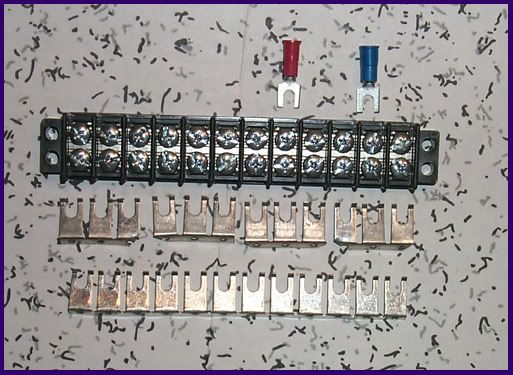
Yes on the matrix do it in parallel like the example below every 144 lights or so for power = 5V+ and ground





 4 votes

Pinball Wizard



Posted 29 August 2018 - 03:48 PM
I use a terminal block set up like this - I use have the block for ground And the other have for the positive voltage
Yes on the matrix do it in parallel like the example below every 144 lights or so for power = 5V+ and ground
Ukexpat71


Posted 14 September 2018 - 10:27 AM
Hi guys,
looking for some electrical advice as to why my 144 led strips are not working.
I have a 70amp 5v power supply and I have hooked 3m of Leds, 1m at a time and both only light up 80% of the way?
I did have the power line running through a 10amp fuse to a 30amp rated terminal block but bypassed all this still no difference.
id be forever grateful if someone could tell me why, getting stressed now.
Thanks,
Webster
Edited by webby, 14 September 2018 - 11:16 AM.
Pinball Wizard


Posted 14 September 2018 - 11:27 AM
Where are you connecting the +ve and -ve power? At one end? At both ends? Each meter?
It sounds like you have power connected at one end and the thin copper strips in the LED tape can't send enough power to the furthest LEDs. For 144 LED strips you would normally connect +ve and -ve each meter.

Ukexpat71
Posted 14 September 2018 - 12:17 PM
Hi,
Thanks for the reply. This is how:
There are 5 cables at each end. 1 ground and 1 power (red and black) together and a 3 cable connector (white/green/red = ground/signal/power). I snip off the connector and cut back the red (power.)
The way the arrows run is where I input.
I am connecting one V+(5v power-red[of the 2 together]), 2 grounds (black to V- and white to Cat6 [teensy/octo] Din [green] to orange cat6
All cables at the the other end are loose.
I followed Wahcade on Youtube. https://www.youtube....h?v=tAk7p3L9yvs
Am I doing it wrong then?
just as a side. I jumped the black and red at the loose end to V+ and V- but no difference.
Could it be my teensy/Octo?
Thanks,
Webster
 IMG20180914194826.jpg 83.67KB
6 downloads
IMG20180914201706.jpg 84.99KB
6 downloads
IMG20180914194826.jpg 83.67KB
6 downloads
IMG20180914201706.jpg 84.99KB
6 downloads
Edited by webby, 14 September 2018 - 02:15 PM.
Enthusiast


Posted 14 September 2018 - 03:18 PM
My first thought was also not enough power (drop in voltage), but 1 Meter should work fine.
You could check that with a power meter, measure at both sides.
You should have 5V where you feed the power in, and a little bit less at the other side. If there is 0, the line is broken. With leds off only only one color, you should still have 4.7 or so.
Another reason could be your DOF setup. that is quite easy to do wrong.
You could spend hours or days searching at the wrong site.
After doing that (wasting time too often), I have modified the Teensy code to run a led through the line on power on.
For 4 lines 4 different colors (and two led's at once for the other 4 lines).
This helps me to find disconnected lines, bad power line or just switched connections.
Takes about 2-3 seconds on power on.
If that works, I know it is software. If it fails, I know I need to check cable.
Originally I wanted to remove that when the cabinet is finished, but it seems this never happens, always new ideas...
Ukexpat71
Posted 15 September 2018 - 02:25 AM
hi,
thanks for you help guys,
Before I send these strip back as faulty, anyway I can test them as its strange that I have tested 2 x 1meter 144 led strips and the last 23 leds don't light up.
I have tested my PC (corsair vs650) power supply which is 20amp at 5V+
Same thing.
It cant be my dof setup because I use the Arduino basic test only, but could it be the wiring of the octo?
Thanks,
webster
Ukexpat71
Posted 15 September 2018 - 02:58 AM
follow wahcade on Youtube, above.
When you connect the Octo and Teensy then install Arduino, Teensyduino, setup the Arduino for your Teensy then in the arduino examples, choose Octo>basic test
All Leds should light up and change colour every few seconds if connected to V+, V- and Din.
I don't know of any other way, power and ground only don't light them.
Thanks,
Webster
Pinball Wizard
Posted 15 September 2018 - 03:18 AM
Do you have other DOF items or is Teensy the only thing?
When I installed my Addressables ... I did the soldering on the boards, update the software then wired it into the Cabinet and use the games to test it
Edited by Outhere, 15 September 2018 - 02:10 PM.
Enthusiast
Posted 15 September 2018 - 08:40 AM
When you want to test your strip and don't know if the power supply is strong enough, don't enable all at the same time.
To test if the strip is working, better enable only a small set of leds. This works even with power supply from the Teensy (only lighting one led at a time).
In the original code, I just added a method:
Enthusiast

Posted 08 October 2018 - 01:13 AM
So it has been at least 6 weeks since I even touched my virtual pinball machine because getting the addressable LEDs working had been so problematic. The last time I was here I was un-daisy-chaining my LED strips and matrix, and making a new set of 3 connectors from the CAT6 cable instead of the single connector using just one pair.
I was just so de-motivated. I was just thinking about how much of a time-suck this has been every time I try to mess with the LEDs to get them working.
Well tonight I decided to finally connect up my new cable and try things out... I saw some life. The right strip seemed to actually be working. A few more edits of the cabinet.xml file and I was getting LEDs on the left and the matrix working. Not quite 100% right, but they were working.
Went back into the cabinet file and noticed that I had my matrix set to a width of 144 instead of 72. I changed that and shapes started looking right!
I played around with a few tables and was getting some action out of them. YAY! (Or as I said to myself, "about damn time.")
I fired up TRON Legacy and holy crap is it active with LEDs. I like it a LOT!
Thanks again for all of the help. The best thing about struggling through this is that I have a greater understanding of the cabinet file a lot more too.
Oh, and the colored pairs that I used were:
Orange for the right strip
Blue for the left strip
Green for the back matrix
I did notice on one of the tables that some of the LEDs wouldn't form the shapes right (a round shape would have part of it a square in a different color for example), and at one point one of those smaller squares (maybe 8 wide by 4 tall) just stayed on, like the LEDs received a comment to light in a (yellow) square not to turn off until I powered down the whole cabinet. Strange. I didn't see anything like that on other tables, and will have to go back and look to see which table it was and make sure that it gets fixed or that I don't play that table until I get that sorted out.
Thanks again everyone.
Hobbyist


Posted 08 October 2018 - 12:38 PM
Excellent. I would always supply a strip a different pair of data cables. Just so it's easier to diagnose if you have any problems. I dont know if it works with chaining them all together but i just wouldnt.
Enthusiast
Posted 08 October 2018 - 12:44 PM
There was talk a few times in the past about a single long daisy chained strip would/should work, but clearly it doesn't.Excellent. I would always supply a strip a different pair of data cables. Just so it's easier to diagnose if you have any problems. I dont know if it works with chaining them all together but i just wouldnt.
Hobbyist
Posted 09 October 2018 - 12:16 PM
I have daisy chained 3 lengths, only one data and one 5v feed both at the head and working fine. Only single row and a 32” cab. I’m using the 144led/m works out to about 250 leds.
How have you set it up in the cabinet file? Do you just say strip 1 is the total length of all the LED's?
Enthusiast
Posted 10 October 2018 - 03:40 AM
I have daisy chained 3 lengths, only one data and one 5v feed both at the head and working fine. Only single row and a 32” cab. I’m using the 144led/m works out to about 250 leds.
How have you set it up in the cabinet file? Do you just say strip 1 is the total length of all the LED's?
That is what I did. 1 long strip in the cabinet file, and just told it which LED in that strip was the "start" for that section (right strip, rear matrix, left strip) and it never worked. Had a lot of people scratching their heads on it, but it just worked when I split it to 3 separate connections from the CAT6 cable.
Would be interesting to see what M4T VW did. Then again, I had 864 LEDs, so a little more complexity.
Enthusiast

Posted 09 December 2018 - 04:14 PM
I have a quick question!!!!!!I have set up my addressable LED bars for each side but due to space limitations at the lockdown bar I set it up for wiring to be at rear of playfield, I did not think about the strips being directional and hope this does not turn out to be backwards, I hope I can just change a setting, let me know if this is going to be a problem.
As always….THANK YOU all!


Community Forum Software by IP.Board
Licensed to: VPForums.org
 are all trademarks of VPFORUMS.
 Top
Top
