
This file comes with Windows and I have it, but maybe it is not registered as the article mention. I reinstalled Windows 10 Pro 21H1 for not so long ago, and I have installed just a few programs.


 40 votes

Grand Schtroumpf




Posted 27 July 2021 - 05:17 PM
This file comes with Windows and I have it, but maybe it is not registered as the article mention. I reinstalled Windows 10 Pro 21H1 for not so long ago, and I have installed just a few programs.
If you want to check my latest uploads then click on the image below:

Next table? A tribute table to Stern's Foo Fighters
Hobbyist


Posted 27 July 2021 - 06:00 PM
@DuMichAuch, @clyde, @jpsalas, @wiesshund - I don't think it is hardware related.When the scripting engine was getting initialized, it executes this chunk of code:// This can fail on some systems (I tested with wine 6.9 and this fails) // In that case, m_pProcessDebugManager will remain as nullptr CoCreateInstance( CLSID_ProcessDebugManager, 0, CLSCTX_ALL, IID_IProcessDebugManager, (LPVOID*)&m_pProcessDebugManager );So `m_pProcessDebugManager` was successfully set for @wiesshund.
After Googling "Process Debug Manager", I found this article:
https://community.sp...prise-architect
Various software could have installed PDM.DLL somewhere along the way. So maybe @wiesshund you have that dll installed and the other's don't?
I've found several pdm.dll in the expected windows subfolders, but maybe unregistered by regsrv32.dll.???
After installing "Remote Tools for Visual Studio 2015 Update 3" as described in the link I have no more crashes for build 282 and later.
After uninstlling the remote tools, the crashes are back...
Edited by DuMichAuch, 27 July 2021 - 06:09 PM.
VPF Legend


Posted 27 July 2021 - 06:23 PM
@DuMichAuch, @clyde, @jpsalas, @wiesshund - I don't think it is hardware related.When the scripting engine was getting initialized, it executes this chunk of code:// This can fail on some systems (I tested with wine 6.9 and this fails) // In that case, m_pProcessDebugManager will remain as nullptr CoCreateInstance( CLSID_ProcessDebugManager, 0, CLSCTX_ALL, IID_IProcessDebugManager, (LPVOID*)&m_pProcessDebugManager );So `m_pProcessDebugManager` was successfully set for @wiesshund.
After Googling "Process Debug Manager", I found this article:
https://community.sp...prise-architect
Various software could have installed PDM.DLL somewhere along the way. So maybe @wiesshund you have that dll installed and the other's don't?
You cant manually register PDM.DLL, not any more anyways.
Just in case anyone tries.
On my laptop and old desktop, it exists via the app VBSedit, which has a JIT debugger
and so has the dll registered
On my normal desktop, it is in place due to VBStudio being installed.
For someone with a stock windows install though, they will probably be devoid of a registered PDM.DLL
unless they have some other app which brings it to the table.
Which is strange considering you can find the file in winsxs resources, it just wont do anything of it's own accord.
So yea, for general use, probably need a fallback or bypass for that requirement, as i do not foresee the average cab having much installed but basic windows
Possibly in S mode, drivers, and the pinball software they require.
Cant see them installing office 2007 or VBStudio or VBSEdit etc.
If you feel the need to empty your wallet in my direction, i don't have any way to receive it anyways
Spend it on Hookers and Blow
Enthusiast


Posted 28 July 2021 - 06:28 PM
Can someone point me to installation instructions for vpx 10.7? I have 10.6 installed and working well and don't want to mess it up. I've downloaded the vpx 10.7 files, but can't find anything that says what to do with them.
Thank you.
VPF Legend
Posted 28 July 2021 - 07:07 PM
Can someone point me to installation instructions for vpx 10.7? I have 10.6 installed and working well and don't want to mess it up. I've downloaded the vpx 10.7 files, but can't find anything that says what to do with them.
Thank you.
Unzip them into the VPX folder (rename your present VpinballX.exe to VpinballX 10.6.exe 1st, and if you made custom changes to scripts\vpmkeys.vbs, back it up also)
all to replace all
VPMkeys in case you made custom keymaps, and the exe incase you need to run something in 10.6 if you find some incompatibility with a specific table
If you feel the need to empty your wallet in my direction, i don't have any way to receive it anyways
Spend it on Hookers and Blow
VPF Legend
Posted 28 July 2021 - 09:14 PM
Thank You - especially for the tip on renaming 10.6 first.
Now if I can just figure out how to rotate the playfield to 90 degrees from 270.
<fullscreen>
		<inclination>5.000000</inclination>
		<fov>35.600021</fov>
		<layback>48.000000</layback>
		<rotation>270.000000</rotation>
		<xscale>0.897600</xscale>
		<yscale>1.080000</yscale>
		<zscale>1.000000</zscale>
		<xoffset>-6.500000</xoffset>
		<yoffset>-0.000000</yoffset>
		<zoffset>-300.000000</zoffset>
	</fullscreen>
Modified fullscreen section
<fullscreen>
<rotation>90.000000</rotation>
</fullscreen>
Edited by wiesshund, 28 July 2021 - 09:15 PM.
If you feel the need to empty your wallet in my direction, i don't have any way to receive it anyways
Spend it on Hookers and Blow
Enthusiast
Posted 28 July 2021 - 09:22 PM
Installed 10.7 - am able to run previously downloaded 10.6 tables that I rotated the playfield to 90 degrees. However, when I load a new 10.7 table, the playfield is at 270 degrees and - unlike VPX10.6 - can't find any menu or way to rotate it to 90 degrees in any 10.7 menu.
Anybody know what I'm missing? It was so easy and convenient in 10.6.
VPF Legend
Posted 28 July 2021 - 09:40 PM
Installed 10.7 - am able to run previously downloaded 10.6 tables that I rotated the playfield to 90 degrees. However, when I load a new 10.7 table, the playfield is at 270 degrees and - unlike VPX10.6 - can't find any menu or way to rotate it to 90 degrees in any 10.7 menu.
Anybody know what I'm missing? It was so easy and convenient in 10.6.
Not gonna explain
Just gonna draw it

make more sense this way?
Technically it works the same way
Edited by wiesshund, 28 July 2021 - 09:41 PM.
If you feel the need to empty your wallet in my direction, i don't have any way to receive it anyways
Spend it on Hookers and Blow
VPF Legend
Posted 28 July 2021 - 10:08 PM
This picture is absolutely worth 1000 words. Thank you!! For this and the other help you've given over the past year.
Help will always be given at Hogwarts, to those who ask for it.
(And also death by mass groups of psychopathic wizards and strange animals, but that's left out of the brochure)
If you feel the need to empty your wallet in my direction, i don't have any way to receive it anyways
Spend it on Hookers and Blow
Hobbyist

Posted 29 July 2021 - 10:02 PM
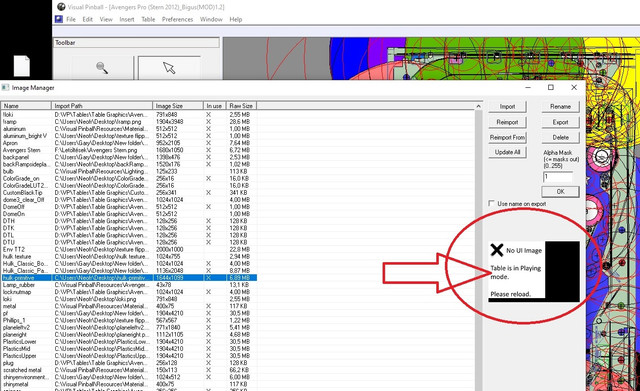
VP 10.7 why can't I see the thumbnails in the image manager Since switching from 10.6 to 10.7, I don't see any thumbnails in the image manager - n / a why .... someone have an idea why that is ... see photo This is disadvantageous for personal editing of the table
VPF Legend
Posted 29 July 2021 - 10:05 PM
VP 10.7 why can't I see the thumbnails in the image manager Since switching from 10.6 to 10.7, I don't see any thumbnails in the image manager - n / a why .... someone have an idea why that is ... see photo This is disadvantageous for personal editing of the table
Open table in edit mode rather than play mode and you will see them
right click table and pick edit when opening it
If you feel the need to empty your wallet in my direction, i don't have any way to receive it anyways
Spend it on Hookers and Blow
Pinball Fan


Posted 30 July 2021 - 10:56 AM
If it were possible to read the "value" of the EMReel of each digit (as for the rotation angle of the flippers, spinners, gates),
I suppose it must also be a decimal value if we also consider the motor steps.
Grand Schtroumpf
Posted 04 August 2021 - 07:23 PM
I'm trying the latest revision, 292, and I'm getting this error about the script, but I haven't even opened the script. The script pops up for a second, white, without text, and then VPX quits. It has happened two times in about 1 hour of testing a table. I don't know how to reproduce it, I was simply shooting balls with the mouse to test lanes and loops. I put the crash.txt here in case it has any meaning to you.
Edited by jpsalas, 04 August 2021 - 07:24 PM.
If you want to check my latest uploads then click on the image below:
Next table? A tribute table to Stern's Foo Fighters
Hobbyist


Posted 05 August 2021 - 06:43 AM
2 Release updates windows 10 today has killed 10.7 just opens then closes strait away after having updates done, Have tried rollback and is still crashing. All runtimes updated. Nothing has changed only the updates from Microsoft
CRASH LOG
Pinball Wizard


Posted 05 August 2021 - 07:12 AM
@vpxfx3fp : Your beta is too old - get the newest official beta release before reporting.
From now on. I won't help anyone here at VPF. Please ask Noah why that is.


Community Forum Software by IP.Board
Licensed to: VPForums.org
 are all trademarks of VPFORUMS.
 Top
Top
