Jump to content


Photo
* * * * - 4 votes

How to Set Up Addressable LED Strips


  • Please log in to reply
391 replies to this topic

#201 nickbuol

nickbuol

    Enthusiast

  • Members
  • PipPipPip
  • 268 posts
  • Location:Marion, IA

  • Flag: United States of America

  • Favorite Pinball: Theatre of Magic

Posted 26 July 2018 - 04:07 PM

Just a quick note.  I need to replace one of my LED strips still (as I commented on previously) and stinking Amazon was supposed to have it here Monday originally, then it turned into yesterday, and now it might be tomorrow (tracking shows that it hasn't moved yet).  And I am going to be gone for 2 weeks.  Bummer that I won't get to test this until mid-August now.


#202 grendelrt

grendelrt

    Hobbyist

  • Members
  • PipPip
  • 31 posts
  • Favorite Pinball: T2

Posted 31 July 2018 - 04:50 PM

SOLVED< couple posts down >


Ok so I replaced the strip at the top of my matrix (second strip as well, which is lit, I also tested both prior to putting it in) and I am still not getting data on the top line of my matrix (or after to the right strip). I have resoldered the connections, tested them for continuity as well. Looking for any suggestions, I am thinking it its the cabinet file but have no clue what can be wrong. 


using AFM activate all (shapes tops are cut off show the data is supposed to go there)

PDGCSzE.jpg


Current Cabinet xml (ive tried different ports to see if it affects it, rows in the matrix, etc)


<?xml version="1.0"?>
  <Name>PinKadia</Name>
   <OutputControllers>
    <TeensyStripController>
     <Name>TeensyStripController</Name>
      <NumberOfLedsStrip1>706</NumberOfLedsStrip1>
      <NumberOfLedsStrip2>0</NumberOfLedsStrip2>
      <NumberOfLedsStrip3>0</NumberOfLedsStrip3>
      <NumberOfLedsStrip4>0</NumberOfLedsStrip4>
      <NumberOfLedsStrip5>0</NumberOfLedsStrip5>
      <NumberOfLedsStrip6>0</NumberOfLedsStrip6>
      <NumberOfLedsStrip7>0</NumberOfLedsStrip7>
      <NumberOfLedsStrip8>0</NumberOfLedsStrip8>
      <ComPortName>COM3</ComPortName>
    </TeensyStripController>
   </OutputControllers>
   <Toys>
    <LedStrip>
      <Name>PF Back</Name>
      <Width>71</Width>
      <Height>6</Height>
      <LedStripArrangement>LeftRightAlternateBottomUp</LedStripArrangement>
      <ColorOrder>GRB</ColorOrder>
      <FirstLedNumber>141</FirstLedNumber>
      <FadingCurveName>Linear0To32</FadingCurveName>
      <OutputControllerName>TeensyStripController</OutputControllerName>
    </LedStrip>
<LedStrip>
      <Name>PF Right</Name>
      <Width>1</Width>
      <Height>140</Height>
      <LedStripArrangement>TopDownLeftRight</LedStripArrangement>
      <ColorOrder>GRB</ColorOrder>
      <FirstLedNumber>567</FirstLedNumber>
      <FadingCurveName>SwissLizardsLedCurve</FadingCurveName>
      <OutputControllerName>TeensyStripController</OutputControllerName>
    </LedStrip>
<LedStrip>
      <Name>PF Left</Name>
      <Width>1</Width>
      <Height>140</Height>
      <LedStripArrangement>BottomUpLeftRight</LedStripArrangement>
      <ColorOrder>GRB</ColorOrder>
      <FirstLedNumber>1</FirstLedNumber>
      <FadingCurveName>SwissLizardsLedCurve</FadingCurveName>
      <OutputControllerName>TeensyStripController</OutputControllerName>
    </LedStrip>
<LedWizEquivalent>
   <Name>LedWizEquivalent 30</Name>
    <Outputs>
    <LedWizEquivalentOutput>
     <OutputName>PF Back</OutputName>
     <LedWizEquivalentOutputNumber>5</LedWizEquivalentOutputNumber>
    </LedWizEquivalentOutput>    
 
    <LedWizEquivalentOutput>
     <OutputName>PF Right</OutputName>
     <LedWizEquivalentOutputNumber>17</LedWizEquivalentOutputNumber>
    </LedWizEquivalentOutput>
 
    <LedWizEquivalentOutput>
     <OutputName>PF Left</OutputName>
     <LedWizEquivalentOutputNumber>11</LedWizEquivalentOutputNumber>
    </LedWizEquivalentOutput>
    </Outputs>
   <LedWizNumber>30</LedWizNumber>
   </LedWizEquivalent>
   </Toys>
 <AutoConfigEnabled>true</AutoConfigEnabled>
</Cabinet>

Edited by grendelrt, 31 July 2018 - 06:39 PM.


#203 TerryRed

TerryRed

    Pinball Fan

  • Silver Supporter
  • 1,985 posts

  • Flag: Canada

  • Favorite Pinball: Too many to choose...

Contributor

Posted 31 July 2018 - 05:01 PM

Nothing seems wrong in the cabinet.xml.


To confirm if your other strips are good either way, you can try plugging in the other strips instead of the back MX to confirm if they are good.


#204 grendelrt

grendelrt

    Hobbyist

  • Members
  • PipPip
  • 31 posts
  • Favorite Pinball: T2

Posted 31 July 2018 - 05:05 PM

Nothing seems wrong in the cabinet.xml.


To confirm if your other strips are good either way, you can try plugging in the other strips instead of the back MX to confirm if they are good.

Yeah I have bypassed the matrix and both left and right pf strips work normally. 


#205 grendelrt

grendelrt

    Hobbyist

  • Members
  • PipPip
  • 31 posts
  • Favorite Pinball: T2

Posted 31 July 2018 - 06:41 PM

Holy crap found my problem and boy was it not obvious, found a continuity issue between ground and data near the end of the strip. Apparently in the place where I cut the strip the pads on the bottom were being bridged by the jagged cut or something, I scraped the bottom of the strip and the continuity went away, matrix now works. I mounted on mounting tape and wood to prevent that stuff...still happened. Yeeeesh. 


#206 M4T VW

M4T VW

    Hobbyist

  • Members
  • PipPip
  • 20 posts

  • Flag: United Kingdom

  • Favorite Pinball: Adams Family

Posted 09 August 2018 - 08:30 PM

So i'm looking at making a new cab for myself and looking at LED lighting. I want to have a mixture of RGB backlighting and also addressable LED strips that run up the sides of the machine.

I'm looking at a pinscape controller but since the first post of this thread was 2016, is that still the correct way to control addressable LED's using the teensy board? Is there any other method?


Thanks

Mathew


#207 nickbuol

nickbuol

    Enthusiast

  • Members
  • PipPipPip
  • 268 posts
  • Location:Marion, IA

  • Flag: United States of America

  • Favorite Pinball: Theatre of Magic

Posted 23 August 2018 - 01:48 AM

Just a quick note.  I need to replace one of my LED strips still (as I commented on previously) and stinking Amazon was supposed to have it here Monday originally, then it turned into yesterday, and now it might be tomorrow (tracking shows that it hasn't moved yet).  And I am going to be gone for 2 weeks.  Bummer that I won't get to test this until mid-August now.


Well it is a little past mid-August, and I did a lot of tinkering around...  Not with code, but just with the LED strips.  They are now, finally, all working outside of anything pinball related.  I ended up replacing 3 strips total.  It seems like some of these cheap 144led/m strips are, well, cheap.  I removed 1/2 of one of them to just replace it as it would never light.  Then another piece would flake out in a different way.  I would touch something like the 5th led in from one of the ends, and it would cause the whole thing to go nuts.  The LED strips that I paid a few more dollars per strip never had any problems.


Anyway, it took a lot of monkeying around, but they at least work with a standalone controller.  Now to (finally) update my cabinet.xml code tonight, and test things out tomorrow.


#208 nickbuol

nickbuol

    Enthusiast

  • Members
  • PipPipPip
  • 268 posts
  • Location:Marion, IA

  • Flag: United States of America

  • Favorite Pinball: Theatre of Magic

Posted 25 August 2018 - 09:01 PM

OK.   So I am still at my wits end.  Besides below, I've been referencing this topic again here, a link to TerryRed's basic instructions on another site (from 2016), a PDF from a Facebook group, and all of my notes without any success.


I've tested all of the LEDs using a 3rd party controller from Amazon, and they all work flawlessly, so those problems are fixed.


I just still can not for the life of me get anything to work in VPX.  Currently connected to the Orange and its paired white wire from the Ethernet cable to the first strip.


I've done a major overhaul on my cabinet.xml based off of suggestions here.

I've gone through the DOF Config (using the latest Grander Unified-er DOF R3++ as well).


I just can not seem to get a single LED to do anything.


I've got everything in the standard default directories on the hard drive, and no duplication of files anywhere.


When looking at my DirectOutput.log, I do see a couple of things after trying Medieval Madness as my test table:

1) 2018.08.25 15:16:48.064 Loading table config

    2018.08.25 15:16:48.065 Warning: No table config file found. Will try to load config from LedControl file(s)
and probably most importantly:
2) 2018.08.25 15:16:48.386 Failed: AH100
    2018.08.25 15:16:48.386 Warning: Cant parse the trigger part AH100 of the ledcontrol table config setting  AH100 AL60 AT0 AW19 SHPCircle3 L24.
    2018.08.25 15:16:48.387 EXCEPTION: Could not parse setting ........
 
Something is missing here, but I can't figure it out.  It seems like some people get this working with very little effort, and I am just struggling.  


Here are my updated files:

http://www.buol.us/p...irectOutput.log

http://www.buol.us/p...g_B2SServer.xml

http://www.buol.us/p...DOF/cabinet.xml

And here are my configs from the DOF Config tool.  I left it zipped to save of space.

http://www.buol.us/p...ig-nickbuol.zip


After about 4 MORE hours of tinkering with this today, I am going to take a break and see if anyone has any ideas for me to try tomorrow.


As a reminder, I have 6 total strips of 144LED/m LEDs. Starting on the right side by the plunger, moving to the back matrix, then the matrix starts at the bottom right, and zig-zags up to the top right, then goes to the left back playfield side, and ends at the front left of the playfield.  


8J2afic.jpg


144 LEDs for the right side

576 LEDs for the matrix

144 LEDs for the left side


DOF-Ports.jpg


DOF-CombineToys.jpg


Any help would be great.


Edited by nickbuol, 25 August 2018 - 09:43 PM.


#209 M4T VW

M4T VW

    Hobbyist

  • Members
  • PipPip
  • 20 posts

  • Flag: United Kingdom

  • Favorite Pinball: Adams Family

Posted 25 August 2018 - 10:13 PM

I'm not sure you have the wired correctly. I'm new to the addressable LED's but managed to get a matrix to work.

It's my understanding that each strip/matrix of LED should be connected to a different pair from the ethernet cable. So the left side Orange/Orange white, The Matrix Blue/Blue White, Right side Green/Green White. The order of the Octo ports is listed here. https://www.pjrc.com...28_adaptor.html

I don't think you can daisy chain them and assign differently with DOF as it thinks it's just one long line now.


Keep it simple to start with, just a single strip, one effect in DOF and go from there.


Edited by M4T VW, 25 August 2018 - 10:14 PM.


#210 Outhere

Outhere

    Pinball Wizard

  • Platinum Supporter
  • 4,806 posts

  • Flag: United States of America

  • Favorite Pinball: M M

Posted 25 August 2018 - 10:53 PM

So you have 5v plus going to the strip on the plus side and you have the Ground hook to the negative side

You have the Orange wire from the ethernet cable going to the signal on the correct end and the other wire with the Orange you have hook with ground


As far as I know you can daisy chain the signal wire for all your lights you just have to set the XML file up correctly


Edited by Outhere, 25 August 2018 - 10:54 PM.


#211 Outhere

Outhere

    Pinball Wizard

  • Platinum Supporter
  • 4,806 posts

  • Flag: United States of America

  • Favorite Pinball: M M

Posted 25 August 2018 - 11:11 PM

M4T VW - I have mine hooked up like you do but other people have the signal wire daisy chain


#212 nickbuol

nickbuol

    Enthusiast

  • Members
  • PipPipPip
  • 268 posts
  • Location:Marion, IA

  • Flag: United States of America

  • Favorite Pinball: Theatre of Magic

Posted 26 August 2018 - 12:51 AM

Thanks guys. I could fairly easily split the right, left, and matrix to different pairs if that would help, but I've read that it isn't needed. Maybe that information was wrong....

So here is how it is wired...

Each 144LED strip is getting 5v+ and 5v- from my power supply. I have the orange Ethernet going to the signal wire of the first strip (right front). I have the matching white wire from the Ethernet cable going to the negative connection wire on that same first strip in the chain that is the right front. (I am using one of the wiring connectors that came with each LED strip so I can quick connect and disconnect if I ever need to. I have nothing additional connected to the positive wire on that connector since nothing more is needed. Again, 5v+ and 5v- is connected to the power injection wires. Hopefully that makes sense as to why I have nothing connected to the pigtail with the quick connection on it as there is nothing to connect to that specific wire.

We are out of town at a big fireworks competition and show, but I can draw that up when we are home either really late tonight or tomorrow afternoon.

Let me know your thoughts.

Sent from my SM-G965U using Tapatalk

#213 Outhere

Outhere

    Pinball Wizard

  • Platinum Supporter
  • 4,806 posts

  • Flag: United States of America

  • Favorite Pinball: M M

Posted 26 August 2018 - 01:27 AM

Because you daisy chain the signal wire You should have it set like this with your total lights under strip one and the others is 0...
 
Example
   <OutputControllers>
    <TeensyStripController>
     <Name>TeensyStripController</Name>
      <NumberOfLedsStrip1>693</NumberOfLedsStrip1>
      <NumberOfLedsStrip2>0</NumberOfLedsStrip2>
      <NumberOfLedsStrip3>0</NumberOfLedsStrip3>
      <NumberOfLedsStrip4>0</NumberOfLedsStrip4>
      <NumberOfLedsStrip5>0</NumberOfLedsStrip5>
      <NumberOfLedsStrip6>0</NumberOfLedsStrip6>
      <NumberOfLedsStrip7>0</NumberOfLedsStrip7>
      <NumberOfLedsStrip8>0</NumberOfLedsStrip8>


#214 nickbuol

nickbuol

    Enthusiast

  • Members
  • PipPipPip
  • 268 posts
  • Location:Marion, IA

  • Flag: United States of America

  • Favorite Pinball: Theatre of Magic

Posted 26 August 2018 - 02:11 AM

Hmmm. That actually makes a lot of sense. Everyone else was breaking them into 3 strips when providing help before, but maybe this is it.

Do I need to do anything different with the DOF config tool, or leave them as 3 separate combo toys?

If I decide to just split everything using different pairs on the Ethernet cable, would I leave the config files as is? If that is how more people are doing it, then I feel like I should mirror what is working for other people to prevent differences in my setup...


Sent from my SM-G965U using Tapatalk

#215 Outhere

Outhere

    Pinball Wizard

  • Platinum Supporter
  • 4,806 posts

  • Flag: United States of America

  • Favorite Pinball: M M

Posted 26 August 2018 - 02:33 AM

leave them as 3 separate combo toys? -- leave them

using different pairs on the Ethernet cable, would I leave the config files as is? --  Yes

If that is how more people are doing it..   ---  Actually people are doing it both ways...


Have you ever thought about removing the Zebsboards boards information to see if that makes a difference ... Make a copy of the file then alter the file

This is TerryRed Cabinet.xml file


Spoiler


Edited by Outhere, 26 August 2018 - 02:34 AM.


#216 nickbuol

nickbuol

    Enthusiast

  • Members
  • PipPipPip
  • 268 posts
  • Location:Marion, IA

  • Flag: United States of America

  • Favorite Pinball: Theatre of Magic

Posted 26 August 2018 - 04:34 AM

Well, I know what I am going to do tomorrow.  I can remove the Zebsboards info just to see if things work and test via keyboard too.


I'll report back once I get things wired up separately from the network cable, and a more "basic" cabinet.xml without the Zebsboards controller info.

Thanks.


#217 boslaw

boslaw

    Enthusiast

  • Members
  • PipPipPip
  • 168 posts

  • Flag: United States of America

  • Favorite Pinball: Champions League 2018

Posted 26 August 2018 - 05:43 PM

Hoping someone can help me troubleshoot my led strips. I can get them to light up outside of DOF but not within. Getting the following weird error in my log:

Spoiler


Edited by boslaw, 26 August 2018 - 05:52 PM.


#218 Outhere

Outhere

    Pinball Wizard

  • Platinum Supporter
  • 4,806 posts

  • Flag: United States of America

  • Favorite Pinball: M M

Posted 26 August 2018 - 05:50 PM

Post your GlobalConfig_B2SServer.xml and Cabinet.xml


#219 boslaw

boslaw

    Enthusiast

  • Members
  • PipPipPip
  • 168 posts

  • Flag: United States of America

  • Favorite Pinball: Champions League 2018

Posted 26 August 2018 - 05:54 PM

Cabinet


Spoiler


globalconfig_b2sserver.xml


Spoiler


Trying again:

cabinet:

<?xml version="1.0"?>
 
 
<Name>My Pin Cab</Name>
 
 
-<OutputControllers>
 
 
-<TeensyStripController>
 
<Name>TeensyStripController</Name>
 
<NumberOfLedsStrip1>135</NumberOfLedsStrip1>
 
<NumberOfLedsStrip2>135</NumberOfLedsStrip2>
 
<NumberOfLedsStrip3>0</NumberOfLedsStrip3>
 
<NumberOfLedsStrip4>0</NumberOfLedsStrip4>
 
<NumberOfLedsStrip5>0</NumberOfLedsStrip5>
 
<NumberOfLedsStrip6>0</NumberOfLedsStrip6>
 
<NumberOfLedsStrip7>0</NumberOfLedsStrip7>
 
<NumberOfLedsStrip8>0</NumberOfLedsStrip8>
 
<ComPortName>COM5</ComPortName>
 
</TeensyStripController>
 
</OutputControllers>
 
 
-<Toys>
 
 
-<LedStrip>
 
<Name>PF Right</Name>
 
<Width>1</Width>
 
<Height>135</Height>
 
<LedStripArrangement>BottomUp</LedStripArrangement>
 
<ColorOrder>GRB</ColorOrder>
 
<FirstLedNumber>1</FirstLedNumber>
 
<FadingCurveName>SwissLizardsLedCurve</FadingCurveName>
 
<OutputControllerName>TeensyStripController</OutputControllerName>
 
</LedStrip>
 
 
-<LedStrip>
 
<Name>PF Left</Name>
 
<Width>1</Width>
 
<Height>135</Height>
 
<LedStripArrangement>BottomUp</LedStripArrangement>
 
<ColorOrder>GRB</ColorOrder>
 
<FirstLedNumber>136</FirstLedNumber>
 
<FadingCurveName>SwissLizardsLedCurve</FadingCurveName>
 
<OutputControllerName>TeensyStripController</OutputControllerName>
 
</LedStrip>
 
 
-<LedWizEquivalent>
 
<Name>LedWizEquivalent 30</Name>
 
 
-<Outputs>
 
 
-<LedWizEquivalentOutput>
 
<OutputName>PF Right</OutputName>
 
<LedWizEquivalentOutputNumber>1</LedWizEquivalentOutputNumber>
 
</LedWizEquivalentOutput>
 
 
-<LedWizEquivalentOutput>
 
<OutputName>PF Left</OutputName>
 
<LedWizEquivalentOutputNumber>4</LedWizEquivalentOutputNumber>
 
</LedWizEquivalentOutput>
 
</Outputs>
 
<LedWizNumber>30</LedWizNumber>
 
</LedWizEquivalent>
 
</Toys>
 
<AutoConfigEnabled>true</AutoConfigEnabled>
 
</Cabinet>
 
 
<?xml version="1.0" encoding="UTF-8"?>
 
<!--Global configuration for the DirectOutput framework.-->
 
<!--Saved by DirectOutput Version 3.1.6656.21457: 2018-08-26 12-41-07-->
 
-<GlobalConfig>
 
<LedWizDefaultMinCommandIntervalMs>10</LedWizDefaultMinCommandIntervalMs>
 
<LedControlMinimumEffectDurationMs>60</LedControlMinimumEffectDurationMs>
 
<LedControlMinimumRGBEffectDurationMs>120</LedControlMinimumRGBEffectDurationMs>
 
<PacLedDefaultMinCommandIntervalMs>10</PacLedDefaultMinCommandIntervalMs>
 
<IniFilesPath/>
 
<CabinetConfigFilePattern>C:\DirectOutput\Config\Cabinet.xml</CabinetConfigFilePattern>
 
<TableConfigFilePatterns/>
 
<EnableLogging>true</EnableLogging>
 
<ClearLogOnSessionStart>false</ClearLogOnSessionStart>
 
<LogFilePattern>C:\DirectOutput\Config\DirectOutput.log</LogFilePattern>
 
</GlobalConfig>

Edited by boslaw, 26 August 2018 - 05:55 PM.


#220 Outhere

Outhere

    Pinball Wizard

  • Platinum Supporter
  • 4,806 posts

  • Flag: United States of America

  • Favorite Pinball: M M

Posted 26 August 2018 - 06:25 PM

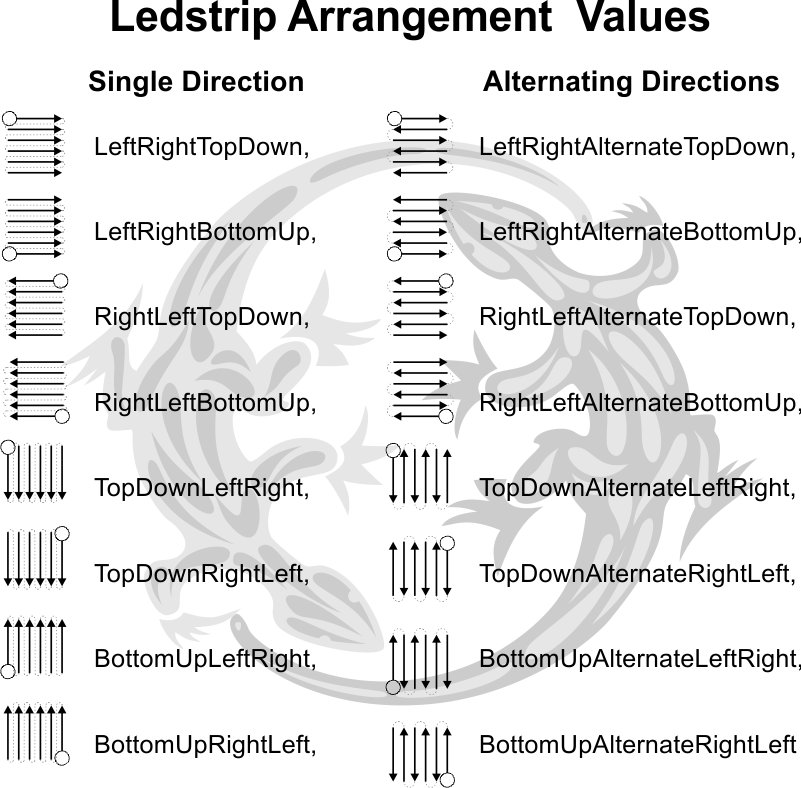
You have to be one of these


LedStripArrangementEnum.jpg