Jump to content


Photo

Better Arcade Mode - MOD for Future Pinball


  • Please log in to reply
918 replies to this topic

#201 hargabyte

hargabyte

    Hobbyist

  • Members
  • PipPip
  • 24 posts

  • Flag: United States of America

  • Favorite Pinball: The Champions Pub

Posted 03 May 2013 - 03:38 AM

Nice vid man. I have to download a couple tables now. I dont have those in my cab. yet. as you can see from my video Im still very much WIP. Got my calibration board completed. works good. I tested on a wii in the sensitivity options. Thanks for that info earlier rav. I ended up going with a parallel circuit instead. only used 2aa batteries. Now that Im more brushed up on led's I was thinking of making a video tutorial if theres anyone interested in making their own calibration board


Edited by hargabyte, 03 May 2013 - 05:00 AM.


#202 StreetPreacher

StreetPreacher

    Enthusiast

  • Members
  • PipPipPip
  • 65 posts
  • Location:Hamilton, Ontario

  • Flag: Canada

  • Favorite Pinball: Addams Family

Posted 03 May 2013 - 03:59 PM

Unbelievable, I'm sooo close to getting this working, but I just can't find a USB extension cable that will work with the damned PS3 EYE!!!!  I tried a dirt cheap one, but it cuts out every few seconds, then tried one that was 3X as much money, same deal....


I can't believe I'm going to have to drop $25 on an active extension cable just to get my $15 Eye to work, assuming that even works... :(  Just curious, but does anyone have experience with active USB extension cables and the Ps3 Eye?  My old logitech camera seemed to work fine even with the crappy .99 cent extension...


And one other question (assuming I get this setup working :))  I assume the PS3 Eye camera lens should be set to the 'blue dot' position for use with BAM?


The camera features a two-setting adjustable fixed focus zoom lens. Selected manually by rotating the lens barrel, the PlayStation Eye can be set to a 56° field of view (red dot) similar to that of the EyeToy,[10] for close-up framing in chat applications, or a 75° field of view (blue dot) for long shot framing in interactive physical gaming applications.[1]


Edited by StreetPreacher, 03 May 2013 - 04:22 PM.


#203 ravarcade

ravarcade

    Enthusiast

  • Members
  • PipPipPip
  • 363 posts

  • Flag: Poland

  • Favorite Pinball: none

Posted 03 May 2013 - 04:22 PM

Unbelievable, I'm sooo close to getting this working, but I just can't find a USB extension cable that will work with the damned PS3 EYE!!!!  I tried a dirt cheap one, but it cuts out every few seconds, then tried one that was 3X as much money, same deal....


I can't believe I'm going to have to drop $25 on an active extension cable just to get my $15 Eye to work, assuming that even works... :(  Just curious, but does anyone have experience with active USB extension cables and the Ps3 Eye?  My old logitech camera seemed to work fine even with the crappy .99 cent extension...


Maybe I give You some clue.
 
Normaly from Motherboard You have some numer of usb port (let say 10).
All ports are grouped in pair.
So You have 2x5 ports.
On every pair You can have max transfer (~25-30MB/s).
This transfer is "shared" in pair.
So You can't connect 2 devices and get max transfer on both.
 
If Your  EyeToy is connected to "pair" with other device (for example WIFI card) You can encounter troubles.
 
"Pairs" are usually visible.
 
Try to connect EyeToy alone to USB "pair".

BAM page: http://www.ravarcade.pl

current BAM version: v1.5-317,  released: Oct 11, 2020


#204 hargabyte

hargabyte

    Hobbyist

  • Members
  • PipPip
  • 24 posts

  • Flag: United States of America

  • Favorite Pinball: The Champions Pub

Posted 03 May 2013 - 05:06 PM

Hey Rav, Im getting ready to setup wii mode tonight. Got a question about the wiimote positions. I see on your website that you have them 1.8m away from each other and 1.8m away from the front of the table. Is this spacing required or can I adjust it for my setup? I would like to have the wii remotes closer together if possible. 


#205 ravarcade

ravarcade

    Enthusiast

  • Members
  • PipPipPip
  • 363 posts

  • Flag: Poland

  • Favorite Pinball: none

Posted 03 May 2013 - 06:24 PM

Hey Rav, Im getting ready to setup wii mode tonight. Got a question about the wiimote positions. I see on your website that you have them 1.8m away from each other and 1.8m away from the front of the table. Is this spacing required or can I adjust it for my setup? I would like to have the wii remotes closer together if possible. 


This is setup how i make videos.
 
Another possible setup:
 
I put 2 wiimotes on top of "backbox".
Away from each other as posible (tested ~0.5m).
They have to point at player head.
 
Problem with this setup is, that wiimotes cams can't see screen. 
They have to narrow FOV.
 
After calibration You have to do "3 points" setup with a "tool".
I used object (plastic tube) with know hight and set these point in known distance (only verticaly) from screen. This distance is measured to "eye" level.
 
I put one end of "plastic tube" on "red diamond" displayed on screen. On other end is ir-led. Then i press "set point" (IR-LED shoud be visible by wiimotes).
 
Same on second & third point.
 
Now about "distance" betwen screen and eye/ir-led (this is length of "plastic tube").
Then You finish "3 point" setup BAM recognize points as "level 0" (or CAM Y=0).
Now You need to tell BAM, that "level 0" is lower. To do this You shoud in "Reality" set this distance in "Shift Y".
(Please remember to set size of Yours TV screen, because this value is used to translet values in CM or INCHs to Future Pinball Unit).
 
 
---
With this setup I get little bit less accurate tracking. Head movement is limited too. But its ok to play.

BAM page: http://www.ravarcade.pl

current BAM version: v1.5-317,  released: Oct 11, 2020


#206 hargabyte

hargabyte

    Hobbyist

  • Members
  • PipPip
  • 24 posts

  • Flag: United States of America

  • Favorite Pinball: The Champions Pub

Posted 03 May 2013 - 07:47 PM

Ok that makes sense. I am familiar with using the y shift from setting up ps3 eye. I will see what I can rig up to extend the wiimotes out as far as possible. Thanks! Ill upload a video tomorrow once i have it setup. 


Streetpreacher, dont go spending a bunch of money on the ps3 setup. $25 will prob buy you 2 used wiimotes. just look for the old ones that dont have motion plus. the calibration board wont cost you much. I built mine last night for about $10 and that was buying parts at radio shack (expensive prices). I wired it up with wiring from an ethernet cable and duct tape. Their isnt a drop of solder on it and it works fine. I can help you work out the components that you need and how to wire them. Its not hard at all. 


#207 StreetPreacher

StreetPreacher

    Enthusiast

  • Members
  • PipPipPip
  • 65 posts
  • Location:Hamilton, Ontario

  • Flag: Canada

  • Favorite Pinball: Addams Family

Posted 03 May 2013 - 09:39 PM

Unbelievable, I'm sooo close to getting this working, but I just can't find a USB extension cable that will work with the damned PS3 EYE!!!!  I tried .So You can't connect 2 devices and get max transfer on both. If Your  EyeToy is connected to "pair" with other device (for example WIFI card) You can encounter troubles. "Pairs" are usually visible. Try to connect EyeToy alone to USB "pair".

Ha ha, thanks Raver I wasn't aware of that, good tip!Sorry for my outburst, it was meant more of a rant, I was upset and figured you guys would be able to sympathize with my petty troubles :)I did find and old powered USB hub, so I think that might work as an active extender!

]Ok that makes sense. I am familiar with using the y shift from setting up ps3 eye. I will see what I can rig up to extend the wiimotes out as far as possible. Thanks! Ill upload a video tomorrow once i have it setup.  Streetpreacher, dont go spending a bunch of money on the ps3 setup. $25 will prob buy you 2 used wiimotes. just look for the old ones that dont have motion plus. the calibration board wont cost you much. I built mine last night for about $10 and that was buying parts at radio shack (expensive prices). I wired it up with wiring from an ethernet cable and duct tape. Their isnt a drop of solder on it and it works fine. I can help you work out the components that you need and how to wire them. Its not hard at all. 


Another great tip, my neighbor is actually in electrician school right now and I believe he has everything I need for a calibration board. I just thought that the Wiimotes would be harder to find and more expensive. I'll start the hunt for cheap wiimotes!


EDIT:  And I think I've been misunderstanding the concept a bit, so the calibration board is basically a dvd case with 4 IR LED lights attached to it?  And you move the board around to do the initial calibration of the wiimotes, and then once that's done you just attach a single IR LED to your forehead while you're playing? For some reason I was thinking that you hooked the wiimotes up to the calibration board to do some sort of programming/calibration :)


Edited by StreetPreacher, 04 May 2013 - 02:07 PM.


#208 sacredgaming

sacredgaming

    Enthusiast

  • Members
  • PipPipPip
  • 156 posts
  • Location:Atlanta

  • Flag: United States of America

  • Favorite Pinball: Monster Bash,twilight zone

  • 360 Gamer Tag: sacredgaming

Posted 04 May 2013 - 02:37 PM

I was trying to get the ps3 eye setup but, i cannot get it to track. I am assuming that i need to install the cl-eye drivers? Anyone who has this up and running any help would be appreciated. 


#209 ravarcade

ravarcade

    Enthusiast

  • Members
  • PipPipPip
  • 363 posts

  • Flag: Poland

  • Favorite Pinball: none

Posted 04 May 2013 - 02:48 PM

I was trying to get the ps3 eye setup but, i cannot get it to track. I am assuming that i need to install the cl-eye drivers? Anyone who has this up and running any help would be appreciated. 

If You don't get picture from cam in BAM it is how to install drivers:

1. Uninstall EyeToy drivers.
 
2. Download & install (with "developer" libs):
http://codelaborator...-1.6.4.0028.exe
 
3. Install EyeToy drivers (same as removed in step 1):
http://codelaborator...-5.3.0.0341.exe


BAM page: http://www.ravarcade.pl

current BAM version: v1.5-317,  released: Oct 11, 2020


#210 The Loafer

The Loafer

    Pinball Wizard

  • VIP
  • 3,471 posts
  • Location:Embrun, Ontario, Canada

  • Flag: ---------

  • Favorite Pinball: Superman, Firepower & Tron


Posted 04 May 2013 - 02:49 PM

Post #162 in this thread explains exactly what you need to do:

http://www.vpforums....e=9#entry223546

Dang it, beaten by Rav! :)

Edited by The Loafer, 04 May 2013 - 02:50 PM.


#211 sacredgaming

sacredgaming

    Enthusiast

  • Members
  • PipPipPip
  • 156 posts
  • Location:Atlanta

  • Flag: United States of America

  • Favorite Pinball: Monster Bash,twilight zone

  • 360 Gamer Tag: sacredgaming

Posted 04 May 2013 - 03:59 PM

OMDPAnVl.jpg


The ps3 camera wasnt showing video because it was in a USB 3.0 port. Once i moved it all was fine. I will visit the previous post mentioned and see if i can find my answers as it isnt tracking inside bam. I see my face and video but, no movement. Thank you guys for the quick response. 


EDIT: I adjusted the drivers as mentioned in previous post. Now using PS3 simple eye. still no movement on the table. I will try to delete ps3eye.dll and see if that resolves the issue


Just to verify i am using XP, 2500k, gtx 480, Using the latest 2.5 rss version of FP and am currently running the gooniescab.fpt  If there is anything else i need to do let me know? As it sits i am not getting any movement on the table though as the picture shows face tracking is working as it should. Thank you guys again for the assistance. 


Edited by sacredgaming, 04 May 2013 - 04:30 PM.


#212 ravarcade

ravarcade

    Enthusiast

  • Members
  • PipPipPip
  • 363 posts

  • Flag: Poland

  • Favorite Pinball: none

Posted 04 May 2013 - 04:28 PM

The ps3 camera wasnt showing video because it was in a USB 3.0 port. Once i moved it all was fine. I will visit the previous post mentioned and see if i can find my answers as it isnt tracking inside bam. I see my face and video but, no movement. Thank you guys for the quick response. 


EDIT: I adjusted the drivers as mentioned in previous post. Now using PS3 simple eye. still no movement on the table. I will try to delete ps3eye.dll and see if that resolves the issue. 

I thin You forget to go "3 points" setup.


here is instruction:

http://www.vpforums....e=8#entry222987


BAM page: http://www.ravarcade.pl

current BAM version: v1.5-317,  released: Oct 11, 2020


#213 hargabyte

hargabyte

    Hobbyist

  • Members
  • PipPip
  • 24 posts

  • Flag: United States of America

  • Favorite Pinball: The Champions Pub

Posted 04 May 2013 - 05:48 PM

got wiimotes working. I had a few issues though. Rav, have you tried the wiimote setup in windows xp? I tried initially on windows xp and ran into an issue where when the game started it would cut out one of the wiimotes. I tried rebooting and resyncing several times but each time I started the game it would kill one wiimote and the other would work fine. The BAM interface only showed on wiimote with battery life. I eventually pulled the drive out and put in a drive that has windows 7 on it. that seems to work fine. once I got the 2 synced I was able to go in and calibrate BAM. Ohh btw when setting up the calibration board are those points measured in millimeters? i just left them as they were set since they have your calibration board settings in them and i made mine from a dvd case as well. it seems to be working fine.


I took a quick video last night. I will try to post it later. Im gonna load up a bunch more table and maybe I will take a video tonight. Im going to pick up a headband while im out today. Like you would use at the gym. I think this would make an easy piece of clothing to wire the IR to. Gonna look kind a goofy wearing a headband but i dont care if it works well. 


#214 StreetPreacher

StreetPreacher

    Enthusiast

  • Members
  • PipPipPip
  • 65 posts
  • Location:Hamilton, Ontario

  • Flag: Canada

  • Favorite Pinball: Addams Family

Posted 04 May 2013 - 06:20 PM

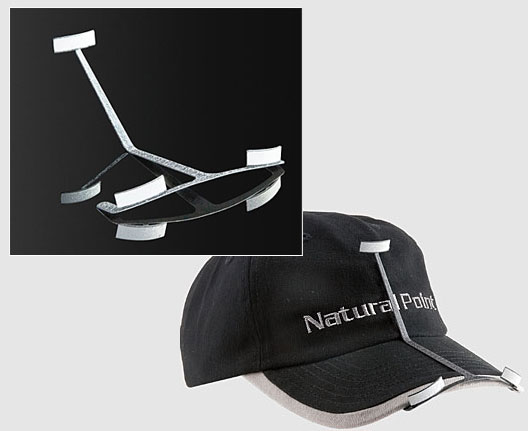
Or if you don't mind messing up your hair, just stick it to a baseball cap ;).


technology_036a_001.jpg


Edited by StreetPreacher, 04 May 2013 - 06:22 PM.


#215 ravarcade

ravarcade

    Enthusiast

  • Members
  • PipPipPip
  • 363 posts

  • Flag: Poland

  • Favorite Pinball: none

Posted 04 May 2013 - 07:54 PM

The ps3 camera wasnt showing video because it was in a USB 3.0 port. Once i moved it all was fine. I will visit the previous post mentioned and see if i can find my answers as it isnt tracking inside bam. I see my face and video but, no movement. Thank you guys for the quick response. 


EDIT: I adjusted the drivers as mentioned in previous post. Now using PS3 simple eye. still no movement on the table. I will try to delete ps3eye.dll and see if that resolves the issue


Just to verify i am using XP, 2500k, gtx 480, Using the latest 2.5 rss version of FP and am currently running the gooniescab.fpt  If there is anything else i need to do let me know? As it sits i am not getting any movement on the table though as the picture shows face tracking is working as it should. Thank you guys again for the assistance. 


On Your screenshot I see values for cam position displayed as 1.$. It means infinity. You probly have  not used "3 points" (last option from screenshot). It is used to show BAM "where is screen" or left/right edges of table.

In link i posted above is decription how to do "3 points" setup for cam


got wiimotes working. I had a few issues though. Rav, have you tried the wiimote setup in windows xp? I tried initially on windows xp and ran into an issue where when the game started it would cut out one of the wiimotes. I tried rebooting and resyncing several times but each time I started the game it would kill one wiimote and the other would work fine. The BAM interface only showed on wiimote with battery life. I eventually pulled the drive out and put in a drive that has windows 7 on it. that seems to work fine. once I got the 2 synced I was able to go in and calibrate BAM. Ohh btw when setting up the calibration board are those points measured in millimeters? i just left them as they were set since they have your calibration board settings in them and i made mine from a dvd case as well. it seems to be working fine.


I took a quick video last night. I will try to post it later. Im gonna load up a bunch more table and maybe I will take a video tonight. Im going to pick up a headband while im out today. Like you would use at the gym. I think this would make an easy piece of clothing to wire the IR to. Gonna look kind a goofy wearing a headband but i dont care if it works well. 

I tested once on XP and i can't connect one wiimote (XP BT stack ask for ID, BT stock from dongle manufacturer do same, and WiiPair don't see wiimotes).

I think its depend from BT dongle & LUCK. On montay i will try again on XP with my own BT dongle.


Values i set are in millimeters, but units are not important. I can multiply values by any scale and it will work exactly same. Only proportions have matter.


---


If You think about placement IR LEDs on head i have some advices.
 
To get best experience with stereoscopic view i will try to get information about position of both eyes.
I think simplest solution is to trace 2 IR LED mounted on left & right edge of glasses. This way BAM will get "line in space" where are eyes and "center point" as arythmetic mediana of 2 IR LEDs positions.
 
But stereoscopic view is for now only in plans.
(With only one IR LED BAM will assume that eyes are horizontaly without any rotation). 

BAM page: http://www.ravarcade.pl

current BAM version: v1.5-317,  released: Oct 11, 2020


#216 CuriousDan

CuriousDan

    Enthusiast

  • Members
  • PipPipPip
  • 116 posts
  • Location:Denmark

  • Flag: Denmark

  • Favorite Pinball: Jacks Open

Posted 04 May 2013 - 08:29 PM

I've been away from pin sims for a while, but now...

Ravarcade, you're a genius!  :otvclap:


#217 hargabyte

hargabyte

    Hobbyist

  • Members
  • PipPip
  • 24 posts

  • Flag: United States of America

  • Favorite Pinball: The Champions Pub

Posted 05 May 2013 - 07:52 PM

Well I have been playing around with the wiimote mode some more. I got my hat wired up and that is working well. I hooked 2 AA batteries to it so if im doing my math right I believe it has about a 50 hour battery life. I also found a page on wiring up a usb cable to power the wiimote. seems simple enough. Then there will be no more battery issue.


edit: ohh here is the link for powering wiimote on usb: http://www.free-trac...?showtopic=1873


Thanks for taking a look into xp rav. I would prefer to run my cab in xp. visual pinball doesnt run very well in win7 for me.


I played around some more with the distance between wiimotes and I think you can get away with about 1m apart. thats what I have right now and it takes some tweaking to get the controllers pointed just right but once they set I am able to move pretty much anywhere around the table. to get this setup I just have someone hold the calibration board about chest height in front of the table and then adjust the wiimotes till the IR's are in the middle of the screens. 


If you get 2 ir headtracking going I will test it out for ya. Id be interested in what the difference would look like with head rotation factored in.


Edited by hargabyte, 05 May 2013 - 08:16 PM.


#218 knucklehd

knucklehd

    Hobbyist

  • Members
  • PipPip
  • 17 posts
  • Location:Dallas Ga.

  • Flag: United States of America

  • Favorite Pinball: whirlwind

Posted 07 May 2013 - 02:44 AM

I just wanted to say how much I like this program. Even without the 3d camera effects it is very worth the download.

It makes setting up tables a breeze. it makes adjustments so easy. You dont have to touch the registry, You see the effects on the fly. 

For good fun, I setup 3 of my tables with water themes with a wavy or boat rocking effect using the happycab mode and just playing with the settings.

Jaws, pirates, and reel it in are totally different like this.  SO table makers could use these type of effects or suggest settings for certain tables. Like the shaker or earthquake effect when only the table moves in TFTC.  

Thanks Again.


#219 ravarcade

ravarcade

    Enthusiast

  • Members
  • PipPipPip
  • 363 posts

  • Flag: Poland

  • Favorite Pinball: none

Posted 07 May 2013 - 07:00 PM

Thanks for taking a look into xp rav. I would prefer to run my cab in xp. visual pinball doesnt run very well in win7 for me.
It manage to connect 2 wiimotes under Win XP (SP3).
I was not soo hard:
1. Use only BT drivers (no custom BT Stack)
2. Use WiiPair:
http://ravarcade.pl/files/WiiPair.zip
Notice.
I added MSVCR80.dll to zip.
Without MSVCR80.dll WiiPair start like this:
WiiPair-missing_msvcr80_dll.PNG
I looks ok, but it don't work. There is missing line in Status Message:
BluetoothFindFirstDevice[..]
... and if You press Eazy Pair nothing will happend
 
with MSVCR80.dll it starts like this:
WiiPair-ok.PNG
 
3. Connect one by one WiiMote:
 - press (and hold) red button near battery on wiimote
 - press Easy Pair
You shoud see WiiMote Adress and 3 times TRUE in line.
If there is WiiMote adress but no 3 times TRUE (one or more FALSE) select line and press Remove
 
Do it with second wiimote
 
If every thing is ok You will see same things like on my screen shot above (only adress will be diffrent)
 
4.The You want to start BAM You have to press A key on booth WiiMotes. Leds start blinking. Start BAM and launch game. Leds will stop blinking.
If BAM detect only one WiiMote ->
 - exit FP,
 - Start again FP
 - load table (don't press F5)
 - press A on WiiMotes (only not connected will start blinking)
 - launch game (press F5)
 
After computer restart You have to only do point 4.
WiiMotes will be connected until computer restert.
If You exit from FP and start again they will be working normaly.
-------------------------------------------------------------
If You have still problems with WiiMotes... PS3Eye plugin is near. :)

Edited by ravarcade, 07 May 2013 - 07:01 PM.

BAM page: http://www.ravarcade.pl

current BAM version: v1.5-317,  released: Oct 11, 2020


#220 ravarcade

ravarcade

    Enthusiast

  • Members
  • PipPipPip
  • 363 posts

  • Flag: Poland

  • Favorite Pinball: none

Posted 07 May 2013 - 09:59 PM

BAM Update!
 
v0.6-25
 
 
change log:
- fixed crashes: (i hope) when user quickly switch between PS3Eye and Simple Cam.
- Updated FPLoaderNew.exe (to version previously available separately). New version should work better with HyperPin.

BAM page: http://www.ravarcade.pl

current BAM version: v1.5-317,  released: Oct 11, 2020