Jump to content


Photo
* * * * * 3 votes

PBX Recorder (Automated PinballX media video recorder)

pbxrecorder screenshot videos ffmpeg recorder Pinballx

  • Please log in to reply
359 replies to this topic

#181 Binkles

Binkles

    Enthusiast

  • Members
  • PipPipPip
  • 69 posts

  • Flag: Australia

  • Favorite Pinball: Funhouse

Posted 02 June 2017 - 12:07 AM

if my table file/folder structure looks this.... will it work??
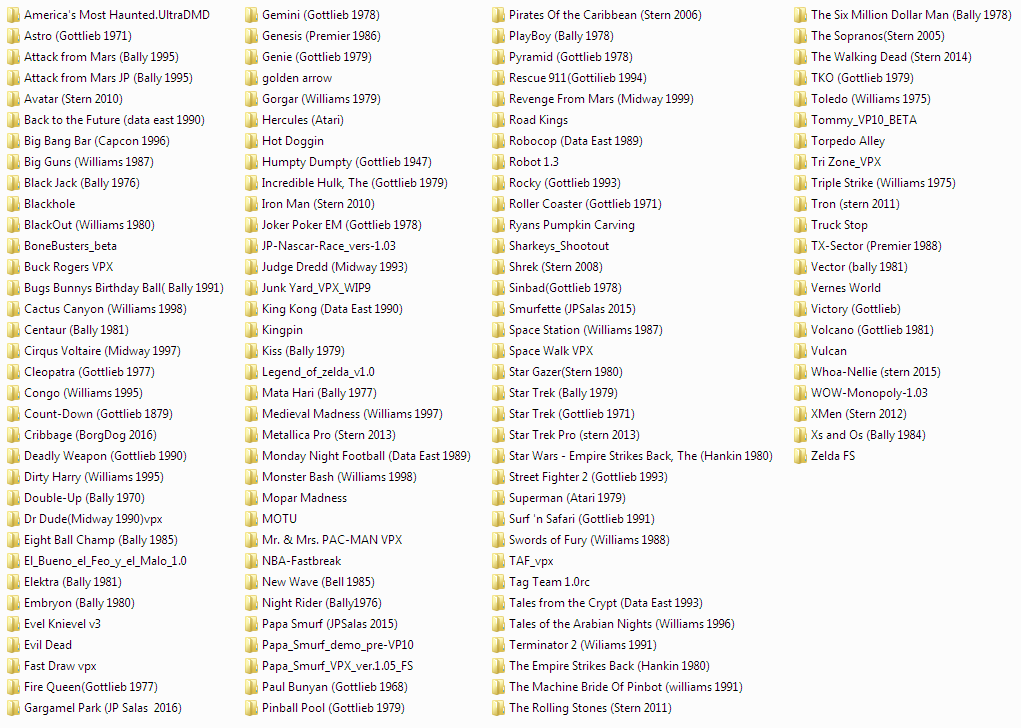
 

26494823245_9efa9d8a31_o.png


Excuse my hijacking the thread - but how do you set this up?  I like this idea way better than just having all tables in one folder.



#182 wrd1972

wrd1972

    Authoring Padawan

  • Platinum Supporter
  • 2,265 posts
  • Location:Central KY. USA

  • Flag: United States of America

  • Favorite Pinball: Funhouse

Posted 02 June 2017 - 12:33 AM

try

1080
1920
1080
1920
1
0
0
1080
1920
1080
0
0


No go. Looks like it aint meant to be.

This is my monitor config:

untitled82.png

1= PF

2 = BG left

3= BG right


I have added the custom numbers in the screenres.txt in the modded PBXR folder while leaving the screenres in the tables folder intact. Also running the modded PBXR to capture the dual BG images. If it might help, I dont need the modded PBXR to capture table vids. I can get those with normal PBXR.


The program is running, just not recording the dual BG images. No black and white numbers crawling on the screen.


My VP Pincab /MAME Arcade  Specs: Dell T3400 workstation with Core2 Quad core 3.0GHZ (Q9650) CPU - 8GB of RAM - Nvidia  GTX 970

40" PF Sony gaming LED TV, Dual 21" Dell monitors in the backbox - Pinscape dual boards - Full DOF - Full MAME arcade support.


#183 blackvulcan3

blackvulcan3

    Enthusiast

  • Members
  • PipPipPip
  • 253 posts
  • Location:Cairns, QLD, Australia

  • Flag: Australia

  • Favorite Pinball: NBA Fastbreak, IJ, TOM, Demolition Man, AFM, T2 & too many others to mention

  • 360 Gamer Tag: jayweb

Posted 11 June 2017 - 08:14 AM

Great program gtxjoe. Thanks for the hard work of everyone involved.


#184 Thalamus

Thalamus

    Pinball Wizard

  • Platinum Supporter
  • 4,983 posts

  • Flag: Norway

  • Favorite Pinball: GOT, Alien Star, LOTR, TOM

Posted 11 June 2017 - 09:02 AM

Carney' idea, implemented in the most awesome way by GtxJoe :)


From now on. I won't help anyone here at VPF. Please ask Noah why that is.


#185 gtxjoe

gtxjoe

    VPF Veteran

  • VIP
  • 5,152 posts

  • Flag: United States of America

  • Favorite Pinball: Medieval Madness, AbraCadabra


Contributor

Posted 11 June 2017 - 10:52 AM

Yes, this wouldn't exist without CarneyPriest sharing his original ffmpeg recording script work!

#186 scottacus

scottacus

    Enthusiast

  • Gold Supporter
  • 307 posts
  • Location:Wisconsin

  • Flag: United States of America

  • Favorite Pinball: Adventures of Rocky and Bullwinkle

Posted 12 July 2017 - 01:07 AM

When I try to do a "one table recording" of a VP 10 table, PBXRecorder 1.1.5  tries to open it with VP9.92.  What can I do to fix this?


#187 scottacus

scottacus

    Enthusiast

  • Gold Supporter
  • 307 posts
  • Location:Wisconsin

  • Flag: United States of America

  • Favorite Pinball: Adventures of Rocky and Bullwinkle

Posted 12 July 2017 - 01:47 AM

Now some VP10 tables will work fine for one table capture (Bad Cats and Astro) but others like Buck Rogers will try to load VP 9.92


Here is a section of the log 

 
July 11,2017 20:49:31
Version 1.5
 
Monitor Count: 3,  Primary Monitor: 1
Monitor 1: 1920x1080 (\\.\DISPLAY1)
Monitor 2: 3840x1080 (\\.\DISPLAY2)
Monitor 3: 5200x768 (\\.\DISPLAY3)
Single File Selected:  C:\Visual Pinball\Tables\Buck_Rogers (Gottlieb 1980).vpx
...
Buck Rogers (Gottlieb 1980)
PBXrecorder set to record complete media set
FYI (FTP not enabled): No Wheel Image - Buck Rogers (Gottlieb 1980).png
Launching table: VPinball992.exe -play C:\Visual Pinball\Tables\Buck_Rogers (Gottlieb 1980).vpx

Edited by scottacus, 12 July 2017 - 01:53 AM.


#188 scottacus

scottacus

    Enthusiast

  • Gold Supporter
  • 307 posts
  • Location:Wisconsin

  • Flag: United States of America

  • Favorite Pinball: Adventures of Rocky and Bullwinkle

Posted 12 July 2017 - 02:27 AM

Oh I think I see where I went wrong.  I didn't select VP 10 in the dropdown menu, I thought that the program would see the extension name and open the appropriate program.


#189 gtxjoe

gtxjoe

    VPF Veteran

  • VIP
  • 5,152 posts

  • Flag: United States of America

  • Favorite Pinball: Medieval Madness, AbraCadabra


Contributor

Posted 12 July 2017 - 02:46 AM

If you have matching VPT and VPX filenames like, Buck_Rogers (Gottlieb 1980).vpx and Buck_Rogers (Gottlieb 1980).vpt than you can run into these type of issues with the single recording option, because PBX Recorder just searches through XML files to find a table name match and launches the associated exe. It has no idea if an exe file is vpx or vp8 or vp9 or physmod2 or phsymod5 etc

#190 Umpa

Umpa

    Pinball Fan

  • Members
  • PipPipPipPip
  • 740 posts

  • Flag: United States of America

  • Favorite Pinball: AC/DC

Posted 13 July 2017 - 05:15 PM

Is there a way to have pbx recorder record colored rom dmd? I tried and it defaults to orange.

Sent from my SAMSUNG-SM-G935A using Tapatalk

#191 gtxjoe

gtxjoe

    VPF Veteran

  • VIP
  • 5,152 posts

  • Flag: United States of America

  • Favorite Pinball: Medieval Madness, AbraCadabra


Contributor

Posted 13 July 2017 - 05:42 PM

It does a video recording of what is displayed on the video screen.  Do you have a PINDMD hardware or is your colored DMD shown in a video monitor?


Recording what is displayed on DMD hardware like PINDMD or PIN2DMD is not supported


Edited by gtxjoe, 13 July 2017 - 05:42 PM.


#192 Umpa

Umpa

    Pinball Fan

  • Members
  • PipPipPipPip
  • 740 posts

  • Flag: United States of America

  • Favorite Pinball: AC/DC

Posted 13 July 2017 - 06:02 PM

It does a video recording of what is displayed on the video screen.  Do you have a PINDMD hardware or is your colored DMD shown in a video monitor?
 
Recording what is displayed on DMD hardware like PINDMD or ******* is not supported

Ok. I have an LCD monitor using freezys.dll. if I let pbxrecorder find missing media it will open the table and back glass and dmd to record but it shows the orange.dmd.instead.of a colored one. I also noticed that it opens table after table and does not close previous tables like I believe it did in the past. Running Windows 10 and latest version of pbxrecorder. I have said it before and I will say it again thanks for a great utility!

Sent from my SAMSUNG-SM-G935A using Tapatalk

#193 jbg4208

jbg4208

    Enthusiast

  • Members
  • PipPipPip
  • 339 posts
  • Location:Arkansas

  • Flag: United States of America

  • Favorite Pinball: Kiss, Monster Bash, Safe Cracker,

  • 360 Gamer Tag: Bobs_Road

Posted 13 July 2017 - 06:51 PM

Make sure you are running pbxrecorder as admin.

Sent from my SM-G920V using Tapatalk

My VPX Tables:

sig0.png


#194 Umpa

Umpa

    Pinball Fan

  • Members
  • PipPipPipPip
  • 740 posts

  • Flag: United States of America

  • Favorite Pinball: AC/DC

Posted 13 July 2017 - 09:22 PM

Make sure you are running pbxrecorder as admin.

Sent from my SM-G920V using Tapatalk

Thank you! That was it! I forgot to change to run as admin when I installed it.

Sent from my SAMSUNG-SM-G935A using Tapatalk

#195 Umpa

Umpa

    Pinball Fan

  • Members
  • PipPipPipPip
  • 740 posts

  • Flag: United States of America

  • Favorite Pinball: AC/DC

Posted 16 July 2017 - 02:38 AM

Sorry one more question. Family guy and diner will not record the backglass. It does record the dmd for family guy. There is no error message and it acts like it records and says it did but when I look in the pbx media folder they are not there. I checked the pbxrecorder log file and it says it recorded it. Any ideas?

Sent from my SAMSUNG-SM-G935A using Tapatalk

#196 Umpa

Umpa

    Pinball Fan

  • Members
  • PipPipPipPip
  • 740 posts

  • Flag: United States of America

  • Favorite Pinball: AC/DC

Posted 16 July 2017 - 09:40 PM

Justbtried it again same results. Weird!

Sent from my SAMSUNG-SM-G935A using Tapatalk

#197 gtxjoe

gtxjoe

    VPF Veteran

  • VIP
  • 5,152 posts

  • Flag: United States of America

  • Favorite Pinball: Medieval Madness, AbraCadabra


Contributor

Posted 16 July 2017 - 09:45 PM

Just try recording backglass only and provide a logfile

#198 Umpa

Umpa

    Pinball Fan

  • Members
  • PipPipPipPip
  • 740 posts

  • Flag: United States of America

  • Favorite Pinball: AC/DC

Posted 16 July 2017 - 10:09 PM

Thank you that worked! I selected only missing media files and backglass videos only and it worked! Then did the same with playfield only and it worked! Not sure why the 1 table record didn't work but all is good again. Thank you!

Sent from my SAMSUNG-SM-G935A using Tapatalk

#199 allheart

allheart

    Hobbyist

  • Platinum Supporter
  • 29 posts

  • Flag: United States of America

  • Favorite Pinball: Funhouse

Posted 21 July 2017 - 01:04 AM

Running into something strange trying to capture backglass images on my 2 monitor mini-pin.   I've had PBXR running fine on my 3 screen full size cabinet without issue.   


I'm trying to capture just the backglass on a table like "24" which has a DMD displayed on the B2S backglasss.   When I run PBXR, I see it kick off the table and B2S and the PInMAME DMD is showing properly.   PBXR does clam to capture an image.   It says it captured in log file.  


However when I look at the image captured, it shows the backglass with a empty "hole" where the backglass is.  Using Faststone image view, the thumbnail shows a white box where the DMD should be.  


Again, when I see it kick off the table the backlgass looks correct and the DMD is being displayed on top of the backglass in the correct position.


Any thoughts on what I might look at?  This is only a 2 screen setup and the screenrescheck looks okay.  I can attach the log file, but it just shows that it capture correctly.  It did capture something, but not what I see on the monitor.  I beleive I have everything running as Administrator.   Currently using Windows 7 64-bit.


Thanks for the great utility. 


#200 gtxjoe

gtxjoe

    VPF Veteran

  • VIP
  • 5,152 posts

  • Flag: United States of America

  • Favorite Pinball: Medieval Madness, AbraCadabra


Contributor

Posted 21 July 2017 - 02:04 AM

hmmm, does it capture backglass/dmd images fine for other tables?

May increase the table start up delay setting in PBXR to see if it captures 24 correctly


Also tagged with one or more of these keywords: pbxrecorder, screenshot, videos, ffmpeg, recorder, Pinballx