Jump to content


Photo
- - - - -

Converting Star Wars Trilogy to FS


  • Please log in to reply
62 replies to this topic

#1 wtiger

wtiger

    Pinball Fan

  • VIP
  • 1,148 posts
  • Location:Los Angeles, CA

  • Flag: United States of America

  • Favorite Pinball: Junkyard


Contributor

Posted 26 April 2010 - 03:51 AM

How to convert Star Wars Trilogy v1.50 to FS

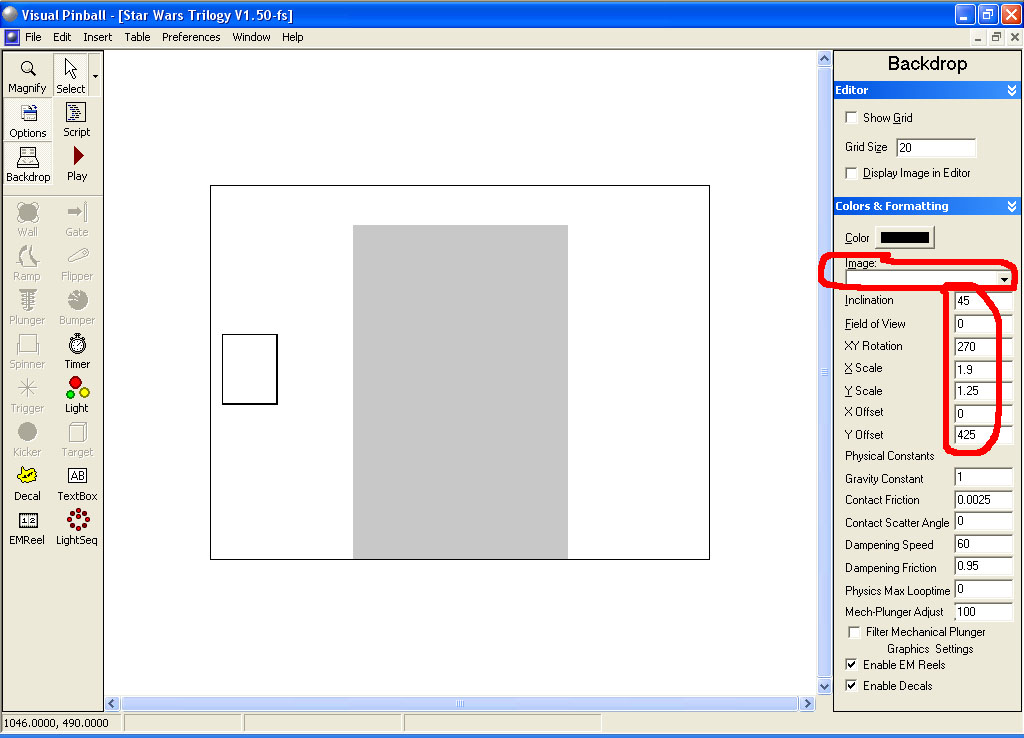
Load the table into the editor and go to the backdrop

Make the following changes:

For the image, select none.
Change the Inclination to 45
Field of View to 0
XY Rotation to 270
X Scale to 1.9
Y Scale to 1.25
Y Offset to 425

Note: I have no idea if the numbers above are good. I only have a one monitor (non-widescreen) setup so I attempted to adjust the table so it filled up the width of the monitor and was still in proportion. If someone has different numbers to use, please post them.


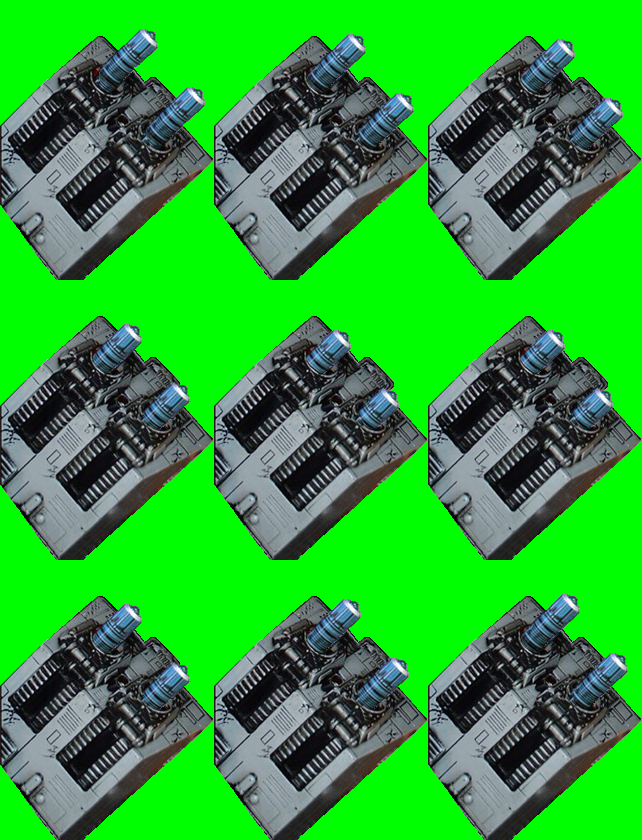
Import in the new emreel below into your table and set the transparency color to green (Red=0, Green=255, and Blue=0):


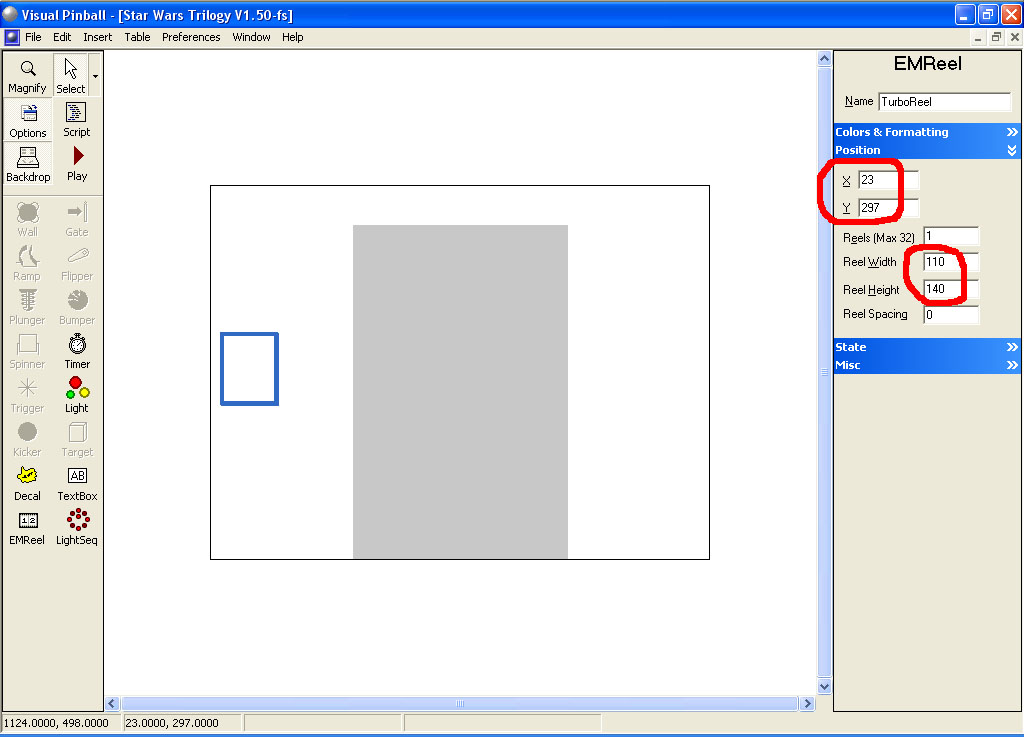
Click on the EMReel (it’s called TurboReel). Under the Position setting change the X position to 23 and the Y position to 297. Change the Reel Width to 110 and the Height to 140. Under Colors & Formatting select the new emreel image you just downloaded and imported.


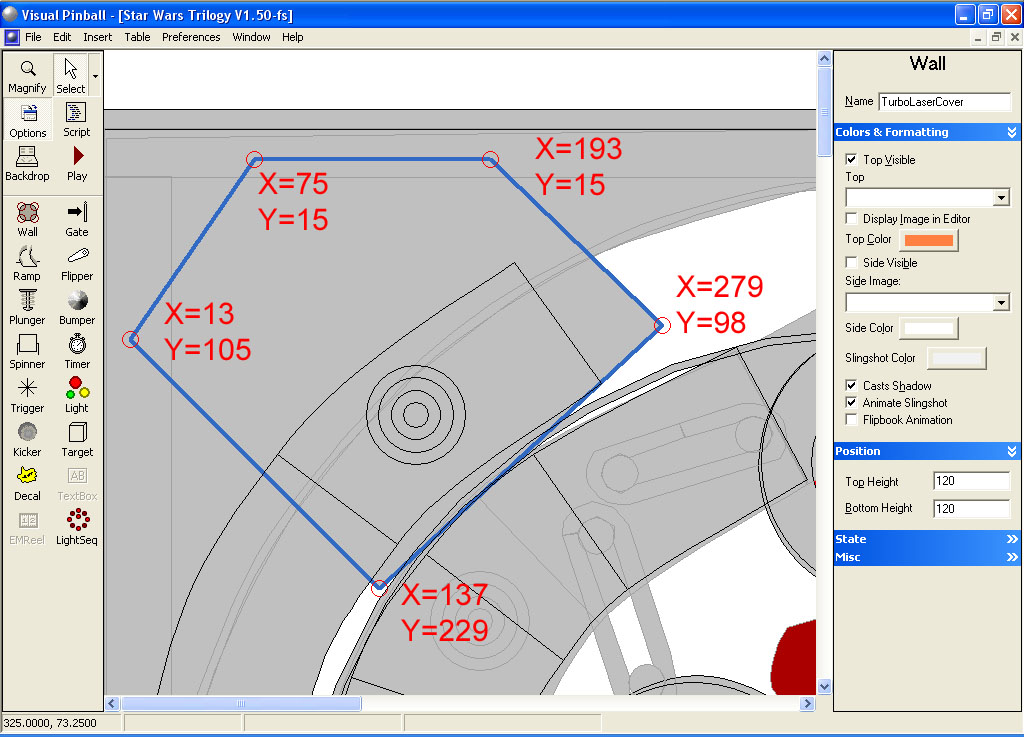
Click back on the Backdrop icon to switch back over to the table in the editor. In the upper left corner there is a wall called TurboLaserCover. It currently has 8 control points. Delete three of them on the right side so you only have 5 left. Change the X and Y values for each of them to match the image below:


Now you need to adjust the VUK (Vertical Up Kicker). Refer to the image below and adjust the inner ramp object. Note that there are actually two ramps on top of each other. One has the metal gold image associated with it and the other doesn’t. Also they have a height difference of 6 units (the one with the metal gold wire is set at 130 and the one without that image is 124). You may also want to add another “wire” above. If you feel that it still doesn’t look quite right, adjust accordingly.
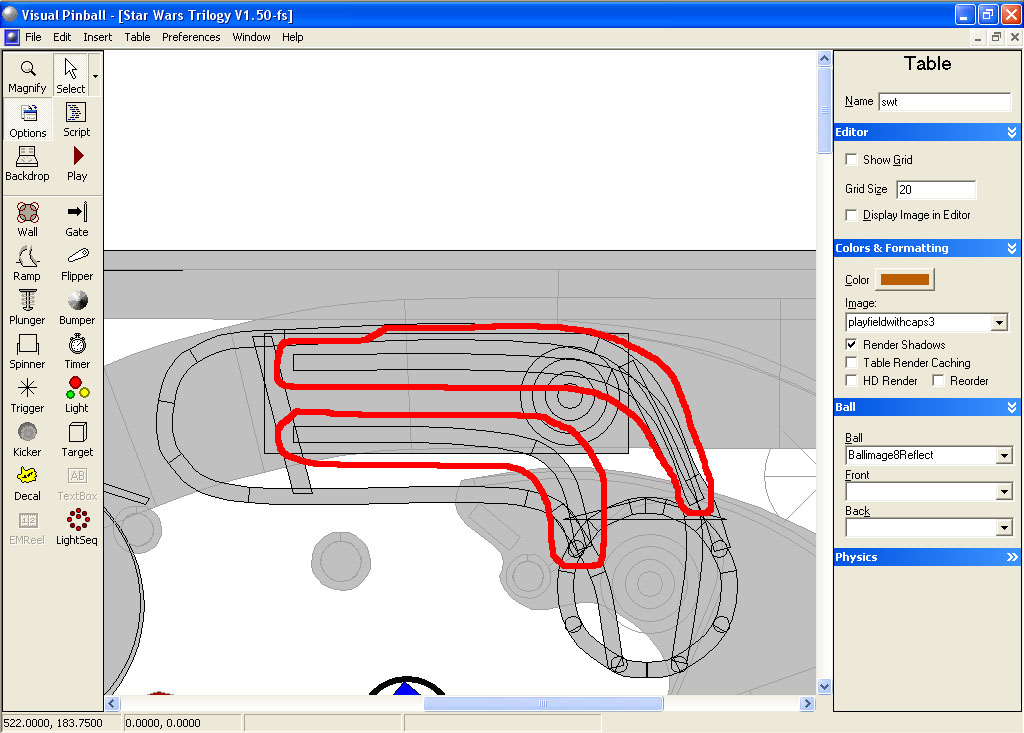


That’s it.


#2 njamont

njamont

    Enthusiast

  • Silver Supporter
  • 409 posts
  • Location:Houten, Utrecht

  • Flag: Netherlands

  • Favorite Pinball: Monster Bash

Posted 26 April 2010 - 06:59 AM

Sweet work !!

can you release it?

i will try myself but maybe some other folks don't have the time for it

Edited by njamont, 26 April 2010 - 07:52 AM.


#3 destruk

destruk

    VPF Veteran

  • VPF Staff
  • 6,338 posts
  • Location:Colorado Springs, CO

  • Flag: United States of America

  • Favorite Pinball: Ultrapin!


Posted 26 April 2010 - 01:23 PM

QUOTE (njamont @ Apr 26 2010, 12:59 AM) <{POST_SNAPBACK}>
Sweet work !!

can you release it?

i will try myself but maybe some other folks don't have the time for it


If they don't have time to make these few changes, do you really think they have time to play the table?

Build a fire, vipers love the heat.


#4 njamont

njamont

    Enthusiast

  • Silver Supporter
  • 409 posts
  • Location:Houten, Utrecht

  • Flag: Netherlands

  • Favorite Pinball: Monster Bash

Posted 26 April 2010 - 03:00 PM

Hi Wtiger

i did what you said but the table looked to small on my cabinet

i adjusted the settings with the same settings as the new south park table

i needed to move the turboreel and now its ok but one more question:

the background of the turboreel stays green with me even if i adjust the settings

here is a screenie with your settings applied:

(i probaly make it works my settings use soutpark as an example)


Edited by njamont, 26 April 2010 - 03:28 PM.


#5 wtiger

wtiger

    Pinball Fan

  • VIP
  • 1,148 posts
  • Location:Los Angeles, CA

  • Flag: United States of America

  • Favorite Pinball: Junkyard


Contributor

Posted 27 April 2010 - 03:42 AM

QUOTE (njamont @ Apr 26 2010, 08:00 AM) <{POST_SNAPBACK}>
Hi Wtiger

i did what you said but the table looked to small on my cabinet

i adjusted the settings with the same settings as the new south park table

i needed to move the turboreel and now its ok but one more question:

the background of the turboreel stays green with me even if i adjust the settings

here is a screenie with your settings applied:

(i probaly make it works my settings use soutpark as an example)


njamont,
Regarding the emreel image, when you saved the image, was it still a .bmp? Also, for the transparency color did you set it to Red=0, Green=255, and Blue=0? I just downloaded the image myself, imported it into a new table, set the transparency color and applied it to a decal image and it worked fine on my computer.


#6 njamont

njamont

    Enthusiast

  • Silver Supporter
  • 409 posts
  • Location:Houten, Utrecht

  • Flag: Netherlands

  • Favorite Pinball: Monster Bash

Posted 27 April 2010 - 07:06 AM

aaah righto i just right clicked the small images and saved stupid me

will try again when i get back home

small question i think the underside is way to up how do i adjust the lengt of the whole table? x scale?

#7 njamont

njamont

    Enthusiast

  • Silver Supporter
  • 409 posts
  • Location:Houten, Utrecht

  • Flag: Netherlands

  • Favorite Pinball: Monster Bash

Posted 27 April 2010 - 05:03 PM

Yo Wtiger,

it worked thanks man!

#8 wtiger

wtiger

    Pinball Fan

  • VIP
  • 1,148 posts
  • Location:Los Angeles, CA

  • Flag: United States of America

  • Favorite Pinball: Junkyard


Contributor

Posted 28 April 2010 - 02:32 AM

QUOTE (njamont @ Apr 27 2010, 12:06 AM) <{POST_SNAPBACK}>
small question i think the underside is way to up how do i adjust the lengt of the whole table? x scale?


njamont,
Glad you got things worked out with the emreel image.

Yes, the X scale will stretch the table. You might need to adjust the Y scale as well so it is still in proportion (plus the X and Y offset). You will have to experiment until your are satisfied with the results. Also in doing that you will possibly need to adjust the position of the emreel for the turbo cannon plus the TurboLaserCover wall.

#9 njamont

njamont

    Enthusiast

  • Silver Supporter
  • 409 posts
  • Location:Houten, Utrecht

  • Flag: Netherlands

  • Favorite Pinball: Monster Bash

Posted 28 April 2010 - 11:56 AM

Yeah it's not easy VP should have the same mechanism as FP in changing table sizez with keys on the board


#10 SuperCombo

SuperCombo

    Neophyte

  • Members
  • Pip
  • 2 posts

  • Flag: Netherlands

  • Favorite Pinball: The Lord of the Rings,Medieval Madness

Posted 28 April 2010 - 01:30 PM

Thnx 4 this little tutorial wtiger. am now gonna try to convert a spanned cabinet table to a FS one, cause there are some tables in that section i'd love 2 play, thnx again cool.gif


#11 razors78

razors78

    Enthusiast

  • Members
  • PipPipPip
  • 143 posts

  • Flag: Sweden

  • Favorite Pinball: Theatre Of Magic

Posted 28 April 2010 - 07:09 PM

QUOTE (SuperCombo @ Apr 28 2010, 01:30 PM) <{POST_SNAPBACK}>
Thnx 4 this little tutorial wtiger. am now gonna try to convert a spanned cabinet table to a FS one, cause there are some tables in that section i'd love 2 play, thnx again cool.gif


Agree. I would love to be able to convert No Fear spanned to FS version. If anyone knows how, do let me know! smile.gif
Would be so nicel to be able to see and react on all those fast paced ramp shots nearby 'Skull'. I think you all know what shots I'm talking about? wink.gif

#12 njamont

njamont

    Enthusiast

  • Silver Supporter
  • 409 posts
  • Location:Houten, Utrecht

  • Flag: Netherlands

  • Favorite Pinball: Monster Bash

Posted 28 April 2010 - 09:18 PM

wtiger question

if i size the table correctly for my cab can you help out with the turbo cannon maybe i cannot get it right in size
thanks

#13 pharaoh

pharaoh

    !

  • Members
  • PipPipPip
  • 336 posts
  • Location:Hudson, FL 34669 USA

  • Flag: United States of America


Posted 28 April 2010 - 10:18 PM

Is someone working on an official FS release for this?
Or is this just a do-it yourself project only?
I am the bravest cowboy that ever rode the west - Ive been all over the Rockies - got bullets in my chest

#14 wtiger

wtiger

    Pinball Fan

  • VIP
  • 1,148 posts
  • Location:Los Angeles, CA

  • Flag: United States of America

  • Favorite Pinball: Junkyard


Contributor

Posted 29 April 2010 - 02:34 AM

QUOTE (njamont @ Apr 28 2010, 02:18 PM) <{POST_SNAPBACK}>
wtiger question

if i size the table correctly for my cab can you help out with the turbo cannon maybe i cannot get it right in size
thanks


Post the values you end up with for scale and offset.


QUOTE (pharaoh @ Apr 28 2010, 03:18 PM) <{POST_SNAPBACK}>
Is someone working on an official FS release for this?
Or is this just a do-it yourself project only?


At the monent it's a do-it-yourself. wink.gif


#15 wtiger

wtiger

    Pinball Fan

  • VIP
  • 1,148 posts
  • Location:Los Angeles, CA

  • Flag: United States of America

  • Favorite Pinball: Junkyard


Contributor

Posted 08 May 2010 - 08:44 PM

I will have a few days off of work this coming week and I hope to change the turbo cannon from an emreel to drop walls and release an FS version.

#16 lettuce

lettuce

    Pinball Fan

  • Silver Supporter
  • 929 posts

  • Flag: England

  • Favorite Pinball: Monster Bash

Posted 08 May 2010 - 09:23 PM

QUOTE (wtiger @ May 8 2010, 09:44 PM) <{POST_SNAPBACK}>
I will have a few days off of work this coming week and I hope to change the turbo cannon from an emreel to drop walls and release an FS version.


Any chance of re-doing the transpartent ramps, they look a bit funky on the 4:3 version

#17 wtiger

wtiger

    Pinball Fan

  • VIP
  • 1,148 posts
  • Location:Los Angeles, CA

  • Flag: United States of America

  • Favorite Pinball: Junkyard


Contributor

Posted 08 May 2010 - 09:59 PM

QUOTE (lettuce @ May 8 2010, 02:23 PM) <{POST_SNAPBACK}>
[
Any chance of re-doing the transpartent ramps, they look a bit funky on the 4:3 version


I don't think they can be re-done much differently. What 4:3 table that has transparent ramps are you comparing it to? I'll take a look that the table you name and see how that author did theirs.

#18 lettuce

lettuce

    Pinball Fan

  • Silver Supporter
  • 929 posts

  • Flag: England

  • Favorite Pinball: Monster Bash

Posted 09 May 2010 - 10:36 AM

QUOTE (wtiger @ May 8 2010, 10:59 PM) <{POST_SNAPBACK}>
QUOTE (lettuce @ May 8 2010, 02:23 PM) <{POST_SNAPBACK}>
[
Any chance of re-doing the transpartent ramps, they look a bit funky on the 4:3 version


I don't think they can be re-done much differently. What 4:3 table that has transparent ramps are you comparing it to? I'll take a look that the table you name and see how that author did theirs.


Maybe its just some settings i have wrong, but they have a few artifacts of some parts of the ramp, but compared to other table they dont look as good.....


I like melons transpartant ramps on his cyclon table

Edited by lettuce, 09 May 2010 - 10:41 AM.


#19 pakitt1

pakitt1

    Enthusiast

  • VIP
  • 92 posts

  • Flag: United States of America

  • Favorite Pinball: bram stoker dracula


Posted 09 May 2010 - 03:32 PM

QUOTE (lettuce @ May 9 2010, 06:36 AM) <{POST_SNAPBACK}>
QUOTE (wtiger @ May 8 2010, 10:59 PM) <{POST_SNAPBACK}>
QUOTE (lettuce @ May 8 2010, 02:23 PM) <{POST_SNAPBACK}>
[
Any chance of re-doing the transpartent ramps, they look a bit funky on the 4:3 version


I don't think they can be re-done much differently. What 4:3 table that has transparent ramps are you comparing it to? I'll take a look that the table you name and see how that author did theirs.


Maybe its just some settings i have wrong, but they have a few artifacts of some parts of the ramp, but compared to other table they dont look as good.....


I like melons transpartant ramps on his cyclon table

Well this is what i finished up with for my pin cab....i left the wire ramps as is...it works fine......

Attached Files


Posted Image

It will make you an offer you can't refuse

#20 pakitt1

pakitt1

    Enthusiast

  • VIP
  • 92 posts

  • Flag: United States of America

  • Favorite Pinball: bram stoker dracula


Posted 09 May 2010 - 03:51 PM

QUOTE (pakitt1 @ May 9 2010, 11:32 AM) <{POST_SNAPBACK}>
QUOTE (lettuce @ May 9 2010, 06:36 AM) <{POST_SNAPBACK}>
QUOTE (wtiger @ May 8 2010, 10:59 PM) <{POST_SNAPBACK}>
QUOTE (lettuce @ May 8 2010, 02:23 PM) <{POST_SNAPBACK}>
[
Any chance of re-doing the transpartent ramps, they look a bit funky on the 4:3 version


I don't think they can be re-done much differently. What 4:3 table that has transparent ramps are you comparing it to? I'll take a look that the table you name and see how that author did theirs.


Maybe its just some settings i have wrong, but they have a few artifacts of some parts of the ramp, but compared to other table they dont look as good.....


I like melons transpartant ramps on his cyclon table

Well this is what i finished up with for my pin cab....i left the wire ramps as is...it works fine......

I just changed the tie fighter m insert color..on the table i have in my basement they are blue and i also changed the stand up colors to yellow

Attached Files


Posted Image

It will make you an offer you can't refuse