Jump to content


Photo
* * * * * 1 votes

DOFLinx not finding sainsmart relay and quitting with error


  • Please log in to reply
51 replies to this topic

#1 SimpleSkin

SimpleSkin

    Hobbyist

  • Silver Supporter
  • 32 posts

  • Flag: United States of America

  • Favorite Pinball: Medieval Madness

  • PS3 Gamer Tag: SimpleSkin
  • 360 Gamer Tag: SimpleSkin

Posted 06 May 2021 - 02:48 PM

Hello. I have waited a few days to post this as I have continued to try to resolve this myself by trying various things and reading and re-reading these forums. I have followed the various video tutorials and wiki tutorials but I still can't manage to get DOFLinx to work. I have the latest DOF R3++ and latest DOFLinx. I also have a dof config file from the config tool where I configured my sainsmart device for my 4 solenoids with diodes. I also have a KL25Z board for my buttons and plunger. When I start DOFLinx it detects KL25Z presenting as joysticks. Then it says "!!! No valid output devices for DOFLinx were found .... sorry about that! Then comes the error. "Error in configuration for left flipper trying to set the device 1 Needs to be in the range of 1-0. 


Any tips at this point would be appreciated. I'm about to delete everything and start over but I'm not sure what I would do differently. 


Thank you!


Edited by SimpleSkin, 06 May 2021 - 03:04 PM.


#2 Outhere

Outhere

    Pinball Wizard

  • Platinum Supporter
  • 4,807 posts

  • Flag: United States of America

  • Favorite Pinball: M M

Posted 06 May 2021 - 03:13 PM

In your DOFLinx.ini file have this set to 1
DEBUG=1
Sounds like you have your settings set to the wrong device and port number

When you start DOFLinx a windows will open
You may have to click on turn Fake Emulation on
Right click the new window and pick test Device
Now you can check to see what device and port number you should be using


#3 SimpleSkin

SimpleSkin

    Hobbyist

  • Silver Supporter
  • 32 posts

  • Flag: United States of America

  • Favorite Pinball: Medieval Madness

  • PS3 Gamer Tag: SimpleSkin
  • 360 Gamer Tag: SimpleSkin

Posted 06 May 2021 - 04:11 PM

In your DOFLinx.ini file have this set to 1
DEBUG=1
Sounds like you have your settings set to the wrong device and port number

When you start DOFLinx a windows will open
You may have to click on turn Fake Emulation on
Right click the new window and pick test Device
Now you can check to see what device and port number you should be using


Thanks for the quick response. I am starting with DEBUG=1. I see the window open and I see what I reported above. None of the buttons on the window clickable as there is a modal error message. If I click on Fake Emulation it just dings. The only thing that's clickable is the error modal. When I close that the debug window also closes and DOFLinx quits.


#4 Outhere

Outhere

    Pinball Wizard

  • Platinum Supporter
  • 4,807 posts

  • Flag: United States of America

  • Favorite Pinball: M M

Posted 06 May 2021 - 05:07 PM

Delete the log
Restart DOFLinx
Try to do the same thing and then post log


#5 SimpleSkin

SimpleSkin

    Hobbyist

  • Silver Supporter
  • 32 posts

  • Flag: United States of America

  • Favorite Pinball: Medieval Madness

  • PS3 Gamer Tag: SimpleSkin
  • 360 Gamer Tag: SimpleSkin

Posted 06 May 2021 - 06:38 PM

Delete the log
Restart DOFLinx
Try to do the same thing and then post log


Here is log. It says "No DOF Global Config file supplied" I'm guessing that's the problem. I'm also including my DOFLinx.ini.


Thanks for looking!


###############


06-May-21 14:27:12.845 - DOF Linx for Pinball Emulators - DOFLinx by DDH69
06-May-21 14:27:12.855 - Starting up - version 7.32
06-May-21 14:27:12.856 - For support come and visit the community here http://www.vpforums....p?showforum=104
06-May-21 14:27:12.859 - Pre-Reading DOFLinx.INI startup config file details
06-May-21 14:27:12.951 - DEBUG enabled with showing of window True
06-May-21 14:27:12.963 - No DOF Global Config file supplied
06-May-21 14:27:13.047 - Joystick # 1 detected : 16 buttons   Z-Axis
06-May-21 14:27:13.084 - !!! No valid output devices for DOFLinx were found ...... sorry about that !!!
06-May-21 14:27:13.086 - Reading DOFLinx.INI startup config file details
06-May-21 14:27:13.090 - Reading DirectOutputConfig file named c:\DirectOutput\config\directoutputconfig40.ini
06-May-21 14:27:13.095 - Turning DEBUG off
06-May-21 14:27:13.113 - DEBUG enabled with showing of window True
06-May-21 14:27:13.124 - Error in configuration for  left flipper trying to set device to 1 Needs to be in the range 1-0
06-May-21 14:27:14.954 - Stopping ROM
06-May-21 14:27:14.958 - !!! No valid output devices for DOFLinx were found ...... sorry about that !!!
06-May-21 14:27:15.608 - Shutting down
06-May-21 14:27:15.613 - Program close
 
#######


DOFLinx.ini


################


####
# The config file for DOFLinx to achieve B2S backglasses only with Pinball FX3
# IMPORTANT - when used just for backglasses with FX3 and no output devices with toys, you must add this command line options for DOFLinx, DISABLEDOF=YES
#
# Edit this file as you see fit, lines that start with a hash (#) or are blank are not processed.  This blurb and comments can be cut out if you want.
####
 
# Point to your directoutputconfig.ini file.  Your file may have a number, ie directoutputconfig20.ini
# You can point to any of your directoutputconfig.ini files, but only one
# Keep this as the first pararameter to process in your INI file.  The order past ths point is not relevant
 
DIRECTOUTPUTCONFIG=c:\DirectOutput\config\directoutputconfig40.ini
DEBUG=1
 
DIRECTOUTPUTGLOBAL=C:\DirectOutput\config\GlobalConfig_b2SServer.xml


# The location of the .FX3 game specific files included with the DOFLinx release package
# Ensure your path has a \ on the end of it
 
PATH_FX3=C:\DirectOutput\FX3\
 
# The path to where you keep all of the .directb2s files that you've downloaded for use with FX3
# Ensure your path has a \ on the end of it
 
#PATH_FX3_B2S=C:\DirectOutput\DOFLinx_FX3_B2S\
 
# This is the folder where B2SServer.exe can be found on your system
 
PATH_B2S_SERVER=C:\Visual Pinball\Tables
 
# The list of processes that can activate DOFLinx, in this case, Pinball FX2, Pinball FX3 and Future Pinball
 
PROCESSES=Pinball FX3
 
# An over-ride to the default setting given this is just being used with Pinball FX3, not FX2, FP or other systems that may require the default delay
 
PROCESS_TO_ACTIVE_TIME=1
 
# Set the key code for the keys being used as Left and Right flippers
# Used for the default fll back if a full link cannot be established
# Left Shift = A0, Right Shift = A1
 
L_FLIPPER_KEY=A0
R_FLIPPER_KEY=A1
 
# Just in case things go wrong (ie no keyup signal is detected, flipper held down for a long time), what is the maximum time a flipper solenoid / contactor can be in in milliseconds
MAX_FLIPPER_ON=5000
 
# Turn on the attempt to make a full connection to Future Pinball when it is detected as running
FP_ATTEMPT_LINK=1
 
# The device / port for the left and right flippers, set to output device 1, left flipper solenoid on port 1 and right flipper solenoid on port 2
L_FLIPPER_OUTPUT=101
R_FLIPPER_OUTPUT=102
LINK_LF=101,50,10000,255
LINK_RF=102,50,10000,255
 
# The other 8 solenoid of a 10 solenoid setup using ports 4 to 11 inclusive
LINK_LS=103,50,500,255
LINK_RS=104,50,500,255
LINK_ML=103,50,500,255
LINK_MC=104,50,500,255
LINK_MR=103,50,500,255
LINK_BL=104,50,500,255
LINK_BC=103,50,500,255
LINK_BR=104,50,500,255
 
####
# Pinscape analogue to key stroke plunger settings
####
#PLUNGER_AXIS=Z
#PLUNGER_JOYSTICK_NUMBER=1
#PLUNGER_KEY=0D
#PLUNGER_PULL_POINT=32767
#PLUNGER_RELEASE_POINT=45000
 
# Pinscape analogue nudge settings that get made into key strokes
####
#JOY_PORT=1
#JOY_X_OFFSET=32767
#JOY_Y_OFFSET=32767
#NUDGE_LEFT_POINT=-5500
#NUDGE_RIGHT_POINT=5500
#NUDGE_FORWARD_POINT=4000
#NUDGE_LEFT_KEY=4C
#NUDGE_RIGHT_KEY=52
#NUDGE_FORWARD_KEY=20
#NUDGE_LEFT_INPUT=A2
#NUDGE_RIGHT_INPUT=A3
#NUDGE_CHECK_BASIC_KEYBOARD=1
 
 
#################


#6 Outhere

Outhere

    Pinball Wizard

  • Platinum Supporter
  • 4,807 posts

  • Flag: United States of America

  • Favorite Pinball: M M

Posted 06 May 2021 - 07:19 PM

Try this
Copy the GlobalConfig_B2SServer.xml File from the Examples Folder to the config folder


#7 SimpleSkin

SimpleSkin

    Hobbyist

  • Silver Supporter
  • 32 posts

  • Flag: United States of America

  • Favorite Pinball: Medieval Madness

  • PS3 Gamer Tag: SimpleSkin
  • 360 Gamer Tag: SimpleSkin

Posted 06 May 2021 - 08:02 PM

That file was already there. Here is what's in it.


Thanks


###################


<?xml version="1.0" encoding="utf-8"?>
<!--Global configuration for the DirectOutput framework.-->
<!--Saved by DirectOutput Version 3.1.7776.42172: 2021-05-03 14-30-10-->
<GlobalConfig>
  <LedWizDefaultMinCommandIntervalMs>10</LedWizDefaultMinCommandIntervalMs>
  <LedControlMinimumEffectDurationMs>60</LedControlMinimumEffectDurationMs>
  <LedControlMinimumRGBEffectDurationMs>120</LedControlMinimumRGBEffectDurationMs>
  <PacLedDefaultMinCommandIntervalMs>10</PacLedDefaultMinCommandIntervalMs>
  <IniFilesPath>C:\DirectOutput\Config</IniFilesPath>
  <CabinetConfigFilePattern></CabinetConfigFilePattern>
  <TableConfigFilePatterns />
  <EnableLogging>true</EnableLogging>
  <ClearLogOnSessionStart>true</ClearLogOnSessionStart>
  <LogFilePattern>.\DirectOutput.log</LogFilePattern>
</GlobalConfig>


#8 Outhere

Outhere

    Pinball Wizard

  • Platinum Supporter
  • 4,807 posts

  • Flag: United States of America

  • Favorite Pinball: M M

Posted 06 May 2021 - 08:24 PM

You have DOF working in VP?


#9 Impzu

Impzu

    Enthusiast

  • Members
  • PipPipPip
  • 90 posts

  • Flag: United States of America

  • Favorite Pinball: Adventure Land (Zen Studios 2017) and Gargamel Park (JPSalas 2016)

  • 360 Gamer Tag: Impzu

Posted 06 May 2021 - 09:16 PM

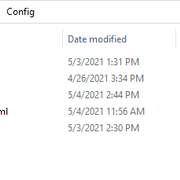
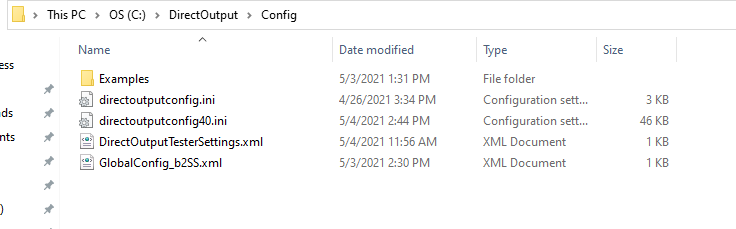
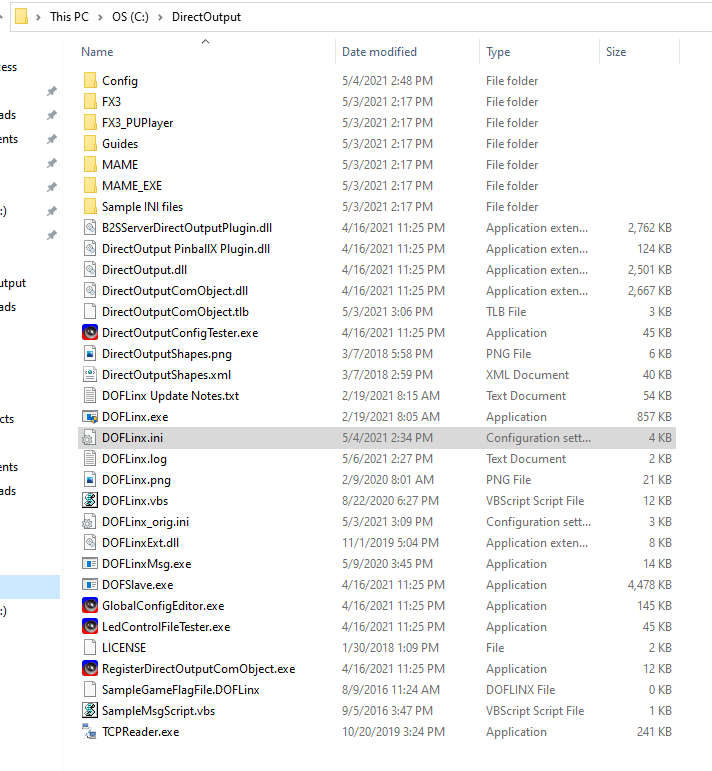
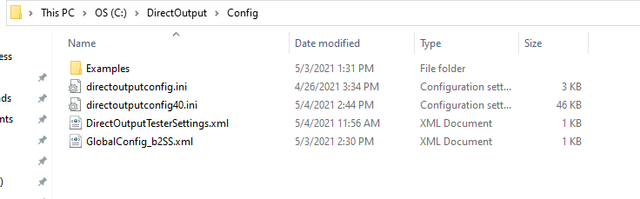
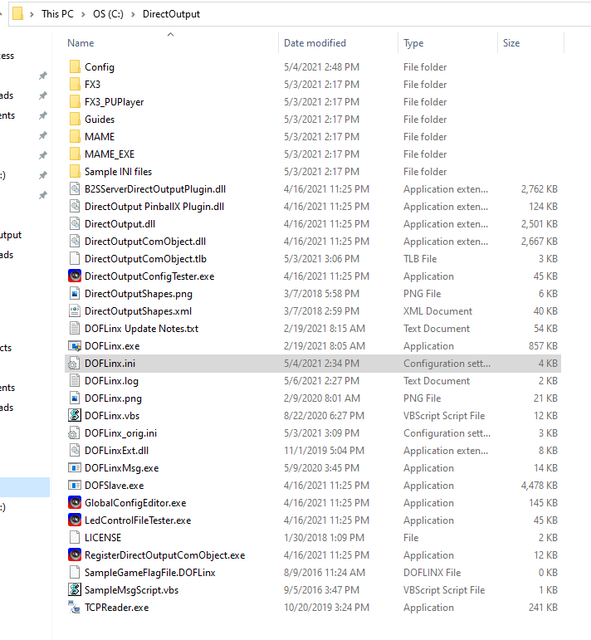
Can I see a a picture of your DirectOutput folder and the DirectOutput/config folder?


~ Impzu Not mine, but good VP Files -> Visual Pinball Archive

visualpinball100.pngpinballfx30.png


#10 SimpleSkin

SimpleSkin

    Hobbyist

  • Silver Supporter
  • 32 posts

  • Flag: United States of America

  • Favorite Pinball: Medieval Madness

  • PS3 Gamer Tag: SimpleSkin
  • 360 Gamer Tag: SimpleSkin

Posted 06 May 2021 - 09:44 PM

Thanks for looking. Trying to figure out image uploads on this forum.


Edited by SimpleSkin, 06 May 2021 - 09:51 PM.


#11 Impzu

Impzu

    Enthusiast

  • Members
  • PipPipPip
  • 90 posts

  • Flag: United States of America

  • Favorite Pinball: Adventure Land (Zen Studios 2017) and Gargamel Park (JPSalas 2016)

  • 360 Gamer Tag: Impzu

Posted 06 May 2021 - 09:55 PM

Ok, try making a copy of the DOFLinx.ini for backup, the try replacing your DOFLinx.ini with this one: https://mega.nz/fold...8it6LvHV5sdBxYw


~ Impzu Not mine, but good VP Files -> Visual Pinball Archive

visualpinball100.pngpinballfx30.png


#12 SimpleSkin

SimpleSkin

    Hobbyist

  • Silver Supporter
  • 32 posts

  • Flag: United States of America

  • Favorite Pinball: Medieval Madness

  • PS3 Gamer Tag: SimpleSkin
  • 360 Gamer Tag: SimpleSkin

Posted 06 May 2021 - 10:53 PM

Ok, try making a copy of the DOFLinx.ini for backup, the try replacing your DOFLinx.ini with this one: https://mega.nz/fold...8it6LvHV5sdBxYw


I get the same error as above. I would love to be able post images but this forum software doesn't allow me to or I'm blind. 


#13 SimpleSkin

SimpleSkin

    Hobbyist

  • Silver Supporter
  • 32 posts

  • Flag: United States of America

  • Favorite Pinball: Medieval Madness

  • PS3 Gamer Tag: SimpleSkin
  • 360 Gamer Tag: SimpleSkin

Posted 06 May 2021 - 11:11 PM

Ignore. I would delete but can't.


Edited by SimpleSkin, 06 May 2021 - 11:40 PM.


#14 wiesshund

wiesshund

    VPF Legend

  • Members
  • PipPipPipPipPipPipPip
  • 11,864 posts

  • Flag: United States of America

  • Favorite Pinball: How many can i have?

Posted 06 May 2021 - 11:15 PM

[url=https://ibb.co/kHwyt3H][img]https://i.ibb.co/kHwyt3H/Config.png[/img][/url] [url=https://ibb.co/Yk9KWtg][img]https://i.ibb.co/Yk9KWtg/Direct-Feedback.png[/img][/url]

LoL what?


Config.png


Direct-Feedback.png


Config.png


Direct-Feedback.png


If you feel the need to empty your wallet in my direction, i don't have any way to receive it anyways

Spend it on Hookers and Blow


#15 SimpleSkin

SimpleSkin

    Hobbyist

  • Silver Supporter
  • 32 posts

  • Flag: United States of America

  • Favorite Pinball: Medieval Madness

  • PS3 Gamer Tag: SimpleSkin
  • 360 Gamer Tag: SimpleSkin

Posted 06 May 2021 - 11:16 PM

Config.png
Direct-Feedback.png


#16 DDH69

DDH69

    Pinball Wizard

  • Platinum Supporter
  • 3,603 posts
  • Location:DOFLinx HQ, Adelaide

  • Flag: Australia

  • Favorite Pinball: Monster Bash

Posted 07 May 2021 - 04:58 AM

There is no config to do in DOFLinx to recognise a Sainsmart board.  DOFLinx simply queries DOF for Sainsmart, Pinscape, LEDwiz, etc output devices.  If DOF can see it then DOFLinx will see it.  Perhaps turn on and check your DOF log.


DOFLinx
Contributions for equipment to help with ongoing DOFLinx development can be made here

#17 SimpleSkin

SimpleSkin

    Hobbyist

  • Silver Supporter
  • 32 posts

  • Flag: United States of America

  • Favorite Pinball: Medieval Madness

  • PS3 Gamer Tag: SimpleSkin
  • 360 Gamer Tag: SimpleSkin

Posted 07 May 2021 - 12:24 PM

You have DOF working in VP?


Ok. I'm clearly missing a piece of the puzzle. I have enabled DOF logging as above and when I run the VP Nudge Test and Calibration table VP recognizes my KL25Z, plunger, accelerometer and buttons. However I don't see a DOF log file being generated. Do you have to start DOF? DOFLinx just crashes when I start it manually. Is there a sequence of events that I'm missing?


#18 Impzu

Impzu

    Enthusiast

  • Members
  • PipPipPip
  • 90 posts

  • Flag: United States of America

  • Favorite Pinball: Adventure Land (Zen Studios 2017) and Gargamel Park (JPSalas 2016)

  • 360 Gamer Tag: Impzu

Posted 07 May 2021 - 05:24 PM

Ok, first off, when you download directoutputonfig40.ini do you delete the original file and paste the new one or do you say 'Replace file in destination'? You need to delete the file first then replace it with the new one.

Next, with directoutputconfig.ini make sure it is a renamed copy of directoutputonfig40.ini

Third, ALWAYS run apps as an administrator. If you made a shortcut of DOFLinx.exe make sure the shortcut is running as an administrator

Fourth, make sure that ALL items in the DirectOutput folder are unblocked (Right-click>Properties>Unblock)

Fifth, try coping all files from the config folder to the main DirectOutput folder

Sixth, try renamed the 'Config' folder to 'config' (lowercase c)

Seventh, Are you trying to do fx3 or future pinball? If you are trying to do FP, then:

Change this line to DOFLinx.ini:

PROCESSES=Pinball FX3

To this line:

PROCESSES=Pinball FX3, Future Pinball


and set this line:

FP_ATTEMPT_LINK=1

to this:

FP_ATTEMPT_LINK=9000


Hope this helps!

~Impzu~


Edited by Impzu, 07 May 2021 - 06:10 PM.

~ Impzu Not mine, but good VP Files -> Visual Pinball Archive

visualpinball100.pngpinballfx30.png


#19 SimpleSkin

SimpleSkin

    Hobbyist

  • Silver Supporter
  • 32 posts

  • Flag: United States of America

  • Favorite Pinball: Medieval Madness

  • PS3 Gamer Tag: SimpleSkin
  • 360 Gamer Tag: SimpleSkin

Posted 07 May 2021 - 06:22 PM

Ok, first off, when you download directoutputonfig40.ini do you delete the original file and paste the new one or do you say 'Replace file in destination'? You need to delete the file first then replace it with the new one.

Next, with directoutputconfig.ini make sure it is a renamed copy of directoutputonfig40.ini

Third, ALWAYS run apps as an administrator. If you made a shortcut of DOFLinx.exe make sure the shortcut is running as an administrator

Fourth, make sure that ALL items in the DirectOutput folder are unblocked (Right-click>Properties>Unblock)

Fifth, try coping all files from the config folder to the main DirectOutput folder

Sixth, try renamed the 'Config' folder to 'config' (lowercase c)

Seventh, Are you trying to do fx3 or future pinball? If you are trying to do FP, then:

Change this line to DOFLinx.ini:

PROCESSES=Pinball FX3

To this line:

PROCESSES=Pinball FX3, Future Pinball


and set this line:

FP_ATTEMPT_LINK=1

to this:

FP_ATTEMPT_LINK=9000


Hope this helps!

~Impzu~


Ok. So I'm only trying to get FX3 to work with solenoids. KL25Z handles the inputs. I did everything you suggested minus the FP changes and I still get the original error. Do you have to start DOF or just DOFLinx? I feel like I'm missing a major piece and this is more than just a config issue.


Thanks you for everyones continued suggestions I really appreciate it. I really enjoy my play so far but I really want the solenoids and other toys down the road. I have the bug in a big way.


#20 Impzu

Impzu

    Enthusiast

  • Members
  • PipPipPip
  • 90 posts

  • Flag: United States of America

  • Favorite Pinball: Adventure Land (Zen Studios 2017) and Gargamel Park (JPSalas 2016)

  • 360 Gamer Tag: Impzu

Posted 07 May 2021 - 07:03 PM

Ok, are you using a 10 solenoid setup? If you are, then tell me which ports are hooked up to what feedback device(like port 7 is hooked up to a solenoid emulating a flipper, port 13 is hooked up to bumper back left, etc.)


~ Impzu Not mine, but good VP Files -> Visual Pinball Archive

visualpinball100.pngpinballfx30.png