Jump to content


Photo
- - - - -

Latest VPX 10.6 Beta & Windows 10 64 bit :: Load Times Unbearable


  • Please log in to reply
76 replies to this topic

#1 jdsabin1

jdsabin1

    Enthusiast

  • Silver Supporter
  • 220 posts
  • Location:Central USA

  • Flag: United States of America

  • Favorite Pinball: A sucker for EM tables....

Posted 26 August 2019 - 03:33 PM

Everyone – I am using the latest VPX 10.6 Beta (3751) and am running Windows 10 64 bit with the latest patches, etc. My problem is simple enough, I open Visual Pinball and when I go to open a table, it loads unbearably slow. It took a full 25 seconds for Capt. Card to load for example. I went so far as to whitelist folders for Windows defender but it made no difference. No other AV on the machine.


Running an i7-8700k, 16 GB memory, GTX 1070 TI.


Any suggestions most appreciated.


'The ball is wild!' - Harry Williams

#2 NailBuster

NailBuster

    Enthusiast

  • Members
  • PipPipPip
  • 301 posts

  • Flag: Canada

  • Favorite Pinball: YES

Posted 26 August 2019 - 04:38 PM

vpx video options, make sure you DO NOT have texture compression checked. 


is it one table or all?  if just one then try lastest version of table or a different directb2s file.


#3 jdsabin1

jdsabin1

    Enthusiast

  • Silver Supporter
  • 220 posts
  • Location:Central USA

  • Flag: United States of America

  • Favorite Pinball: A sucker for EM tables....

Posted 26 August 2019 - 05:42 PM

vpx video options, make sure you DO NOT have texture compression checked. 


is it one table or all?  if just one then try lastest version of table or a different directb2s file.

I will check the compression option. I know that I was surprised at just the one table loading so slow but I will test several others tonight. I know that load times have increased on 10.6 but I didn't think it was quite this bad. I will report back on the timing. Thanks for your reply. 


'The ball is wild!' - Harry Williams

#4 jdsabin1

jdsabin1

    Enthusiast

  • Silver Supporter
  • 220 posts
  • Location:Central USA

  • Flag: United States of America

  • Favorite Pinball: A sucker for EM tables....

Posted 26 August 2019 - 11:16 PM

Texture compression is off. I did some more timings with a stopwatch starting when I clicked open and got the following: 


TOTAN 4k - 20 seconds 

Attack From Mars - 16 seconds

Eight Ball Deluxe - 10 seconds 

STTG - 18 seconds 

Capt Card - 30 seconds (!) 


For those of you who know what timings are supposed to look like, are these in the realm of being normal then (outside of Capt. Card that is)? 


I haven't done any timings in regard to selecting 'play table' to see what those look like at this point. 


Thanks in advance. 


'The ball is wild!' - Harry Williams

#5 toxie

toxie

    VPF Veteran

  • VP Dev Team
  • PipPipPipPipPipPip
  • 5,746 posts
  • Location:berlin, germany

  • Flag: Germany

  • Favorite Pinball: AFM

Posted 27 August 2019 - 07:11 AM

Could you please do timings with the final 10.5 release, too?


#6 BlackPredator72

BlackPredator72

    I ❤ Pinball

  • Members
  • PipPipPip
  • 372 posts
  • Location:Haarlem, The Netherlands

  • Flag: Netherlands

  • Favorite Pinball: Demolition Man

  • PS3 Gamer Tag: BlackPredator72
  • 360 Gamer Tag: BlackPredator72

Posted 18 January 2021 - 02:12 PM

I have the same problem although it's 1.5 years later, so another build of VPX and Windows 10, so I'm curious if jdsabin1 have fixed his problem?


I'm in the middle of updating my tables and I noticed that the bigger tables, 100MB+ are suddenly having some extreme loading times, for example Bugs Bunny 2.4 (112MB) is "loading" for about 2 minutes.

I have an i5 7600k, GTX 1660 Super, M.2 drive and 16GB ram, so should be enough to display in 2K and loads tables fast enough.


When you start a table from within your table folder, the table first loads the table into VPX and after that the table continues to load and start the game. It's the first part that takes a long loading time (2 minutes). The second part goes as normal. I tried some older Betas and after that 10.6 but all the same. When I escape the table, still in VPX, and start the table again it loads quick.


Then I thought what did I change recently and maybe it started after I upgraded my Windows to 20H2. Before that I had 1909. I could restore a backup from the 1909.

But before I do that I'm wondering if I'm the only one with Win10 20H2 and/or this issue?


Another test, when I start a VP9 table, for example Domino's Pizza - The Pinball (Original 2018) which is 120MB it also loads and starts quickly.


A video how I start VPX beta 10.7, start a .vpx from the table folder and starting a .vpt :


https://www.screenca.../t/LfZODjvpsrzb


VPX-settings.png


Edited by BlackPredator72, 18 January 2021 - 03:36 PM.

43327.png?1581090420


#7 toxie

toxie

    VPF Veteran

  • VP Dev Team
  • PipPipPipPipPipPip
  • 5,746 posts
  • Location:berlin, germany

  • Flag: Germany

  • Favorite Pinball: AFM

Posted 18 January 2021 - 05:04 PM

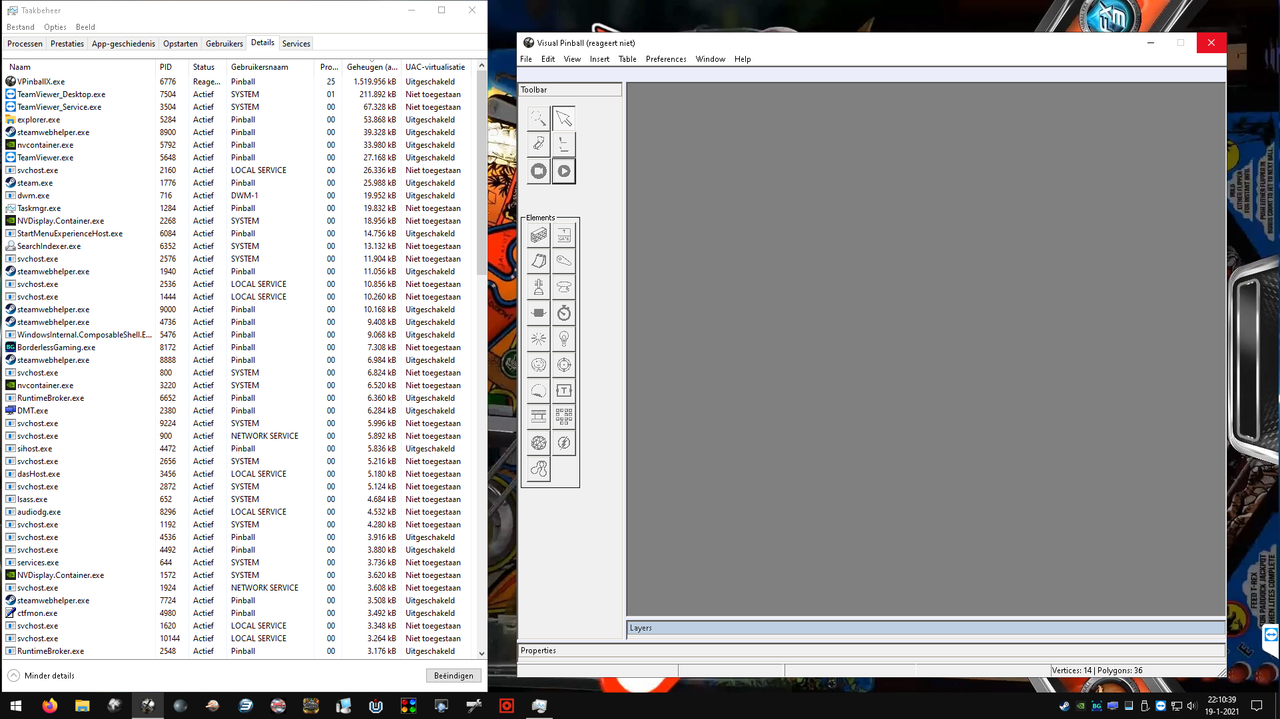
Pretty weird. Could you please check in the task manager under details if its only VPX 10.7 that occupies the CPU, or also other processes?


#8 wiesshund

wiesshund

    VPF Legend

  • Members
  • PipPipPipPipPipPipPip
  • 11,871 posts

  • Flag: United States of America

  • Favorite Pinball: How many can i have?

Posted 18 January 2021 - 07:15 PM

Weird

Win 10 pro 20H2
Laptop
i5 3230m 2.6Ghz

8GB ram

5400 rpm power efficient (meaning slow) HDD


Bugs Bunny Birthday Ball 2.4 table load time
from file explorer double clicking table file

From a cold boot


31 seconds from click to play


Using latest 10.7 build


2+ minutes seems heavily excessive, and also abnormal


curious to know exactly what the pc thinks it is doing for that 2 minutes


If you feel the need to empty your wallet in my direction, i don't have any way to receive it anyways

Spend it on Hookers and Blow


#9 BlackPredator72

BlackPredator72

    I ❤ Pinball

  • Members
  • PipPipPip
  • 372 posts
  • Location:Haarlem, The Netherlands

  • Flag: Netherlands

  • Favorite Pinball: Demolition Man

  • PS3 Gamer Tag: BlackPredator72
  • 360 Gamer Tag: BlackPredator72

Posted 19 January 2021 - 04:35 PM

Pretty weird. Could you please check in the task manager under details if its only VPX 10.7 that occupies the CPU, or also other processes?

Nothing strange there, did you see the video I posted under my message? Looks like the cpu, ram and drive are doing nothing...

Today I restored my backup, so back to Win10 1909 and what do you think? Still the same issue, so it's not Win10 20H2 related (as wiesshund already tested).


Some more tests, starting some vpx tables from the tables folder in seconds before the game is fully loaded:


NBA Mac (MAC S.A. 1996) - table 60MB and B2S 12MB: under 10 seconds

Night of the Living Dead '68 (Original 2018): 115MB and 23MB: 22 seconds

Bugs Bunny's Birthday Ball (Bally 1991): 109MB and 32MB: 110 seconds

America's Most Haunted (Spooky Pinball 2014): 152MB and 20MB: 17 seconds


Also closing VPX takes some more time then normal.


Then I renamed the Visual Pinball folder and downloaded the all-in-one VPX installer 10.6.0 and installed it as a fresh install.

Updated to VPX_7_beta_rev4377 and only have the Bugs Bunny table in there, but still the same problem.


Clean install of the Nvidia drivers...same issue.


Tried instead of 2 x 8GB ram, first the one 8GB module and then the other one, but also same problem.


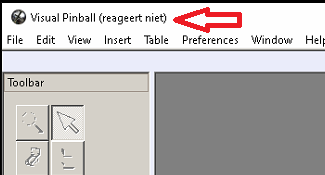
Sometimes when I start Bugs Bunny it's not only the blue circle not turning but also "not responding"
 

vpx.png


Edited by BlackPredator72, 19 January 2021 - 06:09 PM.

43327.png?1581090420


#10 toxie

toxie

    VPF Veteran

  • VP Dev Team
  • PipPipPipPipPipPip
  • 5,746 posts
  • Location:berlin, germany

  • Flag: Germany

  • Favorite Pinball: AFM

Posted 19 January 2021 - 07:36 PM


Pretty weird. Could you please check in the task manager under details if its only VPX 10.7 that occupies the CPU, or also other processes?

Nothing strange there, did you see the video I posted under my message? Looks like the cpu, ram and drive are doing nothing...


Yes, i saw the video, that's why i wondered if any other processes cause this (which you can only see via the 'details' tab).

Cause i simply cannot explain this behavior.


#11 wiesshund

wiesshund

    VPF Legend

  • Members
  • PipPipPipPipPipPipPip
  • 11,871 posts

  • Flag: United States of America

  • Favorite Pinball: How many can i have?

Posted 19 January 2021 - 07:43 PM

Do you have texture compression checked?


If you feel the need to empty your wallet in my direction, i don't have any way to receive it anyways

Spend it on Hookers and Blow


#12 toxie

toxie

    VPF Veteran

  • VP Dev Team
  • PipPipPipPipPipPip
  • 5,746 posts
  • Location:berlin, germany

  • Flag: Germany

  • Favorite Pinball: AFM

Posted 19 January 2021 - 07:59 PM

Good idea, but the screenshot doesn't indicate that.


#13 wiesshund

wiesshund

    VPF Legend

  • Members
  • PipPipPipPipPipPipPip
  • 11,871 posts

  • Flag: United States of America

  • Favorite Pinball: How many can i have?

Posted 19 January 2021 - 08:17 PM

Good idea, but the screenshot doesn't indicate that.

darn, missed that
so much for that idea


If you feel the need to empty your wallet in my direction, i don't have any way to receive it anyways

Spend it on Hookers and Blow


#14 BlackPredator72

BlackPredator72

    I ❤ Pinball

  • Members
  • PipPipPip
  • 372 posts
  • Location:Haarlem, The Netherlands

  • Flag: Netherlands

  • Favorite Pinball: Demolition Man

  • PS3 Gamer Tag: BlackPredator72
  • 360 Gamer Tag: BlackPredator72

Posted 19 January 2021 - 09:15 PM

Starting Bugs Bunny with the details tab open...and again...not responding, but eventually it loads


vpx-bugs.png


43327.png?1581090420


#15 wiesshund

wiesshund

    VPF Legend

  • Members
  • PipPipPipPipPipPipPip
  • 11,871 posts

  • Flag: United States of America

  • Favorite Pinball: How many can i have?

Posted 19 January 2021 - 09:33 PM

Woul;d it help to watch it in process explorer instead?


If you feel the need to empty your wallet in my direction, i don't have any way to receive it anyways

Spend it on Hookers and Blow


#16 Thalamus

Thalamus

    VPF Veteran

  • Platinum Supporter
  • 5,007 posts

  • Flag: Norway

  • Favorite Pinball: GOT, Alien Star, LOTR, TOM

Posted 19 January 2021 - 10:04 PM

When I need to peek into what is going on in a windows machine - I tend to use some of system internals utilities. Process explorer / Process monitor might be of help. Not saying that it will help in this case, but, if it is outside of vpx's control/fault, you might be able to see it.


From now on. I won't help anyone here at VPF. Please ask Noah why that is.


#17 toxie

toxie

    VPF Veteran

  • VP Dev Team
  • PipPipPipPipPipPip
  • 5,746 posts
  • Location:berlin, germany

  • Flag: Germany

  • Favorite Pinball: AFM

Posted 19 January 2021 - 10:06 PM

I absolutely don't get what the problem here could be. :/

On my laptop Bugs Bunny loads pretty fast, same mem usage as yours, etc.


#18 BlackPredator72

BlackPredator72

    I ❤ Pinball

  • Members
  • PipPipPip
  • 372 posts
  • Location:Haarlem, The Netherlands

  • Flag: Netherlands

  • Favorite Pinball: Demolition Man

  • PS3 Gamer Tag: BlackPredator72
  • 360 Gamer Tag: BlackPredator72

Posted 20 January 2021 - 11:49 AM

Ok, so I downloaded this little tool called Process Monitor v3.61 https://docs.microso...wnloads/procmon

No need for install so started the program and created a filter for: VPinballX.exe, B2SBackglassServerEXE.exe and PinUpDisplay.exe

Then I went to the tables folder and started the Bugs Bunny.vpx file. I ended the process when the table was fully loaded and after that closed Visual Pinball.

I saved the result in the program native format PML: https://www.dropbox....ogfile.PML?dl=0

So if someone can have a look, just download Process Monitor (it's a portable file) and just open the PML file.

I searched a little bit through all the events but I don't know what a normal result would look like, so no good comparison.


43327.png?1581090420


#19 batch

batch

    VPFroggie

  • Members
  • PipPipPipPipPip
  • 2,189 posts
  • Location:Center of France

  • Flag: France

  • Favorite Pinball: Anyone if gaming and appearence are great

Posted 20 January 2021 - 12:47 PM

Topic error, sorry


Edited by batch, 20 January 2021 - 05:23 PM.

signature_juin2026-1.jpg     signature_juin2026-2.jpg       


DIRECT LINK TO MY TABLES :  http://www.vpforums....loads&mid=30858    


#20 jpsalas

jpsalas

    Grand Schtroumpf

  • VIP
  • 7,395 posts
  • Location:I'm Spanish, but I live in Oslo (Norway)

  • Flag: Norway

  • Favorite Pinball: I like both new and old, but I guess I prefer modern tables with some rules and goals to achieve.


Posted 20 January 2021 - 05:48 PM

I guess this is about beta 10.7 taking longer time loading a table than in 10.6. But in my computer it doesn't take so long, I guess it takes about twice the time to load it than it does in 10.6. The bigger the table the longer it takes. 

Also, if I load two tables and when I switch between them to copy/paste something,  it takes also much longer to switch between them. 


If you want to check my latest uploads then click on the image below:


vp.jpg