Not sure if this is a Hyperpin, VP, or Virtuapin encoder issue. In Hyperpin when I try to exit a VP table I get the VP (exit) menu instead of the Hyperpin exit menu. How do I fix this?
Running FPlaunch also.
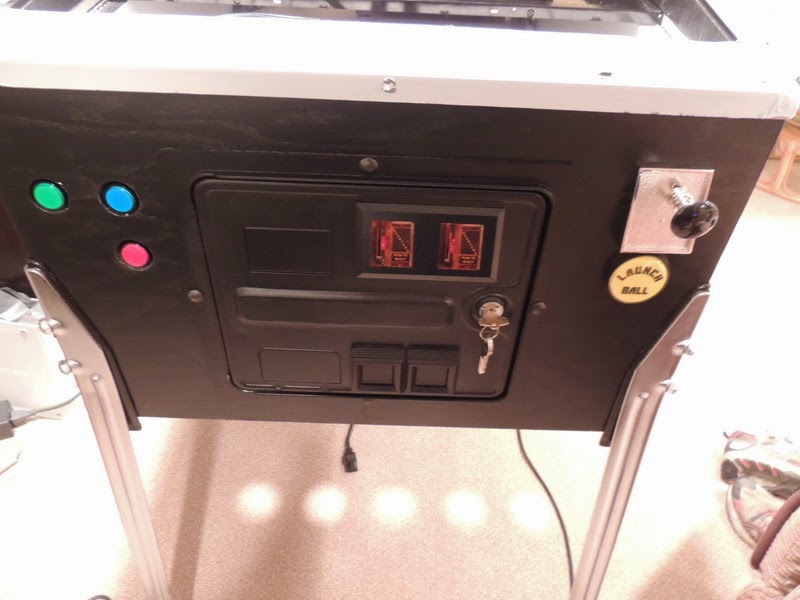
Mounting location

From the front:



Enthusiast


Posted 13 June 2013 - 01:35 AM
Not sure if this is a Hyperpin, VP, or Virtuapin encoder issue. In Hyperpin when I try to exit a VP table I get the VP (exit) menu instead of the Hyperpin exit menu. How do I fix this?
Running FPlaunch also.
Mounting location
From the front:
Cantankerous old B****D


Posted 13 June 2013 - 03:51 AM
Change the exit button value in hyperpin to "e" instead of "esc"
Don't pm or expect an answer from me here ... the links above are my contacts.
I know so much about so little that I could teach you all there is to know about nothing......
Enthusiast
Posted 13 June 2013 - 02:52 PM
So let me back up a little....before I rcvd the plunger kit I was using a keyboard and everything works (and still does with the keyboard). Short press on the keyboard brings up the menu, long press exits the table. Now on the virtuapin encoder I think it may be mapped to ESC??? I didn't see a way to change it in joy.cpl but I'll look again.
VP has the default 'Q' for exit.
[Main]
Version             = 0.5.0.0
Starting_Genre      = All Games

[Video]
Playfield_Monitor   = Primary
Playfield_Rotation  = 270
Backglass_Monitor   = Secondary
Quality             = BEST
Table_Video_Enabled = true
Table_Video_Offset  = 50
Use_Backglass       = true
Backglass_Image_x   = 0
Backglass_Image_y   = 0
Backglass_Image_w   = 1280
Backglass_Image_h   = 1024
Backglass_Image_r   = 0
Backglass_Delay     = .1


[Future Pinball]
Show_Games          = true
Exe                 = Future Pinball.exe
Path                = D:\Future Pinball\
Table_Path          = D:\Future Pinball\Tables\
Table_Video_Path    = D:\HyperPin\Media\Future Pinball\Table Videos\
Table_Image_Path    = D:\HyperPin\Media\Future Pinball\Table Images\
Backglass_Image_Path= D:\HyperPin\Media\Future Pinball\Backglass Images\


[Visual Pinball]
Show_Games          = true
Path                = D:\VPinball\
Table_Path          = D:\VPinball\Tables\
Table_Video_Path    = D:\HyperPin\Media\Visual Pinball\Table Videos\
Table_Image_Path    = D:\HyperPin\Media\Visual Pinball\Table Images\
Backglass_Image_Path= D:\HyperPin\Media\Visual Pinball\Backglass Images\
Exe                 = VPinball.exe

[Wheel]
Speed               = low
Text_Font           = Style2
Text_Stroke_Size    = 5
Text_Stroke_Color   = 0x000000
Text_Color1         = 0xe10008
Text_Color2         = 0xFFFFFF
Text_Color3         = 0xe10008
Color_Ratio         = 100
Shadow_Distance     = 0
Shadow_Angle        = 45
Shadow_Color        = 0x000000
Shadow_Alpha        = 1
Shadow_Blur         = 0

[Intro Video]
Use_Intro           = false
Skip_On_Keypress    = false


[Sound]
Master_Volume       = 100
Video_Volume        = 100
Sound_FX_Volume     = 50
Wheel_Sound_Volume  = 75

[AttractMode]
Active              = true
Time                = 60
MaxSpinTime         = 5

[Press Start Text]
Enabled             = true
Text1               = Free Play
Text2               = Press Start
Color               = 0xe10008

[Keyboard]
Key_Delay           = false
Start               = 13
Exit                = 69
Up                  = 150
Down                = 149
SkipUp              = 191
SkipDown            = 90
Flyer               = 70
Instruction         = 73
Genre               = 71
Service             = 9


[Pinball Wizard]
Joy                 = 0
Start               = 9
Exit                = 8
Up                  = 2
Down                = 10
SkipUp              = 3
SkipDown            = 11
Flyer               = 4
Insruction          = 5
Genre               = 7
Service             = 15

[Flyer]
BottomX             = 300
CenterY             = 360

[Instruction]
Width               = 600
BottomX             = 250
CenterY             = 360

[Exit]
Enable_Exit_Screen  = true
Exit_HyperPin       = true
Shutdown            = false
Enable_Shortcut     = true
Shortcut_Action     = exit
Shortcut_Time       = 3


[Startup Program]
Executable          = D:\HyperPin\ledset.bat
Parameters          =
Working_Directory   =
WinState            = HIDDEN

[Exit Program]
Executable          = D:\HyperPin\ledoff.bat
Parameters          =
Working_Directory   =
WinState            = NORMAL

[FPLaunch]
exitEmulatorKey=e
exitScriptKey=q & s
exitKey=e
exitKey1=p
enterKey=1
enterKey1=Enter
upKey=LShift
upKey1=LShift
downKey=RShift
downKey1=RShift
toggleCursorKey=t
hideCursor=true
hideDesktop=true
hideTaskbar=true
useLoadingScreen=true
useExitScreen=true
useExitAsPause=true
useExitMenu=true
fadespeed=25
pauseFPKey=RButton
saveFPTables=true
editTableKey=!F4
printScreenKey=o
printBGKey=u
pfScreenNum=1
bgScreenNum=2
flyerKey=f
instructionsKey=i
hyperScale=0.75
debugMode=file
ledwiz=true
toggleLedwizKey=1
hyperpinexe=hyperpin.exe
focusSleep=500
useFocus=both
Pinball Fan



 Contributor
Posted 15 June 2013 - 09:37 AM
Enthusiast
Posted 15 June 2013 - 02:04 PM
Oh so close now.......
I changed the up/down/enter keys to the below highlighted and now I can navigate in the exit menu.
[FPLaunch]
exitEmulatorKey=Joy8
exitScriptKey=q & s
exitKey=Joy8
exitKey1=p
enterKey=1
enterKey1=Joy9
upKey=LShift
upKey1=Joy10
downKey=RShift
downKey1=Joy2
I put Joy8 for exitkey and exitemulatorkey and that pulls up the exit menu, but the only issue now is it also pulls the VP exit menu. So at this point I have the ability to exit but not pause. The VP exit key is set to the default 'Q'.
Z
'Rasslin' Fan

 Contributor
Posted 15 June 2013 - 09:19 PM
I was having a similar issue- resolved that- now visual pinball crashes exiting to hyperpin on nearly every table :-(That would be a software issue, not the fault of the plunger kit. We intentionally used the same profile as the Nanotech kit to make it an easy swap out.












My Photobucket Resources
Whether You Believe You Can, Or You Can't, You Are Right." - Henry Ford
The future of pinball lives, it just needs to be nurtured!
If you're here to stab me in the back, you're going to have to get in line.
Pinball Fan
Contributor
Posted 16 June 2013 - 01:35 PM
I put Joy8 for exitkey and exitemulatorkey and that pulls up the exit menu, but the only issue now is it also pulls the VP exit menu. So at this point I have the ability to exit but not pause. The VP exit key is set to the default 'Q'.
Z
Edited by koadic, 16 June 2013 - 01:48 PM.
Pinball Fan


Posted 16 June 2013 - 07:23 PM
I have a setup that closes everything clean, except the occasional dB2S that crashes, even with the exit sub. Driving me nuts.I was having a similar issue- resolved that- now visual pinball crashes exiting to hyperpin on nearly every table :-(

'Rasslin' Fan
Contributor
Posted 16 June 2013 - 08:08 PM
I have a setup that closes everything clean, except the occasional dB2S that crashes, even with the exit sub. Driving me nuts.I was having a similar issue- resolved that- now visual pinball crashes exiting to hyperpin on nearly every table :-(
Care to share that setup.
Of course! I just want to try to figure out the dB2S issue first.

My Photobucket Resources
Whether You Believe You Can, Or You Can't, You Are Right." - Henry Ford
The future of pinball lives, it just needs to be nurtured!
If you're here to stab me in the back, you're going to have to get in line.
Enthusiast
Posted 17 June 2013 - 02:03 AM
With the below VP no longer brings up the exit menu, when exiting HP.
My setup for getting the Virtuapin plunger to exit correctly:


[Main]
Version             = 0.5.0.0
Starting_Genre      = All Games

[Video]
Playfield_Monitor   = Primary
Playfield_Rotation  = 270
Backglass_Monitor   = Secondary
Quality             = BEST
Table_Video_Enabled = true
Table_Video_Offset  = 50
Use_Backglass       = true
Backglass_Image_x   = 0
Backglass_Image_y   = 0
Backglass_Image_w   = 1280
Backglass_Image_h   = 1024
Backglass_Image_r   = 0
Backglass_Delay     = .1


[Future Pinball]
Show_Games          = true
Exe                 = Future Pinball.exe
Path                = D:\Future Pinball\
Table_Path          = D:\Future Pinball\Tables\
Table_Video_Path    = D:\HyperPin\Media\Future Pinball\Table Videos\
Table_Image_Path    = D:\HyperPin\Media\Future Pinball\Table Images\
Backglass_Image_Path= D:\HyperPin\Media\Future Pinball\Backglass Images\


[Visual Pinball]
Show_Games          = true
Path                = D:\VPinball\
Table_Path          = D:\VPinball\Tables\
Table_Video_Path    = D:\HyperPin\Media\Visual Pinball\Table Videos\
Table_Image_Path    = D:\HyperPin\Media\Visual Pinball\Table Images\
Backglass_Image_Path= D:\HyperPin\Media\Visual Pinball\Backglass Images\
Exe                 = VPinball.exe

[Wheel]
Speed               = low
Text_Font           = Style2
Text_Stroke_Size    = 5
Text_Stroke_Color   = 0x000000
Text_Color1         = 0xe10008
Text_Color2         = 0xFFFFFF
Text_Color3         = 0xe10008
Color_Ratio         = 100
Shadow_Distance     = 0
Shadow_Angle        = 45
Shadow_Color        = 0x000000
Shadow_Alpha        = 1
Shadow_Blur         = 0

[Intro Video]
Use_Intro           = false
Skip_On_Keypress    = false


[Sound]
Master_Volume       = 100
Video_Volume        = 100
Sound_FX_Volume     = 50
Wheel_Sound_Volume  = 75

[AttractMode]
Active              = true
Time                = 60
MaxSpinTime         = 5

[Press Start Text]
Enabled             = true
Text1               = Free Play
Text2               = Press Start
Color               = 0xe10008

[Keyboard]
Key_Delay           = false
Start               = 13
Exit                = 69
Up                  = 150
Down                = 149
SkipUp              = 191
SkipDown            = 90
Flyer               = 70
Instruction         = 73
Genre               = 71
Service             = 9


[Pinball Wizard]
Joy                 = 0
Start               = 9
Exit                = 8
Up                  = 2
Down                = 10
SkipUp              = 3
SkipDown            = 11
Flyer               = 4
Insruction          = 5
Genre               = 7
Service             = 15

[Flyer]
BottomX             = 300
CenterY             = 360

[Instruction]
Width               = 600
BottomX             = 250
CenterY             = 360

[Exit]
Enable_Exit_Screen  = true
Exit_HyperPin       = true
Shutdown            = false
Enable_Shortcut     = true
Shortcut_Action     = exit
Shortcut_Time       = 3


[Startup Program]
Executable          = D:\HyperPin\ledset.bat
Parameters          =
Working_Directory   =
WinState            = HIDDEN

[Exit Program]
Executable          = D:\HyperPin\ledoff.bat
Parameters          =
Working_Directory   =
WinState            = NORMAL

[FPLaunch]
exitScriptKey=q & s
exitKey=Joy8
exitKey1=p
enterKey=1
enterKey1=Joy9
upKey=LShift
upKey1=Joy10
downKey=RShift
downKey1=Joy2
toggleCursorKey=t
hideCursor=true
hideDesktop=true
hideTaskbar=true
useLoadingScreen=true
useExitScreen=true
useExitAsPause=true
useExitMenu=true
fadespeed=25
pauseFPKey=RButton
saveFPTables=true
editTableKey=!F4
printScreenKey=o
printBGKey=u
pfScreenNum=1
bgScreenNum=2
flyerKey=f
instructionsKey=i
hyperScale=0.75
debugMode=file
ledwiz=true
toggleLedwizKey=1
hyperpinexe=hyperpin.exe
focusSleep=500
useFocus=both
[LastLoad]
system=Future Pinball
table=Spiderman (Stern 2007) RL 2.0
'Rasslin' Fan
Contributor
Posted 17 June 2013 - 04:15 AM
I wonder why I'm not having any problems with this...... ?You're probably using a different version of FPLaunch.
I have a VirtuaPin as well.
My Photobucket Resources
Whether You Believe You Can, Or You Can't, You Are Right." - Henry Ford
The future of pinball lives, it just needs to be nurtured!
If you're here to stab me in the back, you're going to have to get in line.
Enthusiast

Posted 18 June 2013 - 04:19 AM
I wonder why I'm not having any problems with this...... ?Hmm, me too - I'm using the EXACT same hyperpin, fplaunch and visual pinball as you!
I have a VirtuaPin as well.
Edited by lowepg, 18 June 2013 - 04:24 AM.
<<< Grand Champion >>>

Posted 18 June 2013 - 04:21 AM
Maybe it's that NEW plunger kit...i have the older version I believe...and I don't have the real DMD, just the 3rd monitor for the DMD.

Enthusiast
Posted 18 June 2013 - 04:26 AM
Maybe it's that NEW plunger kit...i have the older version I believe...and I don't have the real DMD, just the 3rd monitor for the DMD.Well, if the only differences are the display and the plunger kit.... Could be. It seems less likely the different display would be the issue, right?
Edited by lowepg, 18 June 2013 - 04:34 AM.
'Rasslin' Fan
Contributor
Posted 18 June 2013 - 04:33 AM
My Photobucket Resources
Whether You Believe You Can, Or You Can't, You Are Right." - Henry Ford
The future of pinball lives, it just needs to be nurtured!
If you're here to stab me in the back, you're going to have to get in line.


Community Forum Software by IP.Board
Licensed to: VPForums.org
 are all trademarks of VPFORUMS.
 Top
Top