Jump to content


Photo
* * * * * 2 votes

ClrVpin - content management tool


  • Please log in to reply
17 replies to this topic

#1 stoj

stoj

    Hobbyist

  • Members
  • PipPip
  • 47 posts

  • Flag: Australia

  • Favorite Pinball: acdc

Posted 02 August 2022 - 10:37 AM

Version 8.0.0 released - available from the releases page at github.
 
ClrVpin is an open source virtual pinball content management tool.  Designed to automate the manual tasks of keeping your collections and databases..
  • Current
  • Accurate
  • Clean
  • Minimal
 
Features
  1. Feeder - check online feeds for potential updates to your collection.
    • Browse the VPS (open source) feed using customizable filters - e.g. last update time, table type, manufacturer, content type, etc.
    • Open the web browser to review, rate, and download content.
    • Frontend agnostic.
  2. Merger - merge downloaded updated content into your collection.
    • Apply criteria to automatically ignore certain files - e.g. older files, too small, adult content, etc.
    • Applies fuzzy logic algorithms to match the file names to the entries in your collection - e.g. author, version, acronyms, incorrect manufacturer/year, etc.
    • Use 'trainer wheels' mode that allows you to review the changes that would be made before any changes are actually made.
    • Automatically backup your files before making any changes.
  3. Cleaner - clean the existing content in your collection (e.g. after merge).
    • Fix files that satisfy customizable criteria - e.g. incorrectly named files, obsolete files, etc.
    • Detailed reports on what was changed
    • Plus all the features offered by Merger.. fuzzy matching, trainer wheels, automated backups, etc.
  4. Explorer - explore content in your collection.
    • Identify missing and out of date content - e.g. missing wheel, out of date table video, etc.
    • Apply customizable filters to locate the table(s) of interest.
    • View and edit all table information stored in your database.
    • Open the content to see how it looks/sounds/etc - e.g. open images, play videos, listen to table audio, etc.
 
Supported Applications
 
Note
  • By design, it will update your collection's files and database(s).  All changes are backed up before any changes are made, but if in doubt please make your own additional backup too.  Also, it can be run in 'trainer wheels' mode which describes what would be made without actually making any changes.
  • Once installed, there is an automatic update option to ensure it keeps in sync with the latest version.
 
More information available on the github wiki.
 
I hope you find it useful as I do.. enjoy
 
home.png   db-update-matched-table.png   image-popup.png   tables-updated-popup.png   settings.png   settings.png   results.pngresults-popup.png   logs.png   settings.png

Edited by stoj, 13 September 2023 - 01:57 PM.


#2 stoj

stoj

    Hobbyist

  • Members
  • PipPip
  • 47 posts

  • Flag: Australia

  • Favorite Pinball: acdc

Posted 02 August 2022 - 01:52 PM

Version 4 released earlier today which completes one of the last major milestones in the roadmap.


ClrVpin can now synchronize the local Pinbally/PinballX database wiht updates from information from online sources.  For example you can now automatically update your local database to..

  • Add missing tables, e.g. add any missing manufactured/original table entries to your collection.
  • Add missing information in your existing collection, e.g. add IPDB references, authors, etc.
  • Fix information in your existing collection, e.g. wrong manufacturer/year, table name, etc.

Also includes are a host of other improvements such as fuzzy matching, feed fixes, UI, identifying manufactured vs original tables, etc.


More information available in the release notes if you're keen.


#3 Mike DA Spike

Mike DA Spike

    Pinball Fan

  • Platinum Supporter
  • 1,280 posts
  • Location:Hoofddorp

  • Flag: Netherlands

  • Favorite Pinball: Too many to mention

Posted 03 August 2022 - 03:22 AM

I'm pretty curious about it, so I will give it a try

Edited by Mike DA Spike, 03 August 2022 - 03:23 AM.

331ddabcc742f0ba74791e946eb0f791.gif Try PinballX Database manager as a replacement of PinballX's game list manager
With special thanks to Scutters 


#4 Mike DA Spike

Mike DA Spike

    Pinball Fan

  • Platinum Supporter
  • 1,280 posts
  • Location:Hoofddorp

  • Flag: Netherlands

  • Favorite Pinball: Too many to mention

Posted 04 August 2022 - 04:07 AM

It took a while before I understand why the fuzzy search was greyed out (also Scanner and rebuilder)
Within the settings the PinballX was not configured automaticlly and didn't notice the scroll bar -duh- !  :stunned:

When checking fuzzy search the app crashes (i created an issue on  .github for you)


btw. Don't understand the slide bar for the fuzy search either. what  does the 50-250 means ?

I should assume that 250 is matching exact word matching and the default 100 just a guess on 25% of the word ?


331ddabcc742f0ba74791e946eb0f791.gif Try PinballX Database manager as a replacement of PinballX's game list manager
With special thanks to Scutters 


#5 stoj

stoj

    Hobbyist

  • Members
  • PipPip
  • 47 posts

  • Flag: Australia

  • Favorite Pinball: acdc

Posted 04 August 2022 - 01:09 PM

Thanks for the feedback Mike.


Scrolling - it's tricky sometimes with scrolling content to show that there's more content further down.  I'll tweak it a little in the next version the last item is partly drawn by default as a visual queue there's more below.  Also, if you've got a standard PinballY/X folder setup then you can also use the 'wand' icon to assign them automatically base on the parent folder.


Crash - thanks for raising it on github.  Sounds like your xml file may not be "well formed".  Should be ean easy one to sort out :)


Fuzzy search slider - it's essential as you've described.  The tables from your xml file get matched against the tables in the online feed (or your physical files in the case of rebuilder) based on various criteria and get scored.  The scores are normalised so 100 (default value) indicates a successful match, but you can override this via the slider too.


Edited by stoj, 05 August 2022 - 12:25 AM.


#6 stoj

stoj

    Hobbyist

  • Members
  • PipPip
  • 47 posts

  • Flag: Australia

  • Favorite Pinball: acdc

Posted 09 October 2022 - 02:18 PM

Version 5 released today.  This release has a lot of UI/memory/usability/performance improvements.


Also, Importer has reached another milestone and now provides full support for unmatched tables (i.e. those that exist in your local collection, but can't be located online).  For instance, unmatched table DB entries can now be editted similar to matched tables.  Also unmatched tables are now displayed in the same list as matched and missing tables.


More information available in the release notes.


Edited by stoj, 10 October 2022 - 01:10 AM.


#7 stoj

stoj

    Hobbyist

  • Members
  • PipPip
  • 47 posts

  • Flag: Australia

  • Favorite Pinball: acdc

Posted 23 October 2022 - 09:57 AM

Version 6 released today.


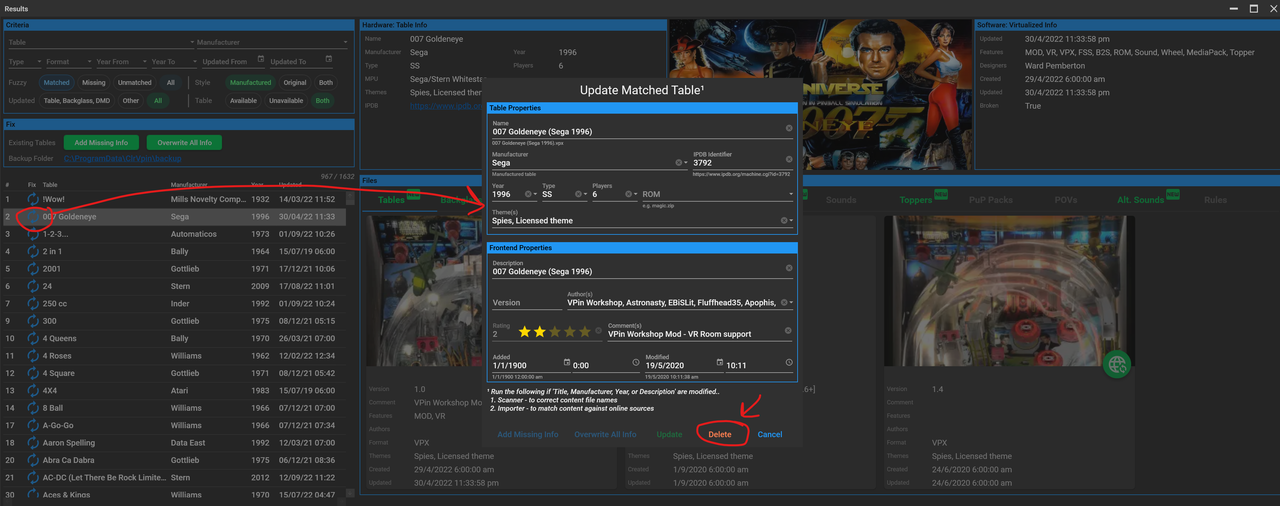
This release supports deleting table entries from your local database. The corresponding table/backglass/media/etc will also be automatically deleted when Scanner is run.

image.png


The release also includes some other improvements.. unmatched table information is used in the driop down filters, more options are persisted across applicaiton restart, 'check for applicaiton update' dialog lets you scroll through all missed versions, plus a few minor bug fixes.


More information available in the release notes.  Enjoy.


Edited by stoj, 23 October 2022 - 10:06 AM.


#8 stoj

stoj

    Hobbyist

  • Members
  • PipPip
  • 47 posts

  • Flag: Australia

  • Favorite Pinball: acdc

Posted 15 November 2022 - 02:19 PM

Version 6.3.1 is available.


This version and it's predecessors (6.1.0 and 6.2.0) include various improvements for..

  • User interface.
  • Performance.
  • Fix some edge case bugs.
  • Feed fixes.
  • Extended the fuzzy matching logic to increase the matching success.

Edited by stoj, 15 November 2022 - 11:12 PM.


#9 stoj

stoj

    Hobbyist

  • Members
  • PipPip
  • 47 posts

  • Flag: Australia

  • Favorite Pinball: acdc

Posted 01 April 2023 - 03:54 PM

Version 7.0.0 released today, which contains some signifcant improvements..

  1. Visually - rebranded feature names to better describe their purpose, larger/clearer UI controls, improved help tips, etc.
  2. Settings - reworked the folder setup to make it a lot simpler to setup.  The folders can now be automatically assigned based on the detected installed applications: Visual Pinball X, Pinball Y, and Pinball X.
  3. Explorer - new feature to allow exploring  your collection.. identify missing and out of date content, edit tables, open content, etc.
  4. Feeder (previously called Importer) - added exclude filters to make it easier to identify new content of interest.
  5. Merger (previous called Rebuilder) - fuzzy logic improvements to match more edge case scenario file naming.
  6. Cleaner (previously called Scanner) - dropped the 'explorer' window in favour of the new stand alone 'Explorer' feature (refer above).
More information available on github release page.


#10 stoj

stoj

    Hobbyist

  • Members
  • PipPip
  • 47 posts

  • Flag: Australia

  • Favorite Pinball: acdc

Posted 30 April 2023 - 01:26 PM

Version 7.1.0 released.


Amongst other things, adds support for..

  • Extracting the ROM name from the VPX table script file.
  • Adds support for a CLI.

More detailed info available from the github release page.


#11 Tesla

Tesla

    Pinball Fan

  • Silver Supporter
  • 1,526 posts
  • Location:Texas, USA

  • Flag: United States of America

  • Favorite Pinball: Star Trek - TNG

Posted 30 April 2023 - 04:13 PM

I need to install this and take a look.


A forum member introduced and recommended it to me. I use PinballY for my 40 or so VPX Tables (mostly 80s-90s Recreations). I'm drifting more to Quality (and a perfect cabinet config/experience for each Table) vs Quantity.


I was just getting ready to start a spreadsheet of my VPX Tables to keep track of them and their specifics. Since my Pinball cabinet is not always powered-up, I was thinking of using Google-Sheets so I can also access the info from my real daily-driver Windows machine. Excel is another possibility (I have MSO 2021 Pro on my daily-driver and free Excel is available on Pinball machine).


I'm hoping this app is fairly "portable" or self-contained so I can run it from ... I'm thinking OneDrive (from both/either machines, but not concurrently).


Edited by Tesla, 30 April 2023 - 04:17 PM.


#12 Tesla

Tesla

    Pinball Fan

  • Silver Supporter
  • 1,526 posts
  • Location:Texas, USA

  • Flag: United States of America

  • Favorite Pinball: Star Trek - TNG

Posted 02 May 2023 - 03:29 AM

Once I saw what this really does, I gave-up on the "Install to OneDrive" idea as I see that it wasn't meant to be run without continual access to VPX and VPinball folders. No big deal. I need to install Ultra-VNC on my Pinball machine anyway (for other reasons).


Install went fine on Windows-10. Got the required Dot-Net-6.x Desktop Runtime and immediately upgraded to v7.2.0. The Wizard for setting-up/accessing my VPX and PinballY installations worked fine. Said I had 37 Tables and no missing ROMS or directB2S files (which is correct).


Although this is not really what I had in mind for my original objective, this is pretty cool and could potentially be useful. I like how the UI is formatted for a Windows desktop in the Portrait orientation. 


Is there a support-forum? Would you be in interested in some feedback, some initial impressions, and how a new/clean install ended-up handling what it found on my system?


Edited by Tesla, 02 May 2023 - 03:31 AM.


#13 stoj

stoj

    Hobbyist

  • Members
  • PipPip
  • 47 posts

  • Flag: Australia

  • Favorite Pinball: acdc

Posted 27 May 2023 - 06:46 AM

Hi Tesla, sorry I hadn't replied earlier but somehow my vpforum 'follow topic' setting had been cleared :(


Here's some quick bullet point answers..

  • There should be no problem specifying a thumb drive to install it too.  Note, the backups by default is assigned to 'c:\programdata\ClrVpin' but this folder location can be changed to your thumb drive too if you prefer.
  • You can run the 'feeder' feature without the VPX/PinballX/PinballY folders available if you prefer.  It will run with full functionality (i.e. checking for table/content update) except that the option to update your PinballY/PinballX database file(s) will be disabled.
  • Regarding quality vs quantity, I'm hoping ClrVpin can cater for both :)  One of the key intentions behind ClrVpin is to ensure the table/content collection is 100% accurate and upto date.
  • Regarding the spreadsheet, a lot of this information is already available via your PinballY DB file(s) in xml format.  But if you've got any extra you're wanting, then perhaps an 'export metadata' option could be added that links in the online information, folder names, etc to a few different file formats such as json, csv, etc.

I'm definitely interested in any feedback (good or otherwise)..  Feel free to post here or start a discussion/issue via github.. https://github.com/stojy/ClrVpin.


Edited by stoj, 27 May 2023 - 07:06 AM.


#14 jarr3

jarr3

    Enthusiast

  • Platinum Supporter
  • 203 posts
  • Location:Frankfurt, Germany

  • Flag: Sweden

  • Favorite Pinball: Medieval Madness

Posted 14 July 2023 - 05:45 AM

Hi,


would really like to try this out, though I am using PinUp Popper... any idea how we could make it work with PinUp Popper as well?


I was thinking about an export to/from the Pup Database to PinballY format, could be a solution? Or do you have a plugin system, so that the PinballX/Y reader, writer could be replaced?


Just thinking loud...


#15 stoj

stoj

    Hobbyist

  • Members
  • PipPip
  • 47 posts

  • Flag: Australia

  • Favorite Pinball: acdc

Posted 16 July 2023 - 10:43 AM

Hi jarr3, you can still use the 'feeder' functionality (which checks for content updates) as this is agnostic of the front end.  So much so, it doesn't care if you have a front end installed/setup.


From a technical perspective, it should be reasonably straighforward to import/export to an alternative DB type/format.  Or as you suggest, support a plugin interface to accommodate a third party driver.


The problem is more philosophical.  My intention is to embrace/extend the virtual pinball open source community and unfortunately (AFAIK) PinUp Popper isn't open source.  If it were open soruce, I'd definitely support it.


That said, never say never.. since I am mid-way through adding some limited PuP pack (also not open source) support to ClrVpin so it doesn't identify tables having missing backglass if they use PuP instead of DB2S.


If you feel strongly about it, please raise an enhancement request on github.. ideally with with some technical details about the popper DB (which I believe uses SQLite) format/table/etc.  I'll give it some thought.


Edited by stoj, 16 July 2023 - 11:43 AM.


#16 stoj

stoj

    Hobbyist

  • Members
  • PipPip
  • 47 posts

  • Flag: Australia

  • Favorite Pinball: acdc

Posted 13 September 2023 - 02:12 PM

Version 8.0.0 released.


This release has quite a lot of new features/improvements..

  • Faster.
  • Reworked feeder filtering options to provide better insight and accuracy of updated content.
  • Extract the PuP pack names from th VPX table script files.
  • Fuzzy matching improvements to cater for additional file naming scenarios.
  • Various fixes.

More detailed info available from the github release page.


#17 markran

markran

    Hobbyist

  • Members
  • PipPip
  • 16 posts

  • Flag: ---------

  • Favorite Pinball: Data East Start Wars

Posted 07 May 2024 - 05:54 PM

This tool looks excellent! Just downloaded and will give it a try today.


#18 fhjui

fhjui

    Enthusiast

  • Members
  • PipPipPip
  • 381 posts
  • Location:Germany

  • Flag: Germany

  • Favorite Pinball: especially EM tables

Posted 08 May 2024 - 04:22 PM

This tool looks excellent! Just downloaded and will give it a try today.

yes, have tested it briefly, but not compatible with Popper. Take a look at vpin-studio https://github.com/syd711/vpin-studio and the YT-videos https://www.youtube.com/@vpin-studio


My documentation for installing vpin software with PinUpsystem (Baller installer): https://mega.nz/fold...wAXZlOEMQGbdutQ

Files and PDF-docu in the subdir "Installation vPin-Software with Baller-Installer"