Jump to content


Photo
- - - - -

Thanks devs.......android


  • Please log in to reply
21 replies to this topic

#1 unclewilly

unclewilly

    sofa king.....

  • VIP
  • 5,173 posts
  • Location:Baltimore, Maryland

  • Flag: United States of America

  • Favorite Pinball: tz, tom, big hurt, who dunnit


Posted 11 April 2024 - 02:30 PM

Was at work this morning thought about the Standalone vpx. Thought maybe they had gotten far enough along I could Playlist my wip on my galaxy s24 ultra. Boy was I pleasantly surprised. Still needs some work but very much playable.

https://youtu.be/BJd...?feature=shared

"it will all be ok in the end, if it's not ok, it's not the end"
 
Monster Bash VP10 WIP https://dl.dropboxus... (vpx)WIP15.vpx

uw2.gif


#2 Fusionwerks

Fusionwerks

    Poorly recovering pinball addict

  • Platinum Supporter
  • 417 posts

  • Flag: United States of America

  • Favorite Pinball: JP (DE), Deadpool, James Bond 007

Posted 11 April 2024 - 03:09 PM

man i cant wait to play this!


#3 jsm174

jsm174

    Enthusiast

  • Silver Supporter
  • 124 posts

  • Flag: United States of America

  • Favorite Pinball: Indiana Jones

Posted 11 April 2024 - 03:21 PM

awesome. it's always nice to see people giving standalone a try!


#4 unclewilly

unclewilly

    sofa king.....

  • VIP
  • 5,173 posts
  • Location:Baltimore, Maryland

  • Flag: United States of America

  • Favorite Pinball: tz, tom, big hurt, who dunnit


Posted 11 April 2024 - 03:33 PM

Hey jsm. How do I move the pinmame dmd. Like on a phone I'd want to put it on the aprin area

"it will all be ok in the end, if it's not ok, it's not the end"
 
Monster Bash VP10 WIP https://dl.dropboxus... (vpx)WIP15.vpx

uw2.gif


#5 jsm174

jsm174

    Enthusiast

  • Silver Supporter
  • 124 posts

  • Flag: United States of America

  • Favorite Pinball: Indiana Jones

Posted 11 April 2024 - 03:52 PM

if the dmd is in there as a text box it will be a little tough, because it gets messed up with aspect ratio, since its take background as width.


If you have one as a flasher, you could reposition that.


You could also trick the table with vbs to think its in VR mode.


I've also seen a bunch of videos where people are using FSS on android, and it looks really good as well.


I don't know who this person is, but guessing thats what they are doing:

https://www.youtube....irtualPinballEB


Edited by jsm174, 11 April 2024 - 03:53 PM.


#6 unclewilly

unclewilly

    sofa king.....

  • VIP
  • 5,173 posts
  • Location:Baltimore, Maryland

  • Flag: United States of America

  • Favorite Pinball: tz, tom, big hurt, who dunnit


Posted 11 April 2024 - 04:02 PM

Easier I guess just add a Flasher where you want it and set up as a scripted dmd.
FSS. Didn't even think of that

"it will all be ok in the end, if it's not ok, it's not the end"
 
Monster Bash VP10 WIP https://dl.dropboxus... (vpx)WIP15.vpx

uw2.gif


#7 Pycur

Pycur

    Neophyte

  • Members
  • Pip
  • 5 posts
  • Location:Hungary

  • Flag: Hungary

  • Favorite Pinball: Hook, WCS94, HighSpeed2

Posted 04 November 2024 - 08:19 PM

Hello! 

I just found out that finally an android port is available of the visual pinball x.

I made it load tables and playable, but shows no score dmd, and hard to find any info about this.

Can anybody show me where to ask about it?

I got a discord with #vpx-standalone but they dont answer...

I also find out that I may need to edit tables script and save but not sure where and how.

Not so fun playing pinball without knowing my score...

Thanks!


----

Edit:


Ok I found it finally:


1. open vpx in computer
2. close the autoplay open window
3. open the table vpx you want to play
4. go to script editor, select all text (ctrl+a) and copy (ctrl+c)
5. open notepad or similar, insert all to that.
6. find a command:
LoadVPM ......
 
Insert THIS text before it:
 
Dim UseVPMDMD : UseVPMDMD = True
Dim UseVPMColoredDMD : UseVPMColoredDMD = True
Sub ImplicitDMD_Init
   Me.x = 10
   Me.y = 670
   Me.width = 999
   Me.height = 64
   Me.fontColor = RGB(255, 0, 0)
   Me.visible = true
   Me.intensityScale = 1
End Sub
 
Save the file as "your pinball table name.vbs"
And add this file to the installed folder on your phone
my path:
card/vpx10/scripts
 
And it will revive DMD in Legacy view to the top left corner.
 
You may mess with the x y and scale values to meet your needs.
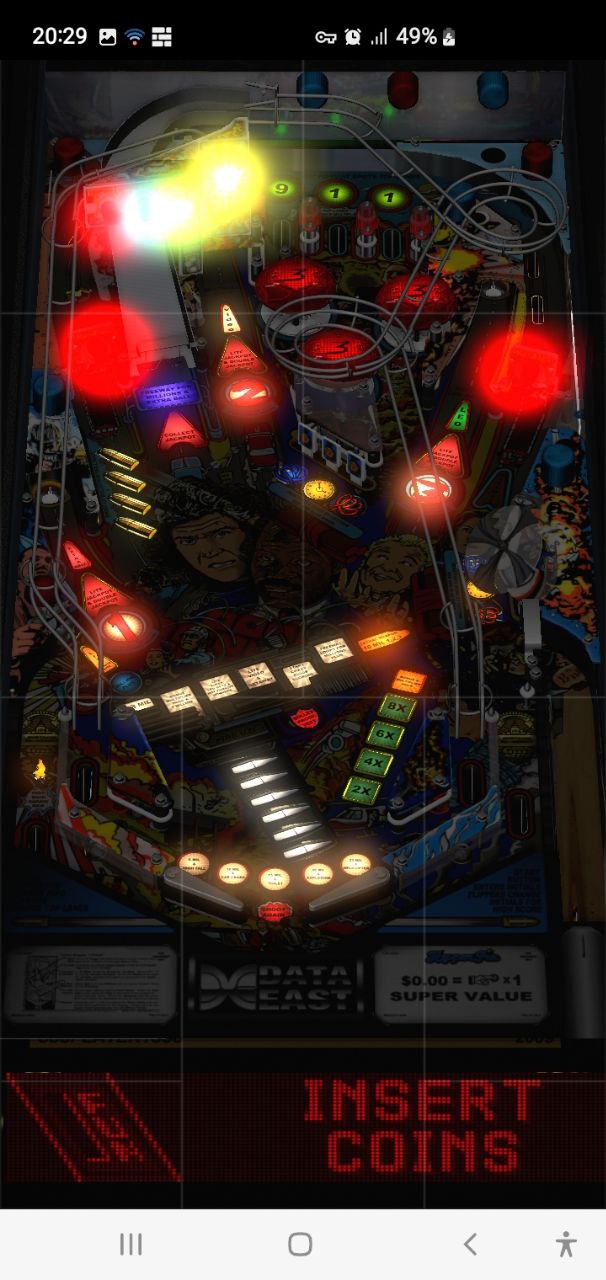
I need to stretch the table, and position this DMD below it.
 
The table COVERS the dmd, so it MUST BE under or top.
 
My table settings:
[TableOverride]
ViewDTMode = 0
ViewDTScaleX = 0.495601
ViewDTScaleY = 0.499088
ViewDTScaleZ = 0.281848
ViewDTRotation = 0.000000
ViewDTPlayerX = 7.963872
ViewDTPlayerY = 129.986084
ViewDTPlayerZ = 1423.921875
ViewDTLookAt = 46.334900
ViewDTFOV = 30.370104
ViewDTLayback = 0.000000
 
Edit your ini file and copy it in and save and see what happens, not much to fine tune to make it work!
 
Cheers!
 

lethal-weapon-3-android-vpx.jpg


Edited by Pycur, 05 November 2024 - 07:56 PM.


#8 flipponzio

flipponzio

    Enthusiast

  • Members
  • PipPipPip
  • 69 posts

  • Flag: Italy

  • Favorite Pinball: Fish Tale

Posted 16 November 2024 - 04:39 PM

Hello! 

I just found out that finally an android port is available of the visual pinball x.

I made it load tables and playable, but shows no score dmd, and hard to find any info about this.

Can anybody show me where to ask about it?

I got a discord with #vpx-standalone but they dont answer...

I also find out that I may need to edit tables script and save but not sure where and how.

Not so fun playing pinball without knowing my score...

Thanks!


----

Edit:


Ok I found it finally:


1. open vpx in computer
2. close the autoplay open window
3. open the table vpx you want to play
4. go to script editor, select all text (ctrl+a) and copy (ctrl+c)
5. open notepad or similar, insert all to that.
6. find a command:
LoadVPM ......
 
Insert THIS text before it:
 
Dim UseVPMDMD : UseVPMDMD = True
Dim UseVPMColoredDMD : UseVPMColoredDMD = True
Sub ImplicitDMD_Init
   Me.x = 10
   Me.y = 670
   Me.width = 999
   Me.height = 64
   Me.fontColor = RGB(255, 0, 0)
   Me.visible = true
   Me.intensityScale = 1
End Sub
 
Save the file as "your pinball table name.vbs"
And add this file to the installed folder on your phone
my path:
card/vpx10/scripts
 
And it will revive DMD in Legacy view to the top left corner.
 
You may mess with the x y and scale values to meet your needs.
I need to stretch the table, and position this DMD below it.
 
The table COVERS the dmd, so it MUST BE under or top.
 
My table settings:
[TableOverride]
ViewDTMode = 0
ViewDTScaleX = 0.495601
ViewDTScaleY = 0.499088
ViewDTScaleZ = 0.281848
ViewDTRotation = 0.000000
ViewDTPlayerX = 7.963872
ViewDTPlayerY = 129.986084
ViewDTPlayerZ = 1423.921875
ViewDTLookAt = 46.334900
ViewDTFOV = 30.370104
ViewDTLayback = 0.000000
 
Edit your ini file and copy it in and save and see what happens, not much to fine tune to make it work!
 
Cheers!
 

lethal-weapon-3-android-vpx.jpg


Hi. I tried the method you described with VPX for iOS but it doesn't work. Can you please describe the steps in more detail?


#9 parycien

parycien

    Neophyte

  • Members
  • Pip
  • 5 posts

  • Flag: Argentina

  • Favorite Pinball: star wars

Posted 27 November 2024 - 11:33 AM

Thanks Pycur it's working a charm and it can be done using winlator in the same phone.
I've done some videos...
Terminator https://youtu.be/k_B...hPxCPg33gHf0tAz

Lethal Weapon https://youtu.be/Zm_...vCxD3Dl6hUAHrrV


Teenage Mutant Ninja Turtles? https://youtu.be/s25...LkHiqmFvKRkAs58

Really thanks to Devs of this app and really hope to see it on Playstore soon, it's deservs!

Edited by parycien, 27 November 2024 - 11:40 AM.


#10 parycien

parycien

    Neophyte

  • Members
  • Pip
  • 5 posts

  • Flag: Argentina

  • Favorite Pinball: star wars

Posted 27 November 2024 - 04:46 PM

 
Hi. I tried the method you described with VPX for iOS but it doesn't work. Can you please describe the steps in more detail?

See if is clearer https://youtu.be/ICp...z1INzU9OugDViTK

Edited by parycien, 02 December 2024 - 07:25 PM.


#11 Pycur

Pycur

    Neophyte

  • Members
  • Pip
  • 5 posts
  • Location:Hungary

  • Flag: Hungary

  • Favorite Pinball: Hook, WCS94, HighSpeed2

Posted 02 December 2024 - 02:57 PM

Neophyte

You made an awesome tutorial about my concept. It should now be clear for everybody.

I just have to mention newer table releases are way too big, 200-300mb. And sometimes may not work on phone...They also very slow/hard to start, my phone shit bricks while tries to load it, but it works. And I think they are also a big energy wasters...

I prefer older ones which are much smaller (20-30mb) and faster to start them.

Look for older versions on the archive org. :) There are a collection for almost all revisions.


#12 parycien

parycien

    Neophyte

  • Members
  • Pip
  • 5 posts

  • Flag: Argentina

  • Favorite Pinball: star wars

Posted 02 December 2024 - 07:23 PM

I've redone It

Much easier and without modifying VPX files...
https://youtu.be/ICp...z1INzU9OugDViTK

#13 parycien

parycien

    Neophyte

  • Members
  • Pip
  • 5 posts

  • Flag: Argentina

  • Favorite Pinball: star wars

Posted 02 December 2024 - 08:59 PM

Also, in the file with the code to copy paste on winlator...

File link https://www.4shared....oid_iOS_DM.html

...I added another one to make floating Dmd (not locked to screen but to FOV), very hard to configure but there is It.

Locked top down screen

-
Dim UseVPMDMD : UseVPMDMD = True
Dim UseVPMColoredDMD : UseVPMColoredDMD = True
Sub ImplicitDMD_Init
Me.x = 10
Me.y = 670
Me.width = 999
Me.height = 64
Me.fontColor = RGB(255, 0, 0)
Me.visible = true
Me.intensityScale = 1
End Sub

-

Floating DMD

-

Dim UseVPMDMD : UseVPMDMD = True
Dim UseVPMColoredDMD : UseVPMColoredDMD = True

Sub ImplicitDMD2_Init
Me.x = 480
Me.y = 2120
Me.height = 400
Me.rotX = 0
Me.rotY = 0
Me.rotZ = 0
Me.color = RGB(255, 0, 0)
Me.intensityScale = 1.5
Me.visible = true
End Sub

From Winlator is easier to copy paste from the txt inside the archive... It also contain a batch vbs extractor.

Edited by parycien, 02 December 2024 - 10:46 PM.


#14 parycien

parycien

    Neophyte

  • Members
  • Pip
  • 5 posts

  • Flag: Argentina

  • Favorite Pinball: star wars

Posted 10 December 2024 - 12:50 PM

New version for Android released!
https://youtu.be/c_b...MifSgncWPyCwAXK

#15 anthias

anthias

    Pinball Fan

  • VIP
  • 796 posts

  • Flag: Australia

  • Favorite Pinball: Lizards In The City


Posted 27 December 2024 - 01:46 AM

I hunted around and the only android download I could find was on the internet archive, and I think it's old. Where is the current one? (it's not in playstore)

I got it working with my tables, but how do I alter POV? do I have to adjust table camera settings on a PC first?Attached File  IMG_20241227_102300.jpg   100.69KB   0 downloads

Edited by anthias, 27 December 2024 - 01:47 AM.

screnstoaug21small.gif

#16 unclewilly

unclewilly

    sofa king.....

  • VIP
  • 5,173 posts
  • Location:Baltimore, Maryland

  • Flag: United States of America

  • Favorite Pinball: tz, tom, big hurt, who dunnit


Posted 27 December 2024 - 03:21 PM

This is the one I am using. It allows for table imports through the ui.
https://drive.google...ew?usp=drivesdk

Here is rbion already packed up for import
https://drive.google...ew?usp=drivesdk
In this new ui you can set the pov and all that within the ui.

"it will all be ok in the end, if it's not ok, it's not the end"
 
Monster Bash VP10 WIP https://dl.dropboxus... (vpx)WIP15.vpx

uw2.gif


#17 unclewilly

unclewilly

    sofa king.....

  • VIP
  • 5,173 posts
  • Location:Baltimore, Maryland

  • Flag: United States of America

  • Favorite Pinball: tz, tom, big hurt, who dunnit


Posted 27 December 2024 - 03:33 PM

If you want to pack a table for import this is the folder structure
```- Table folder
- <table>.vpx
- <table>.vbs (if necessary)
- <table>.ini (if desired)
- <table>.directb2s (if desired)
- music (if table has music)
- *
- pupvideos (if table has pup)
- *
- pinmame
- roms
- <rom>.zip
- altcolor
- <rom>
- <rom>.cRZ (if you want)
- altsound
- <rom>
- * (if you want)
- nvram
- <rom>.nv (if you want)
- ini
- <rom>.ini (if you want)

Then just zip the file and change the extension to vpxz
Alot of tables require script patches which is the vps in the packed files.
You can find them on github.
Just Google standalone vpx script patchgithub

"it will all be ok in the end, if it's not ok, it's not the end"
 
Monster Bash VP10 WIP https://dl.dropboxus... (vpx)WIP15.vpx

uw2.gif


#18 toxie

toxie

    VPF Veteran

  • VP Dev Team
  • PipPipPipPipPipPip
  • 5,734 posts
  • Location:berlin, germany

  • Flag: Germany

  • Favorite Pinball: AFM

Posted 27 December 2024 - 04:07 PM

In principle, https://github.com/v...pinball/actions (vpinball-mobile builds) contain the latest builds, these are in flux though and may contain breaking changes.


#19 anthias

anthias

    Pinball Fan

  • VIP
  • 796 posts

  • Flag: Australia

  • Favorite Pinball: Lizards In The City


Posted 28 December 2024 - 11:37 AM

thanks! I updated what I was using. ill figure out where the UI stuff is tomorrow. at the moment I just get the table list and the same in game menu as before. it's still awesome, even at that, to see vpx on my phone
screnstoaug21small.gif

#20 anthias

anthias

    Pinball Fan

  • VIP
  • 796 posts

  • Flag: Australia

  • Favorite Pinball: Lizards In The City


Posted 08 January 2025 - 03:58 AM

It's pretty cool once you get it running, but I can't get pinmame tables running, or flexdmd. The vpxz files just crash back to the table list.

Attached File  PXL_20250108_033239994.jpg   207.51KB   0 downloadsAttached File  PXL_20250108_033821722.jpg   114.31KB   0 downloadsAttached File  PXL_20250108_033957715.jpg   203.68KB   0 downloadsAttached File  PXL_20250108_034123168.jpg   176.59KB   0 downloads
screnstoaug21small.gif