
- View New Content
-
Getting Started
-
Tutorials
Tutorial Categories
Tutorials Main Page Installation and Setup Downloadable TutorialsROM Adjustments
Number of Balls Adjustments Volume Adjustments
-
Visual Pinball Tables
VP 8 Desktop Tables
All VPM Recreations VP Recreations VP/VPM MODs VP Originals ROMsVP 9 Desktop Tables
All VPM Recreations VP Recreations VP/VPM MODs VP Originals ROMsVP9 Cabinet Tables
All Full Screen Cabinet Full Screen B2S Cabinet Spanned Cabinet Tables Media Packs ROMsVPX Tables
All VPinMAME Recreations VPX- - /VPinMAME - MOD Tables VPX Recreations VPX Originals Media Packs ROMs VR
-
Frontend Media & Backglass
Media Packs
Complete Media Packs Wheel Logos VideosBackglasses
dB2S Animated Backglasses UVP Animated Backglasses Topper Images
- Future Pinball Tables
-
Design Resources
Main Resources
Table Templates Playfield Images Image Library Sound Library Key CodesVP Guides
VP8 Guide - English VP8 Guide - Deutsch VP9 Guide - English VP9.1.x Guide - English VP Object Guide VPM DocumentationFuture Pinball Resources
Playfield Images 3D Model LibraryFuture Pinball Guides
FP Script Guide Big Draco Script Guide FP Table Design Guide FP DMD Guide
- Other Features
- Bug Tracker
- Image Gallery
- Blogs
-
More

Submitter

SUPPORT TOPIC File Information
- Submitted: Dec 29 2021 03:00 PM
- Last Updated: Dec 29 2021 03:00 PM
- File Size: 100.47MB
- Views: 9664
- Downloads: 1,368
-
Author(s):
HSM
Horsepin - Permission to MOD?: Yes, with approval
Download Playboy (Boogie Mod) (HSM, HorsePin 2022) (PinGod) 0.95
 7 Votes
pingod pingodvp
 1
1
Playboy (Bally 78) (Boogie Mod)
Credits:
VPX Table
HSM
PINGOD
HORSEPIN
MUSIC & FX
HORSEPIN (I like to see you move it) , C'n'C
TESTERS
HORSEPIN
-- PINGOD INSTALL --
Note: This setup only needs to be done once
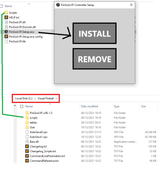
1. Install controller from PinGod.VP-Setup
2. Copy scripts from setup to Visual Pinball
-- DISPLAY CONFIG --
Fullscreen can be set in the script and set the display position X to the 2nd monitor so it fullscreens there. You can edit the .vbs file or save script from table.
-- MANUAL POSITION --
- Display can be changed in the tables script or on the fly pushing F2 on the window.
-- SAVED SETTINGS --
- Display settings are saved in %AppData%\Roaming\Godot\app_userdata\ under the games name.
-- MOVING THE FILES --
You can move the table, but you must update the path to the GameDirectory in its script if the game is not with the vpx file. I would say it's easier to try the files together, but I'm not using a frontend.
Credits:
VPX Table
HSM
PINGOD
HORSEPIN
MUSIC & FX
HORSEPIN (I like to see you move it) , C'n'C
TESTERS
HORSEPIN
-- PINGOD INSTALL --
Note: This setup only needs to be done once
1. Install controller from PinGod.VP-Setup
2. Copy scripts from setup to Visual Pinball
-- DISPLAY CONFIG --
Fullscreen can be set in the script and set the display position X to the 2nd monitor so it fullscreens there. You can edit the .vbs file or save script from table.
-- MANUAL POSITION --
- Display can be changed in the tables script or on the fly pushing F2 on the window.
-- SAVED SETTINGS --
- Display settings are saved in %AppData%\Roaming\Godot\app_userdata\ under the games name.
-- MOVING THE FILES --
You can move the table, but you must update the path to the GameDirectory in its script if the game is not with the vpx file. I would say it's easier to try the files together, but I'm not using a frontend.
What's New in Version 0.95 (See full changelog)
- - Initial Release
Screenshots




hey good job, mais c'est possible d'avoir un tuto pour l'instalation de tes tables
hey good job, mais c'est possible d'avoir un tuto pour l'instalation de tes tables

lol! Nice Mod, not for me, as I wouldn't be able to play the game as I'd be watching the backglass all the time
lol! Nice Mod, not for me, as I wouldn't be able to play the game as I'd be watching the backglass all the time
You haven't got time to look at that if you're on a cabinet, it's setup pretty brutal, so you have to watch the ball and boogie.
You do get a chance on a ball save (I didn't add an auto plunger so you have time to rest)
hey good job, mais c'est possible d'avoir un tuto pour l'instalation de tes tables
j'ai voulu rajouter un b2s, mais ca fonctionne pas, je suis en 3 écran et je voulais ajouter le DMD vidéo sur mon troisième écran. Comment faire?

Very nice indeed, works like a charm

j'ai voulu rajouter un b2s, mais ca fonctionne pas, je suis en 3 écran et je voulais ajouter le DMD vidéo sur mon troisième écran. Comment faire?
Cette table fonctionne avec un nouveau contrôleur PinGod.VP. Cela remplace le contrôleur B2S.Server qui est utilisé pour les backglass (fichiers .directb2s). Tu ne peux donc pas ajouter de backglass, il te faut trouver une autre version classique de la table utilisant le contrôleur B2S.Server.
Si tu souhaites juste afficher le backglass à l'écran, tu peux ajouter ce code dans le script : ça affichera le backglass mais il n'y aura aucune interaction avec (pas d'activation de lumières pendant la partie).
Dim ControllerB2S
On Error Resume Next
Set ControllerB2S = CreateObject("B2S.Server")
ControllerB2S.Run
On Error Goto 0
Et pour arrêter le backglass correctement, il faut ajouter les 2 lignes suivantes dans la fonction _Exit :
Sub Table1_Exit()
ControllerB2S.Pause
ControllerB2S.Stop
End Sub
Pour déplacer l'écran du contrôleur, il faut appuyer sur F2 lorsque tu as le focus dessus, ça affiche alors les bordures de la fenêtre et un déplacement/redimensionnement est possible. Les autres méthodes sont de modifier les coordonnées directement dans le script ou bien dans le fichier settings.save : voir chemin %AppData%\Godot\app_userdata\...

hi how do i get this to work? i installed PinGod but vpx isnt giving me a error. Saying its not registered. any help?
Other files you may be interested in ..
- 18,516 Total Files
- 57 Total Categories
- 883 Total Authors
- 26,147,680 Total Downloads
- AC/DC Remastered (Stern 2026) LE - B2SPro Latest File
- Flying Dutchman Latest Submitter
user(s) are online (in the past 15 minutes)
members, guests, anonymous users


 are all trademarks of VPFORUMS.