
- View New Content
-
Getting Started
-
Tutorials
Tutorial Categories
Tutorials Main Page Installation and Setup Downloadable TutorialsROM Adjustments
Number of Balls Adjustments Volume Adjustments
-
Visual Pinball Tables
VP 8 Desktop Tables
All VPM Recreations VP Recreations VP/VPM MODs VP Originals ROMsVP 9 Desktop Tables
All VPM Recreations VP Recreations VP/VPM MODs VP Originals ROMsVP9 Cabinet Tables
All Full Screen Cabinet Full Screen B2S Cabinet Spanned Cabinet Tables Media Packs ROMsVPX Tables
All VPinMAME Recreations VPX- - /VPinMAME - MOD Tables VPX Recreations VPX Originals Media Packs ROMs VR
-
Frontend Media & Backglass
Media Packs
Complete Media Packs Wheel Logos VideosBackglasses
dB2S Animated Backglasses UVP Animated Backglasses Topper Images
- Future Pinball Tables
-
Design Resources
Main Resources
Table Templates Playfield Images Image Library Sound Library Key CodesVP Guides
VP8 Guide - English VP8 Guide - Deutsch VP9 Guide - English VP9.1.x Guide - English VP Object Guide VPM DocumentationFuture Pinball Resources
Playfield Images 3D Model LibraryFuture Pinball Guides
FP Script Guide Big Draco Script Guide FP Table Design Guide FP DMD Guide
- Other Features
- Bug Tracker
- Image Gallery
- Blogs
-
More

Submitter

SUPPORT TOPIC File Information
- Submitted: May 03 2020 08:25 PM
- Last Updated: Feb 01 2022 01:23 PM
- File Size: 135.58MB
- Views: 107148
- Downloads: 18,848
- Author(s): 32assassin, JLouLoulou
- Manufacturer: Gottlieb
- Year: 1995
-
IPDB Link:

- Permission to MOD?: Yes, with approval
Previous Versions
-
09 May 2020
 Stargate ( Gottlieb 1995) Vpx Edtion v1.2.0
-
06 May 2020
Stargate ( Gottlieb 1995) Vpx Edtion v1.1.0
-
04 May 2020
Stargate ( Gottlieb 1995) Vpx Edtion v1.0
Download Stargate ( Gottlieb 1995) Vpx Edtion v1.3.0
 113 Votes
Stargate VPX
 26
26

Here we go Pincaber! 32assassin and me are proud to release the first version of Stargate for VPX!
I'm a lucky man that have the real Stargate Pinball. So with the proposal of 32assassin, we work together to reproduce it. The work started at 2, to finish with help from good dev like Thalamus, Djrobx, JPJ, Rascal, Fuzzel, Fleep etc..
So thanks to:
Thalamus-JPJ-Fleep-Rothbauerw for SSF
DjRobx for Glidercraft script
Arngrim for DOF
Thanks to them
Specials thanks to Fuzzel, Rascal, Chucky, Mat'for their advise, testing and feedback
Thanks for Rothbauerw and Fleep for TOM soundfiles and SSF script parts
Thanks for Chucky for making b2s backglass and long long testing
And thanks to 32Assassin to be patient with me, it's the first time I work on VPX. He make the script, the shape, all flat plastics modeling and texturing and lot of other thing like toys animation !
I make lighting, all 3D toys and texturing, ramps modeling and physics.
I hope you will be enjoy. But keep in mind, Stargate is a powerfull pinball not like other brand. Flippers bats are very strong an stiff, tricks are near impossible for most of them in real. So I try to make it to the most close to reality.
I'm counting on the owners of Stargate to give their gameplay feedback.
-All parts are made from my real Stargate ( I know i'm lucky to have this pinball ).
-All plastics are scanned from my real stargate.
-All Decals for ramp, apron, target...... are scanned by me from newer set i buy for my real stragate.
-All toys are full 3D scan by me or redraw from real with my CAO software
-All ramp are redraw from real with CAO software and some use their own physics from 3D mesh like sheet metal ramp. "No invisible ramp". Because it's impossible to make the good shape for ball trajectory in VPX.
-All scan are made with more 8k resolution at my workplace
-Backglass made by TeamPP ( big thanks to Chucky ) from my scan.
-Playfield from VPForum and remastered by NeoFr from Team PP. Thanks to him
-Scan cleaning and remastering by Chucky from Team PP
-All solenoid sound are from my real stargate recording
For later, I plan to make better sound quality. For the V1, it's a first step. Maybe we will have very good help, to make sound more realistic in the future. I hope.!
In the file, you'll find all nvram file to initialise ROM, with default setup like real. You'll also find custom instructions card you can use as you want.
In the next day, i'll publish all my resource i make, to the community.
You can change the Rom filename in the script like which version you have
Pincabily,
32assassin and JLouLoulou
What's New in Version v1.3.0 (See full changelog)
- v1.3.0
- -Reduce EOS 6° to 2°
- -Adjust physics for outlines elements at base flipper bats
- -Add "TournamentTimer.Interval = 1" in script option. If you have "switch short return 5 / 6" message at ROM startup,
- set it to 3000 and Increase it in steps of 100 until it desapear between each restart of VPX.
- -New Apron materials to delete false reflection ( Thx JPJ )
Screenshots


Hi, on the latest version I can go in to the new mode to select tournament mode and play, but next time I launch VPX I get the switch error on the DMD each re-launch. Is this a known issue?
Hi, on the latest version I can go in to the new mode to select tournament mode and play, but next time I launch VPX I get the switch error on the DMD each re-launch. Is this a known issue?
Hi, i explain how to resolve it here: https://www.vpforums...=44258&p=450228
If it not working anymore, set value higher than 3000 for the TournamentTimer

Amazing job!!!!!!
Thank you!!!

How does a noob install this? Not sure where to put nvram files.
Please be kind...I'm trying my best

How does a noob install this? Not sure where to put nvram files.
Please be kind...I'm trying my best
Hi, you need to put the table in the tables folder inside the visual pinball folder, rename the b2s file the same as your table (easiest way is to right click on your table name and select rename then ctrl and c, then right click on your b2s file and select rename and press ctrl and v) and put that into the tables folder as well. The rom (zip file) goes into the vpinmame roms folder which is inside your visual pinball folder (leave that file zipped). The NVRam file which you do unzip goes into the vpinmame nvram folder which is inside you visual pinball folder. There is a link to the rom and nvram file in this thread if you read back a bit. If the table acts a bit wierd to start with just exit and go back in again or try pressing F3 to reload it. Good luck, keep trying, its worth it in the end.

ok,thanks..but I get this error....someone can understand what it is?
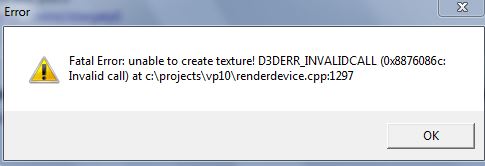
I also seem to be getting this error...No idea what it could be.
thanks rockclimber! i have been able to install many a table on my cabinet, but this is the first one that i have encountered with an nvram
thanks rockclimber! i have been able to install many a table on my cabinet, but this is the first one that i have encountered with an nvram
All good, in that case just copy the nvram file into the visual pinball/vpinmame/nvram folder. When it asks to replace the original file just click yes and you're good to go.
It works! HUGE thanks to Pmax and rockclimber for your advice! All of you guys rock!!!! Thank you thank you thank you!
Other files you may be interested in ..
- 18,397 Total Files
- 57 Total Categories
- 874 Total Authors
- 25,499,941 Total Downloads
- Electric road (Md of Italy 1967) 1 EM Latest File
- eduguitar72 Latest Submitter
user(s) are online (in the past 15 minutes)
members, guests, anonymous users


 are all trademarks of VPFORUMS.
Disregard, figured it out. Working great now